TwiML™ Voice: <Number>
<Number> is a noun for the TwiML verb <Dial> and it specifies a phone number to dial. Using the noun's attributes you can specify particular behaviors that Twilio should apply when dialing the number.
You can use up to ten <Number> nouns within a <Dial> verb to simultaneously call all of them at once. The first call to pick up is connected to the current call and the rest are hung up. For each <Number> noun you can specify what call progress events you want to receive webhooks for.
The <Number> noun supports the following attributes that modify its behavior:
| Attribute Name | Allowed Values | Default Value |
|---|---|---|
| sendDigits | Any digits | None |
| url | Relative or absolute URL | None |
| method | GET, POST | POST |
| byoc | BYOC Trunk SID | None |
| statusCallbackEvent | initiated, ringing, answered, completed | completed |
| statusCallback | Any URL | None |
| statusCallbackMethod | GET, POST | POST |
| machineDetection | Enable, DetectMessageEnd | None |
| machineDetectionTimeout | 3-60 | 30 |
| machineDetectionSpeechThreshold | 1000-6000 | 2400 |
| machineDetectionSpeechEndThreshold | 500-5000 | 1200 |
| machineDetectionSilenceTimeout | 2000-10000 | 5000 |
| amdStatusCallback | Any URL | None |
| amdStatusCallbackMethod | GET, POST | POST |
Phone numbers should be formatted with a + and country code, for example: +16175551212 ([E.164][1] format). Twilio will also accept unformatted US numbers, e.g., (415) 555-1212 or 415-555-1212.
The sendDigits attribute tells Twilio to play DTMF tones when the call is answered. This is useful when dialing a phone number and an extension. Twilio will dial the number, and when the automated system picks up, send the DTMF tones to connect to the extension.
The url attribute allows you to specify a URL that will return a TwiML response to be run on the called party's end, after they answer, but before the parties are connected.
You can use this TwiML to privately <Play> or <Say> information to the called party. You could also provide a chance to decline the phone call using <Gather> and <Hangup>. The url attribute does not support any other TwiML verbs.
If the [answerOnBridge][dial-answer-on-bridge] attribute is used on <Dial>, the current caller will continue to hear ringing while the TwiML document executes on the other end. TwiML documents executed in this manner are not allowed to contain the <Dial> verb.
The method attribute allows you to specify which HTTP method Twilio should use when requesting the URL in the url attribute. The default is POST.
The byoc attribute allows you to specify which configured customer [BYOC Trunk][bring-your-own-carrier] Twilio should use to route the call to the PSTN. The default is none, in which case the call will be routed via the Twilio Super Network.
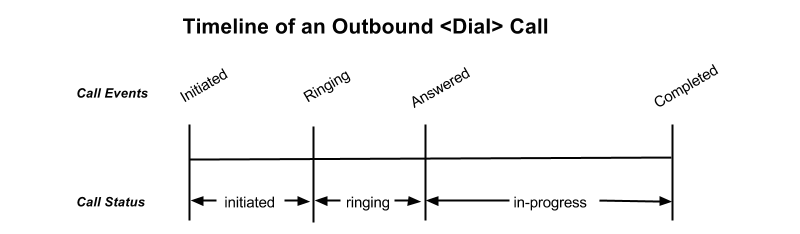
When dialing out to a number using <Dial>, an outbound call is initiated. The call transitions from the initiated state to the ringing state when the phone starts ringing. It transitions to the answered state when the call is picked up, and finally to the completed state when the call is over.
With statusCallbackEvent, you can subscribe to receive webhooks for the different call progress events for a given call: initiated, ringing, answered, or completed. Non-relative URLs must contain a valid hostname (underscores are not permitted).
The statusCallbackEvent attribute allows you to specify which events Twilio should trigger a webhook on. To specify multiple events separate them with a space: initiated ringing answered completed. If a statusCallback is provided and no status callback events are specified, the completed event will be sent by default.
As opposed to creating an outbound call via the API, outbound calls created using <Dial> are initiated right away and never queued. The following shows a timeline of possible call events that can be returned and the different call statuses that a <Dial> leg may experience:
| Event | Description |
|---|---|
| initiated | The initiated event is fired when Twilio starts dialing the call. |
| ringing | The ringing event is fired when the call starts ringing. |
| answered | The answered event is fired when the call is answered. |
| completed | The completed event is fired when the call is completed, regardless of the termination status: busy, canceled, completed, failed, or no-answer. If no StatusCallbackEvent is specified, completed will be fired by default. |
The statusCallback attribute allows you to specify a URL for Twilio to send webhook requests to on each event specified in the statusCallbackEvent attribute.
The statusCallbackMethod attribute allows you to specify which HTTP method Twilio should use when requesting the URL in the statusCallback attribute. The default is POST.
The parameters Twilio passes to your application in its asynchronous request to the StatusCallback URL include all parameters passed in a synchronous request to retrieve TwiML when Twilio receives a call to one of your Twilio numbers. The full list of parameters and descriptions of each are in the [TwiML Voice Request][voice-request] documentation.
When the call progress events are fired, the Status Callback request also passes these additional parameters:
| Parameter | Description |
|---|---|
| CallSid | A unique identifier for this call, generated by Twilio. You can use the CallSid to modify the child call by [POSTing to Calls/{CallSid} with a new TwiML URL][update-call]. |
| ParentCallSid | A unique identifier for the parent call. |
| CallStatus | A descriptive status for the call. The value is one of queued, initiated, ringing, in-progress, busy, failed, or no-answer. See the [CallStatus section][call-status] for more details. |
| CallDuration | The duration in seconds of the just-completed call. Only present in the completed event. |
| RecordingUrl | The URL of the phone call's recorded audio. This parameter is included only if record is set on the <Dial> and does not include recordings initiated in other ways. RecordingUrl is only present in the completed event. |
| RecordingSid | The unique ID of the [Recording][recordings] from this call. RecordingSid is only present in the completed event. |
| RecordingDuration | The duration of the recorded audio (in seconds). RecordingDuration is only present in the completed event. To get a final accurate recording duration after any trimming of silence, use [recordingStatusCallback][recording-status-callback]. |
| Timestamp | The timestamp when the event was fired, given as UTC in [RFC 2822][rfc-2822] format. |
| CallbackSource | A string that describes the source of the webhook. This is provided to help disambiguate why the webhook was made. On Status Callbacks, this value is always call-progress-events. |
| SequenceNumber | The order in which the events were fired, starting from 0. Although events are fired in order, they are made as separate HTTP requests and there is no guarantee they will arrive in the same order. |
Whether to detect if a human, answering machine, or fax has picked up the call. Can be: Enable or DetectMessageEnd. Use Enable if you would like us to return AnsweredBy as soon as the called party is identified. Use DetectMessageEnd if you would like to leave a message on an answering machine. .
The number of seconds that we should attempt to detect an answering machine before timing out and sending a voice request with AnsweredBy of unknown.
The number of milliseconds that is used as the measuring stick for the length of the speech activity, where durations lower than this value will be interpreted as a human and longer than this value as a machine.
The number of milliseconds of silence after speech activity at which point the speech activity is considered complete.
The number of milliseconds of initial silence after which an unknown AnsweredBy result will be returned.
The URL that we should call to notify your application whether the call was answered by human, machine or fax.
The HTTP method we should use when calling the amdStatusCallback URL.
In this case, we want to dial the 1928 extension at 415-123-4567. We use a <Number> noun to describe the phone number and give it the attribute
sendDigits. We want to wait before sending the extension, so we add a few leading w characters. Each w tells Twilio to wait half a second instead of playing a digit. This lets you adjust the timing of when the digits begin playing to suit the phone system you are dialing.
In this case, we use several <Number> tags to dial three phone numbers at the same time. The first of these calls to answer will be connected to the current caller, while the rest of the connection attempts are canceled.
In this case, we want to receive a webhook for each call progress event when dialing a number using <Dial>.
In this case, we want to receive a webhook for each call progress event for each number when dialing multiple numbers using <Dial>.
In this case, we want to connect two parties using <Dial>, but we also want TwiML instructions to be sent to the party we are calling before they are connected to the call. By setting the url attribute, we can specify a URL that will return a TwiML response to be run on the called party's end. This TwiML will run after they answer, but before the parties are connected.
-
You can specify up to ten numbers within a
<Dial>verb to dial simultaneously. - Simultaneous dialing is useful when you have several phones (or several people) that you want to ring when you receive an incoming call. Keep in mind that the first call that connects will cancel all the other attempts. If you dial an office phone system or a cellphone in airplane mode, it may pick up after a single ring, preventing the other phone numbers from ringing long enough for a human ever to answer. So you should take care to use simultaneous dialing only in situations where you know the behavior of the called parties.