Retrieve Call Logs with PHP
In this guide we'll cover how to retrieve information about in progress and completed calls from your Twilio account.
We'll use Twilio's PHP SDK in these examples to interact with the Twilio REST APIs Calls endpoint.
To get started, we'll first need our Twilio account credentials.
First, you'll need to get your Twilio account credentials. They consist of your AccountSid and your Auth Token. They can be found on the home page of the console.
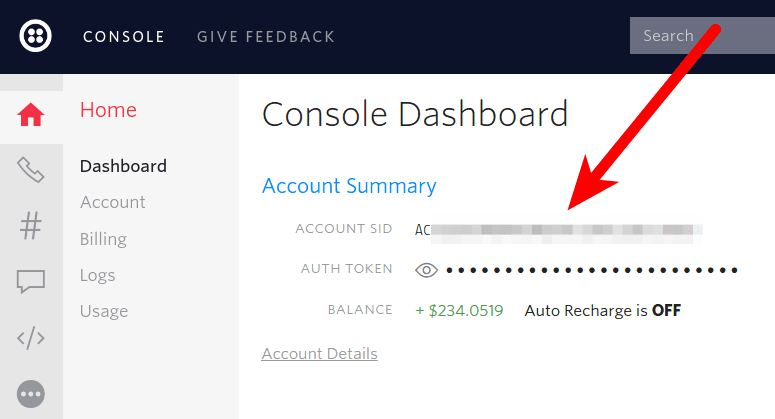
With our account credentials, we can then use the Twilio PHP library to retrieve our call logs.
You can use Twilio's REST API to retrieve logs about the phone calls to and from your Twilio account. If you just want to check a couple logs, however, you should try looking at the voice logs in your Twilio console first.
To list all phone calls for your Twilio account, just call $client->calls->read().
Info
The read method automatically handles paging for you, eagerly fetching all records and paging under the hood. For more information, visit the PHP SDK page.
1<?php23// Update the path below to your autoload.php,4// see https://getcomposer.org/doc/01-basic-usage.md5require_once "/path/to/vendor/autoload.php";67use Twilio\Rest\Client;89// Find your Account SID and Auth Token at twilio.com/console10// and set the environment variables. See http://twil.io/secure11$sid = getenv("TWILIO_ACCOUNT_SID");12$token = getenv("TWILIO_AUTH_TOKEN");13$twilio = new Client($sid, $token);1415$calls = $twilio->calls->read([], 20);1617foreach ($calls as $record) {18print $record->end;19}
Response
1{2"calls": [3{4"account_sid": "ACaaaaaaaaaaaaaaaaaaaaaaaaaaaaaaaa",5"answered_by": "machine_start",6"api_version": "2010-04-01",7"caller_name": "callerid1",8"date_created": "Fri, 18 Oct 2019 17:00:00 +0000",9"date_updated": "Fri, 18 Oct 2019 17:01:00 +0000",10"direction": "outbound-api",11"duration": "4",12"end_time": "Fri, 18 Oct 2019 17:03:00 +0000",13"forwarded_from": "calledvia1",14"from": "+13051416799",15"from_formatted": "(305) 141-6799",16"group_sid": "GPdeadbeefdeadbeefdeadbeefdeadbeef",17"parent_call_sid": "CAdeadbeefdeadbeefdeadbeefdeadbeef",18"phone_number_sid": "PNdeadbeefdeadbeefdeadbeefdeadbeef",19"price": "-0.200",20"price_unit": "USD",21"sid": "CAaaaaaaaaaaaaaaaaaaaaaaaaaaaaaaaa",22"start_time": "Fri, 18 Oct 2019 17:02:00 +0000",23"status": "completed",24"subresource_uris": {25"notifications": "/2010-04-01/Accounts/ACaaaaaaaaaaaaaaaaaaaaaaaaaaaaaaaa/Calls/CAaaaaaaaaaaaaaaaaaaaaaaaaaaaaaaaa/Notifications.json",26"recordings": "/2010-04-01/Accounts/ACaaaaaaaaaaaaaaaaaaaaaaaaaaaaaaaa/Calls/CAaaaaaaaaaaaaaaaaaaaaaaaaaaaaaaaa/Recordings.json",27"payments": "/2010-04-01/Accounts/ACaaaaaaaaaaaaaaaaaaaaaaaaaaaaaaaa/Calls/CAaaaaaaaaaaaaaaaaaaaaaaaaaaaaaaaa/Payments.json",28"events": "/2010-04-01/Accounts/ACaaaaaaaaaaaaaaaaaaaaaaaaaaaaaaaa/Calls/CAaaaaaaaaaaaaaaaaaaaaaaaaaaaaaaaa/Events.json",29"siprec": "/2010-04-01/Accounts/ACaaaaaaaaaaaaaaaaaaaaaaaaaaaaaaaa/Calls/CAaaaaaaaaaaaaaaaaaaaaaaaaaaaaaaaa/Siprec.json",30"streams": "/2010-04-01/Accounts/ACaaaaaaaaaaaaaaaaaaaaaaaaaaaaaaaa/Calls/CAaaaaaaaaaaaaaaaaaaaaaaaaaaaaaaaa/Streams.json",31"transcriptions": "/2010-04-01/Accounts/ACaaaaaaaaaaaaaaaaaaaaaaaaaaaaaaaa/Calls/CAaaaaaaaaaaaaaaaaaaaaaaaaaaaaaaaa/Transcriptions.json",32"user_defined_message_subscriptions": "/2010-04-01/Accounts/ACaaaaaaaaaaaaaaaaaaaaaaaaaaaaaaaa/Calls/CAaaaaaaaaaaaaaaaaaaaaaaaaaaaaaaaa/UserDefinedMessageSubscriptions.json",33"user_defined_messages": "/2010-04-01/Accounts/ACaaaaaaaaaaaaaaaaaaaaaaaaaaaaaaaa/Calls/CAaaaaaaaaaaaaaaaaaaaaaaaaaaaaaaaa/UserDefinedMessages.json"34},35"to": "+13051913581",36"to_formatted": "(305) 191-3581",37"trunk_sid": "TKdeadbeefdeadbeefdeadbeefdeadbeef",38"uri": "/2010-04-01/Accounts/ACaaaaaaaaaaaaaaaaaaaaaaaaaaaaaaaa/Calls/CAaaaaaaaaaaaaaaaaaaaaaaaaaaaaaaaa.json",39"queue_time": "1000"40},41{42"account_sid": "ACaaaaaaaaaaaaaaaaaaaaaaaaaaaaaaaa",43"answered_by": "human",44"api_version": "2010-04-01",45"caller_name": "callerid2",46"date_created": "Fri, 18 Oct 2019 16:00:00 +0000",47"date_updated": "Fri, 18 Oct 2019 16:01:00 +0000",48"direction": "inbound",49"duration": "3",50"end_time": "Fri, 18 Oct 2019 16:03:00 +0000",51"forwarded_from": "calledvia2",52"from": "+13051416798",53"from_formatted": "(305) 141-6798",54"group_sid": "GPdeadbeefdeadbeefdeadbeefdeadbeee",55"parent_call_sid": "CAdeadbeefdeadbeefdeadbeefdeadbeee",56"phone_number_sid": "PNdeadbeefdeadbeefdeadbeefdeadbeee",57"price": "-0.100",58"price_unit": "JPY",59"sid": "CAaaaaaaaaaaaaaaaaaaaaaaaaaaaaaaa0",60"start_time": "Fri, 18 Oct 2019 16:02:00 +0000",61"status": "completed",62"subresource_uris": {63"notifications": "/2010-04-01/Accounts/ACaaaaaaaaaaaaaaaaaaaaaaaaaaaaaaaa/Calls/CAaaaaaaaaaaaaaaaaaaaaaaaaaaaaaaa0/Notifications.json",64"recordings": "/2010-04-01/Accounts/ACaaaaaaaaaaaaaaaaaaaaaaaaaaaaaaaa/Calls/CAaaaaaaaaaaaaaaaaaaaaaaaaaaaaaaa0/Recordings.json",65"payments": "/2010-04-01/Accounts/ACaaaaaaaaaaaaaaaaaaaaaaaaaaaaaaaa/Calls/CAaaaaaaaaaaaaaaaaaaaaaaaaaaaaaaa0/Payments.json",66"events": "/2010-04-01/Accounts/ACaaaaaaaaaaaaaaaaaaaaaaaaaaaaaaaa/Calls/CAaaaaaaaaaaaaaaaaaaaaaaaaaaaaaaa0/Events.json",67"siprec": "/2010-04-01/Accounts/ACaaaaaaaaaaaaaaaaaaaaaaaaaaaaaaaa/Calls/CAaaaaaaaaaaaaaaaaaaaaaaaaaaaaaaa0/Siprec.json",68"streams": "/2010-04-01/Accounts/ACaaaaaaaaaaaaaaaaaaaaaaaaaaaaaaaa/Calls/CAaaaaaaaaaaaaaaaaaaaaaaaaaaaaaaa0/Streams.json",69"transcriptions": "/2010-04-01/Accounts/ACaaaaaaaaaaaaaaaaaaaaaaaaaaaaaaaa/Calls/CAaaaaaaaaaaaaaaaaaaaaaaaaaaaaaaa0/Transcriptions.json",70"user_defined_message_subscriptions": "/2010-04-01/Accounts/ACaaaaaaaaaaaaaaaaaaaaaaaaaaaaaaaa/Calls/CAaaaaaaaaaaaaaaaaaaaaaaaaaaaaaaa0/UserDefinedMessageSubscriptions.json",71"user_defined_messages": "/2010-04-01/Accounts/ACaaaaaaaaaaaaaaaaaaaaaaaaaaaaaaaa/Calls/CAaaaaaaaaaaaaaaaaaaaaaaaaaaaaaaa0/UserDefinedMessages.json"72},73"to": "+13051913580",74"to_formatted": "(305) 191-3580",75"trunk_sid": "TKdeadbeefdeadbeefdeadbeefdeadbeef",76"uri": "/2010-04-01/Accounts/ACaaaaaaaaaaaaaaaaaaaaaaaaaaaaaaaa/Calls/CAaaaaaaaaaaaaaaaaaaaaaaaaaaaaaaa0.json",77"queue_time": "1000"78}79],80"end": 1,81"first_page_uri": "/2010-04-01/Accounts/ACaaaaaaaaaaaaaaaaaaaaaaaaaaaaaaaa/Calls.json?Status=completed&To=%2B123456789&From=%2B987654321&StartTime=2008-01-02&ParentCallSid=CAaaaaaaaaaaaaaaaaaaaaaaaaaaaaaaaa&EndTime=2009-01-02&PageSize=2&Page=0",82"next_page_uri": "/2010-04-01/Accounts/ACaaaaaaaaaaaaaaaaaaaaaaaaaaaaaaaa/Calls.json?Status=completed&To=%2B123456789&From=%2B987654321&StartTime=2008-01-02&ParentCallSid=CAaaaaaaaaaaaaaaaaaaaaaaaaaaaaaaaa&EndTime=2009-01-02&PageSize=2&Page=1&PageToken=PACAaaaaaaaaaaaaaaaaaaaaaaaaaaaaaaa0",83"page": 0,84"page_size": 2,85"previous_page_uri": null,86"start": 0,87"uri": "/2010-04-01/Accounts/ACaaaaaaaaaaaaaaaaaaaaaaaaaaaaaaaa/Calls.json?Status=completed&To=%2B123456789&From=%2B987654321&StartTime=2008-01-02&ParentCallSid=CAaaaaaaaaaaaaaaaaaaaaaaaaaaaaaaaa&EndTime=2009-01-02&PageSize=2&Page=0"88}
You can also filter the results. This example only returns phone calls to the phone number "+15558675309" which had a call status of "busy" but you can filter on other call properties as well.
1<?php23// Update the path below to your autoload.php,4// see https://getcomposer.org/doc/01-basic-usage.md5require_once "/path/to/vendor/autoload.php";67use Twilio\Rest\Client;89// Find your Account SID and Auth Token at twilio.com/console10// and set the environment variables. See http://twil.io/secure11$sid = getenv("TWILIO_ACCOUNT_SID");12$token = getenv("TWILIO_AUTH_TOKEN");13$twilio = new Client($sid, $token);1415$calls = $twilio->calls->read(16[17"to" => "+15558675310",18"status" => "busy",19],202021);2223foreach ($calls as $record) {24print $record->end;25}
Response
1{2"calls": [3{4"account_sid": "ACaaaaaaaaaaaaaaaaaaaaaaaaaaaaaaaa",5"answered_by": "machine_start",6"api_version": "2010-04-01",7"caller_name": "callerid1",8"date_created": "Fri, 18 Oct 2019 17:00:00 +0000",9"date_updated": "Fri, 18 Oct 2019 17:01:00 +0000",10"direction": "outbound-api",11"duration": "4",12"end_time": "Fri, 18 Oct 2019 17:03:00 +0000",13"forwarded_from": "calledvia1",14"from": "+13051416799",15"from_formatted": "(305) 141-6799",16"group_sid": "GPdeadbeefdeadbeefdeadbeefdeadbeef",17"parent_call_sid": "CAdeadbeefdeadbeefdeadbeefdeadbeef",18"phone_number_sid": "PNdeadbeefdeadbeefdeadbeefdeadbeef",19"price": "-0.200",20"price_unit": "USD",21"sid": "CAaaaaaaaaaaaaaaaaaaaaaaaaaaaaaaaa",22"start_time": "Fri, 18 Oct 2019 17:02:00 +0000",23"status": "completed",24"subresource_uris": {25"notifications": "/2010-04-01/Accounts/ACaaaaaaaaaaaaaaaaaaaaaaaaaaaaaaaa/Calls/CAaaaaaaaaaaaaaaaaaaaaaaaaaaaaaaaa/Notifications.json",26"recordings": "/2010-04-01/Accounts/ACaaaaaaaaaaaaaaaaaaaaaaaaaaaaaaaa/Calls/CAaaaaaaaaaaaaaaaaaaaaaaaaaaaaaaaa/Recordings.json",27"payments": "/2010-04-01/Accounts/ACaaaaaaaaaaaaaaaaaaaaaaaaaaaaaaaa/Calls/CAaaaaaaaaaaaaaaaaaaaaaaaaaaaaaaaa/Payments.json",28"events": "/2010-04-01/Accounts/ACaaaaaaaaaaaaaaaaaaaaaaaaaaaaaaaa/Calls/CAaaaaaaaaaaaaaaaaaaaaaaaaaaaaaaaa/Events.json",29"siprec": "/2010-04-01/Accounts/ACaaaaaaaaaaaaaaaaaaaaaaaaaaaaaaaa/Calls/CAaaaaaaaaaaaaaaaaaaaaaaaaaaaaaaaa/Siprec.json",30"streams": "/2010-04-01/Accounts/ACaaaaaaaaaaaaaaaaaaaaaaaaaaaaaaaa/Calls/CAaaaaaaaaaaaaaaaaaaaaaaaaaaaaaaaa/Streams.json",31"transcriptions": "/2010-04-01/Accounts/ACaaaaaaaaaaaaaaaaaaaaaaaaaaaaaaaa/Calls/CAaaaaaaaaaaaaaaaaaaaaaaaaaaaaaaaa/Transcriptions.json",32"user_defined_message_subscriptions": "/2010-04-01/Accounts/ACaaaaaaaaaaaaaaaaaaaaaaaaaaaaaaaa/Calls/CAaaaaaaaaaaaaaaaaaaaaaaaaaaaaaaaa/UserDefinedMessageSubscriptions.json",33"user_defined_messages": "/2010-04-01/Accounts/ACaaaaaaaaaaaaaaaaaaaaaaaaaaaaaaaa/Calls/CAaaaaaaaaaaaaaaaaaaaaaaaaaaaaaaaa/UserDefinedMessages.json"34},35"to": "+13051913581",36"to_formatted": "(305) 191-3581",37"trunk_sid": "TKdeadbeefdeadbeefdeadbeefdeadbeef",38"uri": "/2010-04-01/Accounts/ACaaaaaaaaaaaaaaaaaaaaaaaaaaaaaaaa/Calls/CAaaaaaaaaaaaaaaaaaaaaaaaaaaaaaaaa.json",39"queue_time": "1000"40},41{42"account_sid": "ACaaaaaaaaaaaaaaaaaaaaaaaaaaaaaaaa",43"answered_by": "human",44"api_version": "2010-04-01",45"caller_name": "callerid2",46"date_created": "Fri, 18 Oct 2019 16:00:00 +0000",47"date_updated": "Fri, 18 Oct 2019 16:01:00 +0000",48"direction": "inbound",49"duration": "3",50"end_time": "Fri, 18 Oct 2019 16:03:00 +0000",51"forwarded_from": "calledvia2",52"from": "+13051416798",53"from_formatted": "(305) 141-6798",54"group_sid": "GPdeadbeefdeadbeefdeadbeefdeadbeee",55"parent_call_sid": "CAdeadbeefdeadbeefdeadbeefdeadbeee",56"phone_number_sid": "PNdeadbeefdeadbeefdeadbeefdeadbeee",57"price": "-0.100",58"price_unit": "JPY",59"sid": "CAaaaaaaaaaaaaaaaaaaaaaaaaaaaaaaa0",60"start_time": "Fri, 18 Oct 2019 16:02:00 +0000",61"status": "completed",62"subresource_uris": {63"notifications": "/2010-04-01/Accounts/ACaaaaaaaaaaaaaaaaaaaaaaaaaaaaaaaa/Calls/CAaaaaaaaaaaaaaaaaaaaaaaaaaaaaaaa0/Notifications.json",64"recordings": "/2010-04-01/Accounts/ACaaaaaaaaaaaaaaaaaaaaaaaaaaaaaaaa/Calls/CAaaaaaaaaaaaaaaaaaaaaaaaaaaaaaaa0/Recordings.json",65"payments": "/2010-04-01/Accounts/ACaaaaaaaaaaaaaaaaaaaaaaaaaaaaaaaa/Calls/CAaaaaaaaaaaaaaaaaaaaaaaaaaaaaaaa0/Payments.json",66"events": "/2010-04-01/Accounts/ACaaaaaaaaaaaaaaaaaaaaaaaaaaaaaaaa/Calls/CAaaaaaaaaaaaaaaaaaaaaaaaaaaaaaaa0/Events.json",67"siprec": "/2010-04-01/Accounts/ACaaaaaaaaaaaaaaaaaaaaaaaaaaaaaaaa/Calls/CAaaaaaaaaaaaaaaaaaaaaaaaaaaaaaaa0/Siprec.json",68"streams": "/2010-04-01/Accounts/ACaaaaaaaaaaaaaaaaaaaaaaaaaaaaaaaa/Calls/CAaaaaaaaaaaaaaaaaaaaaaaaaaaaaaaa0/Streams.json",69"transcriptions": "/2010-04-01/Accounts/ACaaaaaaaaaaaaaaaaaaaaaaaaaaaaaaaa/Calls/CAaaaaaaaaaaaaaaaaaaaaaaaaaaaaaaa0/Transcriptions.json",70"user_defined_message_subscriptions": "/2010-04-01/Accounts/ACaaaaaaaaaaaaaaaaaaaaaaaaaaaaaaaa/Calls/CAaaaaaaaaaaaaaaaaaaaaaaaaaaaaaaa0/UserDefinedMessageSubscriptions.json",71"user_defined_messages": "/2010-04-01/Accounts/ACaaaaaaaaaaaaaaaaaaaaaaaaaaaaaaaa/Calls/CAaaaaaaaaaaaaaaaaaaaaaaaaaaaaaaa0/UserDefinedMessages.json"72},73"to": "+13051913580",74"to_formatted": "(305) 191-3580",75"trunk_sid": "TKdeadbeefdeadbeefdeadbeefdeadbeef",76"uri": "/2010-04-01/Accounts/ACaaaaaaaaaaaaaaaaaaaaaaaaaaaaaaaa/Calls/CAaaaaaaaaaaaaaaaaaaaaaaaaaaaaaaa0.json",77"queue_time": "1000"78}79],80"end": 1,81"first_page_uri": "/2010-04-01/Accounts/ACaaaaaaaaaaaaaaaaaaaaaaaaaaaaaaaa/Calls.json?Status=completed&To=%2B123456789&From=%2B987654321&StartTime=2008-01-02&ParentCallSid=CAaaaaaaaaaaaaaaaaaaaaaaaaaaaaaaaa&EndTime=2009-01-02&PageSize=2&Page=0",82"next_page_uri": "/2010-04-01/Accounts/ACaaaaaaaaaaaaaaaaaaaaaaaaaaaaaaaa/Calls.json?Status=completed&To=%2B123456789&From=%2B987654321&StartTime=2008-01-02&ParentCallSid=CAaaaaaaaaaaaaaaaaaaaaaaaaaaaaaaaa&EndTime=2009-01-02&PageSize=2&Page=1&PageToken=PACAaaaaaaaaaaaaaaaaaaaaaaaaaaaaaaa0",83"page": 0,84"page_size": 2,85"previous_page_uri": null,86"start": 0,87"uri": "/2010-04-01/Accounts/ACaaaaaaaaaaaaaaaaaaaaaaaaaaaaaaaa/Calls.json?Status=completed&To=%2B123456789&From=%2B987654321&StartTime=2008-01-02&ParentCallSid=CAaaaaaaaaaaaaaaaaaaaaaaaaaaaaaaaa&EndTime=2009-01-02&PageSize=2&Page=0"88}
Finally, if you just want to retrieve information about a specific call you can get that CallSid directly.
1<?php23// Update the path below to your autoload.php,4// see https://getcomposer.org/doc/01-basic-usage.md5require_once "/path/to/vendor/autoload.php";67use Twilio\Rest\Client;89// Find your Account SID and Auth Token at twilio.com/console10// and set the environment variables. See http://twil.io/secure11$sid = getenv("TWILIO_ACCOUNT_SID");12$token = getenv("TWILIO_AUTH_TOKEN");13$twilio = new Client($sid, $token);1415$call = $twilio->calls("CA42ed11f93dc08b952027ffbc406d0868")->fetch();1617print $call->to;
Response
1{2"account_sid": "ACXXXXXXXXXXXXXXXXXXXXXXXXXXXXXXXX",3"answered_by": "machine_start",4"api_version": "2010-04-01",5"caller_name": "callerid",6"date_created": "Fri, 18 Oct 2019 17:00:00 +0000",7"date_updated": "Fri, 18 Oct 2019 17:01:00 +0000",8"direction": "outbound-api",9"duration": "4",10"end_time": "Fri, 18 Oct 2019 17:03:00 +0000",11"forwarded_from": "calledvia",12"from": "+13051416799",13"from_formatted": "(305) 141-6799",14"group_sid": "GPdeadbeefdeadbeefdeadbeefdeadbeef",15"parent_call_sid": "CAdeadbeefdeadbeefdeadbeefdeadbeef",16"phone_number_sid": "PNdeadbeefdeadbeefdeadbeefdeadbeef",17"price": "-0.200",18"price_unit": "USD",19"sid": "CA42ed11f93dc08b952027ffbc406d0868",20"start_time": "Fri, 18 Oct 2019 17:02:00 +0000",21"status": "completed",22"subresource_uris": {23"notifications": "/2010-04-01/Accounts/ACaaaaaaaaaaaaaaaaaaaaaaaaaaaaaaaa/Calls/CAaaaaaaaaaaaaaaaaaaaaaaaaaaaaaaaa/Notifications.json",24"recordings": "/2010-04-01/Accounts/ACaaaaaaaaaaaaaaaaaaaaaaaaaaaaaaaa/Calls/CAaaaaaaaaaaaaaaaaaaaaaaaaaaaaaaaa/Recordings.json",25"payments": "/2010-04-01/Accounts/ACaaaaaaaaaaaaaaaaaaaaaaaaaaaaaaaa/Calls/CAaaaaaaaaaaaaaaaaaaaaaaaaaaaaaaaa/Payments.json",26"events": "/2010-04-01/Accounts/ACaaaaaaaaaaaaaaaaaaaaaaaaaaaaaaaa/Calls/CAaaaaaaaaaaaaaaaaaaaaaaaaaaaaaaaa/Events.json",27"siprec": "/2010-04-01/Accounts/ACaaaaaaaaaaaaaaaaaaaaaaaaaaaaaaaa/Calls/CAaaaaaaaaaaaaaaaaaaaaaaaaaaaaaaaa/Siprec.json",28"streams": "/2010-04-01/Accounts/ACaaaaaaaaaaaaaaaaaaaaaaaaaaaaaaaa/Calls/CAaaaaaaaaaaaaaaaaaaaaaaaaaaaaaaaa/Streams.json",29"transcriptions": "/2010-04-01/Accounts/ACaaaaaaaaaaaaaaaaaaaaaaaaaaaaaaaa/Calls/CAaaaaaaaaaaaaaaaaaaaaaaaaaaaaaaaa/Transcriptions.json",30"user_defined_message_subscriptions": "/2010-04-01/Accounts/ACaaaaaaaaaaaaaaaaaaaaaaaaaaaaaaaa/Calls/CAaaaaaaaaaaaaaaaaaaaaaaaaaaaaaaaa/UserDefinedMessageSubscriptions.json",31"user_defined_messages": "/2010-04-01/Accounts/ACaaaaaaaaaaaaaaaaaaaaaaaaaaaaaaaa/Calls/CAaaaaaaaaaaaaaaaaaaaaaaaaaaaaaaaa/UserDefinedMessages.json"32},33"to": "+13051913581",34"to_formatted": "(305) 191-3581",35"trunk_sid": "TKdeadbeefdeadbeefdeadbeefdeadbeef",36"uri": "/2010-04-01/Accounts/ACaaaaaaaaaaaaaaaaaaaaaaaaaaaaaaaa/Calls/CAaaaaaaaaaaaaaaaaaaaaaaaaaaaaaaaa.json",37"queue_time": "1000"38}
We learned how to retrieve call logs using PHP. Check out our tutorials to see full implementations of Twilio Voice in PHP with Laravel.