Analytics-iOS Frequently asked questions
End-of-Support for Analytics-iOS in March 2026
End-of-support for the Analytics-iOS SDK is scheduled for March 2026. Segment's future development efforts concentrate on the new Analytics-Swift SDK. To migrate to Analytics-Swift, see the migration guide.
The core Segment SDK is extremely lightweight. It is approximately 212 KB.
Segment highly recommends using Swift Package Manager or Cocoapods. Segment can't guarantee support if you do not use a dependency manager.
However, if you cannot use Swift Package Manager or Cocoapods, you can manually install Segment's dynamic framework which lets you send data to Segment and on to enabled cloud-mode destinations. Segment doesn't support sending data to bundled, device-mode integrations outside of Cocoapods.
To install manually:
- Download the latest built SDK, and unzip the zip file.
- Drag the unzipped
Segment.frameworkfolder into your XCode project. - In the General Tab for your project, search for
Embedded Binariesand add theSegment.framework.
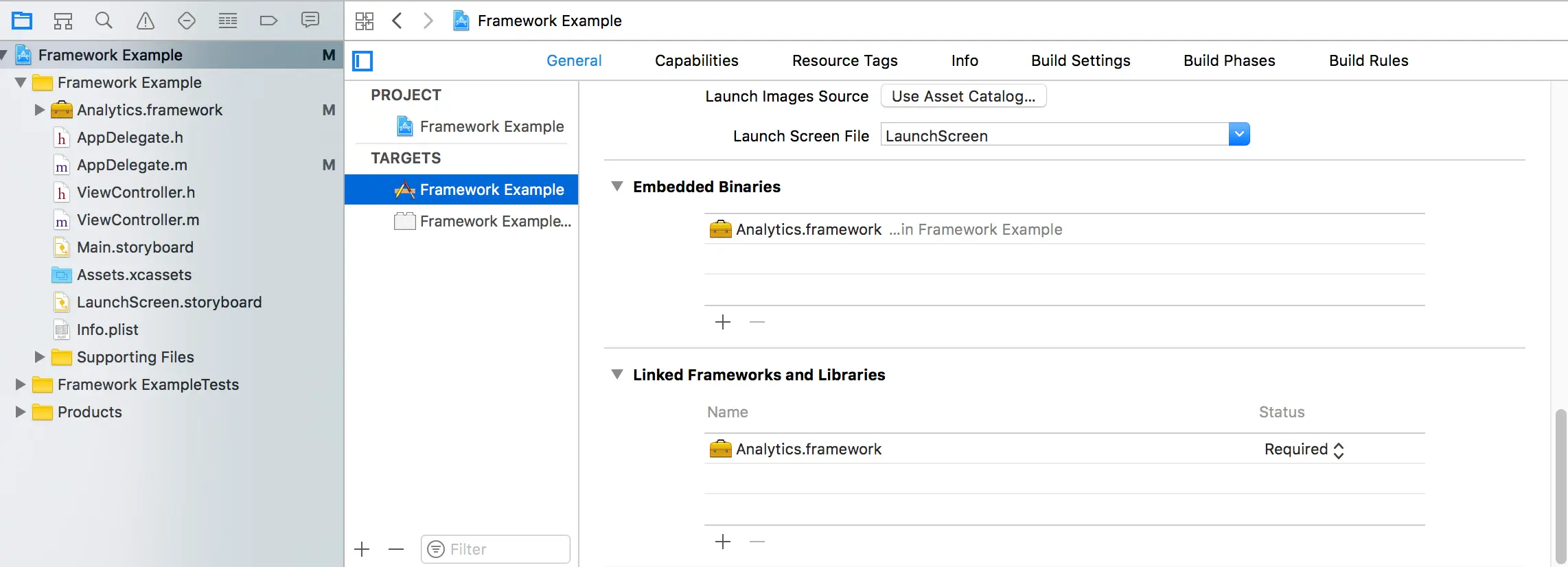
Once you install the framework, import the header file and install as described in Install the SDK.
If you choose not to use a dependency manager, you must manually keep files up-to-date with regularly scheduled, manual updates.
No, Segment doesn't support sending events to multiple writeKeys for a single iOS project post-initialization. You can conditionally set the writeKey based on an environment variable. For example:
1let writeKey2ENV == 'production' ? (writeKey = 'A') : (writeKey = 'B')
No. Don't include destination-native SDKs manually for a service Segment supports. Instead, bundle the destination's Segment-integration SDK.
If you already include destination native SDKs, you should remove them when you install the Segment SDK. Keeping the duplicate native SDK can cause symbol conflicts, namespace collisions, duplicate data, and sometimes even silent failures.
If you're using device-mode for a mobile destination and want to access a feature from the tool's native SDK, you can include the header file and call the method just as normal.
For example, you might want access to Flurry's location logging or Localytics's attribution parameters. To use the destination's SDK you import the headers, then access the SDK as you would without Segment. Segment still handles initialization, event, screen and user tracking, plus all the proxied services and data storage for you. Here's an example for Flurry location logging:
1#import <Segment/SEGAnalytics.h>2#import <Flurry-iOS-SDK/Flurry.h>34CLLocationManager *locationManager = [[CLLocationManager alloc] init];5[locationManager startUpdatingLocation];6CLLocation *location = locationManager.location;7[Flurry setLatitude:location.coordinate.latitude8longitude:location.coordinate.longitude9horizontalAccuracy:location.horizontalAccuracy10verticalAccuracy:location.verticalAccuracy];11
For services that send push notifications, you must first create a Push SSL certificate. Then configure your application delegate similarly to the following example code, replacing YOUR_WRITE_KEY with your own Segment source write key.
Detailed examples of how to complete the process can be found in Apple's documentation.
1func application(_ application: UIApplication, didFinishLaunchingWithOptions launchOptions: [UIApplication.LaunchOptionsKey: Any]?) -> Bool {2let configuration = AnalyticsConfiguration(writeKey: "YOUR_WRITE_KEY")34// Use launchOptions to track tapped notifications5configuration.launchOptions = launchOptions6Analytics.setup(with: configuration)78// See the Apple linked above for detailed setup information, as it will vary9// based on which versions of iOS are supported and what language is being used.10...1112return true13}14
Once you've passed in the launch options and configured the types of notifications your application should received you can then call into Segment's library to indicate that a device token and/or notification has been received.
1// Let Segment Analytics know a device token was received2Analytics.shared().registeredForRemoteNotifications(deviceToken: deviceToken)34...56// Let Segment Analytics know that a remote notification was received7Analytics.shared().receivedRemoteNotification(userInfo)
Yes, you can pass a nil value for the userId in an Identify call, like in the following example:
Analytics.shared().identify(nil, traits: ["email": "example@example.com", "gender": "F"])
Analytics-iOS supports iOS 11.0+.
If you need support for older operating systems you can fork the Segment iOS repo on GitHub and build the framework with support for your version of iOS.
Yes, Swift's compatibility with Objective-C lets you create a source that contains files written in either language. To use the Segment Analytics-iOS SDK from a Swift source, follow these instructions from Apple.
Yes, the Segment Analytics-iOS SDK is open-source.
The iOS library posts a notification to indicate when it initializes any destination, so you can call its methods directly.
1NotificationCenter.default.addObserver(self, selector: #selector(integrationDidStart(_:)), name: SEGAnalyticsIntegrationDidStart, object: nil)23@objc func integrationDidStart(_ notification:Notification) {4guard let integration = notification.object as? String else { return }56if integration == "Mixpanel" {7// Call Mixpanel library methods here.8}9}
Segment collects IP addresses for device-mode (iOS, Android, Analytics.js and Xamarin) events automatically. If you don't want to record your tracked users' IP in destinations (and in storage destinations like S3), you can set the event's context.ip field to 0.0.0.0 . The Segment servers don't record the IP address of the client for libraries if the context.ip field is already set.
If you'd like to centralize this logic, you can write a middleware for it.
The following examples show how to set a static 0 value for the IP.
Analytics.shared().track("Clicked Button", properties: nil, options: ["context": ["ip": "0.0.0.0"]])
Some destinations, especially mobile attribution tools (for example, Kochava), require the IDFA (identifier for advertisers). The IDFA appears in Segment calls in the debugger as context.device.advertisingId. To capture this value with Analytics-iOS, follow the steps in Ad-tracking and IDFA. Apple requires that the user consent to your tracking before you can collect the IDFA.
Analytics-iOS supports tvOS, macOS, and Catalyst in version 4.1.0 and later. Follow the quickstart documentation to set it up.
If you are tracking App Clips using iOS or Swift libraries, there is a chance that you may encounter zeros in your device ID. Segment recommends that you set your own device ID in this instance to avoid running into this issue.
With iOS 16.4, Apple deprecated the method to return the network carrier. The iOS library can no longer return a valid value for the network carrier on devices using iOS 16.4 or later. As a result, you will likely see -- set for the context.network.carrier field.