Operations and Message Tracking
An Operation represents a request that creates more than one resource, such as sending a message to multiple recipients. When you submit the request, the Communications API validates the input and returns an HTTP 202 Accepted response that includes an operationId header. Use the operationId value to monitor the status and progress of the Operation.
As the Operation is processed, it generates a Message with an associated messageId (different from a typical message SID) for each recipient. Each Message then creates at least one SM/MM message SID, one for each channel that we attempt.
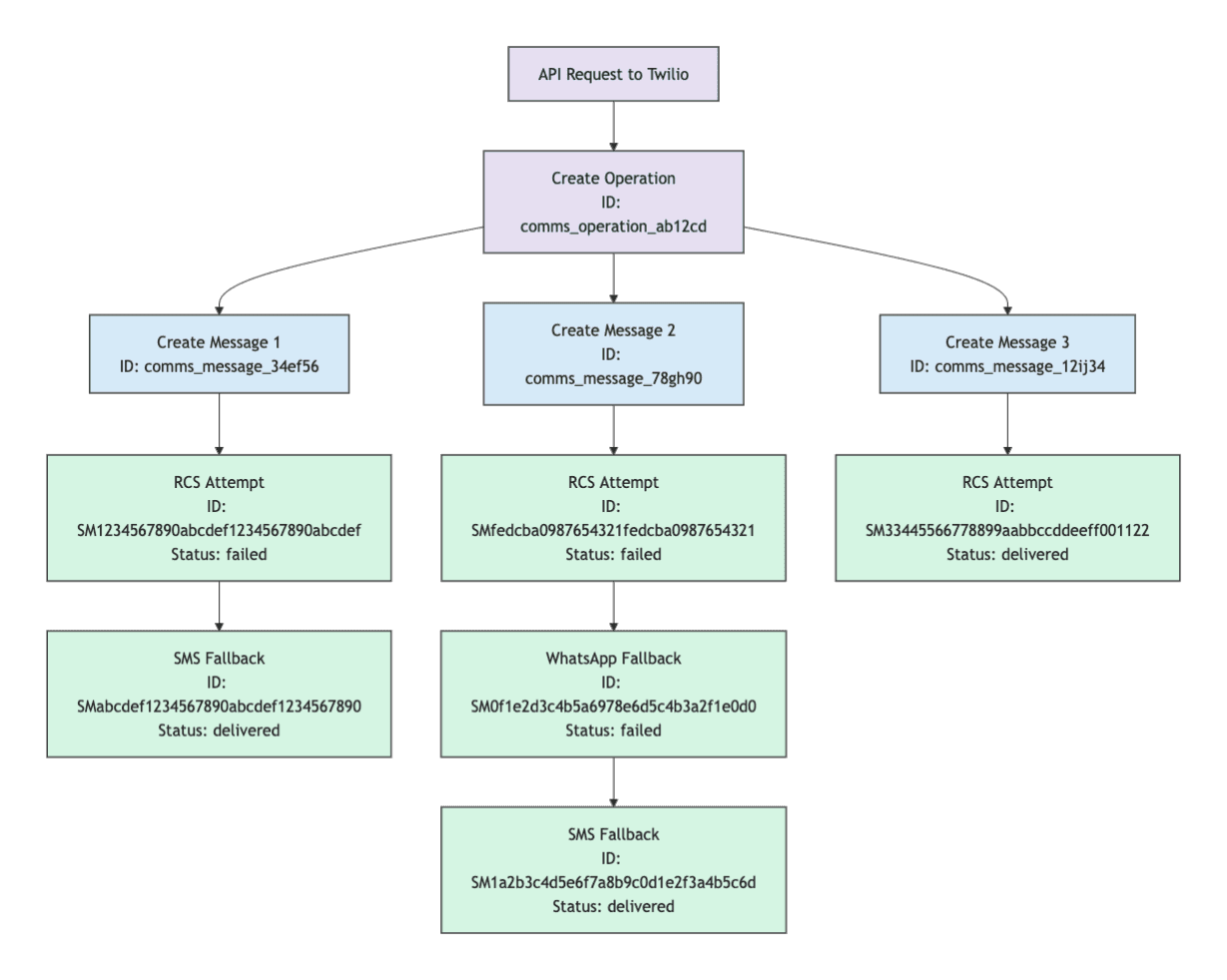
You can associate every delivery attempt (each try to send a message to a recipient over a specific channel) with its parent Message and Operation resource by using the messageId and operationId values included in each status callback event.
You can make a GET request with the Operation ID to retrieve its status.
1curl -X GET 'https://comms.twilio.com/preview/Messages/Operations/{operationId}' \2--header 'Content-Type: application/json' \3-u $TWILIO_ACCOUNT_SID:$TWILIO_AUTH_TOKEN
Sample response:
1{2"id": "comms_operation_01h2xcejqtf2nbrexx3vqjhp41",3"status": "COMPLETED",4"stats": {5"total": 1,6"recipients": 1,7"attempts": 1,8"unaddressable": 0,9"queued": 0,10"sent": 0,11"scheduled": 0,12"delivered": 1,13"read": 0,14"undelivered": 0,15"failed": 0,16"canceled": 017},18"createdAt": "2024-04-05T06:20:00Z",19"updatedAt": "2024-04-05T06:20:00Z"20}
See the Message Operation API reference.
You can also use the List Message endpoint to retrieve the Message resources that an Operation created.
1curl -X GET 'https://comms.twilio.com/preview/Messages?operation_id={operation_id}' \2--header 'Content-Type: application/json' \3-u $TWILIO_ACCOUNT_SID:$TWILIO_AUTH_TOKEN
Sample response:
1{2"messages": [3{4"id": "comms_message_01h2xcejqtf2nbrexx3vqjhp41",5"from": {6"address": "+12065558844",7"channel": "WHATSAPP",8"senderId": "comms_sender_01h9krwprkeee8fzqspvwy6nq8"9},10"to": [11{12"address": "+14153901002",13"channel": "PHONE",14"contactId": "comms_contact_01h9krwprkeee8fzqspvwy6nq7"15}16],17"status": "SENT",18"related": [19{20"name": "operation",21"id": "comms_operation_01h2xcejqtf2nbrexx3vqjhp41",22"uri": "/Messages/Operations/01h2xcejqtf2nbrexx3vqjhp41"23}24],25"tags": {},26"scheduledFor": null,27"createdAt": "2023-08-24T14:15:22Z",28"updatedAt": "2023-08-24T14:15:22Z",29"deletedAt": null30}31],32"pagination": {33"next": null,34"self": "https://comms.twilio.com/preview/Messages"35}36}
For more details, see the List Messages API reference.
See the Personalization guide to learn how to personalize messages for each recipient.