Supervise AI agents with Conversation Intelligence
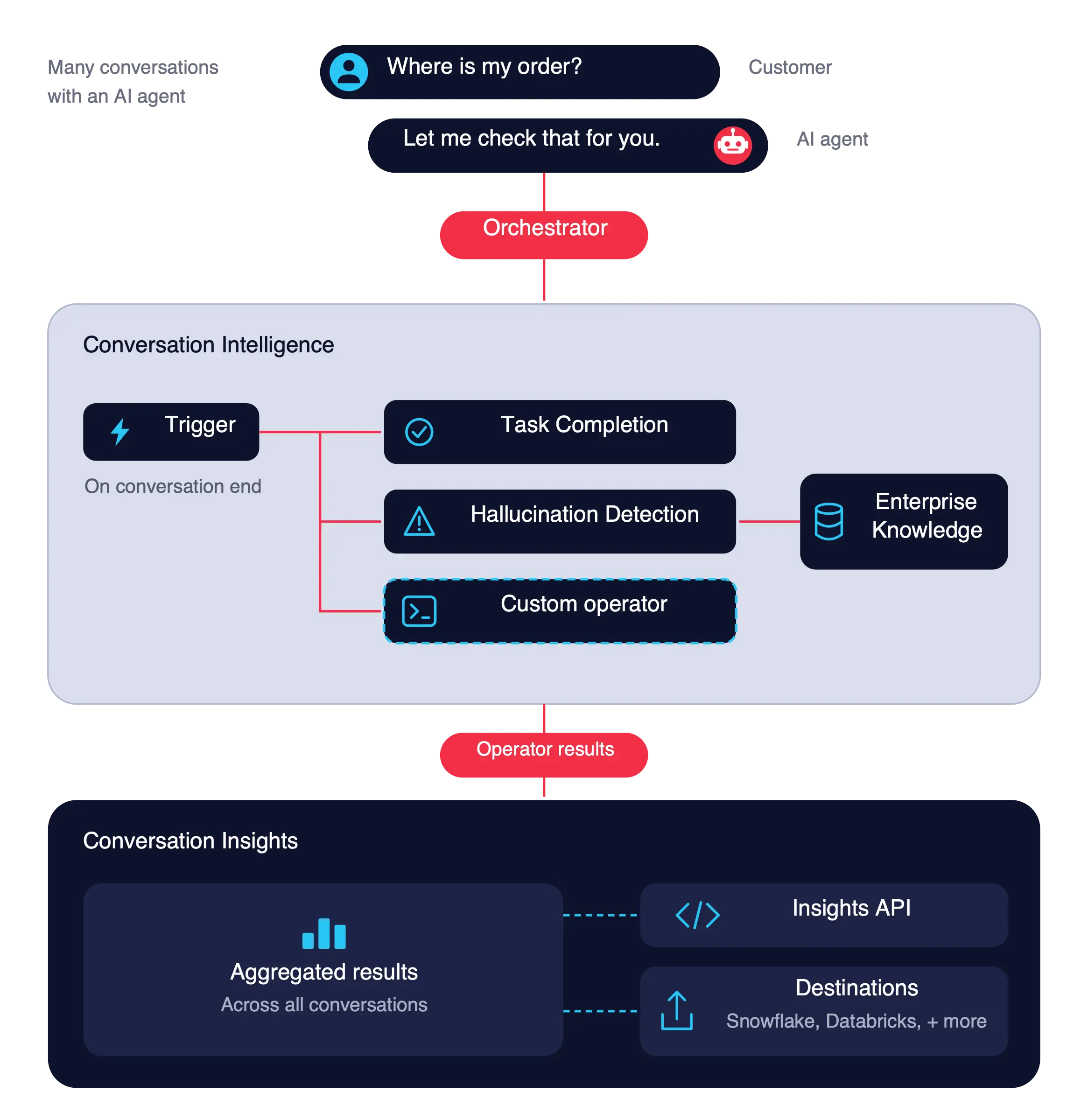
AI Supervision evaluates what your AI agent said to customers, whichever model or vendor powers it. In this guide, you set up a rule that runs Task Completion and Hallucination Detection operators on every conversation when it ends, with Enterprise Knowledge as the source of truth. You then view the results in Twilio Console, optionally receive them at a webhook, and aggregate them with the Insights API.
Public beta
Task Completion and Hallucination Detection operators are currently in public beta and the information contained in this document is subject to change. Some features are not yet implemented and others may be changed before the product is declared as generally available. Public beta products are not covered by the Twilio Support Terms or Twilio Service Level Agreement.
Task Completion and Hallucination Detection operators are not PCI compliant or a HIPAA Eligible Service and should not be used in workflows that are subject to HIPAA or PCI.
Conversations products are only available in the new Twilio Console. If your account hasn't been migrated, you'll be redirected to the legacy Console where these products won't appear.
- A Twilio account and a channel your AI agent talks to customers on, for example a Twilio phone number with voice capabilities.
- A Twilio API key and secret, for the Insights API.
- A conversation configuration and memory store.
- A conversation configuration that captures your agent's conversations. The conversation intelligence must be attached to the conversation configuration.
- A knowledge base in Enterprise Knowledge with the articles your agent should follow.
- In Twilio Console, go to Orchestration > Conversation Intelligence > Intelligence configurations.
- Find your intelligence configuration and click Create rule.
- Follow the instructions in the UI to:
- Add the Task Completion and Hallucination Detection operators.
- Set the trigger to At conversation end. Both operators run once on the full conversation after it closes.
- (Optional) add a Webhook action to receive results at your own endpoint.
- Select the knowledge base in Enterprise Knowledge.
The Hallucination Detection operator checks what the agent said against it. If you don't select a knowledge base, the operator analyzes contradictions within a conversation.
Have a conversation with your AI agent on the captured channel, and end it. Ask a question your knowledge base answers, so you can check Hallucination Detection against it.
You can view the results of the language operators for each conversation in the Twilio Console or optionally receive them via webhook.
-
In Twilio Console, go to Orchestration > Conversation Intelligence > Intelligence configurations.
-
Click the intelligence configuration you want to explore.
-
Click the Conversations tab.
You'll see a list of conversations analyzed by the intelligence configuration. -
Optionally, filter conversations by date, channel, or other metadata.
-
Click the conversation you want to view.
- Task Completion returns one label (
RESOLVED,UNRESOLVED,ESCALATED, orAGENT_DECLINED) and a one-sentence reason. - Hallucination Detection returns the flagged statements with their type, the agent utterance, and what your knowledge base says.
To view the full output of each operator, see Use Twilio-authored language operators.
- Task Completion returns one label (
If you set the webhook action in your intelligence configuration, the results of the language operators are sent to the specified URL when the conversation ends. This webhook sends the raw operator results for each conversation. For one summarized record per conversation, ready for reporting, use Data Destinations.
Note: This example is shortened for readability. For the full payload structure, see Rule Execution webhook.
1{2"accountId": "AC00000000000000000000000000000000",3"conversationId": "conv_conversation_01k1etk2y5f1y9fpe2epfdtvv2",4"intelligenceConfiguration": {5"id": "intelligence_configuration_01kermhm82e5mr98nbeh1hpmbn",6"displayName": "ai-supervision",7"version": 1,8"ruleId": "intelligence_configurationrule_01kermhm81fwfvy7j0f7h7v5mr"9},10"operatorResults": [11{12"id": "intelligence_operatorresult_01k6fc25s7epm9qtk8rszbv3q5",13"operator": { "id": "intelligence_operator_04aesmz370ev5vz77jed2vec1k", "displayName": "Agent-Task-Completion", "version": 1 },14"outputFormat": "JSON",15"result": { "label": "RESOLVED", "reason": "The agent answered the customer's refund question." },16"dateCreated": "2026-11-06T10:15:00Z",17"executionDetails": { "trigger": { "on": "CONVERSATION_END", "timestamp": "2026-11-06T10:14:52Z" } },18...19},20{21"id": "intelligence_operatorresult_01k6fc25s7epm9qtk8rszbv3q6",22"operator": { "id": "intelligence_operator_01m4wvhe37ebarkr9wbhy2w3n4", "displayName": "Hallucination-Detection", "version": 1 },23"outputFormat": "JSON",24"result": {25"hallucination_detected": true,26"hallucination_count": 1,27"hallucinations": [28{29"type": "external_context_conflict",30"source": "knowledge",31"evidence": "Refunds are available for 60 days.",32"expected": "Refunds are available for 30 days."33}34]35},36"dateCreated": "2026-11-06T10:15:00Z",37"executionDetails": {38"trigger": { "on": "CONVERSATION_END", "timestamp": "2026-11-06T10:14:52Z" },39"resolvedContext": {40"knowledge": {41"sources": [42{ "baseId": "know_knowledgebase_xxxxxxxxxxxxxxxxxxxxxxxxxxxx", "sourceId": "know_knowledge_xxxxxxxxxxxxxxxxxxxxxxxxxxxx" }43]44}45},46...47},48...49}50]51}
Query Conversation Insights to count outcomes and hallucination types over time, for example, how many conversations were UNRESOLVED this week. Results are available about 15 to 20 minutes after the conversation closes. To monitor these rates alongside the rest of your stack, sync them with Data Destinations to a tool such as Datadog or Snowflake.
To learn more about aggregating results with Conversation Insights, see Core concepts and Aggregate data.
The OperatorResult cube holds a row for every operator result. This example filters it to the Task Completion operator to count conversations by task completion level.
1// Download the helper library from https://www.twilio.com/docs/node/install2const twilio = require("twilio"); // Or, for ESM: import twilio from "twilio";34// Find your Account SID at twilio.com/console5// Provision API Keys at twilio.com/console/runtime/api-keys6// and set the environment variables. See http://twil.io/secure7// For local testing, you can use your Account SID and Auth token8const accountSid = process.env.TWILIO_ACCOUNT_SID;9const apiKey = process.env.TWILIO_API_KEY;10const apiSecret = process.env.TWILIO_API_SECRET;11const client = twilio(apiKey, apiSecret, { accountSid: accountSid });1213async function createQueryResults() {14const query = await client.insights.v3.query.create({15domain: "Conversations",16query: {17measures: ["OperatorResult.Count"],18dimensions: ["OperatorResult.OperatorLabel"],19filters: [20{21expressions: [22{23op: "EQ",24field: "OperatorResult.OperatorName",25values: ["Agent-Task-Completion"],26},27{28op: "GT",29field: "OperatorResult.CreatedDate",30values: ["2026-11-01"],31},32{33op: "LT",34field: "OperatorResult.CreatedDate",35values: ["2026-11-08"],36},37],38},39],40},41});4243console.log(query.domain);44}4546createQueryResults();
The response returns one item per label, with the count of conversations for each task completion level.
1{2"domain": "Conversations",3"items": [4{ "OperatorResult.OperatorLabel": "RESOLVED", "OperatorResult.Count": "412" },5{ "OperatorResult.OperatorLabel": "UNRESOLVED", "OperatorResult.Count": "96" },6{ "OperatorResult.OperatorLabel": "ESCALATED", "OperatorResult.Count": "71" },7{ "OperatorResult.OperatorLabel": "AGENT_DECLINED", "OperatorResult.Count": "9" }8],9"meta": { "key": "items", "nextToken": null, "pageSize": 50, "previousToken": null }10}
The OperatorResult cube has one row per operator result, so a single query can't filter one conversation on the results of two different operators. To cross-filter, use the ConversationSummary cube instead. This example queries OperatorResult for both the Task Completion and Hallucination Detection operators over the same period.
1// Download the helper library from https://www.twilio.com/docs/node/install2const twilio = require("twilio"); // Or, for ESM: import twilio from "twilio";34// Find your Account SID at twilio.com/console5// Provision API Keys at twilio.com/console/runtime/api-keys6// and set the environment variables. See http://twil.io/secure7// For local testing, you can use your Account SID and Auth token8const accountSid = process.env.TWILIO_ACCOUNT_SID;9const apiKey = process.env.TWILIO_API_KEY;10const apiSecret = process.env.TWILIO_API_SECRET;11const client = twilio(apiKey, apiSecret, { accountSid: accountSid });1213async function createQueryResults() {14const query = await client.insights.v3.query.create({15domain: "Conversations",16query: {17dimensions: [18"OperatorResult.ConversationId",19"OperatorResult.OperatorName",20"OperatorResult.OperatorLabel",21],22filters: [23{24op: "AND",25expressions: [26{27op: "IN",28field: "OperatorResult.OperatorName",29values: ["Agent-Task-Completion", "Hallucination-Detection"],30},31{32op: "GT",33field: "OperatorResult.CreatedDate",34values: ["2026-11-01"],35},36{37op: "LT",38field: "OperatorResult.CreatedDate",39values: ["2026-11-08"],40},41],42},43],44},45});4647console.log(query.domain);48}4950createQueryResults();
The response returns one item per operator result, so each conversation appears once for each operator in the query. In the example response, the conversation appears twice because it has a result from both Task Completion (RESOLVED) and Hallucination Detection (a statement flagged against the knowledge base).
1{2"domain": "Conversations",3"items": [4{5"OperatorResult.ConversationId": "conv_conversation_01k1etk2y5f1y9fpe2epfdtvv2",6"OperatorResult.OperatorName": "Agent-Task-Completion",7"OperatorResult.OperatorLabel": "RESOLVED"8},9{10"OperatorResult.ConversationId": "conv_conversation_01k1etk2y5f1y9fpe2epfdtvv2",11"OperatorResult.OperatorName": "Hallucination-Detection",12"OperatorResult.OperatorLabel": "external_context_conflict:knowledge"13}14],15"meta": { "key": "items", "nextToken": null, "pageSize": 50, "previousToken": null }16}
The ConversationSummary cube provides one denormalized row per conversation with per-operator results. This lets you query and filter across operators, like TaskCompletion=UNRESOLVED and HasHallucination=true.
1// Download the helper library from https://www.twilio.com/docs/node/install2const twilio = require("twilio"); // Or, for ESM: import twilio from "twilio";34// Find your Account SID at twilio.com/console5// Provision API Keys at twilio.com/console/runtime/api-keys6// and set the environment variables. See http://twil.io/secure7// For local testing, you can use your Account SID and Auth token8const accountSid = process.env.TWILIO_ACCOUNT_SID;9const apiKey = process.env.TWILIO_API_KEY;10const apiSecret = process.env.TWILIO_API_SECRET;11const client = twilio(apiKey, apiSecret, { accountSid: accountSid });1213async function createQueryResults() {14const query = await client.insights.v3.query.create({15domain: "Conversations",16query: {17measures: ["ConversationSummary.Count"],18dimensions: [19"ConversationSummary.ConversationName",20"ConversationSummary.TaskCompletion",21"ConversationSummary.HasHallucination",22"ConversationSummary.HallucinationCount",23],24filters: [25{26op: "AND",27expressions: [28{29op: "GT",30field: "ConversationSummary.CreatedDate",31values: ["2026-11-06T21:56:29Z"],32},33],34},35{36op: "OR",37expressions: [38{39op: "IN",40field: "ConversationSummary.TaskCompletion",41values: ["UNRESOLVED", "ESCALATED"],42},43{44op: "EQ",45field: "ConversationSummary.HasHallucination",46values: ["true"],47},48],49},50],51},52});5354console.log(query.domain);55}5657createQueryResults();
1{2"domain": "Conversations",3"items": [4{ "ConversationSummary.ConversationName": "supervision-hallucinated-refund", "ConversationSummary.Count": "1", "ConversationSummary.HallucinationCount": "2", "ConversationSummary.HasHallucination": true, "ConversationSummary.TaskCompletion": "RESOLVED" },5{ "ConversationSummary.ConversationName": "supervision-escalation-missed", "ConversationSummary.Count": "1", "ConversationSummary.HallucinationCount": "1", "ConversationSummary.HasHallucination": true, "ConversationSummary.TaskCompletion": "UNRESOLVED" },6{ "ConversationSummary.ConversationName": "supervision-escalation-handled", "ConversationSummary.Count": "1", "ConversationSummary.HallucinationCount": "0", "ConversationSummary.HasHallucination": false, "ConversationSummary.TaskCompletion": "ESCALATED" }7],8"meta": { "key": "items", "nextToken": null, "pageSize": 50, "previousToken": null }9}