Conversation Intelligence quickstart
In this quickstart, you'll build an end-to-end implementation that analyzes voice conversations in real-time and delivers insights to your application. You'll use Twilio Agent Connect (TAC), a Python SDK that wires Twilio's Conversation Memory, Conversation Orchestrator, and Conversation Intelligence primitives into your AI application.
By the end of this quickstart:
- You'll call a Twilio phone number and talk to an AI-powered customer (GPT-4o)
- A browser dashboard will show real-time script adherence checkpoints as you follow an example support script
- A summary will appear automatically when the call ends
Info
Conversation Intelligence supports multiple channels, including Voice, SMS, RCS, and WhatsApp. This quickstart focuses on Voice to demonstrate the core concepts.
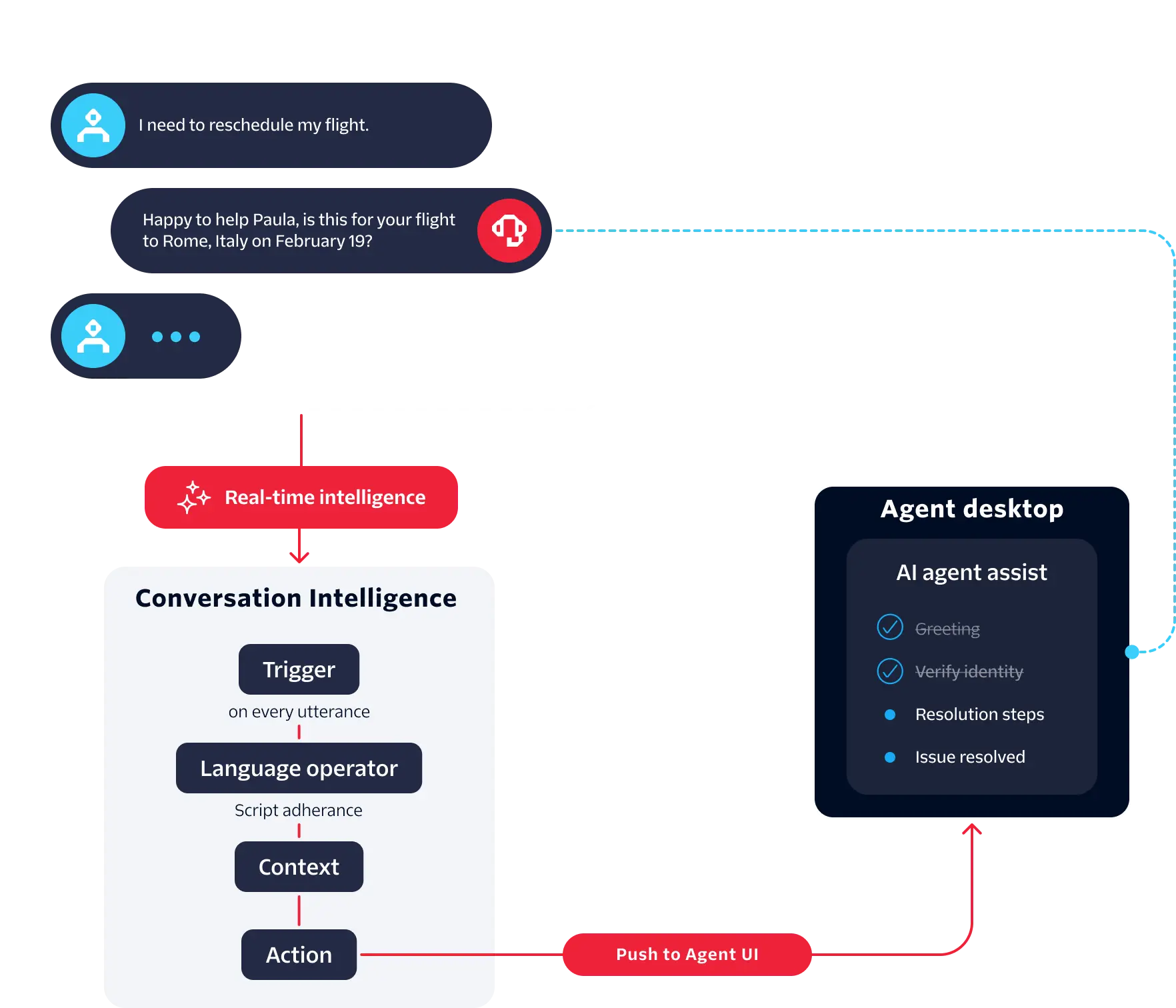
The following diagram illustrates the architecture of the quickstart application and how Conversation Intelligence works with TAC:
1Phone call (PSTN)2└── Twilio routes to /tac/twiml (Conversation Relay)34FastAPI Server (server.py)5├── /tac/* → TAC VoiceChannel (Conversation Relay WebSocket)6├── /webhook/cintel → receives Script Adherence + Summary results7└── /api/events → SSE stream to browser dashboard89TAC VoiceChannel10└── Conversation Relay ↔ WebSocket ↔ TAC ↔ handle_message_ready()11└── OpenAI GPT-4o (AI customer)1213Twilio Conversation Intelligence14├── Script Adherence operator → fires per utterance → /webhook/cintel → SSE checkpoint-update15└── Summary operator → fires on call end → /webhook/cintel → SSE summary-update
When a call arrives, Twilio sends an HTTP request to the voice webhook on your TAC server. TAC responds with TwiML that includes a <ConversationRelay> verb with your Conversation Configuration ID:
1<Response>2<Connect>3<ConversationRelay4url="wss://your-domain.ngrok.io/ws"5conversationConfiguration="conv_configuration_xxx" />6</Connect>7</Response>
Twilio reads the conversationConfiguration attribute and automatically creates a Conversation in the Conversation Orchestrator, adds the caller as a participant, and opens a WebSocket connection to your server for the audio stream. From that point, Twilio handles transcription and streams each utterance to TAC over the WebSocket. TAC invokes your handle_message_ready callback with the transcribed text, and your response is sent back through the same WebSocket as synthesized speech. This means you never call the Conversations API directly. Passing the ID in TwiML is sufficient for Twilio to manage the entire conversation lifecycle.
This quickstart uses the following billable products in addition to Conversation Intelligence operator charges:
- Conversation Relay
- Inbound voice minutes
- Phone numbers
Post-upgrade free units for upgraded accounts
All upgraded Twilio accounts receive [Post-upgrade free units (PUFU)] that apply automatically before any charges.
Learn more about Conversation Intelligence billing and Twilio Voice pricing.
Before you begin, complete the following prerequisites:
- Sign up for Twilio and buy a Twilio phone number with voice capabilities.
- Get an OpenAI API key for the conversational AI agent.
- Install Python 3.10+.
- Install uv.
- Install and set up ngrok.
- Install Git.
In a terminal, clone the quickstart application repository and navigate to the project directory:
1git clone --branch feature/cintel-quickstart https://github.com/twilio/twilio-agent-connect-python.git2cd twilio-agent-connect-python
To start ngrok and create a tunnel to your localhost, run:
ngrok http 3340
Custom ngrok domain
To use your custom ngrok domain and avoid VPN blocking issues, run ngrok http 3340 --domain=your-domain.ngrok.app.
The ngrok console displays your forwarding URL (for example, https://your-domain.ngrok.app or https://abc123.ngrok.app).
The TAC setup wizard provisions all required Twilio resources and configures your phone number automatically.
- From the repo root, run:
make setup
-
In a browser, open http://localhost:8080.
-
Under Twilio Credentials, enter your Twilio credentials (API key SID, API key secret, Account SID, Auth token) and your Twilio phone number in E.164 format.
-
Under Memory Store, select a memory store. If you want to create a new one, click Create New and enter a Display name and Description for the memory store, then click Create.
-
Under Conversation Configuration, enter a Display name and Description.
-
Enter your ngrok domain (without
https://) and OpenAI API key. -
Under Profile Information, enter Email and Phone number.
-
Click Set Up Services.
The wizard creates:
- Memory store: Stores customer memory and conversation history
- Conversation configuration: Captures inbound voice calls to your number and links to the memory store and intelligence configuration
-
Click Detect ngrok Tunnel.
-
Click Create Intelligence Configuration & Configure phone number.
The wizard creates an Intelligence Configuration with two operators:
- Script Adherence (trigger:
on: COMMUNICATION): Evaluates agent speech against a preset support script in real-time. Sends results tohttps://<ngrok-domain>/webhook/cintel. - Summary (trigger:
on: CONVERSATION_END): Generates a post-call summary. Sends results to the same webhook.
The wizard also configures your Twilio phone number's voice webhook to
https://<ngrok-domain>/tac/twimlso incoming calls are handled by the demo server. - Script Adherence (trigger:
When the wizard completes, it displays all required environment variable values. Copy them.
To configure the application, create a .env file in the getting_started/examples/cintel directory:
1cd getting_started/examples/cintel2cp .env.example .env
Paste the setup wizard output into .env.
1INTELLIGENCE_CONFIG_SID=intelligence_configuration_xxx2WEBHOOK_BASE_URL=https://abc123.ngrok-free.app34# From Step 1:5MEMORY_STORE_SID=mem_store_xxx67# From Step 2:8CONVERSATION_CONFIGURATION_ID=conv_configuration_xxx910# Twilio credentials11TWILIO_ACCOUNT_SID=ACxxxxxxxxxxxxxxxxxxxxxxxxxxxxxxxx12TWILIO_AUTH_TOKEN=xxxxxxxxxxxxxxxxxxxxxxxxxxxxxxxx13TWILIO_API_KEY=SKxxxxxxxxxxxxxxxxxxxxxxxxxxxxxxxx14TWILIO_API_TOKEN=xxxxxxxxxxxxxxxxxxxxxxxxxxxxxxxx15TWILIO_PHONE_NUMBER=+1xxxxxxxxxx1617# Voice18TWILIO_TAC_VOICE_PUBLIC_DOMAIN=abc123.ngrok-free.app1920# OpenAI21OPENAI_API_KEY=sk-xxxxxxxxxxxxxxxxxxxxxxxxxxxxxxxx2223# Server24PORT=334025ENV=development
Install the demo application's Python dependencies, then start the local development server:
1make install2make dev
Open http://localhost:3340. You'll see a dashboard with two panels:
- Live transcript
- Script checkpoints
Call the phone number shown in the dashboard banner. An AI customer (GPT-4o playing a frustrated internet subscriber) will answer. Follow the Owl Internet support script:
| Checkpoint | What to say |
|---|---|
| Greeting | "Hi, this is [your name] calling from Owl Internet" |
| Identity verification | "Can I get your account number to pull up your information?" |
| Resolution steps | "Let me trigger a remote modem reset for you" |
| Brand-approved closing | "Thank you for choosing Owl Internet. Is there anything else I can help you with?" |
Watch the checkpoints turn green in real-time as you follow each step. After you hang up, the summary appears automatically in the right panel.
You can also view the operator results in Twilio Console.
- In Twilio Console, go to Products & services > Conversation Intelligence > Intelligence configurations.
- Select your configuration, then open the Conversations tab.
- Click a conversation to view its operator results.
1"categories": [2{3"category_key": "greeting",4"criteria": [5{6"criteria_key": "introduce_yourself",7"criteria_met": "Failed"8}9]10},11...12]
1{2"summary_text": "Customer called about recurring internet disconnections. Agent followed the full support script and resolved the issue by triggering a remote modem reset.",3"key_points": ["Internet disconnecting every few hours", "Remote modem reset resolved issue"]4}
See the following common issues and resolutions.
- Verify ngrok is running and
TWILIO_TAC_VOICE_PUBLIC_DOMAINin.envmatches the current domain. - In Twilio Console, go to Develop > Troubleshoot > Debugger to see failed webhook deliveries to
/webhook/cintel. - Go to Products & services > Conversation Intelligence. Click your configuration, then click the Conversations tab to confirm operators ran.
- In
.env, updateTWILIO_TAC_VOICE_PUBLIC_DOMAIN. - Re-run the setup wizard to update both the Intelligence Configuration webhook URL and the phone number voice webhook.
- To restart the server, run
make dev.
- In
.env, verifyOPENAI_API_KEYis valid (starts withsk-). - Check server logs for OpenAI errors.
- To build tailored analysis for your use case, create custom language operators.
- Learn how to integrate results with your application.
- Explore language operator results.
- Learn more about TAC.