Facebook Ads Source
Source Info
- The Facebook Ads Source is an Object Cloud source. This means that it sends information (traits) about a thing that exists and persists over time, such as a person or company, and which can be updated over time. Data from this source can only be exported directly to a warehouse, but it can then be used for further analysis. Learn more about cloud sources.
Facebook is one of the most efficient ways to advertise online. Take your company's analysis to the next level by adding Facebook Ads as a Source to Segment.
-
From your workspace's Sources catalog page, click Add source.
-
Choose Facebook Ads.
-
Give the source a nickname. The nickname is a label used in the Segment interface, and Segment creates a related schema name which you query against in your warehouse. The nickname can be whatever you like, but we recommend sticking to something that reflects the source itself, like
Facebook AdsorFacebook Ads Prod.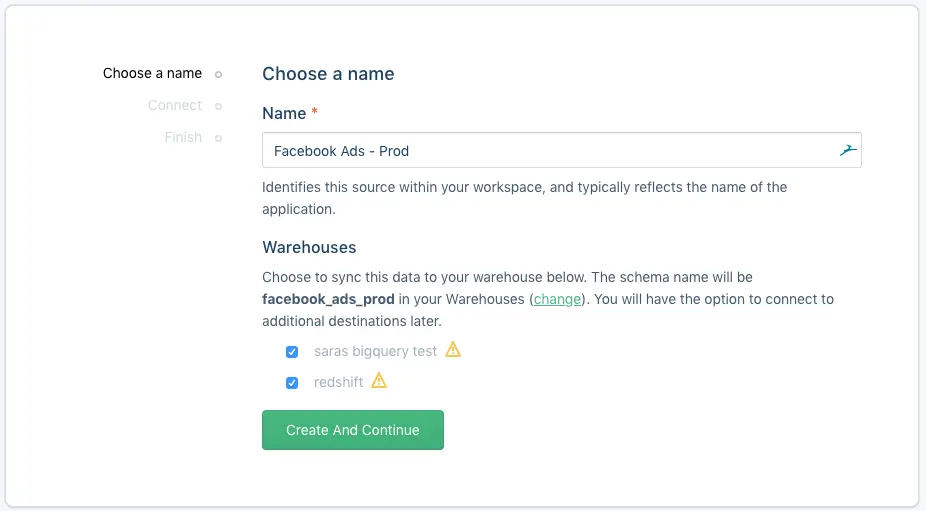
-
Click Create And Continue then Connect to OAuth into Facebook.
-
Select which accounts you would like to sync (you may change this selection later).
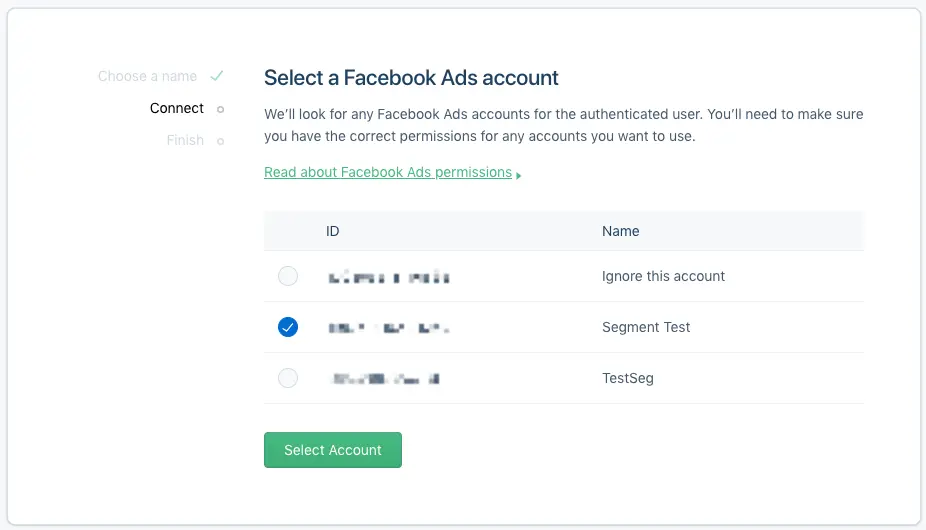
- Click Finish.
If your Facebook user has read permissions to Facebook Ads account's data, you should be able to use your account for the Source.
Facebook Ads has a sync component, which means Segment makes requests to Facebook's API on your behalf on a 3 hour interval to pull the latest data into Segment. In the initial sync, Segment grabs all the Facebook objects (and their corresponding properties) according to the Collections table below. The objects are written into a separate schema, corresponding to the source instance's schema name you designated upon creation. For example, if you went with fb_ads, the ads collection will be accessible at fb_ads.ads in SQL.
Segment's sync component uses an upsert API, so the data in your warehouse loaded using sync will reflect the latest state of the corresponding resource in Facebook Ads. For example, if budget went from 0 to 100 between syncs, on its next sync that value will be 100.
The source syncs and warehouse syncs are independent processes. Source runs pull your data into the Segment Hub, and warehouse runs flush that data to your warehouse. Sources sync with Segment every 3 hours. Depending on your Warehouses plan, Segment pushes the Source data to your warehouse on the interval associated with your billing plan.
Collections are the groupings of resources Segment pulls from your source. In your warehouse, each collection gets its own table.
| Collection | Type | Description |
|---|---|---|
| ad_accounts | object | An ad account is an account used to manage ads on Facebook |
| ad_sets | object | An ad set is a group of ads that share the same daily or lifetime budget, schedule, bid type, bid info, and targeting data |
| ads | object | An ad object contains the data necessary to visually display an ad and associate it with a corresponding ad set. |
| campaigns | object | A campaign is a grouping of ad sets which are organized by the same business objective. |
| insights | object | Insights contain performance statistics for an ad broken down by day. |
The following tables outline the properties included in collections.
| Property Name | Description |
|---|---|
| id | Ad Account ID. |
| balance | Bill amount due. |
| name | Name of the account. If the account name is not set, the name of the first admin visible to the user will be returned. |
| partner_id | The ID of a Facebook Page or Facebook App. |
| spend_cap | The maximum that can be spent by this account after which campaigns will be paused. A value of 0 signifies no spending-cap and setting a new spend cap only applies to spend AFTER the time at which you set it. Value specified in basic unit of the currency, e.g. cents for USD. |
| Property Name | Description |
|---|---|
| id | Ad set ID. |
| account_id | Ad Account ID. |
| campaign_id | Campaign ID. |
| configured_status | The status set at the ad set level. It can be different from the effective status due to its parent campaign. |
| daily_budget | The daily budget of the set defined in your account currency. |
| effective_status | The effective status of the ad set, which can be either its own status or caused by its parent campaign. |
| end_time | End time, in UTC UNIX timestamp. |
| name | Name of ad set. |
| Property Name | Description |
|---|---|
| id | The ID of this ad. |
| adset_id | ID of the ad set that contains the ad. |
| account_id | The ID of the ad account that this ad belongs to. |
| bid_amount | Bid amount for this ad which will be used in auction instead of the ad set bid_amount, if specified. |
| bid_type | Bid type. |
| campaign_id | ID of the ad campaign that contains this ad. |
| name | Name of the ad. |
| status | The configured status of the ad. |
| url_parameters | URL parameters. |
| utm_source | UTM source. |
| utm_medium | UTM medium. |
| utm_campaign | UTM campaign. |
| utm_term | UTM term. |
| utm_content | UTM content. |
| Property Name | Description |
|---|---|
| id | Campaign's ID. |
| account_id | ID of the ad account that owns this campaign. |
| buying_type | Buying type. |
| effective_status | The effective status of this campaign. |
| name | Campaign's name. |
| spend_cap | A spend cap for the campaign, such that it will not spend more than this cap. Expressed as integer value of the subunit in your currency. |
| start_time | Start time. |
| stop_time | Stop time. |
| Property Name | Description |
|---|---|
| id | Segment internal ID. |
| ad_id | The unique ID of the ad you're viewing in reporting. |
| clicks | The number of clicks on your ads. |
| date_start | The start date for your data. |
| date_stop | The end date for your data. |
| frequency | The average number of times each person saw your ad. |
| impressions | The number of times your ads were on screen. |
| inline_post_engagements | The total number of actions that people take involving your ads. |
| social_spend | The total amount you've spent so far for your ads showed with social information. |
| spend | The estimated total amount of money you've spent on your campaign, ad set or ad during its schedule. |
| unique_clicks | The number of people who performed a click (all). This metric is estimated. |
| unique_impressions | Deprecated in favor of reach . You can continue to query unique_impressions for this metric, but zero-values will now be null. |
| reach | The number of people who saw your ads at least once. Reach is different from impressions, which may include multiple views of your ads by the same people. |
Segment supports both Breakdowns for Insights and Ads Actions Stats. Breakdowns and Ads Action Stats are not enabled by default; reach out to Segment support to enable them.
The following table lists the Ads Action Stats that Segment supports:
| Field | Description |
|---|---|
actions | The total number of actions people took that are attributed to your ads. |
actions_values | The total value of all conversions attributed to your ads. |
unique_actions | The total number of unique actions attributed to your ads. |
video_p25_watched_actions | The number of times your video played at 25% of its length, including plays that skipped to this point. |
video_p50_watched_actions | The number of times your video played at 50% of its length, including plays that skipped to this point. |
video_p75_watched_actions | The number of times your video played at 75% of its length, including plays that skipped to this point. |
video_p95_watched_actions | The number of times your video played at 95% of its length, including plays that skipped to this point. |
video_p100_watched_actions | The number of times your video played at 100% of its length, including plays that skipped to this point. |
video_30_sec_watched_actions | The number of times your video played for at least 30 seconds, or for nearly its total length if it's shorter than 30 seconds. |
video_avg_time_watched_actions | The average time a video played, including any time spent replaying the video for a single impression. |
For more information, view Meta's Insights APIs documentation.
Warehouses are the only supported destination for object-cloud sources.