Facebook Pixel Destination
Destination Info
- Accepts Page, Identify and Track calls.
- Refer to it as Facebook Pixel in the Integrations object
Components
- Browser
Facebook Pixel lets you measure and optimize the performance of your Facebook Ads, making conversion tracking, optimization and remarketing easier than ever. The Facebook Pixel Destination is open-source. You can browse the code on GitHub.
Warning
Facebook deprecated the modular Ads For Websites suite, which previously comprised Facebook Custom Audiences and Facebook Conversion Tracking. Segment consolidated those two destinations into this new and improved Facebook Pixel destination.
Use cases
This page is about the Facebook Pixel destination. For documentation on other Facebook destinations, see the pages linked below.
| Facebook Destination | Supported by Engage |
|---|---|
| Facebook App Events | Yes |
| Facebook Offline Conversions | Yes |
| Facebook Pixel | No |
| Facebook Custom Audiences | Yes |
| Facebook Conversions API | Yes |
- From the Segment web app, click Catalog.
- Search for "Facebook Pixel" in the Catalog, select it, and choose which of your sources to connect the destination to.
- In the destination settings, enter your
pixelIdfrom the Pixels tab in Facebook Ads Manager.
When you enable Facebook Pixel as a destination in your Segment workspace, Segment automatically initializes Facebook's pixel with your pixelId upon loading analytics.js. This means you should remove the native Facebook script from your page.
If you're not familiar with the Segment Spec, take a look to understand what the Page method does. An example call would look like:
analytics.page();
Segment maps analytics.page() to Facebook's fbq('track', "PageView") method and will forward all page views accordingly. The integration will ignore any parameters you pass to analytics.page().
If you're not familiar with the Segment Spec, take a look to understand what the Identify method does. An example call would look like:
1analytics.identify('ze8rt1u89', {2name: 'Zaphod Kim',3gender: 'Male',4email: 'jane.kim@example.com',5phone: '1-401-555-4421',6address: {7city: 'San Francisco',8state: 'Ca',9postalCode: '94107'10}11});
When you make an Identify call with Segment, it updates Facebook Pixel the next time the user loads a page on your website. Facebook Pixel does not support immediately updating user properties using Identify. When you perform an Identify call in Segment, it updates in Facebook Pixel using their Advanced Matching feature.
If you're not familiar with the Segment Spec, take a look to understand what the Track method does. An example call would look like:
1analytics.track("My Custom Event", {2checkinDate: new Date(),3myCoolProperty: "foobar",4});
Segment's analytics.js client-side integration supports all three documented methods of sending events to Facebook.
At any time, you can define a custom contentType on the integration options. If the value is present, it takes
precedence over any other setting or default value.
1analytics.track('Checkout Started', {2revenue: 2,3products: [{4id: "FB_product_1234",5currency: "USD",6category: "tshirts",7quantity: 1,8price: 29}]10},11{ 'Facebook Pixel': { contentType: 'mycustomtype' } }12);
To send Standard events, use the Segment destination setting labeled "Map Your Events to Standard FB Events". Then, any time Segment receives one of the events in that mapping, it's sent to Facebook as the standard event you specified. All properties you included in the event will be sent as event properties. For more information, view Meta's conversion tracking documentation.
In addition, Segment sends the following event types as Standard events:
Order Completed, which Segment sends asPurchaseProduct Added, which Segment sends asAddToCartProduct List Viewed, which Segment sends asViewContentProduct Viewed, which Segment sends asViewContentProducts Searched, which Segment sends asSearchCheckout Started, which Segment sends asInitiateCheckout
Facebook requires a currency for Purchase events. If you leave out a currency, Segment will set a default value of USD.
You can set custom properties for the events listed above. Use the setting "Standard Events custom properties" to list all the properties you want to send.
Here's how you'd specify standard events in the settings view:
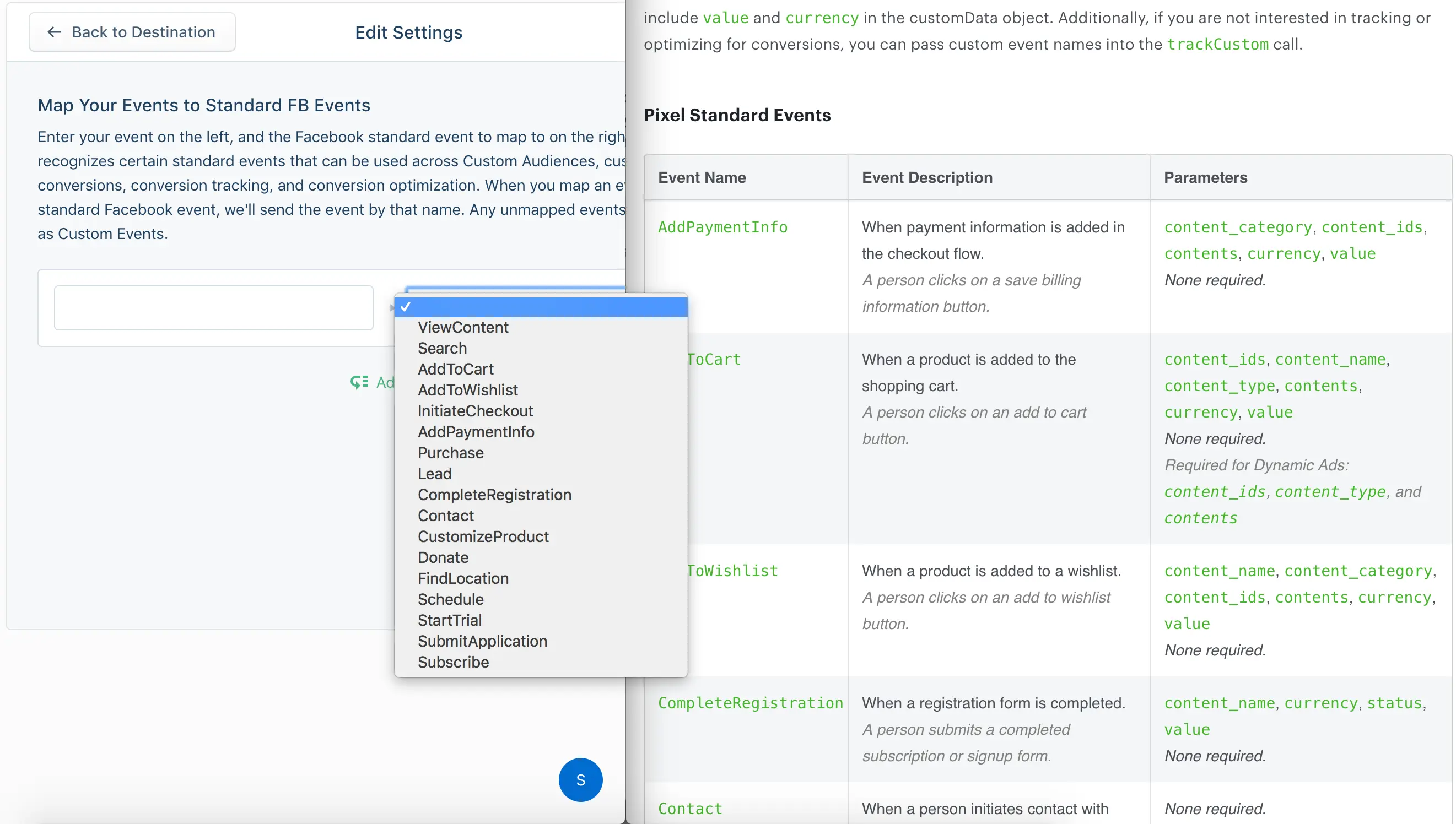
You can map more than one Track event to the same Facebook standard event.
To send Legacy Conversion events, use the Segment setting called "Legacy Conversion Pixel IDs". Any events that appear in that mapping will be sent to Facebook with the specified Pixel ID used as the Facebook Pixel eventName. Conversion events only support currency and value as event properties, so only these will be associated with the event. currency will default to USD if left out.
To send Custom events, send any event that does not appear in either mapping. All properties you include in the event are included as event properties. Segment sends any events you don't add to the "Map Your Events to Standard FB Events" setting to Facebook as a custom event. There is no setting to add custom events in the Facebook Pixel Destination configuration.
Facebook Pixel uses a custom timestamp format: an ISO 8601 timestamp without timezone information. For the following event fields, if you pass in a JavaScript Date object, it will be converted to this custom format. If you pass in a string, Segment assumes that the string is already formatted as Facebook expects:
checkinDatecheckoutDatedepartingArrivalDatedepartingDepartureDatereturningArrivalDatereturningDepartureDatetravelEndtravelStart
The Segment Facebook Pixel integration supports Advanced Matching, which enables you to send your customer data through the pixel to match more website actions with Facebook users. With this additional data, you can report and optimize your ads for more conversions and build larger re-marketing audiences. When the page loads, and before Segment fires off the pixels, Segment checks for traits that the user has been previously identified with and sends that along with each call.
Facebook accepts the following properties:
- First name
- Last name
- Phone number
- Gender
- Birthday
- City
- State
- Zip code
If you follow Segment's spec, these properties send in the correct format.
When you use Advanced Matching, Facebook also accepts an external_id. This can be any unique ID from the advertiser, like loyalty membership IDs, user IDs, and external cookie IDs. To send an external_id to Facebook you can either:
- Send the Segment
userIdoranonymousIdasexternal_idusing the Use User ID or Anonymous ID as External ID setting - Indicate which user trait you would like Segment to map to
external_idusing the Advanced Match Trait Key for External ID setting
In July 2020, Facebook released Limited Data Use feature to help businesses comply with the California Consumer Privacy Act (CCPA). This feature limits the way user data is stored and processed for all California residents who opt out of the sale of their data. You can send Limited Data Use data processing parameters to Facebook on each event so that Facebook can appropriately apply the user's data choice. Segment recommends that you first familiarize yourself on this feature and the Data Processing Options Facebook accepts.
This destination supports the following parameters:
- Data Processing Options
- Data Processing Options Country
- Data Processing Options State
You can enable the feature using the Use Limited Data Use destination setting and control it using Data Processing Initialization Parameters.
Info
The Use Limited Data Use destination setting is disabled by default for all Facebook destinations except for Facebook Pixel. You must enable the setting manually from the destination settings if you're using other Facebook destinations.
You can change the Use Limited Data Use destination setting to enable or disable Limited Data Use. This must be enabled (set to "on") if you want to send data processing parameters as part of the the Limited Data Use feature.
The Data Processing parameters you set are the Data Processing Options Segment uses when sending data to Facebook. By default, Segment uses the following Data Processing Parameters:
| Data Processing Parameter | Default Value | What it means |
|---|---|---|
| Data Processing Options | ["LDU"] | Use Facebook's Limited Data Use processing |
| Data Processing Options Country | 0 | Use Facebook's geolocation to determine country |
| Data Processing Options State | 0 | Use Facebook's geolocation to determine state |
Facebook uses context.ip to determine event geolocation.
You can manually change the Data Processing parameters by adding settings to the integrations object. For Facebook Pixel, you must store these settings in the Load object so that Segment can set them before it calls init. The following example shows how you might set custom Data Processing parameters in Analytics.js.
1analytics.load("replace_with_your_write_key", {2integrations: {3'Facebook Pixel': {4dataProcessingOptions: [['LDU'], 1, 1000]5}6}7});
If you're using real estate, travel, or automotive Dynamic Ads you can map category values to content_type values. For example, you might map the category "cars" to the "vehicle" content type so Facebook promotes relevant vehicles from your catalog. To understand which content types you can map to, consult the Facebook Dynamic Ads documentation.
For most implementations, Segment recommends leaving these mappings blank. By default, Segment sets content_type to "product".
The same mapping can be used to change the content_ids from the default value (product_id or the sku) to anything specific for Meta Pixel. For more information about required Meta Pixel events, see Meta's Required Meta Pixel events and parameters for Advantage+ catalog ads documentation.
Facebook enforces strict guidelines around sending Personally Identifiable Information (PII) as properties of Pixel events. To adhere to these guidelines, Segment automatically scans track event properties for PII and removes any that get flagged from the event to Facebook. The following keys are currently filtered:
- firstName
- lastName
- gender
- city
- country
- phone
- state
- zip
- birthday
Any track events with properties containing those keys will be sent to Facebook with those properties omitted.
If you have events that use any of those keys for non-PII properties, you can manually allowlist them using the Allowlist PII Properties setting. You may also add to this list and/or optionally hash blocklisted properties with the Blocklist PII Properties setting.
Facebook conversion pixels can fire inconsistently due to page redirects or reloads before the pixel has finished loading on the page. Make sure your page doesn't redirect or reload for at least 300ms after the conversion event happens. In some cases a delay of 500ms is necessary.
Segment recommends using the trackLink or trackForm helpers to delay the page redirect. For more on these methods, view the track link documentation. You can extend the delay by setting the timeout to 500ms.
This may be due to conversion events being sent from your development, staging, or testing environments. Segment recommends setting up separate sources for each environment, which will let you either point events to test conversion pixels in Facebook Conversion Tracking or turn off Facebook Conversion Tracking completely in non-production environments.
Double check that your mapped conversion events aren't happening anywhere else on your site. If the user reloads the conversion page or re-triggers the tracked event, they may be double counted.
Facebook's conversion reports count view-through conversions as well as click-through conversions by default. You can change that setting inside Facebook Conversion Tracking in the report attribution settings.
Facebook counts conversions per person, as opposed to Google Analytics which counts per browser cookie session (unless you're using Google Analytics User-ID).
If someone saw or clicked on your ad on a mobile phone then later came back directly to purchase on a desktop machine, Google Analytics wouldn't know that this was the same person, but Facebook would. In that scenario, Google Analytics would count two unique visits with a conversion last attributed to a direct visit on desktop. Facebook would count one conversion with the conversion properly attributed to the last ad click/view on mobile.
Facebook Pixel events typically don't display in real-time within the Facebook Ads Manager or other reporting interfaces. While Facebook Pixel events are tracked in near real-time, there might be some delay before you see them in your reporting. Visit Facebook's documentation to learn more.
Segment does not handle nested properties that need to be blocklisted, including the standard PII properties. If you have properties you would like to blocklist, you can use destination filters to drop those properties before they are sent downstream.
Segment pre-maps revenue or total to value for purchase events, like "Order Completed". If you have a custom value property, it's overwritten with the value from revenue or total, or, if those two properties aren't present, it appears as '0.00'. If you have a value property, you can use a destination middleware or destination plugin to transform the name before it is sent downstream to avoid any data loss.
If there are events that are not purchase events, but that you'd like to track value data about, use the Value Field Identifier setting to specify which existing field should map to Facebook's value field.
Many times this is a limitation on the tool's detection process, where the detector is looking for a specific HTML element on your page. Our client side analytics.js library asynchronously loads the tool's library or pixel onto the page. As such, the detection fails.
In order to confirm that the tool's library or pixel is actually loaded onto the page, you can open up the JavaScript console and go to the network tab when the page is loading.
If the script isn't loading, check that any form of ad blocker is disabled.
When both Facebook Pixel and Facebook Conversions API are enabled, you may see a "Mismatched IP Address" warning in Facebook reports. This happens because the two sources may send different IP versions (IPv4 vs. IPv6) for the same event:
- Facebook Pixel collects the user's IP address directly from the browser, including IPv6 addresses when available. This happens independently of Segment. Even though Segment's Analytics.js defaults to collecting only IPv4, the Facebook Pixel automatically collects and sends IPv6 if it's available.
- Facebook Conversions API sends events to Facebook using data collected by Segment, which typically includes only an IPv4 address.
Since the IP addresses from these two sources don't always match, Facebook may flag the event with a "Mismatched IP Address" warning.
To resolve this, you can manually collect and send the IPv6 address (when available) in your event payload and send it to Segment. Then, map this data to the Facebook Conversions API destination. This ensures that Facebook receives the same IP version from both sources, preventing mismatches.
Segment lets you change these destination settings from the Segment app without having to touch any code.
Optional
The Facebook Pixel will, by default, send button click and page metadata from your website to improve your ads delivery and measurement and automate your pixel setup. You can learn more about this here. You can disable this functionality by unchecking this setting.
trueOptional
Facebook has a strict policy prohibiting any personally identifiable information (PII) from being sent as properties of events to their API. By default, this integration will scan track events for these properties and strip them from the payload that gets sent to Facebook. If your events contain other properties with PII values, you can use this setting to append to this default list. You can also use this setting to optionally hash any PII values instead of dropping them.
Optional
Enter your category value on the left, and the Facebook content type to map to on the right. Facebook recognizes certain event types that can help deliver relevant ads. If no category values are mapped we'll default to product and product_group, depending on the event.
Optional
If enabled, we will initialize Facebook Pixel with any user traits that have been cached in the Segment cookies from your previous .identify() calls.
falseOptional
Please indicate a user trait key which you would like Segment to use to send an external_id to Facebook Pixel using advanced matching. Segment will use the value of this trait to map it to Facebook Pixel's external_id. Note: Enable Advanced Matching must be enabled to use this setting.
Optional
These are your deprecated Conversion Pixel IDs from Facebook Conversion Tracking. Facebook will still accept data in this format, though it's no longer possible to create conversion Pixel IDs. Now you create conversions based on standard and custom events inside their interface. Enter your event name in the left column and your pixel ID in the right column.
Optional
The Limited Data Use (LDU) setting controls whether or not Limited Data Use mode is set in the FB Pixel SDK. When enabling LDU, Segment will send default user geography options to request that Facebook geolocate the event. To override the default geography options set the values in the analytics.js Load Options under the key dataProcessingOptions.
trueOptional
Enter your event on the left, and the Facebook standard event to map to on the right. Facebook recognizes certain standard events that can be used across Custom Audiences, custom conversions, conversion tracking, and conversion optimization. When you map an event to a standard Facebook event, we'll send the event by that name. Any unmapped events will still be sent as Custom Events.
Optional
Add here all the custom properties you want to send as part of your Standard Events (Order Completed, Checkout Started, etc) as property name.
Optional
Enable this setting if you want to send userId (or anonymousId if not present) as external_id to Facebook when using advanced matching. Note: Enable Advanced Matching must be enabled to use this setting.
falseOptional
For pre-purchase events such as Product Viewed and Product Added, choose which Segment property you would like to map to Facebook's value property.
valueOptional
By default, Segment will strip any PII from the properties of track events that get sent to Facebook. If you would like to override this functionality, you can input each property you would like to allow as a line item in this setting. Please reference our documentation for the exact property names we filter out.