Facebook Conversions API (Actions)
Destination Info
- Accepts Page, Identify and Track calls.
- Refer to it as Facebook Conversions API (Actions) in the Integrations object
Facebook Conversions API (Actions) enables advertisers to send events from their servers directly to Facebook. Server-side events link to Facebook Pixel events, and process like browser pixel events. This means that server-side events are used in measurement, reporting, and optimization, just like browser pixel events.
Customer Information Parameters Requirements
Facebook Marketing API v13.0 and later enforces requirements for customer information parameters (user data). To ensure your events don't throw an error, Segment recommends that you review Facebook's requirements.
The Facebook Conversions API (Actions) destination provides the following benefits over the classic Facebook Conversions API destination:
- Fewer settings. Data mapping for actions-based destinations happens during configuration, which eliminates the need for most settings.
- Clearer mapping of data. Actions-based destinations enable you to define the mapping between the data Segment receives from your source, and the data Segment sends to Facebook Conversions API.
- Prebuilt mappings. Mappings for standard Facebook Conversions API events, like
Purchase, are prebuilt with the prescribed parameters and available for customization. - Support for page calls. Page calls can be sent to Facebook as a standard Page View.
- Support for identify calls. Identify calls can be sent to Facebook as a standard or custom event.
- Support for multi-product arrays. Product data nested within arrays, like the
productsarray in the Order Completed event, can be sent to Facebook. - Data normalization. Data is normalized before it is hashed to ensure the hashed value matches Facebook Pixel (browser).
This page is about the Facebook Conversions API. For documentation on other Facebook destinations, see the pages linked below.
| Facebook Destination | Supported by Engage |
|---|---|
| Facebook App Events | Yes |
| Facebook Offline Conversions | Yes |
| Facebook Pixel | No |
| Facebook Custom Audiences | Yes |
| Facebook Conversions API | Yes |
Set up your Pixel to work with the Facebook Conversions API (Actions) destination. You can use an existing Facebook Pixel that you already have set up, or create a new one.
- Go to the Facebook Business Events Manager and click Connect Data Sources.
- Choose "Web" and then click Get Started.
- Select "Conversions API" and then click Connect.
- Choose "Segment" from the list of partners.
- Enable the setting to "Authorize Segment Connection" and then click Continue.
- Go to the Pixel Settings in Facebook Business Events Manager
- Scroll down to the "Set up through a partner integration section" and click Choose Partner.
- Choose "Segment" from the list of partners.
- Enable the setting to "Authorize Segment Connection" and then click Continue.
- From the Segment web app, click Catalog, then click Destinations.
- Search for "Facebook Conversions API (Actions)" in the Destinations Catalog, and select the destination.
- Click Configure Facebook Conversions API (Actions) in the top-right corner of the screen.
- Select the source that will send data to Facebook Conversions API and follow the steps to name your destination.
- On the Settings tab, enter in your Pixel ID and click Save.
- Follow the steps in the Destinations Actions documentation on Customizing mappings.
Actions v2 provides additional access to features. Segment's Actions v2 support the following features:
- Sync modes: Control how Segment updates your Facebook Business Events Manager by selecting a sync mode, or a strategy for updating your downstream data.
- Dynamic dropdowns: When creating or updating a mapping in the Segment app, the dropdown auto-populates all of the available properties directly from Facebook.
Warning
You might need to reauthorize your Facebook Business Events Manager account to use all of the features associated with v2 Actions.
The following Facebook Conversions API (Actions) are Actions v2:
Sync modes allow users to define how Segment should update the data in your destination.
Available sync modes for the Facebook Conversions API (Actions) include:
- Add: Add records to a list, segment, or journey.
Your Facebook Pixel ID. Note: You may also use a dataset ID here if you have configured a dataset in your Facebook Events Manager.
Optional
Use this field to specify that events should be test events rather than actual traffic. You can find your Test Event Code in your Facebook Events Manager under the "Test events" tab. This can be overridden by the Test Event Code defined in the mapping. You'll want to remove your Test Event Code when sending real traffic through this integration.
Build your own Mappings. Combine supported triggers with the following Facebook Conversions API-supported actions:
Mapping limits per destination
Individual destination instances support a maximum of 5 mappings.
Send a custom event
Custom Event is a Cloud action.
This field allows you to specify where your conversions occurred. See Facebook documentation for supported values.
A Unix timestamp in seconds indicating when the actual event occurred. Facebook will automatically convert ISO 8601 timestamps to Unix.
These parameters are a set of identifiers Facebook can use for targeted attribution. You must provide at least one of the following parameters in your request. More information on recommended User Data parameters in Facebook’s Best Practices for Conversions API.
Optional
These fields support sending app events to Facebook through the Conversions API. For more information about app events support in the Conversions API, see the Facebook docs here. App events sent through the Conversions API must be associated with a dataset. Instructions for creating a dataset can be found here. Once a dataset is created, the dataset ID can be substituted for the pixel ID in the destination settings.
Optional
The custom data object can be used to pass custom properties. See Facebook documentation for more information.
Optional
This ID can be any unique string. Event ID is used to deduplicate events sent by both Facebook Pixel and Conversions API.
Optional
The browser URL where the event happened. The URL must begin with http:// or https:// and should match the verified domain. This is required if the action source is "website."
Optional
The Data Processing Options to send to Facebook. If set to true, Segment will send an array to Facebook indicating events should be processed with Limited Data Use (LDU) restrictions. More information can be found in Facebook’s documentation.
Optional
A country that you want to associate to the Data Processing Options. Accepted values are 1, for the United States of America, or 0, to request that Facebook geolocates the event using IP address. This is required if Data Processing Options is set to true. If nothing is provided, Segment will send 0.
Optional
A state that you want to associate to the Data Processing Options. Accepted values are 1000, for California, or 0, to request that Facebook geolocates the event using IP address. This is required if Data Processing Options is set to true. If nothing is provided, Segment will send 0.
Optional
Use this field to specify that events should be test events rather than actual traffic. You can find your Test Event Code in your Facebook Events Manager under the "Test events" tab. This property overrides the test event code defined in Settings. You'll want to remove your Test Event Code when sending real traffic through this integration.
Send event when a user completes a purchase
Purchase is a Cloud action. The default Trigger is type = "track" and event = "Order Completed"
This field allows you to specify where your conversions occurred. See Facebook documentation for supported values.
The currency for the value specified. Currency must be a valid ISO 4217 three-digit currency code.
A Unix timestamp in seconds indicating when the actual event occurred. Facebook will automatically convert ISO 8601 timestamps to Unix.
These parameters are a set of identifiers Facebook can use for targeted attribution. You must provide at least one of the following parameters in your request. More information on recommended User Data parameters in Facebook’s Best Practices for Conversions API.
Optional
These fields support sending app events to Facebook through the Conversions API. For more information about app events support in the Conversions API, see the Facebook docs here. App events sent through the Conversions API must be associated with a dataset. Instructions for creating a dataset can be found here. Once a dataset is created, the dataset ID can be substituted for the pixel ID in the destination settings.
A numeric value associated with this event. This could be a monetary value or a value in some other metric.
Optional
The numeric net revenue value associated with the purchase event.
Optional
The content IDs associated with the event, such as product SKUs.
Optional
The name of the page or product associated with the event.
Optional
The content type should be set to product or product_group. See Facebook documentation for more information.
Optional
A list of JSON objects that contain the product IDs associated with the event plus information about the products. ID and quantity are required fields.
Optional
This ID can be any unique string. Event ID is used to deduplicate events sent by both Facebook Pixel and Conversions API.
Optional
The browser URL where the event happened. The URL must begin with http:// or https:// and should match the verified domain. This is required if the action source is "website."
Optional
The number of items when checkout was initiated.
Optional
The custom data object can be used to pass custom properties. See Facebook documentation for more information.
Optional
The Data Processing Options to send to Facebook. If set to true, Segment will send an array to Facebook indicating events should be processed with Limited Data Use (LDU) restrictions. More information can be found in Facebook’s documentation.
Optional
A country that you want to associate to the Data Processing Options. Accepted values are 1, for the United States of America, or 0, to request that Facebook geolocates the event using IP address. This is required if Data Processing Options is set to true. If nothing is provided, Segment will send 0.
Optional
A state that you want to associate to the Data Processing Options. Accepted values are 1000, for California, or 0, to request that Facebook geolocates the event using IP address. This is required if Data Processing Options is set to true. If nothing is provided, Segment will send 0.
Optional
Use this field to specify that events should be test events rather than actual traffic. You can find your Test Event Code in your Facebook Events Manager under the "Test events" tab. This property overrides the test event code defined in Settings. You'll want to remove your Test Event Code when sending real traffic through this integration.
Send event when a user searches content or products
Search is a Cloud action. The default Trigger is type = "track" and event = "Products Searched"
This field allows you to specify where your conversions occurred. See Facebook documentation for supported values.
A Unix timestamp in seconds indicating when the actual event occurred. Facebook will automatically convert ISO 8601 timestamps to Unix.
These parameters are a set of identifiers Facebook can use for targeted attribution. You must provide at least one of the following parameters in your request. More information on recommended User Data parameters in Facebook’s Best Practices for Conversions API.
Optional
These fields support sending app events to Facebook through the Conversions API. For more information about app events support in the Conversions API, see the Facebook docs here. App events sent through the Conversions API must be associated with a dataset. Instructions for creating a dataset can be found here. Once a dataset is created, the dataset ID can be substituted for the pixel ID in the destination settings.
Optional
The category of the content associated with the event.
Optional
The content IDs associated with the event, such as product SKUs.
Optional
A list of JSON objects that contain the product IDs associated with the event plus information about the products. ID and quantity are required fields.
Optional
The currency for the value specified. Currency must be a valid ISO 4217 three-digit currency code.
Optional
This ID can be any unique string. Event ID is used to deduplicate events sent by both Facebook Pixel and Conversions API.
Optional
The browser URL where the event happened. The URL must begin with http:// or https:// and should match the verified domain. This is required if the action source is "website."
Optional
A search query made by a user. This must be a string.
Optional
A numeric value associated with this event. This could be a monetary value or a value in some other metric.
Optional
The custom data object can be used to pass custom properties. See Facebook documentation for more information.
Optional
The Data Processing Options to send to Facebook. If set to true, Segment will send an array to Facebook indicating events should be processed with Limited Data Use (LDU) restrictions. More information can be found in Facebook’s documentation.
Optional
A country that you want to associate to the Data Processing Options. Accepted values are 1, for the United States of America, or 0, to request that Facebook geolocates the event using IP address. This is required if Data Processing Options is set to true. If nothing is provided, Segment will send 0.
Optional
A state that you want to associate to the Data Processing Options. Accepted values are 1000, for California, or 0, to request that Facebook geolocates the event using IP address. This is required if Data Processing Options is set to true. If nothing is provided, Segment will send 0.
Optional
Use this field to specify that events should be test events rather than actual traffic. You can find your Test Event Code in your Facebook Events Manager under the "Test events" tab. This property overrides the test event code defined in Settings. You'll want to remove your Test Event Code when sending real traffic through this integration.
Send a page view event when a user lands on a page
Page View is a Cloud action. The default Trigger is type = "page"
This field allows you to specify where your conversions occurred. See Facebook documentation for supported values.
A Unix timestamp in seconds indicating when the actual event occurred. Facebook will automatically convert ISO 8601 timestamps to Unix.
These parameters are a set of identifiers Facebook can use for targeted attribution. You must provide at least one of the following parameters in your request. More information on recommended User Data parameters in Facebook’s Best Practices for Conversions API.
Optional
These fields support sending app events to Facebook through the Conversions API. For more information about app events support in the Conversions API, see the Facebook docs here. App events sent through the Conversions API must be associated with a dataset. Instructions for creating a dataset can be found here. Once a dataset is created, the dataset ID can be substituted for the pixel ID in the destination settings.
Optional
This ID can be any unique string. Event ID is used to deduplicate events sent by both Facebook Pixel and Conversions API.
Optional
The browser URL where the event happened. The URL must begin with http:// or https:// and should match the verified domain. This is required if the action source is "website."
Optional
The custom data object can be used to pass custom properties. See Facebook documentation for more information.
Optional
The Data Processing Options to send to Facebook. If set to true, Segment will send an array to Facebook indicating events should be processed with Limited Data Use (LDU) restrictions. More information can be found in Facebook’s documentation.
Optional
A country that you want to associate to the Data Processing Options. Accepted values are 1, for the United States of America, or 0, to request that Facebook geolocates the event using IP address. This is required if Data Processing Options is set to true. If nothing is provided, Segment will send 0.
Optional
A state that you want to associate to the Data Processing Options. Accepted values are 1000, for California, or 0, to request that Facebook geolocates the event using IP address. This is required if Data Processing Options is set to true. If nothing is provided, Segment will send 0.
Optional
Use this field to specify that events should be test events rather than actual traffic. You can find your Test Event Code in your Facebook Events Manager under the "Test events" tab. This property overrides the test event code defined in Settings. You'll want to remove your Test Event Code when sending real traffic through this integration.
Send event when a user enters the checkout flow
Initiate Checkout is a Cloud action. The default Trigger is type = "track" and event = "Checkout Started"
This field allows you to specify where your conversions occurred. See Facebook documentation for supported values.
A Unix timestamp in seconds indicating when the actual event occurred. Facebook will automatically convert ISO 8601 timestamps to Unix.
These parameters are a set of identifiers Facebook can use for targeted attribution. You must provide at least one of the following parameters in your request. More information on recommended User Data parameters in Facebook’s Best Practices for Conversions API.
Optional
These fields support sending app events to Facebook through the Conversions API. For more information about app events support in the Conversions API, see the Facebook docs here. App events sent through the Conversions API must be associated with a dataset. Instructions for creating a dataset can be found here. Once a dataset is created, the dataset ID can be substituted for the pixel ID in the destination settings.
Optional
The category of the content associated with the event.
Optional
The content IDs associated with the event, such as product SKUs.
Optional
A list of JSON objects that contain the product IDs associated with the event plus information about the products. ID and quantity are required fields.
Optional
The currency for the value specified. Currency must be a valid ISO 4217 three-digit currency code.
Optional
This ID can be any unique string. Event ID is used to deduplicate events sent by both Facebook Pixel and Conversions API.
Optional
The browser URL where the event happened. The URL must begin with http:// or https:// and should match the verified domain. This is required if the action source is "website."
Optional
The number of items when checkout was initiated.
Optional
A numeric value associated with this event. This could be a monetary value or a value in some other metric.
Optional
The custom data object can be used to pass custom properties. See Facebook documentation for more information.
Optional
The Data Processing Options to send to Facebook. If set to true, Segment will send an array to Facebook indicating events should be processed with Limited Data Use (LDU) restrictions. More information can be found in Facebook’s documentation.
Optional
A country that you want to associate to the Data Processing Options. Accepted values are 1, for the United States of America, or 0, to request that Facebook geolocates the event using IP address. This is required if Data Processing Options is set to true. If nothing is provided, Segment will send 0.
Optional
A state that you want to associate to the Data Processing Options. Accepted values are 1000, for California, or 0, to request that Facebook geolocates the event using IP address. This is required if Data Processing Options is set to true. If nothing is provided, Segment will send 0.
Optional
Use this field to specify that events should be test events rather than actual traffic. You can find your Test Event Code in your Facebook Events Manager under the "Test events" tab. This property overrides the test event code defined in Settings. You'll want to remove your Test Event Code when sending real traffic through this integration.
Send event when a user views content or a product
View Content is a Cloud action. The default Trigger is type = "track" and event = "Product Viewed"
This field allows you to specify where your conversions occurred. See Facebook documentation for supported values.
A Unix timestamp in seconds indicating when the actual event occurred. Facebook will automatically convert ISO 8601 timestamps to Unix.
These parameters are a set of identifiers Facebook can use for targeted attribution. You must provide at least one of the following parameters in your request. More information on recommended User Data parameters in Facebook’s Best Practices for Conversions API.
Optional
These fields support sending app events to Facebook through the Conversions API. For more information about app events support in the Conversions API, see the Facebook docs here. App events sent through the Conversions API must be associated with a dataset. Instructions for creating a dataset can be found here. Once a dataset is created, the dataset ID can be substituted for the pixel ID in the destination settings.
Optional
The category of the content associated with the event.
Optional
The content IDs associated with the event, such as product SKUs.
Optional
The name of the page or product associated with the event.
Optional
The content type should be set to product or product_group. See Facebook documentation for more information.
Optional
A list of JSON objects that contain the product IDs associated with the event plus information about the products. ID and quantity are required fields.
Optional
The currency for the value specified. Currency must be a valid ISO 4217 three-digit currency code.
Optional
This ID can be any unique string. Event ID is used to deduplicate events sent by both Facebook Pixel and Conversions API.
Optional
The browser URL where the event happened. The URL must begin with http:// or https:// and should match the verified domain. This is required if the action source is "website."
Optional
A numeric value associated with this event. This could be a monetary value or a value in some other metric.
Optional
The custom data object can be used to pass custom properties. See Facebook documentation for more information.
Optional
The Data Processing Options to send to Facebook. If set to true, Segment will send an array to Facebook indicating events should be processed with Limited Data Use (LDU) restrictions. More information can be found in Facebook’s documentation.
Optional
A country that you want to associate to the Data Processing Options. Accepted values are 1, for the United States of America, or 0, to request that Facebook geolocates the event using IP address. This is required if Data Processing Options is set to true. If nothing is provided, Segment will send 0.
Optional
A state that you want to associate to the Data Processing Options. Accepted values are 1000, for California, or 0, to request that Facebook geolocates the event using IP address. This is required if Data Processing Options is set to true. If nothing is provided, Segment will send 0.
Optional
Use this field to specify that events should be test events rather than actual traffic. You can find your Test Event Code in your Facebook Events Manager under the "Test events" tab. This property overrides the test event code defined in Settings. You'll want to remove your Test Event Code when sending real traffic through this integration.
Send event when a user adds a product to the shopping cart
Add to Cart is a Cloud action. The default Trigger is type = "track" and event = "Product Added"
This field allows you to specify where your conversions occurred. See Facebook documentation for supported values.
A Unix timestamp in seconds indicating when the actual event occurred. Facebook will automatically convert ISO 8601 timestamps to Unix.
These parameters are a set of identifiers Facebook can use for targeted attribution. You must provide at least one of the following parameters in your request. More information on recommended User Data parameters in Facebook’s Best Practices for Conversions API.
Optional
These fields support sending app events to Facebook through the Conversions API. For more information about app events support in the Conversions API, see the Facebook docs here. App events sent through the Conversions API must be associated with a dataset. Instructions for creating a dataset can be found here. Once a dataset is created, the dataset ID can be substituted for the pixel ID in the destination settings.
Optional
The content IDs associated with the event, such as product SKUs.
Optional
The name of the page or product associated with the event.
Optional
The content type should be set to product or product_group. See Facebook documentation for more information.
Optional
A list of JSON objects that contain the product IDs associated with the event plus information about the products. ID and quantity are required fields.
Optional
The currency for the value specified. Currency must be a valid ISO 4217 three-digit currency code.
Optional
This ID can be any unique string. Event ID is used to deduplicate events sent by both Facebook Pixel and Conversions API.
Optional
The browser URL where the event happened. The URL must begin with http:// or https:// and should match the verified domain. This is required if the action source is "website."
Optional
A numeric value associated with this event. This could be a monetary value or a value in some other metric.
Optional
The custom data object can be used to pass custom properties. See Facebook documentation for more information.
Optional
The Data Processing Options to send to Facebook. If set to true, Segment will send an array to Facebook indicating events should be processed with Limited Data Use (LDU) restrictions. More information can be found in Facebook’s documentation.
Optional
A country that you want to associate to the Data Processing Options. Accepted values are 1, for the United States of America, or 0, to request that Facebook geolocates the event using IP address. This is required if Data Processing Options is set to true. If nothing is provided, Segment will send 0.
Optional
A state that you want to associate to the Data Processing Options. Accepted values are 1000, for California, or 0, to request that Facebook geolocates the event using IP address. This is required if Data Processing Options is set to true. If nothing is provided, Segment will send 0.
Optional
Use this field to specify that events should be test events rather than actual traffic. You can find your Test Event Code in your Facebook Events Manager under the "Test events" tab. This property overrides the test event code defined in Settings. You'll want to remove your Test Event Code when sending real traffic through this integration.
Send event when a user completes a purchase
Purchase V2 is a Cloud action. The default Trigger is type = "track" and event = "Order Completed"
This field allows you to specify where your conversions occurred. See Facebook documentation for supported values.
The currency for the value specified. Currency must be a valid ISO 4217 three-digit currency code.
A Unix timestamp in seconds indicating when the actual event occurred. Facebook will automatically convert ISO 8601 timestamps to Unix.
These parameters are a set of identifiers Facebook can use for targeted attribution. You must provide at least one of the following parameters in your request. More information on recommended User Data parameters in Facebook’s Best Practices for Conversions API.
Optional
These fields support sending app events to Facebook through the Conversions API. For more information about app events support in the Conversions API, see the Facebook docs here. App events sent through the Conversions API must be associated with a dataset. Instructions for creating a dataset can be found here. Once a dataset is created, the dataset ID can be substituted for the pixel ID in the destination settings.
A numeric value associated with this event. This could be a monetary value or a value in some other metric.
Optional
The numeric net revenue value associated with the purchase event.
Optional
The content IDs associated with the event, such as product SKUs.
Optional
The name of the page or product associated with the event.
Optional
The content type should be set to product or product_group. See Facebook documentation for more information.
Optional
A list of JSON objects that contain the product IDs associated with the event plus information about the products. ID and quantity are required fields.
Optional
This ID can be any unique string. Event ID is used to deduplicate events sent by both Facebook Pixel and Conversions API.
Optional
The browser URL where the event happened. The URL must begin with http:// or https:// and should match the verified domain. This is required if the action source is "website."
Optional
The number of items when checkout was initiated.
Optional
The custom data object can be used to pass custom properties. See Facebook documentation for more information.
Optional
The Data Processing Options to send to Facebook. If set to true, Segment will send an array to Facebook indicating events should be processed with Limited Data Use (LDU) restrictions. More information can be found in Facebook’s documentation.
Optional
A country that you want to associate to the Data Processing Options. Accepted values are 1, for the United States of America, or 0, to request that Facebook geolocates the event using IP address. This is required if Data Processing Options is set to true. If nothing is provided, Segment will send 0.
Optional
A state that you want to associate to the Data Processing Options. Accepted values are 1000, for California, or 0, to request that Facebook geolocates the event using IP address. This is required if Data Processing Options is set to true. If nothing is provided, Segment will send 0.
Optional
Use this field to specify that events should be test events rather than actual traffic. You can find your Test Event Code in your Facebook Events Manager under the "Test events" tab. This property overrides the test event code defined in Settings. You'll want to remove your Test Event Code when sending real traffic through this integration.
Send event when a user adds a product to the shopping cart
Add to Cart V2 is a Cloud action. The default Trigger is type = "track" and event = "Product Added"
This field allows you to specify where your conversions occurred. See Facebook documentation for supported values.
A Unix timestamp in seconds indicating when the actual event occurred. Facebook will automatically convert ISO 8601 timestamps to Unix.
These parameters are a set of identifiers Facebook can use for targeted attribution. You must provide at least one of the following parameters in your request. More information on recommended User Data parameters in Facebook’s Best Practices for Conversions API.
Optional
These fields support sending app events to Facebook through the Conversions API. For more information about app events support in the Conversions API, see the Facebook docs here. App events sent through the Conversions API must be associated with a dataset. Instructions for creating a dataset can be found here. Once a dataset is created, the dataset ID can be substituted for the pixel ID in the destination settings.
Optional
The content IDs associated with the event, such as product SKUs.
Optional
The name of the page or product associated with the event.
Optional
The content type should be set to product or product_group. See Facebook documentation for more information.
Optional
A list of JSON objects that contain the product IDs associated with the event plus information about the products. ID and quantity are required fields.
Optional
The currency for the value specified. Currency must be a valid ISO 4217 three-digit currency code.
Optional
This ID can be any unique string. Event ID is used to deduplicate events sent by both Facebook Pixel and Conversions API.
Optional
The browser URL where the event happened. The URL must begin with http:// or https:// and should match the verified domain. This is required if the action source is "website."
Optional
A numeric value associated with this event. This could be a monetary value or a value in some other metric.
Optional
The custom data object can be used to pass custom properties. See Facebook documentation for more information.
Optional
The Data Processing Options to send to Facebook. If set to true, Segment will send an array to Facebook indicating events should be processed with Limited Data Use (LDU) restrictions. More information can be found in Facebook’s documentation.
Optional
A country that you want to associate to the Data Processing Options. Accepted values are 1, for the United States of America, or 0, to request that Facebook geolocates the event using IP address. This is required if Data Processing Options is set to true. If nothing is provided, Segment will send 0.
Optional
A state that you want to associate to the Data Processing Options. Accepted values are 1000, for California, or 0, to request that Facebook geolocates the event using IP address. This is required if Data Processing Options is set to true. If nothing is provided, Segment will send 0.
Optional
Use this field to specify that events should be test events rather than actual traffic. You can find your Test Event Code in your Facebook Events Manager under the "Test events" tab. This property overrides the test event code defined in Settings. You'll want to remove your Test Event Code when sending real traffic through this integration.
Send a custom event
Custom Event V2 is a Cloud action.
This field allows you to specify where your conversions occurred. See Facebook documentation for supported values.
A Unix timestamp in seconds indicating when the actual event occurred. Facebook will automatically convert ISO 8601 timestamps to Unix.
These parameters are a set of identifiers Facebook can use for targeted attribution. You must provide at least one of the following parameters in your request. More information on recommended User Data parameters in Facebook’s Best Practices for Conversions API.
Optional
These fields support sending app events to Facebook through the Conversions API. For more information about app events support in the Conversions API, see the Facebook docs here. App events sent through the Conversions API must be associated with a dataset. Instructions for creating a dataset can be found here. Once a dataset is created, the dataset ID can be substituted for the pixel ID in the destination settings.
Optional
The custom data object can be used to pass custom properties. See Facebook documentation for more information.
Optional
This ID can be any unique string. Event ID is used to deduplicate events sent by both Facebook Pixel and Conversions API.
Optional
The browser URL where the event happened. The URL must begin with http:// or https:// and should match the verified domain. This is required if the action source is "website."
Optional
The Data Processing Options to send to Facebook. If set to true, Segment will send an array to Facebook indicating events should be processed with Limited Data Use (LDU) restrictions. More information can be found in Facebook’s documentation.
Optional
A country that you want to associate to the Data Processing Options. Accepted values are 1, for the United States of America, or 0, to request that Facebook geolocates the event using IP address. This is required if Data Processing Options is set to true. If nothing is provided, Segment will send 0.
Optional
A state that you want to associate to the Data Processing Options. Accepted values are 1000, for California, or 0, to request that Facebook geolocates the event using IP address. This is required if Data Processing Options is set to true. If nothing is provided, Segment will send 0.
Optional
Use this field to specify that events should be test events rather than actual traffic. You can find your Test Event Code in your Facebook Events Manager under the "Test events" tab. This property overrides the test event code defined in Settings. You'll want to remove your Test Event Code when sending real traffic through this integration.
Send a page view event when a user lands on a page
Page View V2 is a Cloud action. The default Trigger is type = "page"
This field allows you to specify where your conversions occurred. See Facebook documentation for supported values.
A Unix timestamp in seconds indicating when the actual event occurred. Facebook will automatically convert ISO 8601 timestamps to Unix.
These parameters are a set of identifiers Facebook can use for targeted attribution. You must provide at least one of the following parameters in your request. More information on recommended User Data parameters in Facebook’s Best Practices for Conversions API.
Optional
These fields support sending app events to Facebook through the Conversions API. For more information about app events support in the Conversions API, see the Facebook docs here. App events sent through the Conversions API must be associated with a dataset. Instructions for creating a dataset can be found here. Once a dataset is created, the dataset ID can be substituted for the pixel ID in the destination settings.
Optional
This ID can be any unique string. Event ID is used to deduplicate events sent by both Facebook Pixel and Conversions API.
Optional
The browser URL where the event happened. The URL must begin with http:// or https:// and should match the verified domain. This is required if the action source is "website."
Optional
The custom data object can be used to pass custom properties. See Facebook documentation for more information.
Optional
The Data Processing Options to send to Facebook. If set to true, Segment will send an array to Facebook indicating events should be processed with Limited Data Use (LDU) restrictions. More information can be found in Facebook’s documentation.
Optional
A country that you want to associate to the Data Processing Options. Accepted values are 1, for the United States of America, or 0, to request that Facebook geolocates the event using IP address. This is required if Data Processing Options is set to true. If nothing is provided, Segment will send 0.
Optional
A state that you want to associate to the Data Processing Options. Accepted values are 1000, for California, or 0, to request that Facebook geolocates the event using IP address. This is required if Data Processing Options is set to true. If nothing is provided, Segment will send 0.
Optional
Use this field to specify that events should be test events rather than actual traffic. You can find your Test Event Code in your Facebook Events Manager under the "Test events" tab. This property overrides the test event code defined in Settings. You'll want to remove your Test Event Code when sending real traffic through this integration.
Send event when a user views content or a product
View Content V2 is a Cloud action. The default Trigger is type = "track" and event = "Product Viewed"
This field allows you to specify where your conversions occurred. See Facebook documentation for supported values.
A Unix timestamp in seconds indicating when the actual event occurred. Facebook will automatically convert ISO 8601 timestamps to Unix.
These parameters are a set of identifiers Facebook can use for targeted attribution. You must provide at least one of the following parameters in your request. More information on recommended User Data parameters in Facebook’s Best Practices for Conversions API.
Optional
These fields support sending app events to Facebook through the Conversions API. For more information about app events support in the Conversions API, see the Facebook docs here. App events sent through the Conversions API must be associated with a dataset. Instructions for creating a dataset can be found here. Once a dataset is created, the dataset ID can be substituted for the pixel ID in the destination settings.
Optional
The category of the content associated with the event.
Optional
The content IDs associated with the event, such as product SKUs.
Optional
The name of the page or product associated with the event.
Optional
The content type should be set to product or product_group. See Facebook documentation for more information.
Optional
A list of JSON objects that contain the product IDs associated with the event plus information about the products. ID and quantity are required fields.
Optional
The currency for the value specified. Currency must be a valid ISO 4217 three-digit currency code.
Optional
This ID can be any unique string. Event ID is used to deduplicate events sent by both Facebook Pixel and Conversions API.
Optional
The browser URL where the event happened. The URL must begin with http:// or https:// and should match the verified domain. This is required if the action source is "website."
Optional
A numeric value associated with this event. This could be a monetary value or a value in some other metric.
Optional
The custom data object can be used to pass custom properties. See Facebook documentation for more information.
Optional
The Data Processing Options to send to Facebook. If set to true, Segment will send an array to Facebook indicating events should be processed with Limited Data Use (LDU) restrictions. More information can be found in Facebook’s documentation.
Optional
A country that you want to associate to the Data Processing Options. Accepted values are 1, for the United States of America, or 0, to request that Facebook geolocates the event using IP address. This is required if Data Processing Options is set to true. If nothing is provided, Segment will send 0.
Optional
A state that you want to associate to the Data Processing Options. Accepted values are 1000, for California, or 0, to request that Facebook geolocates the event using IP address. This is required if Data Processing Options is set to true. If nothing is provided, Segment will send 0.
Optional
Use this field to specify that events should be test events rather than actual traffic. You can find your Test Event Code in your Facebook Events Manager under the "Test events" tab. This property overrides the test event code defined in Settings. You'll want to remove your Test Event Code when sending real traffic through this integration.
Send event when a user enters the checkout flow
Initiate Checkout V2 is a Cloud action. The default Trigger is type = "track" and event = "Checkout Started"
This field allows you to specify where your conversions occurred. See Facebook documentation for supported values.
A Unix timestamp in seconds indicating when the actual event occurred. Facebook will automatically convert ISO 8601 timestamps to Unix.
These parameters are a set of identifiers Facebook can use for targeted attribution. You must provide at least one of the following parameters in your request. More information on recommended User Data parameters in Facebook’s Best Practices for Conversions API.
Optional
These fields support sending app events to Facebook through the Conversions API. For more information about app events support in the Conversions API, see the Facebook docs here. App events sent through the Conversions API must be associated with a dataset. Instructions for creating a dataset can be found here. Once a dataset is created, the dataset ID can be substituted for the pixel ID in the destination settings.
Optional
The category of the content associated with the event.
Optional
The content IDs associated with the event, such as product SKUs.
Optional
A list of JSON objects that contain the product IDs associated with the event plus information about the products. ID and quantity are required fields.
Optional
The currency for the value specified. Currency must be a valid ISO 4217 three-digit currency code.
Optional
This ID can be any unique string. Event ID is used to deduplicate events sent by both Facebook Pixel and Conversions API.
Optional
The browser URL where the event happened. The URL must begin with http:// or https:// and should match the verified domain. This is required if the action source is "website."
Optional
The number of items when checkout was initiated.
Optional
A numeric value associated with this event. This could be a monetary value or a value in some other metric.
Optional
The custom data object can be used to pass custom properties. See Facebook documentation for more information.
Optional
The Data Processing Options to send to Facebook. If set to true, Segment will send an array to Facebook indicating events should be processed with Limited Data Use (LDU) restrictions. More information can be found in Facebook’s documentation.
Optional
A country that you want to associate to the Data Processing Options. Accepted values are 1, for the United States of America, or 0, to request that Facebook geolocates the event using IP address. This is required if Data Processing Options is set to true. If nothing is provided, Segment will send 0.
Optional
A state that you want to associate to the Data Processing Options. Accepted values are 1000, for California, or 0, to request that Facebook geolocates the event using IP address. This is required if Data Processing Options is set to true. If nothing is provided, Segment will send 0.
Optional
Use this field to specify that events should be test events rather than actual traffic. You can find your Test Event Code in your Facebook Events Manager under the "Test events" tab. This property overrides the test event code defined in Settings. You'll want to remove your Test Event Code when sending real traffic through this integration.
Send event when a user searches content or products
Search V2 is a Cloud action. The default Trigger is type = "track" and event = "Products Searched"
This field allows you to specify where your conversions occurred. See Facebook documentation for supported values.
A Unix timestamp in seconds indicating when the actual event occurred. Facebook will automatically convert ISO 8601 timestamps to Unix.
These parameters are a set of identifiers Facebook can use for targeted attribution. You must provide at least one of the following parameters in your request. More information on recommended User Data parameters in Facebook’s Best Practices for Conversions API.
Optional
These fields support sending app events to Facebook through the Conversions API. For more information about app events support in the Conversions API, see the Facebook docs here. App events sent through the Conversions API must be associated with a dataset. Instructions for creating a dataset can be found here. Once a dataset is created, the dataset ID can be substituted for the pixel ID in the destination settings.
Optional
The category of the content associated with the event.
Optional
The content IDs associated with the event, such as product SKUs.
Optional
A list of JSON objects that contain the product IDs associated with the event plus information about the products. ID and quantity are required fields.
Optional
The currency for the value specified. Currency must be a valid ISO 4217 three-digit currency code.
Optional
This ID can be any unique string. Event ID is used to deduplicate events sent by both Facebook Pixel and Conversions API.
Optional
The browser URL where the event happened. The URL must begin with http:// or https:// and should match the verified domain. This is required if the action source is "website."
Optional
A search query made by a user. This must be a string.
Optional
A numeric value associated with this event. This could be a monetary value or a value in some other metric.
Optional
The custom data object can be used to pass custom properties. See Facebook documentation for more information.
Optional
The Data Processing Options to send to Facebook. If set to true, Segment will send an array to Facebook indicating events should be processed with Limited Data Use (LDU) restrictions. More information can be found in Facebook’s documentation.
Optional
A country that you want to associate to the Data Processing Options. Accepted values are 1, for the United States of America, or 0, to request that Facebook geolocates the event using IP address. This is required if Data Processing Options is set to true. If nothing is provided, Segment will send 0.
Optional
A state that you want to associate to the Data Processing Options. Accepted values are 1000, for California, or 0, to request that Facebook geolocates the event using IP address. This is required if Data Processing Options is set to true. If nothing is provided, Segment will send 0.
Optional
Use this field to specify that events should be test events rather than actual traffic. You can find your Test Event Code in your Facebook Events Manager under the "Test events" tab. This property overrides the test event code defined in Settings. You'll want to remove your Test Event Code when sending real traffic through this integration.
The Facebook Conversions API (Actions) destination gives you several ways to implement your conversion tracking. You can use it with Facebook Pixel, or as a stand-alone alternative. You can read more about implementation options below and in Facebook documentation.
This approach provides a redundancy that ensures maximum signal reliability. Events that previously could have been lost (for several different reasons) when sent from the browser to Facebook Pixel, are also captured using the Facebook Conversions API. You can use this if you do not want to miss any events coming from the browser.
For this option to work best, pass the same External ID from the browser and the server. To do this, go to your Facebook Pixel destination settings in Segment and enable the Enable Advanced Matching setting. Next, enable the Use User ID or Anonymous ID as External ID setting, or choose a custom trait for External ID using the Advanced Match Trait Key for External ID setting.
With the Facebook Conversions API (Actions) destination, you can choose any field in your event to map to External ID. By default, Segment uses the userId (or anonymousId if userId is not present) to set the External ID, but you can change this in the User Data object mapping of your Action.
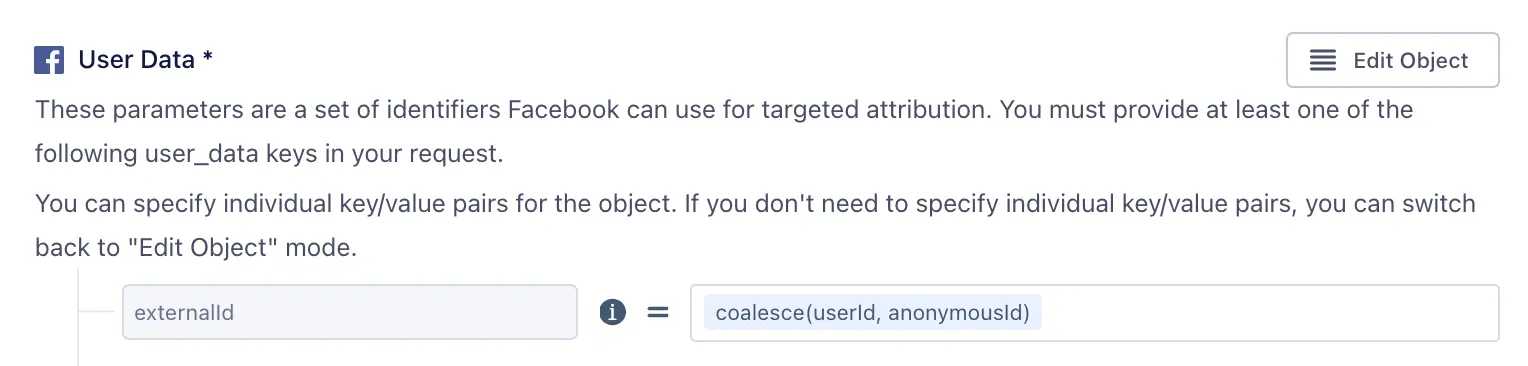
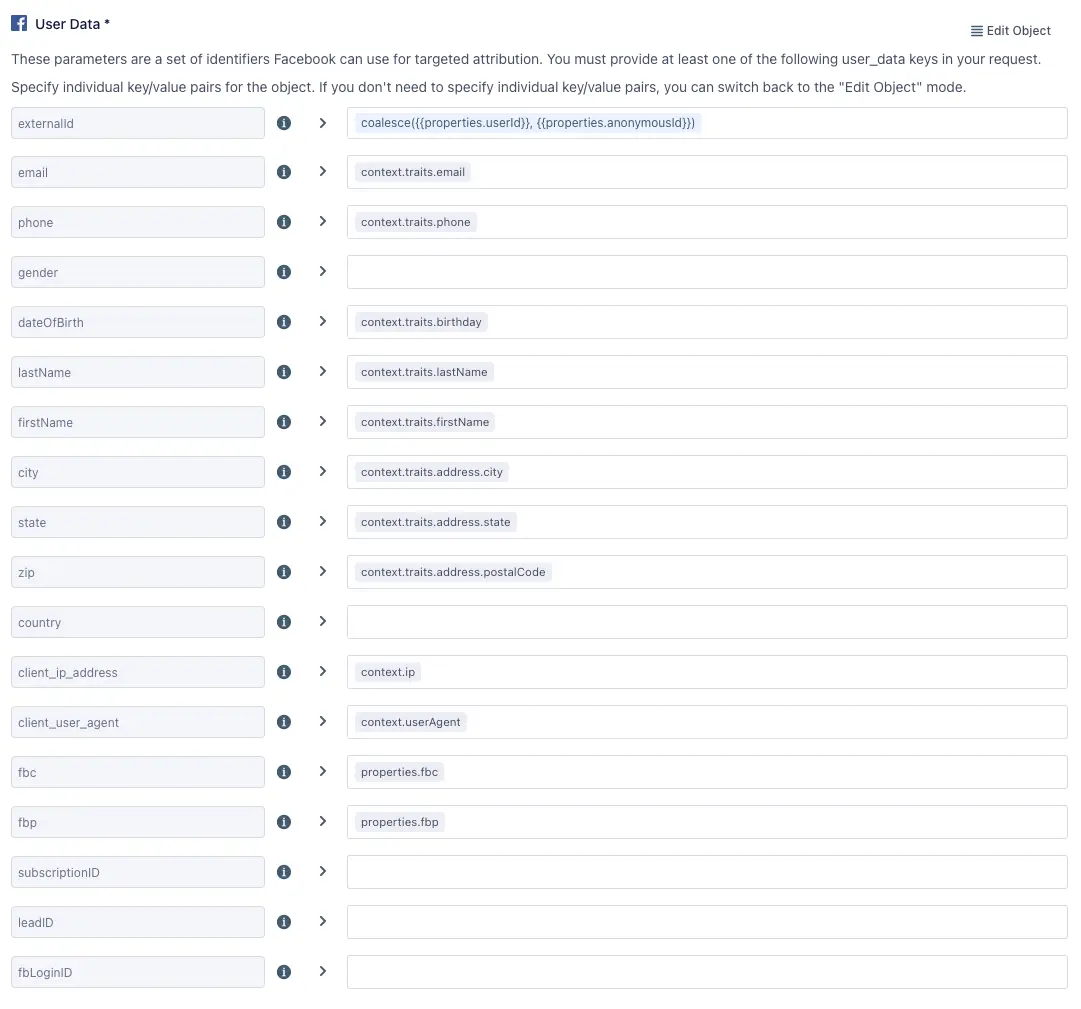
You can send additional User Data to increase the match rate for events from a server source. Collect other fields from the browser, like User Agent, IP Address, and Facebook's cookie parameters (fbp, fbc), pass them to the server, and map them in the User Data object. See Facebook's Customer Information Parameters for more information on User Data fields, and Facebook's Best Practices for Conversions API for match rate best practices. In addition, you can check your event match quality (EMQ) rating in the Meta Events Manager.
A redundant setup requires deduplication to ensure browser events that are sent to Facebook Pixel and Facebook Conversions API are not duplicated. Facebook can deduplicate identical events sent through the Pixel and the Conversions API in two ways:
Segment's Facebook Conversions API (Actions) destination allows you to map your data to these four fields, to support either deduplication method. Please note that Segment's Facebook Pixel destination will set messageId as the eventId. See Facebook's Handling Duplicate Pixel and Conversions API Events for more information.
If you want to separate events completed on a user's browser from events completed outside the browser, such as a server-based payment system, you can send some events to Facebook Pixel and other events to Facebook Conversions API. Sensitive information is best kept out of browsers, so any data you don't want exposed to users should only be sent using a server source. You can also set up the Conversions API to measure customer actions that are deeper in your marketing funnel. Seeing these deeper funnel events means you can more accurately measure how your ads are helping you reach your business goals.
For this option to work best, the same External ID needs to be passed from the browser and the server. To achieve this, go to your Facebook Pixel destination settings in Segment and enable the Enable Advanced Matching setting. Next, enable the Use User ID or Anonymous ID as External ID setting, or choose a custom trait for External ID using the Advanced Match Trait Key for External ID setting.
With the Facebook Conversions API (Actions) destination, you can choose any field in your event to map to External ID. By default, Segment uses the userId (or anonymousId if userId is not present) to set the External ID, but you can change this in the User Data object mapping of your Action.
You can send additional User Data to increase the match rate for events from a server source. Collect other fields from the browser, like User Agent, IP Address, and Facebook's cookie parameters (fbp, fbc), pass them to the server, and map them in the User Data object. See Facebook's Customer Information Parameters for more information on User Data fields, and Facebook's Best Practices for Conversions API for match rate best practices. In addition, you can check your event match quality (EMQ) rating in the Meta Events Manager.
If you choose this option, each source sends different events, and deduplication is not necessary.
Use this approach if you don't want to track users from the browser with Facebook Pixel. By default, Facebook Pixel collects cookie data, as well as browser data such as the IP Address and the User Agent, some of which you might not want to collect. By sending from a Segment server source to Facebook's Conversions API, you can control which identifiers you pass to Facebook.
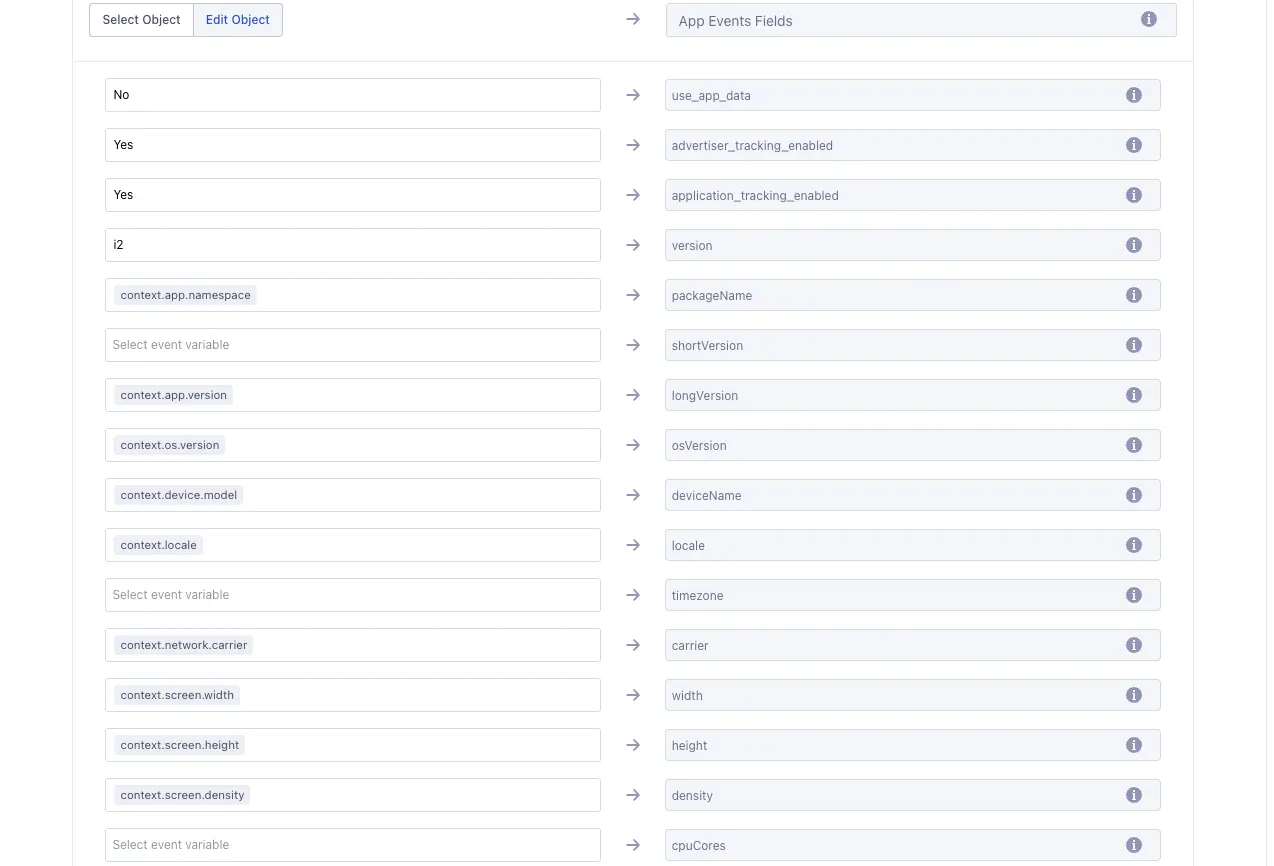
App events may be sent through the Conversions API by first setting up a dataset in your Facebook Events Manager. Learn more about passing app events through the Conversions API in Facebook's Conversions API for App Events documentation. Learn how to create a dataset in Facebook's About datasets in Meta Events Manager documentation.
Sending app events requires the action_source parameter to be set to app.
App events usage is opt-in, and you're required to set the use_app_data field to Yes before sending app data.
Additionally, configure the "App Events Fields" object with the required fields:
advertiser_tracking_enabledapplication_tracking_enabledversionosVersion
Info
The value for the version field should be a2 for Android or i2 for iOS, as stated in Facebook's documentation.
If you use Facebook Conversions API as a stand-alone without certain data fields collected from the browser, the match rate might not be as high as if you included them. You can increase the match rate for events from a server source by including User Data, such as Zip Code, Country and State.
You can send additional User Data to increase the match rate for events from a server source. Collect other fields from the browser, like User Agent, IP Address, and Facebook's cookie parameters (fbp, fbc), pass them to the server, and map them in the User Data object. In addition, you can check your event match quality (EMQ) rating in the Meta Events Manager.
If you choose this option, each source sends different events, and deduplication is not necessary.
If you want to send a Facebook standard event that Segment does not have a prebuilt mapping for, you can use the Custom Event action to send the standard event. For example, if you want to send a CompleteRegistration event, create a mapping for Custom Event, set up your Event Trigger criteria for completed registrations, and input a literal string of "CompleteRegistration" as the Event Name. You can use the Custom Data key/value editor to add fields that are in the CompleteRegistration event such as content_name and currency.
Segment creates a SHA-256 hash of the following fields before sending to Facebook:
- External ID
- Phone
- Gender
- Date of Birth
- Last Name
- First Name
- City
- State
- Zip Code
- Country
If you use Facebook Pixel, the Pixel library also hashes the External ID. This means External IDs will match across Facebook Pixel and Facebook Conversions API if they use the External ID for deduplication.
If you hash data before sending it to Segment, and then Segment applies its hashing, this could result in double hashing. Double hashing might make the data unusable for matching purposes on platforms like Facebook, which rely on specific hashing algorithms (like SHA-256) applied to the original PII to match users. If your data involves a lot of PII and PHI, Segment recommendeds that you send this data to Segment in its original, non-hashed format. You can then rely on Segment's privacy tools and destination-specific configurations to ensure that data is hashed appropriately when sent to destinations that require hashed PII. This approach helps maintain the integrity and usability of the data while ensuring privacy and compliance.
Segment applies formatting to User Data Parameters as follows:
| User Data Field | Formatting applied to field value before hashing |
|---|---|
| External ID | All whitespace is removed from string, set to lowercase. |
| All whitespace is removed from string, set to lowercase. | |
| First Name, Last Name | All whitespace is removed from string, set to lowercase. |
| Gender | All whitespace is removed from string, set to lowercase. "male" is set to "m", "female" is set to "f". |
| Date of Birth | No formatting is applied. |
| Phone | All whitespace is removed from string. |
| Zip Code | All whitespace is removed from string. |
| State | All whitespace is removed from string and the result is compared against a map object of states and their two-character ANSI abbreviation code. Example: "Texas", "TX", or "tx" in this field will be formatted as "tx". |
| Country | All whitespace is removed from string and the result is compared against a map object of countries and their two-letter ISO 3166-1 alpha-2 country code. Example: "Germany", "germany", or "de" will be formatted as "de". |
Segment automatically maps User Data fields to their corresponding parameters as expected by the Conversions API before sending to Facebook:
| User Data Field | Conversions API User Data Parameter |
|---|---|
| External ID | external_id |
| em | |
| Phone | ph |
| Gender | ge |
| Date of Birth | db |
| Last Name | ln |
| First Name | fn |
| City | ct |
| State | st |
| Zip Code | zp |
| Country | country |
Facebook requires the action_source server event parameter for all events sent to the Facebook Conversions API. This parameter specifies where the conversions occur. If action_source is set to website, then the client_user_agent and the event_source_url parameters are also required. Events sent to the Conversions API that don't meet the requirements may not be available for optimization, targeting, or measurement. Facebook requires additional fields as well such as, Event Name, Event Type, and User Data. See the full list of required fields in Facebook's Server Event Parameters documentation.
After you start sending events, you should start seeing them in twenty minutes. You can confirm that Facebook received them:
- Go to the Events Manager.
- Click on the corresponding pixel.
- In the Overview tab, look for events where the "Connection Method" is Server.
Facebook allows you to send one External ID per payload as a string, or multiple per payload in an array of External ID strings. Send an array of External IDs through Segment by mapping an array to the externalId field when setting up your Actions mappings.
Facebook releases updates to its platform regularly. Those updates can include new requirements for use of the Conversions API. Check Facebook's Graph API Changelog to keep up to date with the current requirements.