Spec: Track
The Track API call is how you record any actions your users perform, along with any properties that describe the action.
Each action is known as an event. Each event has a name, like User Registered, and properties. For example, a User Registered event might have properties like plan or accountType. Calling Track in one of our sources is one of the first steps to getting started with Segment.
Here's the payload of a typical Track call with most common fields removed:
1{2"type": "track",3"event": "User Registered",4"properties": {5"plan": "Pro Annual",6"accountType" : "Facebook"7}8}
And here's the corresponding JavaScript event that would generate the above payload:
1analytics.track("User Registered", {2plan: "Pro Annual",3accountType: "Facebook"4});
Info
Based on the library you use, the syntax in the examples might be different. You can find library-specific documentation on the Sources Overview page.
Beyond the common fields, the Track call has the following fields:
| Field | Type | Description | |
|---|---|---|---|
event | required | String | Name of the action that a user has performed. See the Event field docs for more details. |
properties | optional | Object | Free-form dictionary of properties of the event, like revenueSee the Properties docs for a list of reserved property names. |
Here's a complete example of a Track call:
1{2"anonymousId": "23adfd82-aa0f-45a7-a756-24f2a7a4c895",3"context": {4"library": {5"name": "analytics.js",6"version": "2.11.1"7},8"page": {9"path": "/academy/",10"referrer": "",11"search": "",12"title": "Analytics Academy",13"url": "https://segment.com/academy/"14},15"userAgent": "Mozilla/5.0 (Macintosh; Intel Mac OS X 10_11_0) AppleWebKit/537.36 (KHTML, like Gecko) Chrome/46.0.2490.86 Safari/537.36",16"ip": "108.0.78.21"17},18"event": "Course Clicked",19"integrations": {},20"messageId": "ajs-f8ca1e4de5024d9430b3928bd8ac6b96",21"properties": {22"title": "Intro to Analytics"23},24"receivedAt": "2015-12-12T19:11:01.266Z",25"sentAt": "2015-12-12T19:11:01.169Z",26"timestamp": "2015-12-12T19:11:01.249Z",27"type": "track",28"userId": "AiUGstSDIg",29"originalTimestamp": "2015-12-12T19:11:01.152Z"30}
The User ID is a unique identifier for the user performing the actions. Check out the User ID docs for more detail.
The Anonymous ID can be any pseudo-unique identifier, for cases where you don't know who the user is, but you still want to tie them to an event. Check out the Anonymous ID docs for more detail.
Note: In the browser and mobile libraries a User ID is automatically added from the state stored by a previous Identify call, so you do not need to add it yourself. They will also automatically handle Anonymous IDs under the covers.
Every Track call records a single user action. Segment calls these "events", and recommend that you make your event names human-readable, so that everyone on your team (even you, after all that caffeine) can know what they mean instantly.
Don't use nondescript names like Event 12 or TMDropd. Instead, use unique but recognizable names like Video Recorded and Order Completed.
Segment recommends event names built from a noun and past-tense verb
For more information about best practices in event naming, check out Segment's Analytics Academy lesson on best practices for naming conventions for clean data.
Segment has standardized a series of reserved event names that have special semantic meaning. We map these events to tools that support them whenever possible. See the Semantic Events docs for more detail.
Properties are extra pieces of information you can tie to events you track. They can be anything that will be useful while analyzing the events later. Segment recommends sending properties whenever possible because they give you a more complete picture of what your users are doing.
Segment has reserved some properties that have semantic meanings, and handle them in special ways. For example, we always expect revenue to be a dollar amount that we send to tools that handle revenue tracking.
You should only use reserved properties for their intended meaning.
The following are all of the reserved properties Segment has standardized that apply to all events. Check out the Semantic Events docs for properties specific to individual reserved events.
| Property | Type | Description |
|---|---|---|
revenue | Number | Amount of revenue an event resulted in. This should be a decimal value, so a shirt worth $19.99 would result in a revenue of 19.99. |
currency | String | Currency of the revenue an event resulted in. This should be sent in the ISO 4127 format. If this isn't set, Segment assumes the revenue to be in US dollars. |
value | Number | An abstract "value" to associate with an event. This is typically used in situations where the event doesn't generate real-dollar revenue, but has an intrinsic value to a marketing team, like newsletter signups. |
Note: You might be used to some destinations recognizing special properties differently. For example, Mixpanel has a special track_charges method for accepting revenue. Luckily, you don't have to worry about those inconsistencies. Just pass along revenue. Segment will handle all of the destination-specific conversions for you automatically. Same goes for the rest of the reserved properties.
All events have the ability to include additional event data in the context object. There may be instances when your team may want to include user traits or group traits in a Track event, such as having a single event trigger multiple events in an Actions destination. Since user Traits are not standard fields for a Track event, in order to do this, you'll need to explicitly pass the user's traits into the event payload's context.traits object.
For instructions on how to pass fields to the context object for a specific library, see the related library's Source documentation.
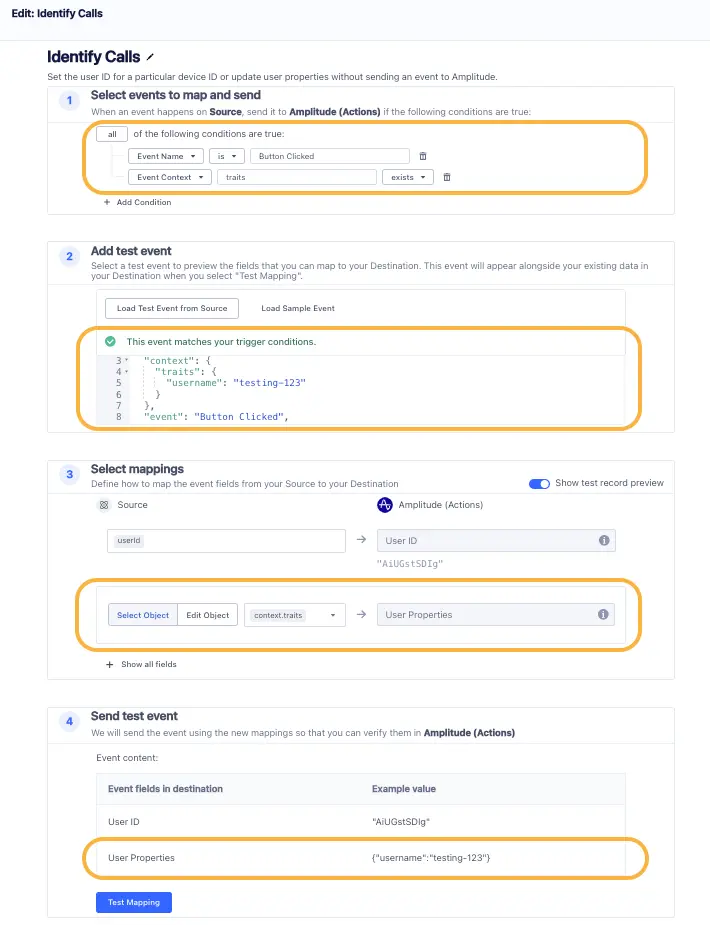
Segment's Actions destinations allows your team to build individual actions that are triggered based on a set of configured conditions. By adding the user's latest traits to the Track event's context.traits object, its possible to build two separate Actions to be triggered by this single event.
For example, if your team would like to send an Identify event anytime the specific Track event "Button Clicked" is triggered:
- Add the available traits into the Track event's payload.
- Then, build a destination Actions for the Track event
Event Name is Button Clicked, and a destination Action for the Identify eventAll of the following conditions are true: Event Name is Button Clicked, Event Context traits exists.
Both Actions will then have access to reference the context.traits fields within its mappings.
Unify profiles require Identify calls
Adding user traits to a Track or Page call using context.traits lets you send that data to Actions destinations, but it won't update the user's profile in Unify. To update traits in Unify, use an Identify call instead.
For more information on the context object, see the Spec: Common Fields documentation.
| Field | Type | Description | |
|---|---|---|---|
context | optional | Object | Dictionary of extra information that provides useful context about a message, but is not directly related to the API call like ip address or localeSee the Context field docs for more details. |
If the Example Payload shared above is modified as the event Button Clicked with "username": "testing-123" in the context.traits object, then the event's payload would be :
1{2"anonymousId": "23adfd82-aa0f-45a7-a756-24f2a7a4c895",3"context": {4"library": {5"name": "analytics.js",6"version": "2.11.1"7},8"page": {9"path": "/academy/",10"referrer": "",11"search": "",12"title": "Analytics Academy",13"url": "https://segment.com/academy/"14},15"userAgent": "Mozilla/5.0 (Macintosh; Intel Mac OS X 10_11_0) AppleWebKit/537.36 (KHTML, like Gecko) Chrome/46.0.2490.86 Safari/537.36",16"ip": "108.0.78.21",17"traits": {18"username": "testing-123"19}20},21"event": "Button Clicked",22"integrations": {},23"messageId": "ajs-f8ca1e4de5024d9430b3928bd8ac6b96",24"properties": {25"title": "Intro to Analytics"26},27"receivedAt": "2015-12-12T19:11:01.266Z",28"sentAt": "2015-12-12T19:11:01.169Z",29"timestamp": "2015-12-12T19:11:01.249Z",30"type": "track",31"userId": "AiUGstSDIg",32"originalTimestamp": "2015-12-12T19:11:01.152Z"33}
Here's what that Identify Action would look like:
Context is a dictionary of extra information that provides useful context about a datapoint, for example the user's ip address or locale. You should only use Context fields for their intended meaning.
| Field | Type | Description |
|---|---|---|
active | Boolean | Whether a user is active. This is usually used to flag an .identify() call to just update the traits but not "last seen." |
app | Object | dictionary of information about the current application, containing name, version, and build. This is collected automatically from the mobile libraries when possible. |
campaign | Object | Dictionary of information about the campaign that resulted in the API call, containing name, source, medium, term, content, and any other custom UTM parameter. This maps directly to the common UTM campaign parameters. |
device | Object | Dictionary of information about the device, containing id, advertisingId, manufacturer, model, name, type, and version. |
ip | String | Current user's IP address. |
library | Object | Dictionary of information about the library making the requests to the API, containing name and version. |
locale | String | Locale string for the current user, for example en-US. |
network | Object | Dictionary of information about the current network connection, containing bluetooth, carrier, cellular, and wifi. If the context.network.cellular and context.network.wifi fields are empty, then the user is offline. |
os | Object | Dictionary of information about the operating system, containing name and version. |
page | Object | Dictionary of information about the current page in the browser, containing path, referrer, search, title and url. This is automatically collected by Analytics.js. |
referrer | Object | Dictionary of information about the way the user was referred to the website or app, containing type, name, url, and link. |
screen | Object | Dictionary of information about the device's screen, containing density, height, and width. |
timezone | String | Timezones are sent as tzdata strings to add user timezone information which might be stripped from the timestamp, for example America/New_York. |
groupId | String | Group / Account ID. This is useful in B2B use cases where you need to attribute your non-group calls to a company or account. It is relied on by several Customer Success and CRM tools. |
traits | Object | Dictionary of traits of the current user. This is useful in cases where you need to track an event, but also associate information from a previous Identify call. You should fill this object the same way you would fill traits in an identify call. |
userAgent | String | User agent of the device making the request. |
userAgentData | Object | The user agent data of the device making the request. This always contains brands, mobile, platform, and may contain bitness, model, platformVersion,uaFullVersion, fullVersionList, wow64, if requested and available. This populates if the Client Hints API is available on the browser. This may contain more information than is available in the userAgent in some cases. |
channel | String | where the request originated from: server, browser or mobile |