Profile API
The Segment Profile API provides a single API to read user-level and account-level customer data. You can query the entire user or account object programmatically, including the external_ids, traits, and events that make up a user's journey through your product.
You can use this API to:
- Build an in-app recommendation engine to show users or accounts the last five products they viewed but didn't purchase
- Empower your sales and support associates with the complete customer context by embedding the user profile in third-party tools like Zendesk
- Power personalized marketing campaigns by enriching dynamic / custom properties with profile traits in marketing tools like Braze
- Qualify leads faster by embedding the user event timeline in Salesforce
This document has four parts:
- Product Highlights
- Quickstart: Walks you through how to get started querying your user profile in < 1 min
- API Reference: Retrieve a list of users sorted by recent activity or find a particular user
- Best Practices: Recommended implementation and example Profile API workflow
- Fast response times — fetch traits from a user profile under 200ms
- Real-time data — query streaming data on the user profile
- One identity — query an end user's interactions across web, mobile, server, and third party touch-points
- Rich data — query user traits, audiences, and events
- Any external ID — the API supports query from user_id, advertising IDs, anonymous_id, and custom external IDs.
Warning
Important: The Profile API is intended to be used server-side. You should not implement directly in client applications. See the Best Practices section for more details.
Your access token enables you to call the Profile API and access customer data.
European Union requirements
To implement the Profile API in the European Union, you must complete the following steps within an EU workspace. View the regional Segment documentation for more information.
- Navigate to the API access settings page Unify > Unify settings > API access.
- Create your Access Token with a name that describes your use case, for example
testing/development. Take note of the space ID value, you'll pass this into the Profile API request URL in a later step. - Click Generate token. Copy the resulting Access Token and store it in a file on your computer. You'll pass in the Access Token into the Profile API for authorization as an HTTP Basic Auth username in a later step.
-
Navigate to Unify > Profile explorer and select the user you want to query through the API.
-
Take note of the user's available identifiers. For example, this user has an
anonymous_idwith the valueeml_3bca54b7fe7491add4c8d5d4d9bf6b3e085c6092. The Profile API requires both the type of ID and the value separated by a colon. For example,anonymous_id:eml_3bca54b7fe7491add4c8d5d4d9bf6b3e085c6092. Click the duplicate icon to copy the identifier to your clipboard.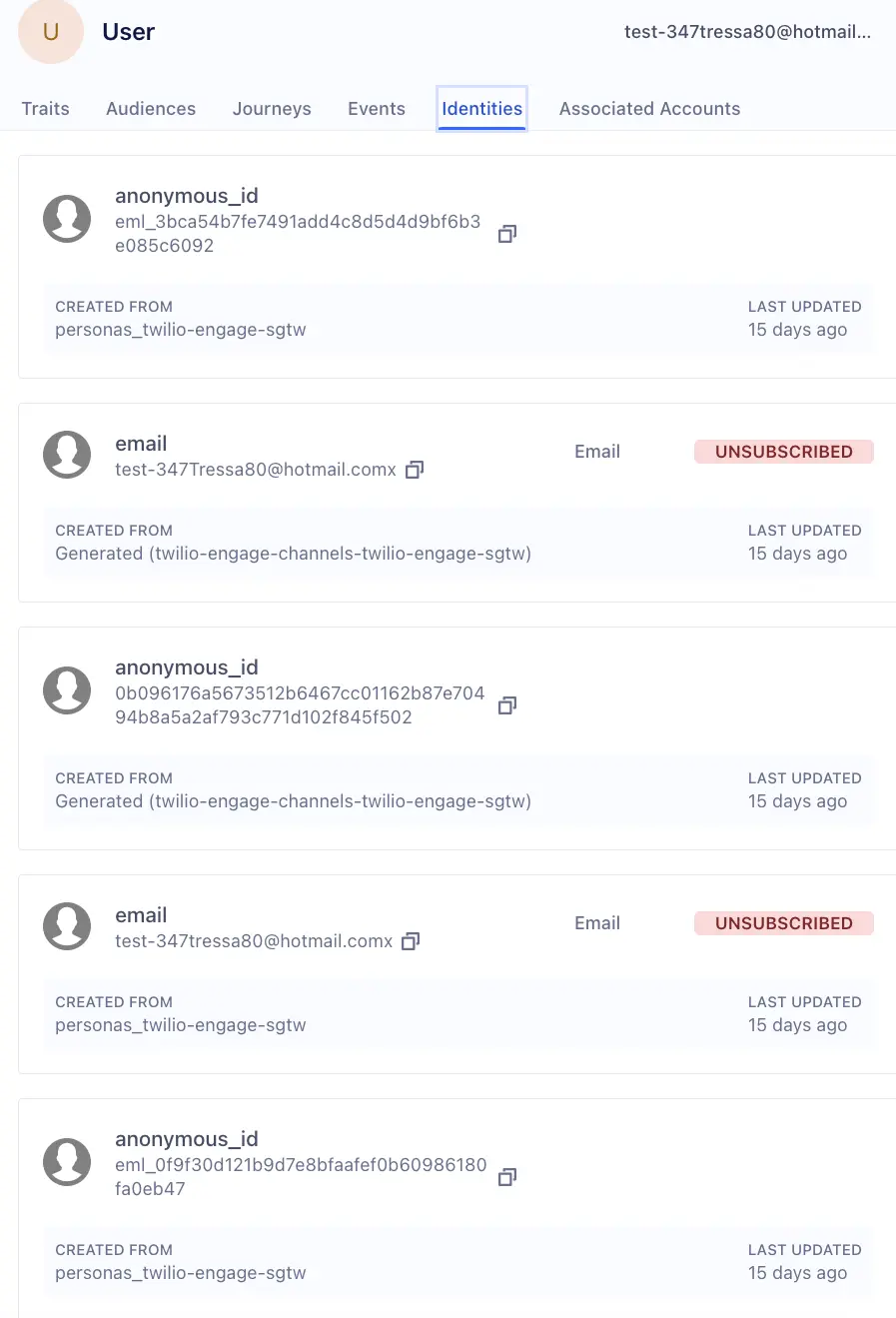
Warning
To query phone numbers that contain a plus sign (+), insert the escape characters %2B in place of the plus sign.
For example, if a phone_number identifier has the value +5555550123, enter phone_number:%2B5555550123 in your query.
If the field you're using within the Profile API endpoint contains a value with a non-alphanumeric character, then the Profile API may respond with 500 error. In this case, see W3's ASCII Encoding Reference, which lists the escape characters you can use to replace the non-alphanumeric character in the Profile API endpoint so that the Profile API will respond with a 200 Success.
Make Profile API queries using a lowercase external_id
Queries with an external_id in other casing won't return any profiles.
- From the HTTP API testing application of your choice, configure the authentication as described above.
- Identify the user's external ID.
- The Profile API requires both the ID type and value, separated by a colon (like
anonymous_id:eml_3bca54b7fe7491add4c8d5d4d9bf6b3e085c6092). Learn more in Find a user's external ID.
- The Profile API requires both the ID type and value, separated by a colon (like
- Prepare the request URL by replacing
<space_id>and<external_id>in the request URL:https://profiles.segment.com/v1/spaces/<space_id>/collections/users/profiles/<external_id>/traits- If you're using the Profile API in the EU, use the following URL for all requests:
https://profiles.euw1.segment.com/v1/spaces/<space_id>/collections/users/profiles/<external_id>/traits
- If you're using the Profile API in the EU, use the following URL for all requests:
- Send a
GETrequest to the URL.
Consent preferences not returned in the response
Segment does not return a user's consent preferences in a Profile API response. For more information about consent stored on your Profiles, see the Consent on the Profile docs.
The response is returned as a JSON object which contains the queried user's assigned traits.
1{2"traits": {3"3_product_views_in_last_60_days": false,4"Campaign Name": "Organic",5"Campaign Source": "Organic",6"Experiment Group": "Group A",7"Invited User?": "Invited User?",8"Referrering Domain": "http://duckduckgo.com",9"all_users_order_completed": true,10"big_spender": false11},12"cursor": {13"url": "https://profiles.segment.com/v1/spaces/kNU0gh7EVl/collections/users/profiles/user_id:1413639574/traits?%3Acollection=users&%3Aid=user_id%3A1413639574&%3Anamespace=kNU0gh7EVl&next=browser",14"has_more": true,15"next": "browser",16"limit": 1017}18}
-
Search by an External ID: You can query directly by a user's user_id or other external_id.
https://profiles.segment.com/v1/spaces/<space_id>/collections/users/profiles/<user_identifier>/events -
External IDs: You can query all of a user's external IDs such as
anonymous_idoruser_id.https://profiles.segment.com/v1/spaces/<space_id>/collections/users/profiles/<user_identifier>/external_ids
Traits
You can query a user's traits (such as first_name, last_name, and more):
https://profiles.segment.com/v1/spaces/<space_id>/collections/users/profiles/<external_id>/traits
By default, the response includes 10 traits. You can return up to 200 traits by appending ?limit=200 to the querystring. If you wish to return a specific trait, append ?include={trait} to the querystring (for example ?include=age). You can also use the ?class=audience or ?class=computed_trait URL parameters to retrieve audiences or computed traits specifically.
Metadata
You can query all of a user's metadata (such as created_at, updated_at, and more):
https://profiles.segment.com/v1/spaces/<space_id>/collections/users/profiles/<external_id>/metadata
Search an account profile
If you're sending Group calls to Segment, you can also access your account profiles. Retrieve your account traits, computed traits, and audience traits by querying the group_id you are interested in:
https://profiles.segment.com/v1/spaces/<space_id>/collections/accounts/profiles/group_id:12345/traits
Search for linked users or accounts
If you're looking to find all the users linked to an account, you can search for an account's linked users, or a user's linked accounts.
https://profiles.segment.com/v1/spaces/<space_id>/collections/accounts/profiles/group_id:12345/links
The return limit for the /links endpoint is 20 records, which you can request by appending ?limit=20 to the query string.
You can also request using cURL:
1export SEGMENT_ACCESS_SECRET="YOUR_API_ACCESS_TOKEN_SECRET_HERE"23curl https://profiles.segment.com/v1/spaces/<space_id>/collections/users/profiles/<external_id>/traits -u $SEGMENT_ACCESS_SECRET:
The Segment API is organized around REST. The API has predictable, resource-oriented URLs, and uses HTTP response codes to indicate API errors. Segment uses standard HTTP features, like HTTP authentication and HTTP verbs, which are understood by off-the-shelf HTTP clients. JSON is returned by all API responses, including errors.
Endpoint
European Union endpoint
The Profile API uses basic authentication for authorization — with the Access Token as the authorization key. Your Access Token carries access to all of your customer data, so be sure to keep them secret. Don't share your Access Token in publicly accessible areas such as GitHub or client-side code.
You can create your Access Secret in your Unify settings page. Segment recommends that you name your tokens with the name of your app and its environment, such as marketing_site/production. Access tokens are shown once — you won't be able to see it again. In the event of a security incident, you can revoke and cycle the access token.
When you make requests to the Profile API, use the Access Token as the basic authentication username and keep the password blank. Base64 is a requirement for authentication. If you use a tool like Postman, or if you use the -u flag in a cURL request, this encoding occurs automatically. Otherwise, you'll need to use Base64 to manually encode your Access Token.
1curl https://profiles.segment.com/v1/spaces/<space_id>/collections/users/profiles2-u $SEGMENT_ACCESS_TOKEN:
If you're using a Segment Function or Node.js you can format your header object to include authentication, like so:
1headers: {2'Content-Type': 'application/json',3Authorization:4`Basic ${btoa('<access_token>' + ':')}`,5}
Segment uses conventional HTTP response codes to indicate the success or failure of an API request. In general, codes in the 2xx range indicate success, codes in the 4xx range indicate an error that failed given the information provided (for example, a required parameter was omitted), and codes in the 5xx range indicate an error with Segment's servers.
HTTP Status
| HTTP Status | Description |
|---|---|
| 200 - OK | Everything worked as expected. |
| 400 - Bad Request | The request was unacceptable, often due to missing a required parameter. |
| 401 - Unauthorized | No valid Access Token provided. |
| 404 - Not Found | The requested resource doesn't exist. |
| 429 - Too Many Requests | Too many requests hit the API too quickly. Segment recommends an exponential backoff of your requests. By default, each space has a limit of 100 requests/sec. Please contact friends@segment.com if you need a higher limit with details around your use case. |
| 500, 502, 503, 504 - Server Errors | Something went wrong on Segment's side. |
Error Body
1{2"error": {3"code": "validation_error",4"message": "The parameter `collection` has invalid character(s) `!`"5}6}
| Code | Message |
|---|---|
| authentication_error | Failure to properly authenticate yourself in the request. |
| invalid_request_error | Invalid request errors arise when your request has invalid parameters. |
| rate_limit_error | Too many requests hit the API too quickly. |
| validation_error | Errors triggered when failing to validate fields (for example, when a collection name has invalid characters). |
To ensure low response times, every Space has a default rate limit of 100 requests/sec. Please contact friends@segment.com if you need a higher limit with details around your use case. For more information about rate limits, see the Product Limits documentation.
All top-level API resources have support for bulk fetches using "list" API methods. For instance you can list profiles, a profile's events, a profile's traits, and a profile's external_ids. These list API methods share a common structure, taking at least two parameters: next and limit.
| Argument | Description |
|---|---|
limit | A limit on the number of objects to be returned, between 1 and 100. |
next | The string cursor that indexes the next page of requests. |
| Argument | Description |
|---|---|
has_more | Whether or not there are more elements available after this set. If false, this set comprises the end of the list. |
next | The string cursor that indexes the next page of requests. |
url | The URL for accessing this list. |
Each API request has an associated request identifier. You can find this value in the response headers, under Request-Id.
1curl -i https://profiles.segment.com/v1/spaces/<space_id>/collections/users/profiles/<identifier>/metadata2HTTP/1.1 200 OK3Date: Mon, 01 Jul 2013 17:27:06 GMT4Status: 200 OK5Request-Id: 1111-2222-3333-4444
Info
If you need to contact Segment regarding a specific API request, please capture and provide the Request-Id.
The Profile API supports the following routes. These routes are appended the Profile API request URL:
https://profiles.segment.com/v1/spaces/<space_id>/
| Name | Route |
|---|---|
| Get a Profile's Traits | collections/users/profiles/<identifier>/traits |
| Get a Profile's External IDs | collections/users/profiles/<identifier>/external_ids |
| Get a Profile's Events | collections/users/profiles/<identifier>/events |
| Get a Profile's Metadata | collections/users/profiles/<identifier>/metadata |
| Get a Profile's Links | collections/users/profiles/<identifier>/links |
Retrieve a single profile's traits within a collection using an external_id. For example, two different sources can set a different first_name for a user. The traits endpoint will resolve properties from multiple sources into a canonical source using the last updated precedence order.
GET /v1/spaces/<space_id>/collections/users/profiles/<id_type:external_id>/traits
| Argument | Description | Example |
|---|---|---|
class | Supports returning all audiences, or all computed traits | class=audience or class=computed_trait |
include | A comma-separated list of property keys to include | first_name,city |
limit | Defines how many traits are returned in one call | 100 |
verbose | True for verbose field selection | true,false |
This example retrieves a profile's traits by an external id, like an anonymous_id:
GET /v1/spaces/lg8283283/collections/users/profiles/anonymous_id:a1234/traits
Or a user_id:
GET /v1/spaces/lg8283283/collections/users/profiles/user_id:u1234/traits
Request
1curl https://profiles.segment.com/v1/spaces/<space_id>/collections/users/profiles/<id_type:ext_id>/traits2-X GET3-u $SEGMENT_ACCESS_SECRET:
404 Not Found
1{2"error": {3"code": "not_found",4"message": "Profile was not found."5}6}
200 OK
1{2"traits": {3"first_name": "Bob",4"emails_opened_last_30_days": 33,5},6"cursor": {7"url": "/v1/spaces/lgJ4AAjFN4/collections/users/profiles/use_RkjG0kW53igMijEISMH0vKBF4sL/traits",8"has_more": false,9"next": ""10}11}12
With ?verbose=true enabled:
1{2"traits": {3"first_name": {4"value": "Bob",5"source_id": "..",6"updated_at": ".."7}8"emails_opened_last_30_days": {9"value": 33,10"source_id": "..",11"updated_at": ".."12}13},14"cursor": {15"url": "/v1/spaces/lgJ4AAjFN4/collections/users/profiles/use_RkjG0kW53igMijEISMH0vKBF4sL/traits",16"has_more": false,17"next": ""18}19}
Get a single profile's external ids within a collection using an external_id.
GET /v1/spaces/<space_id>/collections/users/profiles/<id_type:ext_id>/external_ids
Request
1curl https://profiles.segment.com/v1/spaces/<space_id>/collections/users/profiles/<id_type:ext_id>/external_ids2-X GET3-u $SEGMENT_ACCESS_TOKEN:
404 Not Found
1{2"error": {3"code": "not_found",4"message": "Profile was not found."5}6}
200 OK
1{2"data": [3{4"source_id": "GFu4AJc2bE"5"collection": "users",6"id": "1d1cd931-bc7d-4e39-a1a7-61563296fb15",7"type": "cross_domain_id",8"created_at": "2017-11-30T06:05:01.40468Z",9"encoding": "none",10"first_message_id": "ajs-0af8675aa114c759210a76b2baea0a03-clean",11}12],13"cursor": {14"url": "/v1/spaces/lgJ4AAjFN4/collections/users/profiles/use_RkjG0kW53igMijEISMH0vKBF4sL/external_ids",15"has_more": true,16"next": "map_0vKouKs2XyirgwMO4SmnDGaps7j"17}18}
| Argument | Description | Example |
|---|---|---|
include | A comma-separated list of external ids to include | user_id, anonymous_id |
limit | Defines how many external ids are returned in one call | 25 |
verbose | True for verbose field selection | true,false |
Get up to 14 days of a profile's historical events within a collection using an external_id.
GET /v1/spaces/<space_id>/collections/users/profiles/<external_id>/events
Request
1curl https://profiles.segment.com/v1/spaces/<space_id>/collections/users/profiles/<external_id>/events2-X GET3-u $SEGMENT_ACCESS_SECRET:
404 Not Found
1{2"error": {3"code": "not_found",4"message": "Profile was not found."5}6}
200 OK
1{2"data": [3{4"external_ids": [5{6"collection": "users",7"type": "user_id",8"id": "c0HN02fNe1",9"encoding": "none"10},11{12"collection": "users",13"type": "cross_domain_id",14"id": "1d1cd931-bc7d-4e39-a1a7-61563296fb15",15"encoding": "none"16}17],18"context": {19"ip": "73.92.233.78",20"library": {21"name": "analytics.js",22"version": "3.2.5"23},24"page": {25"path": "/docs/connections/spec/ecommerce/v2/",26"referrer": "https://www.google.com/",27"search": "",28"title": "Spec: V2 Ecommerce Events Documentation - Segment",29"url": "https://twilio.com/docs/segment/connections/spec/ecommerce/v2/"30},31"traits": {32"crossDomainId": "1d1cd931-bc7d-4e39-a1a7-61563296fb15"33},34"userAgent": "Mozilla/5.0 (Macintosh; Intel Mac OS X 10_13_2) AppleWebKit/537.36 (KHTML, like Gecko) Chrome/63.0.3239.84 Safari/537.36"35},36"type": "track",37"message_id": "ajs-1a6064a677b3c16a01b8055c18f16e0b-clean",38"source_id": "CRx5M9uk2p",39"timestamp": "2018-01-05T00:16:35.663Z",40"properties": {41"name": "Docs",42"page_name": "Docs",43"path": "/docs/connections/spec/ecommerce/v2/",44"referrer": "https://www.google.com/",45"search": "",46"section": "Spec",47"title": "Spec: V2 Ecommerce Events Documentation - Segment",48"topic": "Spec: V2 Ecommerce Events",49"url": "https://twilio.com/docs/segment/connections/spec/ecommerce/v2/"50},51"event": "Page Viewed",52"related": {53"users": "use_RkjG0kW53igMijEISMH0vKBF4sL"54}55}56],57"cursor": {58"url": "/v1/spaces/lgJ4AAjFN4/collections/users/profiles/use_RkjG0kW53igMijEISMH0vKBF4sL/events",59"has_more": true,60"next": "MTUxMzc1NTQzNjg2NzAwMDAwMDo6YWpzLTcyMWFhNzFjNDM2ZWJhOTUyYmI1ZmNiMzJlZWI3MWMzLWNsZWFu"61}62}
| Argument | Description | Example |
|---|---|---|
end | Returns all the events that end before end (in ISO 8601). | 2018-01-02 |
exclude | A comma-separated list of event keys to exclude. | Page Viewed,Experiment Viewed |
include | A comma-separated list of event keys to include. | Page Viewed,Experiment Viewed |
limit | Defines how many events are returned in one call. | 100 |
sort | Determines whether the result is ascending or descending. Defaults to descending. | asc,desc |
start | Returns all the events that start after start (in ISO 8601). | 2006-01-02 |
Get a single profile's metadata within a collection using an external_id.
GET /v1/spaces/<space_id>/collections/users/profiles/<external_id>/metadata
Request
1curl https://profiles.segment.com/v1/spaces/<space_id>/collections/users/profiles/<external_id>/metadata2-X GET3-u $SEGMENT_ACCESS_SECRET:
404 Not Found
1{2"error": {3"code": "not_found",4"message": "Profile was not found."5}6}
200 OK
1{2"metadata": {3"created_at": "2017-10-23T00:22:42.78Z",4"updated_at": "2018-01-05T00:16:36.919Z",5"expires_at": null,6"first_message_id": "ajs-32ed8dea3980c0c92ed2b8c9c8c5dfb5-clean",7"first_source_id": "GFu4AJc2bE",8"last_message_id": "ajs-1a6064a677b3c16a01b8055c18f16e0b-clean",9"last_source_id": "CRx5M9uk2p",10},11}
| Argument | Description | Example |
|---|---|---|
verbose | True for verbose field selection | true,false |
Get the users linked to an account, or accounts linked to a user, using an external_id.
GET /v1/spaces/<space_id>/collections/users/profiles/<external_id>/links
Request
1curl https://profiles.segment.com/v1/spaces/<space_id>/collections/users/profiles/<external_id>/links2-X GET3-u $SEGMENT_ACCESS_SECRET:
404 Not Found
1{2"error": {3"code": "not_found",4"message": "Profile was not found."5}6}
200 OK
1{2"data": [3{4"to_collection": "accounts",5"external_ids": [6{7"id": "ADGCJE3Y8H",8"type": "group_id",9"source_id": "DFAAJc2bE",10"collection": "accounts",11"created_at": "2018-10-06T03:43:26.63387Z",12"encoding": "none"13}14]15},16{17"to_collection": "accounts",18"external_ids": [19{20"id": "ghdctIwnA",21"type": "group_id",22"source_id": "DFAAJc2bE",23"collection": "accounts",24"created_at": "2018-10-07T06:22:47.406773Z",25"encoding": "none"26}27]28}29]30}
The Profile API doesn't support CORS because it has access to the sum of a customer's data. Segment also requests that you prevent the Access Token to the public, for example in a client-side application. Engineers implementing this API are advised to create a personalization service in their infrastructure, which other apps, websites, and services communicate with to fetch personalizations about their users.
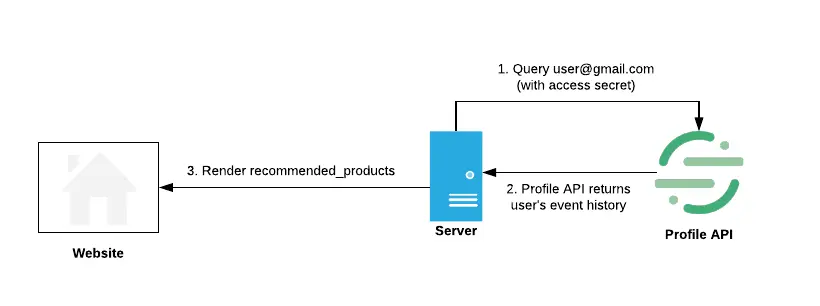
If you want to display the most relevant blog posts given a reader's favorite blog category:
- Create a computed trait
favorite_blog_categoryin the Engage UI [Marketer or Engineer] - Create
/api/recommended-postsin customer-built personalization service [Engineer]- Accept
user_id,anonymous_idto fetchfavorite_blog_categoryusing API - Return array of most recent posts of that category to render in recommended section
- Accept
- Add recommended section to the blog [Engineer]
- Client-side by making a request to
/recommended-postsif it accepts CORS (recommended for static blogs, WordPress plugin, or other CMS solutions) - Server-side by collecting all the personalizations you want to make on the blog in a single request to increase the total time to load (recommended for custom blog setup)
- Client-side by making a request to
Users who take a few minutes to read through an article on the blog will find posts recommended using their historical reading pattern including the post they just read.
Segment does not recommend using external_ids as a lookup field that might contain personally identifiable information (PII), because this can make its way into your server logs that can be hard to find and remove. For this reason, Segment recommends against using email as an external_id for Profile API use cases.
Segment typically sees p95 response times under 200ms for the /traits endpoint, based on an in-region test in us-west to retrieve 50 traits. However, if you know which traits you're looking for, Segment suggests you use the /traits?include= parameter to provide a list of traits you want to retrieve.
Another best practice to optimize performance in high-throughput applications is to use connection pooling. Your personalization service should share existing connections when making a request to the Profile API, instead of opening and closing a connection for each request. This additional TLS handshake is a common source of overhead for each request.
Segment recommends against blocking the page render to wait for a third party API's response, as even small slow down can impact the page's conversion performance. Instead, Segment recommends you to asynchronously request the data from after the page loads and use a server-to-server request for the necessary computed traits. Resulting computed traits can be cached for the second page load.