Consent on the Profile
Segment uses the consent object on Segment events, including the Segment Consent Preference Updated Track event, to evaluate and store consent preferences on the Profile. Consent on the Profiles serves as the source of truth of an end user's consent preference when enforcing consent in Twilio Engage.
Segment requires every event from all of your sources to include the end user consent preferences, captured by your CMP or your application logic, in the form of the consent object. The consent object is a JSON object nestled inside of the context object with the following format:
Success!
The JSON keys in the consent object should represent the categoryId for each consent category.
1{2"context": {3"consent": {4"categoryPreferences": {5"Advertising": true,6"Analytics": false,7"Functional": true,8"DataSharing": false9}10}11}12}13
Segment events without a context object or consent object or events that have an empty context or consent object do not impact consent preferences on the Profile.
Segment considers consent preferences for a category to be "missing" when events are sent without consent data to categories that already exist on the profile.
Segment considers consent preferences for a category to be "never collected" when events are sent without consent data to categories that do not yet exist on the profile.
This behavior includes:
- Segment setting a value of
falseon a Profile for each consent category in any events with an emptycontext.consent.categoryPreferencesobject. - Segment assumes a value of
falsefor all "missing" categories in ancontext.consent.categoryPreferencesobject. - Segment assumes a value of
falsefor all "missing" and "never collected" categories during a Profile Merge. This might result in a Profile level conflict. - Segment assumes a value of
falsefor all "missing" and "never collected" categories when used in Engage Audiences.
Success!
The Segment Consent Preference Updated event is generally available (GA).
Every time an end user provides or updates their consent preferences, Segment requires you to generate a Segment Consent Preference Updated event. If you are using Segment's OneTrust consent wrappers, Segment automatically generates a Segment Consent Preference Updated event. This event is required to add the end user's consent preference on their Profile in Unify.
For example, if an end user agreed to share their information for functional and advertising purposes but not for analytics or data sharing, the Segment Consent Preference Updated Track call demonstrating their new consent preferences would have the following format:
1{2"anonymousId": "23adfd82-aa0f-45a7-a756-24f2a7a4c895",3"type": "track",4"event": "Segment Consent Preference Updated",5"userId": "u123",6"timestamp": "2023-01-01T00:00:00.000Z",7"context": {8"consent": {9"categoryPreferences" : {10"Advertising": true,11"Analytics": false,12"Functional": true,13"DataSharing": false14}15}16}17}
If you use Protocols, the Segment app automatically adds the Segment Consent Preference Updated event to all your existing Tracking Plans and for every new Tracking Plan. Segment recommends you don't edit or delete the default fields in the Segment Consent Preference Updated events, but you can add new fields as needed.
Segment Consent Preference Updated is a reserved event name
Segment has standardized a series of reserved event names that have special semantic meaning and maps these events to tools that support them.
See the Semantic Events docs for more details.
Segment stamps consent preferences on every Segment event from streaming and Reverse ETL sources as a trait to store them on the Profile.
Storing consent on the Profile is in public beta
Storing consent preferences on a Unify Profile is in public beta. Some functionality may change before it becomes generally available.
If you're using Consent Management and Profiles, you shouldn't give your customers a Custom Trait value that matches one of the consent categories that you set up in the Segment app, as this can lead to unexpected Audience behavior. For example, if your end user consented to the "Marketing" destination category, you shouldn't give them a custom trait of segment_consent_preference.categories.marketing.<value>, as this can lead your user to unexpectedly enter or leave an Audience.
If you've stored end-user consent preferences in your warehouse and would like to make them available to your Profiles, use Reverse ETL and Segment Profiles to extract the consent information from your warehouse and load the information into Segment.
If you want to use end-user consent coming directly from your single source of truth, you can generate an Identify, Track, or Segment Consent Preferences Updated Track event to add consent information to the context object. For more information about the requirements for data collection, see the Configure Consent Management documentation.
When collecting end user consent, you can occasionally capture multiple consent preferences linked to the same user. For example, you might collect consent from a user's cell phone browser and the web browser on their laptop (called a device-level conflict) or merge two distinct Unify profiles together (called a profile-level conflict).
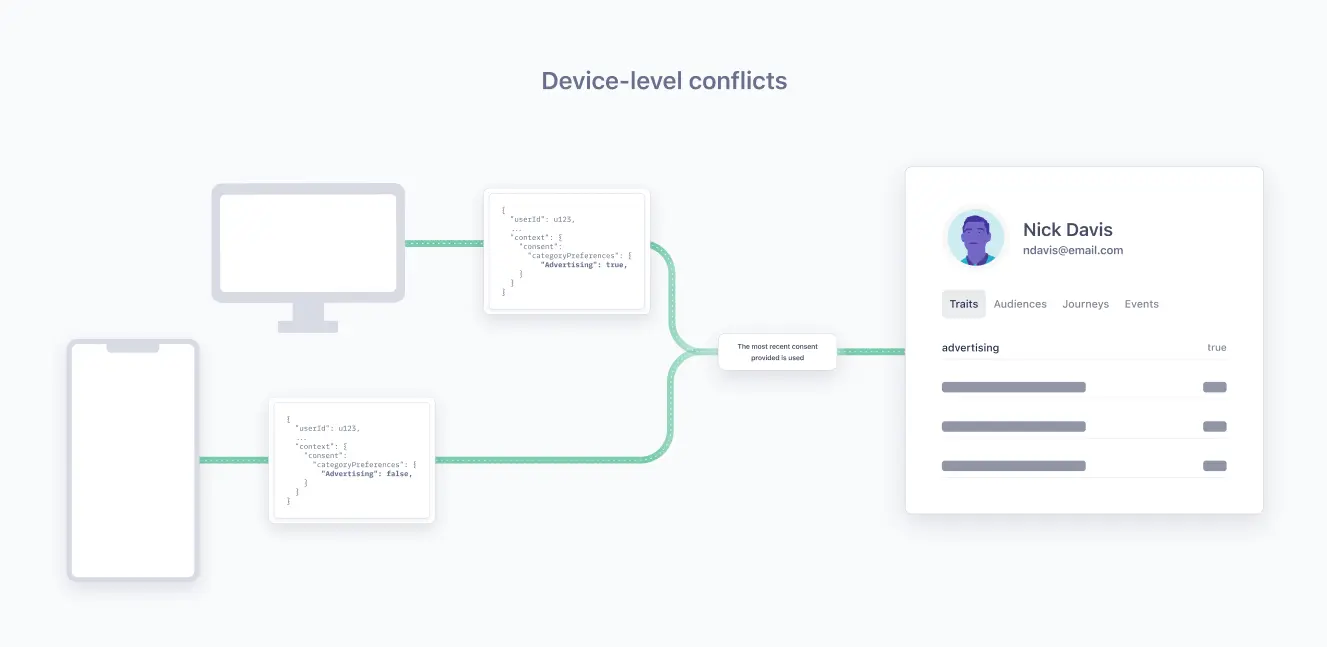
A device-level conflict occurs when conflicting consent preferences linked to one user ID are collected from two distinct devices.
Segment uses `anonymousId` to approximate device identification
Because some of Segment's libraries don't track deviceId, Segment uses anonymousId to approximate device identification.
For example, if an end-user didn't consent to Advertising on their mobile phone, but later consented to Advertising on their desktop computer, this user would have a conflicting consent preference for the advertising category.
By default, Segment relies on the latest consent preferences collected for a user and would set the advertising category to true given that the latest consent preference collected (from the desktop computer) consented to the advertising category.
If you would like to use a different method of conflict resolution, you must build an approach to address and resolve conflicting consent preferences in your website or mobile app and then send the updated consent back to Segment.
Examples of other conflict resolution strategies include:
- Rely on a single source of truth for consent preferences: Apply the consent preferences found in your single source of truth across all of a user's devices.
- Ask user to resolve conflict: Ask a user for consent preference information and apply their preferences across all of a user's devices. If this new request for consent preferences results in a conflict with the information stored in your single source of truth, prompt your user to resolve the conflict and provide their consent preferences.
Consent status for device-level conflicts
An end user's Profile with device-level conflicts will always result in a consent status of true or false for the conflicting consent categories.
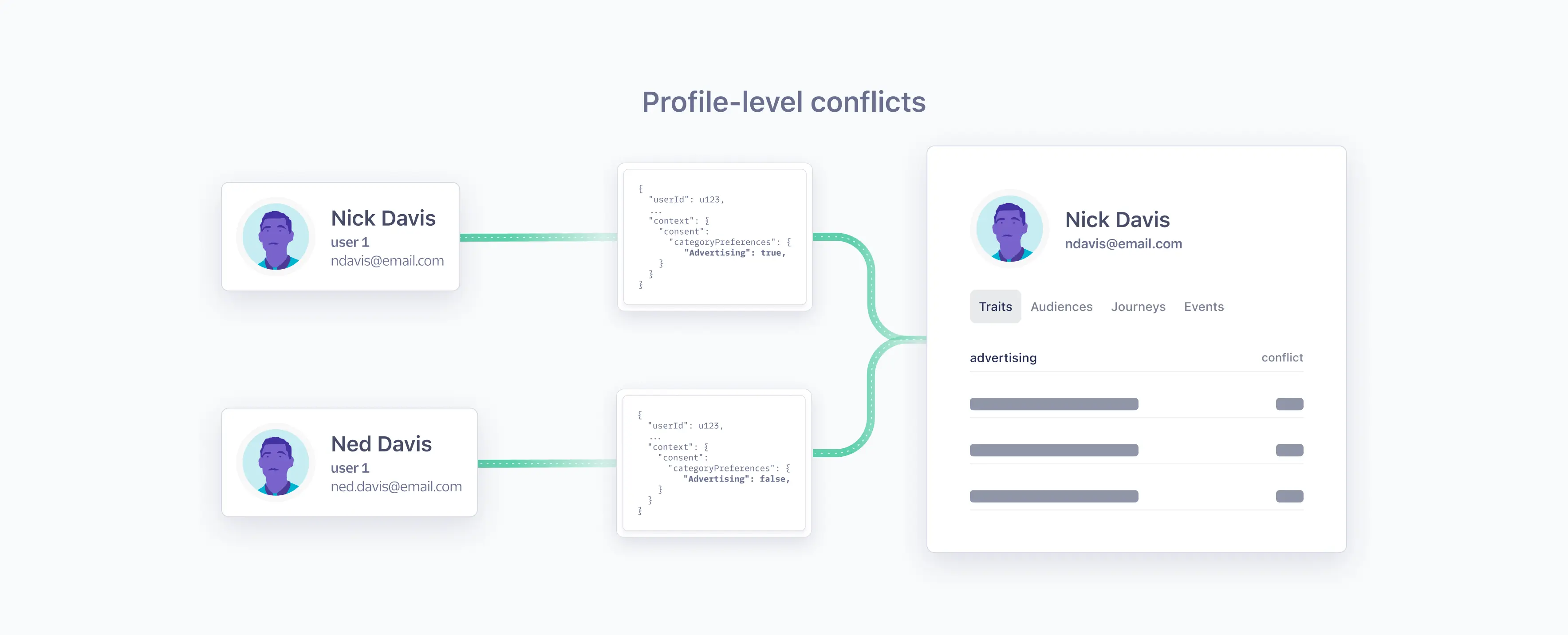
A Profile-level conflict occurs when two distinct userIDs with different consent preferences are merged into one Unify Profile. A Profile-level conflict can also occur when a userID and an anonymousID (one without a linked userID) are linked to the same Profile by an external ID, like an email address or phone number, and the consent preferences of both Profiles do not match.
To avoid Profile-level conflicts, Segment recommends that you take the following steps:
- Ensure your Identity Resolution rules have exactly 1 identifier (for example,
user_idor email orphone_number) that uniquely identifies a profile or person: Set this identifier to have a priority of 1 and limit your identifier to 1 value ever. With a unique, persistent identifier for each profile, there can never be a profile level conflict between two users on the same Profile. Segment evaluates and stores events withidsthat are discarded due to a maximum value limit violation on the existing Profile. - Only collect any additional identifiers when that unique identifier is present: For example, if consent is initially captured for an anonymous ID and email, but no
user_id(the unique identifier), it will create one profile. Later, if the same email is captured with auser_id, a different anonymous ID, and updated consent preferences, a second profile is created. Since both profiles share the same email, a profile merge will occur, potentially leading to conflict in consent preferences. - Maintain the default
reset()behavior: When a user explicitly logs out of your application, callanalytics.reset()to prevent any further event activity from being associated with the previous user and generate a newanonymousIdfor subsequent activity until a user logs in again. This helps you avoid ambiguity when multiple people use a shared device.
Success!
Profile-level conflicts only impact Profiles used in Engage spaces.
Segment stores consent preferences as traits on the Profile, which you can use to build Audiences.
You can validate consent is present on the Profile by looking for the consent trait provided for a Profile on the consent tab.
- If the value is
true: Your user consented to have their data used for this purpose - If the value is
false: Your user did not consent to have their data used for this purpose - If the value is
conflict: At the time this Profile was merged, there was a conflict in the consent preferences recorded for a consent category. For more information about consent conflicts, see the Profile-level conflict documentation.
Consent preferences collected in the consent object from the source are used to store consent on the Profile. Sources with no consent object do not impact what is stored on the Profile. If the source generates an empty consent object, Segment interprets this as an end-user failing to consent to any category. As a result, the consent preference will be updated to false for all consent categories.