Create Tasks from Phone Calls using TwiML: Dequeue a Call to a Worker
In the previous step we created a Task from an incoming phone call using <Enqueue workflowSid="WW0123401234..">. In this step we will create another call and dequeue it to an eligible Worker when one becomes available.
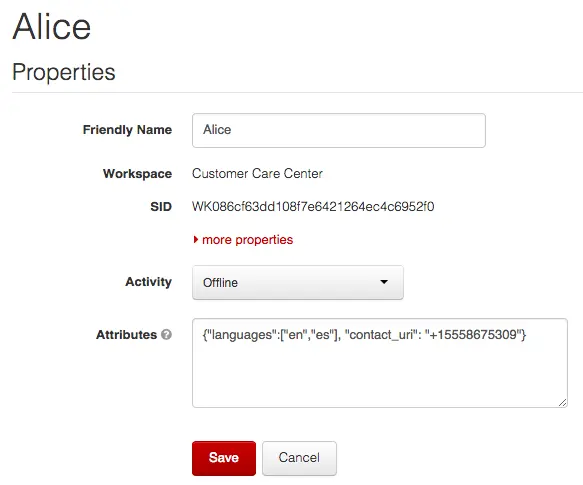
Back in Part 1 of the Quickstart we created a Worker named Alice that is capable of handling both English and Spanish inquiries. With your Workspace open in the TaskRouter web portal, click 'Workers' and click to edit the details of our Worker Alice. Ensure that Alice is set to a non-available Activity state such as 'Offline'. Next, edit Alice's JSON attributes and add a contact_uri field. Replace the dummy 555 number below with your own phone number.
Alice's modified JSON attributes:
{"languages": ["en", "es"], "contact_uri": "+15555555555"}
Or, as displayed in the web portal:
In this step, we again use <Enqueue> to create a Task from an incoming phone call. When an eligible Worker (in this case Alice) becomes available, TaskRouter will make a request to our Assignment Callback URL. This time, we will respond with a special 'dequeue' instruction; this tells Twilio to call Alice at her contact_uri and bridge to the caller.
For this part of the Quickstart, although not totally necessary it will be useful to have two phones available - one to call your Twilio number, and one to receive a call as Alice. Experienced Twilio users might consider using the Twilio Dev Phone as one of the endpoints.
Before we add the 'dequeue' assignment instruction we need to create a new Activity in our TaskRouter Workspace. One of the nice things about integrating TaskRouter with TwiML is that our Worker will automatically transition through various Activities as the call is assigned, answered and even hung up. We need an Activity for our Worker to transition to when the call ends.
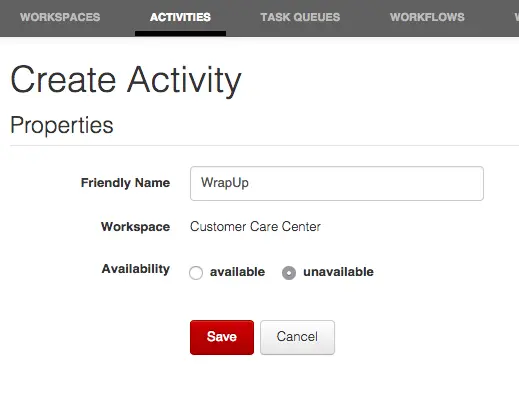
With your Workspace open in the TaskRouter web portal, click 'Activities' and then 'Create Activity'. Give the new Activity a name of 'WrapUp' and a value of 'unavailable'. Once you've saved it, make a note of the Activity Sid:
To return the 'dequeue' assignment instruction, modify server.rb assignment_callback endpoint to now issue a dequeue instruction, substituting your new WrapUp ActivitySid between the curly braces:
1require 'rubygems'2require 'twilio-ruby'3require 'sinatra'4require 'json'56set :port, 808078# Find your Account SID at twilio.com/console9# Provision API Keys at twilio.com/console/runtime/api-keys10account_sid = '{{ account_sid }}'11api_key = '{{ api_key }}'12api_secret = '{{ api_secret }}'13workspace_sid = '{{ workspace_sid }}'14workflow_sid = '{{ workflow_sid }}'1516@client = Twilio::REST::Client.new(api_key, api_secret, account_sid)1718post '/assignment_callback' do19# Respond to assignment callbacks with accept instruction20content_type :json21# from must be a verified phone number from your twilio account22{23"instruction" => "dequeue",24"from" => "+15556667777",25"post_work_activity_sid" => "WA0123401234..."26}.to_json27end2829get '/create-task' do30# Create a task31task = @client.taskrouter.workspaces(workspace_sid)32.tasks33.create(34attributes: {35'selected_language' => 'es'36}.to_json,37workflow_sid: workflow_sid38)39task.attributes40end4142get '/accept_reservation' do43# Accept a Reservation44task_sid = params[:task_sid]45reservation_sid = params[:reservation_sid]4647reservation = @client.taskrouter.workspaces(workspace_sid)48.tasks(task_sid)49.reservations(reservation_sid)50.update(reservation_status: 'accepted')51reservation.worker_name52end5354get '/incoming_call' do55Twilio::TwiML::VoiceResponse.new do |r|56r.gather(action: '/enqueue_call', method: 'POST', timeout: 5, num_digits: 1) do |gather|57gather.say('Para Español oprime el uno.', language: 'es')58gather.say('For English, please hold or press two.', language: 'en')59end60end.to_s61end6263post '/enqueue_call' do64digit_pressed = params[:Digits]65if digit_pressed == 166language = "es"67else68language = "en"69end7071attributes = '{"selected_language":"'+language+'"}'7273Twilio::TwiML::VoiceResponse.new do |r|74r.enqueue workflowSid: workflow_sid do |e|75e.task attributes76end77end.to_s78end
This returns a very simple JSON object from the Assignment Callback URL:
{"instruction":"dequeue", "from": "+15556667777", "post_work_activity_sid": "WA01234012340123401234"}
The JSON instructs Twilio to dequeue the waiting call and, because we don't include an explicit "to" field in our JSON, connect it to our Worker at their contact_uri. This is convenient default behavior provided by TaskRouter.
In the next step, we test our incoming call flow from end-to-end.