analytics.js Vimeo Plugin
The analytics.js Vimeo Plugin collects Vimeo player events into the Segment ecosystem.
To use the plugin you must first generate an Access Token in Vimeo. The plugin uses this token to access metadata about the video content being played.
Vimeo provides documentation outlining this process in the Vimeo The Basics documentation. Make sure you are carefully selecting your access scopes. The plugin only needs to read information about your video(s).
Enable a new plugin by navigating to the settings for your Source and clicking Plugins. You can enable the Vimeo plugin from this menu.
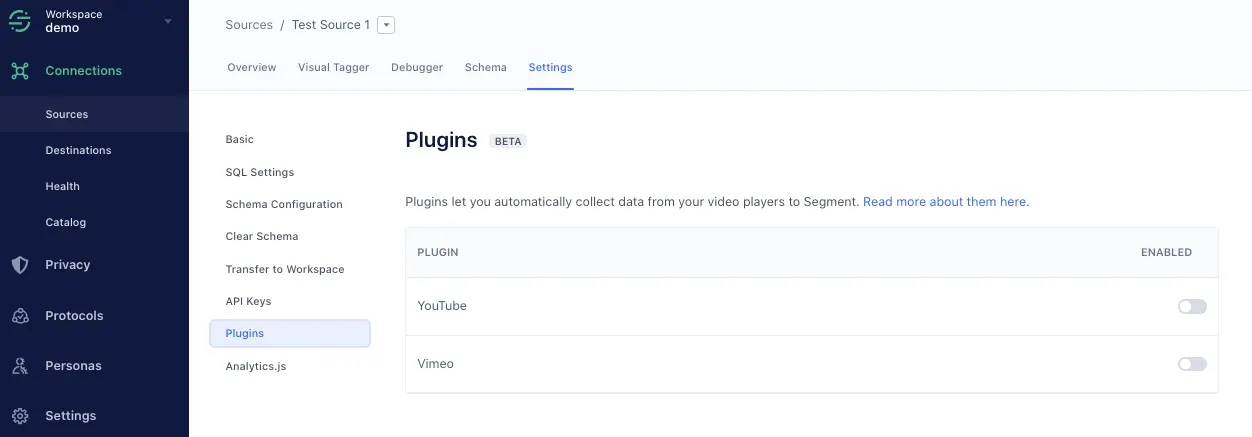
NOTE: Only JavaScript sources support plugins.
Initialize the plugin by giving it your Vimeo Access Token, and granting it access to the Vimeo video player instance(s) running on the page. Do this using the initialize method:
1<iframe src="https://player.vimeo.com/video/76979871" width="640" height="360" frameborder="0" webkitallowfullscreen mozallowfullscreen allowfullscreen></iframe>2<script src="https://player.vimeo.com/api/player.js"></script>3<script>4var iframe = document.querySelector('iframe');5var player = new Vimeo.Player(iframe);6var VimeoAnalytics = window.analyticsPlugins.VimeoAnalytics7<b>var vimeoAnalytics = new VimeoAnalytics(player, 'XXXXXXXXXXXXXXXXXXXXXXXXXXXX0365')8vimeoAnalytics.initialize()</b>9</script>
The plugin listens to the Vimeo player for events, and responds by firing the corresponding Segment Video Spec events on Analytics.js.
The following Segment Video Spec events are tracked by this plugin:
- Video Playback Started
- Video Playback Completed
- Video Playback Paused/Resumed
- Video Content Started/Completed
The following Segment Video Spec properties are automatically attached to the above events:
'Playback' Events
- Total Length
- Position
- Video Player
- Sound
'Content' Events
- Title
- Description
- Publisher