Video Spec
Segment's video spec helps you define how customers engage with your video and ad content. This page covers the naming syntax and conventions for how you should send events when tracking video analytics.
Not all destinations support video tracking
You should always check with the individual destination documentation to confirm.
Before you start implementing the Segment video spec, you should understand the overall structure and classification of events. The video spec has three distinct event categories:
You can think of playback events being related to the actual playback of the video content. This means that these events are meant to track information about the video player (such as pause, resume, or play). Thus, you can think of playback events to be at the session level. For example, when a customer presses play on your video, you would start by sending a Video Playback Started event with a unique session_id. In particular, this event should fire after the last user action required for playback to begin.
Then, for the duration of that user's session with that specific video player, all
subsequent events generated from this session/playback should be tied with the same aforementioned session_id. So if you had a web page that had two video players, you would have two separate sessions and session_ids, but if you only had one video player on the page but the playback played two video contents in a row, you would only have one session but two contents tied to it.
All playback events share the same event properties that describe information about the current state of the player. Below is a table of the supported properties of this object.
| Property | Type | Description |
|---|---|---|
session_id | String | The unique ID of the overall session used to tie all events generated from a specific playback. This value should be the same across all playback, content, and ad events if they are from the same playback session. |
content_asset_id, content_asset_ids | String, Array[string] | The Content Asset Id(s) of the video/videos playing or about to be played in the video player. For Video Playback Started events only, you should send the plural form with an Array of unique asset IDs. For all other playback events, you should send the singular form with the ID of the current content asset playing at the time of the event. |
content_pod_id, content_pod_ids | String, Array[string] | The Content Pod Id(s) of the video/videos playing or about to be played in the video player. For Video Playback Started events only, you should send the plural form with an Array of unique pod IDs. For all other playback events, you should send the singular form with the ID of the current content pod playing at the time of the event. |
ad_asset_id | String, Array[string] | The Ad Asset Id(s) of the ad/ads playing or about to be played in the video player. For Video Playback Started events only, you should send an Array of unique ad asset IDs. For all other playback events, you should send a string with the ID of the current ad asset playing at the time of the event. |
ad_pod_id | String, Array[string] | The Ad Pod Id(s) of the ad/ads playing or about to be played in the video player. For Video Playback Started events only, you should send an Array of unique ad pod IDs. For all other playback events, you should send a string with the ID of the current ad pod playing at the time of the event. |
ad_type | Enum {pre-roll, mid-roll, post-roll} | The type of ad playing at the time of the event. Values can include pre-roll, mid-roll, and post-roll. |
position | Integer | The current index position in seconds of the playhead, including the duration of any ads seen (if available). If the playback is a livestream, check the documentation for relevant destinations for details on how to correctly pass the playhead position. |
total_length | Integer | The total duration of the playback in seconds. This should include the duration of all your content and ad included in this playback session. For livestream playback, send null. |
bitrate | Integer | The current kbps. |
framerate | Float | The average fps. |
video_player | String | The name of the video player (for example, youtube or vimeo). |
sound | Integer | The sound level of the playback represented in a 0 to 100 scale where 0 is muted and 100 is full volume. |
full_screen | Boolean | true if playback is currently in full screen mode and false otherwise. |
ad_enabled | Boolean | false if the user has adblock or any other ad blockers, otherwise true if they can view your video ads. |
quality | String | The quality of the video, for example, highres, hd1080, or 480p. |
method | String | For Video Playback Interrupted events only, you can send this property denoting how the playback was interrupted (such as browser redirect, device lock, or call). |
livestream | Boolean | If the playback will be a livestream, send true, otherwise false. |
Below is the full list of Video Playback Events.
This event is tracked when a user presses Play after the last user action required for playback to begin (for example, after user login/authentication).
1{2"action": "track",3"event": "Video Playback Started",4"userId": "userId",5"properties": {6"session_id": "12345",7"content_asset_ids": ["0129370"],8"content_pod_ids": ["segA", "segB"],9"ad_asset_id": ["ad123", "ad097"],10"ad_pod_id": ["adSegA", "adSegB"],11"ad_type": ["mid-roll", "post-roll"],12"position": 0,13"total_length": 392,14"bitrate": 100,15"framerate": 29.00,16"video_player": "youtube",17"sound": 88,18"full_screen": false,19"ad_enabled": true,20"quality": "hd1080",21"livestream": false22}23}
Collected when a user presses Pause.
1{2"action": "track",3"event": "Video Playback Paused",4"userId": "userId",5"properties": {6"session_id": "12345",7"content_asset_id": "0129370",8"content_pod_id": "segA",9"position": 278,10"total_length": 392,11"bitrate": 100,12"framerate": 29.00,13"video_player": "youtube",14"sound": 55,15"full_screen": false,16"ad_enabled": false,17"quality": "hd1080",18"livestream": false19}20}
Collected when the playback stops unintentionally (from network loss, browser close/redirect, or app crash). With this event you can pass method as a property to denote the cause of the interruption.
1{2"action": "track",3"event": "Video Playback Interrupted",4"userId": "userId",5"properties": {6"session_id": "12345",7"content_asset_id": "0129370",8"content_pod_id": "segA",9"position": 278,10"total_length": 392,11"bitrate": 100,12"framerate": 29.00,13"video_player": "youtube",14"sound": 55,15"full_screen": false,16"ad_enabled": false,17"quality": "hd1080",18"livestream": false,19"method": "network loss"20}21}
Collected when playback starts buffering content or an ad.
1{2"action": "track",3"event": "Video Playback Buffer Started",4"userId": "userId",5"properties": {6"session_id": "12345",7"content_asset_id": "0129370",8"content_pod_id": "segA",9"position": 278,10"total_length": 392,11"bitrate": 100,12"framerate": 29.00,13"video_player": "youtube",14"sound": 55,15"full_screen": false,16"ad_enabled": false,17"quality": "hd1080",18"livestream": false19}20}
Collected when playback finishes buffering content or an ad.
1{2"action": "track",3"event": "Video Playback Buffer Completed",4"userId": "userId",5"properties": {6"session_id": "12345",7"content_asset_id": "0129370",8"content_pod_id": "segA",9"position": 278,10"total_length": 392,11"bitrate": 100,12"framerate": 29.00,13"video_player": "youtube",14"sound": 55,15"full_screen": false,16"ad_enabled": false,17"quality": "hd1080",18"livestream": false19}20}
Collected when a user manually seeks a certain position of the content or ad in the playback. Pass in the seek_position to denote where the user is seeking to, and pass in the position property to denote where the user is seeking from.
1{2"action": "track",3"event": "Video Playback Seek Started",4"userId": "userId",5"properties": {6"session_id": "12345",7"content_asset_id": "0129370",8"content_pod_id": "segA",9"position": 278,10"seek_position": 320,11"total_length": 392,12"bitrate": 100,13"framerate": 29.00,14"video_player": "youtube",15"sound": 55,16"full_screen": false,17"ad_enabled": false,18"quality": "hd1080",19"livestream": false20}21}
Collected after a user manually seeks to a certain position of the content or ad in the playback. Pass in the position property to denote where the user desires to begin the playback from.
1{2"action": "track",3"event": "Video Playback Seek Completed",4"userId": "userId",5"properties": {6"session_id": "12345",7"content_asset_id": "0129370",8"content_pod_id": "segA",9"position": 320,10"total_length": 392,11"bitrate": 100,12"framerate": 29.00,13"video_player": "youtube",14"sound": 55,15"full_screen": false,16"ad_enabled": false,17"quality": "hd1080",18"livestream": false19}20}
Collected when playback is resumed, by the user, after being paused.
1{2"action": "track",3"event": "Video Playback Resumed",4"userId": "userId",5"properties": {6"session_id": "12345",7"content_asset_id": "0129370",8"content_pod_id": "segA",9"position": 278,10"total_length": 392,11"bitrate": 100,12"framerate": 29.00,13"video_player": "youtube",14"sound": 55,15"full_screen": false,16"ad_enabled": false,17"quality": "hd1080",18"livestream": false19}20}
Collected when playback is complete and only when the session is finished.
1{2"action": "track",3"event": "Video Playback Completed",4"userId": "userId",5"properties": {6"session_id": "12345",7"content_asset_id": "0129370",8"content_pod_id": "segA",9"position": 392,10"total_length": 392,11"bitrate": 100,12"framerate": 29.00,13"video_player": "youtube",14"sound": 55,15"full_screen": false,16"ad_enabled": false,17"quality": "hd1080",18"livestream": false19}20}
Collected when user navigates away from a playback/stream.
1{2"action": "track",3"event": "Video Playback Exited",4"userId": "userId",5"properties": {6"session_id": "12345",7"content_asset_id": "0129370",8"content_pod_id": "segA",9"position": 392,10"total_length": 392,11"bitrate": 100,12"framerate": 29.00,13"video_player": "youtube",14"sound": 55,15"full_screen": false,16"ad_enabled": false,17"quality": "hd1080",18"livestream": false19}20}
Underneath the playback level, we now have the pod level. A pod can be seen as a "group" or "segment" of either the content or advertisement.
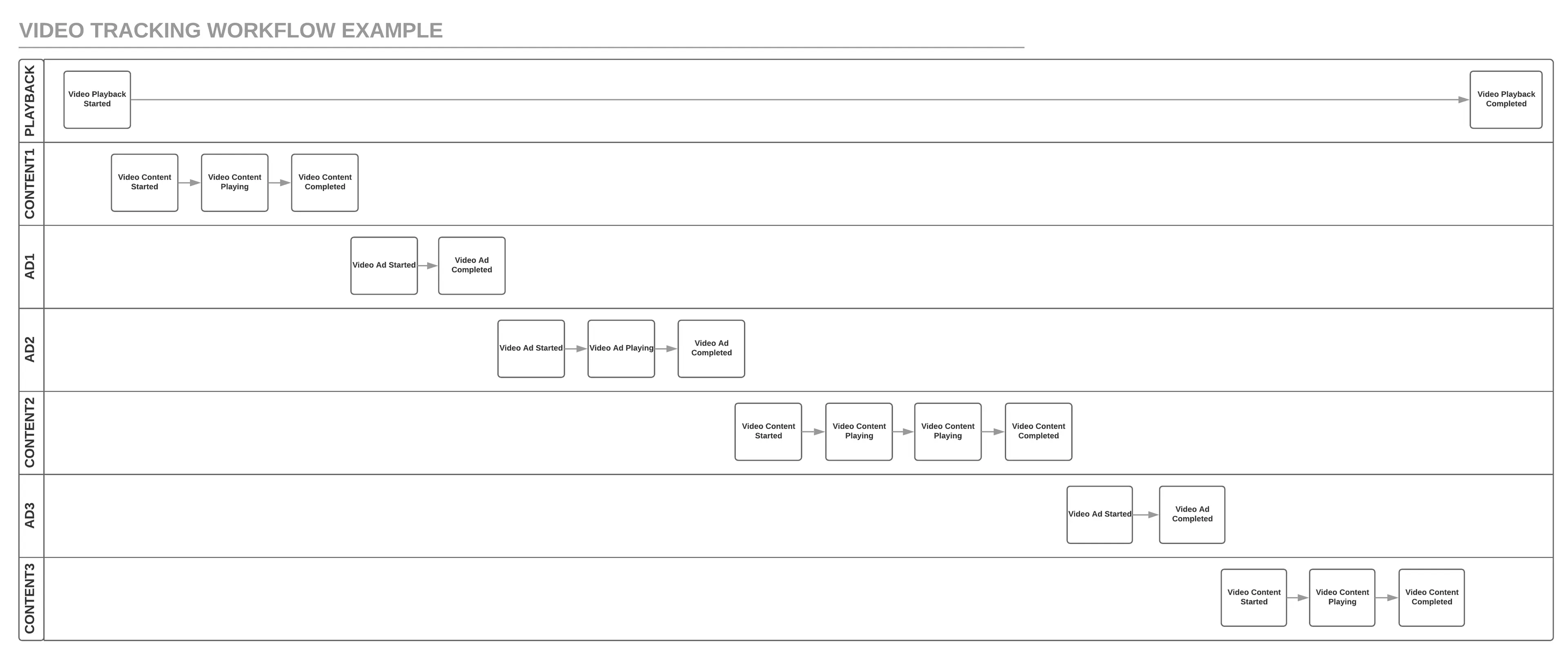
Consider, for example, a playback session that might have some content and one mid-roll advertisement. This would mean that you would have two content pods (since the mid-roll ad split the content playback into two sections) while you might have one ad pod for the mid-roll ad. In this instance, you'd start and complete the first pod of content; you'd start and complete the ad; you'd start and complete the second pod of content. All of this would happen within one playback start.
All content events share the same event properties that describe information about the current video content the user is interacting with. Below is a table of the supported properties of this object.
| Property | Type | Description |
|---|---|---|
session_id | String | The unique ID of the overall session used to tie all events generated from a specific playback. This value should be same across all playback, content, and ad events if they are from the same playback session. |
asset_id | String | The unique ID of the content asset. |
pod_id | String | The unique ID of the content pod. |
title | String | The title of the video content. |
description | String | Short description of the video content. |
keywords | Array[string] | An array of arbitrary keywords or tags that describe or categorize the video content. |
season | String | The season number if applicable. |
episode | String | The episode number if applicable. |
genre | String | The genre of the content. For example,comedy or action. |
program | String | The name of the content program or show if applicable. |
publisher | String | The content creator, author, producer, or publisher. |
position | Integer | The current index position in seconds of the playhead into the content/asset. This position must exclude the duration of any ads played. If the playback is a livestream, check the documentation for relevant destinations for details on how to correctly pass the playhead position. |
total_length | Integer | The total duration of the content/asset in seconds. This should exclude the duration of any ads included in the playback of this asset. For livestream playback, send null. |
channel | String | The channel in which the video content is playing, such as espn or my blog. |
full_episode | Boolean | true if content is a full episode and false otherwise. |
livestream | Boolean | If the playback is a livetream, send true, otherwise false. |
airdate | ISO 8601 Date String | An ISO 8601 Date String representing the original air date or published date. |
bitrate | Integer | The current kbps. |
framerate | Float | The average fps. |
Below is the full list of Video Content Events.
Collected when a video content segment starts playing within a playback.
1{2"action": "track",3"event": "Video Content Started",4"userId": "userId",5"properties": {6"session_id": "12345",7"asset_id": "0129370",8"pod_id": "segA",9"program": "Planet Earth",10"title": "Seasonal Forests",11"description": "David Attenborough reveals the greatest woodlands on earth.",12"season": "1",13"position": 0,14"total_length": 3600,15"genre": "Documentary",16"publisher": "BBC",17"full_episode": true,18"keywords": ["nature", "forests", "earth"]19}20}
Heartbeats that you can fire every n seconds to track how far into the content the user is currently viewing as indicated by the position.
1{2"action": "track",3"event": "Video Content Playing",4"userId": "userId",5"properties": {6"session_id": "12345",7"asset_id": "0129370",8"pod_id": "segA",9"program": "Planet Earth",10"title": "Seasonal Forests",11"description": "David Attenborough reveals the greatest woodlands on earth.",12"season": "1",13"position": 10,14"total_length": 3600,15"genre": "Documentary",16"publisher": "BBC",17"full_episode": true,18"keywords": ["nature", "forests", "earth"]19}20}
Collected when a video content segment completes playing within a playback. That is, position and total_length are equal.
1{2"action": "track",3"event": "Video Content Completed",4"userId": "userId",5"properties": {6"session_id": "12345",7"asset_id": "0129370",8"pod_id": "segA",9"program": "Planet Earth",10"title": "Seasonal Forests",11"description": "David Attenborough reveals the greatest woodlands on earth.",12"season": "1",13"position": 3600,14"total_length": 3600,15"genre": "Documentary",16"publisher": "BBC",17"full_episode": true,18"keywords": ["nature", "forests", "earth"]19}20}
Just like Content events, Ad Events also live underneath the playback level and at the pod level. A given ad pod can have multiple ad assets (or just one) and a playback session might have multiple ad pods. For example, if your video playback has two pre-roll, one mid-roll, and one post-roll ads, you would have three ad pods:
- ad pod 1: plays the two pre-roll ads
- ad pod 2: plays the one mid-roll ad
- ad pod 3: plays the one post-roll ad
All ad events share the same event properties that describe information about the current ad content the user is interacting with. Below is a table of the supported properties of this object.
| Property | Type | Description |
|---|---|---|
session_id | String | The unique ID of the overall session used to tie all events generated from a specific playback. This value should be same across all playback, content, and ad events if they are from the same playback session. |
asset_id | String | The unique ID of the ad asset. |
pod_id | String | The unique ID of the ad pod. |
pod_position | Integer | The position of the ad asset relative to other assets in the same pod. |
pod_length | Integer | The number of ad assets the current ad pod contains. |
type | Enum {pre-roll, mid-roll, post-roll} | The ad type. You can send either pre-roll, mid-roll, or post-roll. |
title | String | The title of the video ad. |
publisher | String | The ad creator, author, producer, or publisher. |
position | Integer | The current index position, in seconds, of the playhead with respect to the length of the ad. |
total_length | Integer | The total duration of the current ad asset in seconds. |
load_type | Enum {linear, dynamic} | dynamic if ads are loaded dynamically and linear if ads are same for all users. |
content | Object[ContentEventObject] | For video destinations that require content metadata to be sent with ad events, you can send all the content metadata nested under this property (such as content.asset_id or content.title) as a Content Event Object. |
quartile | Integer | For Video Ad Playing events, this property can be set to indicate when a specific ad quartile has been reached (1,2, or 3). If you are using a Segment client-side library to track your video events you don't need to send this property as Segment's libraries will automatically track quartiles. |
Info
Since some video destinations require sending Content metadata along with Ad metadata, you may need to send your content properties also in all your ad events under properties.content depending on the video destination you're using.
1{2"action": "track",3"event": "Video Ad Started",4"userId": "userId",5"properties": {6"session_id": "12345",7"asset_id": "0129370",8"pod_id": "segA",9"type": "pre-roll",10"title": "The New New Thing!",11"position": 0,12"total_length": 30,13"publisher": "Apple",14"load_type": "dynamic"15}16}
1{2"action": "track",3"event": "Video Ad Playing",4"userId": "userId",5"properties": {6"session_id": "12345",7"asset_id": "0129370",8"pod_id": "segA",9"type": "pre-roll",10"title": "The New New Thing!",11"position": 5,12"total_length": 30,13"publisher": "Apple",14"load_type": "dynamic"15}16}
1{2"action": "track",3"event": "Video Ad Completed",4"userId": "userId",5"properties": {6"session_id": "12345",7"asset_id": "0129370",8"pod_id": "segA",9"type": "pre-roll",10"title": "The New New Thing!",11"position": 30,12"total_length": 30,13"publisher": "Apple",14"load_type": "dynamic"15}16}
When you fire a Video Playback Resumed event, you should immediately call a Segment heartbeat event (Video Content Playing or Video Ad Playing depending on what the playback resumed to). This should effectively mean that you are also resuming your 10 second heartbeats (since they should've been paused after sending Video Playback Paused event).
To track changes in video quality, send a Video Quality Updated event whenever the quality changes, with the following properties:
bitrateframeratestartupTimedroppedFrames
Below is an example of how one might implement the video spec:
- User presses play on a video:
1analytics.track('Video Playback Started', {2session_id: '12345',3content_asset_ids: ['0129370'],4content_pod_ids: ['segA', 'segB'],5ad_asset_ids: [ 'ad123', 'ad097' ],6ad_pod_ids: ['adSegA', 'adSegB'],7ad_types: ['mid-roll', 'post-roll'],8position: 0,9total_length: 392,10bitrate: 100,11video_player: 'youtube',12sound: 88,13full_screen: false,14ad_enabled: false,15quality: 'hd1080'16});
- Playback starts to play content:
1analytics.track('Video Content Started', {2session_id: '12345',3asset_id: '0129370',4pod_id: 'segA',5title: 'Interview with Tony Robbins',6description: 'short description',7keywords: ['entrepreneurship', 'motivation'],8season: '2',9episode: '177',10genre: 'entrepreneurship',11program: 'Tim Ferris Show',12publisher: 'Tim Ferris',13position: 0,14total_length: 360,15channel: 'espn',16full_episode: true,17livestream: false,18airdate: '1991-08-13'19});
- User views content for 20 seconds and we have 10 second heartbeats:
1analytics.track('Video Content Playing', {2session_id: '12345',3asset_id: '0129370',4pod_id: 'segA',5title: 'Interview with Tony Robbins',6description: 'short description',7keywords: ['entrepreneurship', 'motivation'],8season: '2',9episode: '177',10genre: 'entrepreneurship',11program: 'Tim Ferris Show',12publisher: 'Tim Ferris',13position: 10,14total_length: 360,15channel: 'espn',16full_episode: true,17livestream: false,18airdate: '1991-08-13'19});
1analytics.track('Video Content Playing', {2session_id: '12345',3asset_id: '0129370',4pod_id: 'segA',5title: 'Interview with Tony Robbins',6description: 'short description',7keywords: ['entrepreneurship', 'motivation'],8season: '2',9episode: '177',10genre: 'entrepreneurship',11program: 'Tim Ferris Show',12publisher: 'Tim Ferris',13position: 20,14total_length: 360,15channel: 'espn',16full_episode: true,17livestream: false,18airdate: '1991-08-13'19});
- Playback is paused and resumed:
1analytics.track('Video Playback Paused', {2session_id: '12345',3content_asset_id: '0129370',4content_pod_id: 'segA',5ad_asset_id: null,6ad_pod_id: null,7ad_type: null,8position: 21,9total_length: 392,10video_player: 'youtube',11sound: 88,12bitrate: 100,13full_screen: false,14ad_enabled: false,15quality: 'hd1080'16});
1analytics.track('Video Playback Resumed', {2session_id: '12345',3content_asset_id: '0129370',4content_pod_id: 'segA',5ad_asset_id: null,6ad_pod_id: null,7ad_type: null,8position: 21,9total_length: 392,10sound: 88,11bitrate: 100,12full_screen: false,13video_player: 'youtube',14ad_enabled: false,15quality: 'hd1080'16});
- Mid-roll ad starts playing:
1analytics.track('Video Ad Started', {2session_id: '12345',3asset_id: 'ad123',4pod_id: 'adSegA',5type: 'mid-roll',6title: 'Segment Connection Modes',7publisher: 'Segment',8position: 0,9total_length: 21,10load_type: 'dynamic'11});
- User watches the full 21 second ad and we have 10 second heartbeats:
1analytics.track('Video Ad Playing', {2session_id: '12345',3asset_id: 'ad123',4pod_id: 'adSegA',5type: 'pre-roll',6title: 'Segment Connection Modes',7publisher: 'Segment',8position: 10,9total_length: 21,10load_type: 'dynamic'11});
1analytics.track('Video Ad Playing', {2session_id: '12345',3asset_id: 'ad123',4pod_id: 'adSegA',5type: 'pre-roll',6title: 'Segment Connection Modes',7publisher: 'Segment',8position: 20,9total_length: 21,10load_type: 'dynamic'11});
1analytics.track('Video Ad Completed', {2session_id: '12345',3asset_id: 'ad123',4pod_id: 'adSegA',5type: 'pre-roll',6title: 'Segment Connection Modes',7publisher: 'Segment',8position: 21,9total_length: 21,10load_type: 'dynamic'11});
- Content resumes, user finishes the full content:
1analytics.track('Video Content Playing', {2session_id: '12345',3asset_id: '0129370',4pod_id: 'segB',5title: 'Interview with Tony Robbins',6description: 'short description',7keywords: ['entrepreneurship', 'motivation'],8season: '2',9episode: '177',10genre: 'entrepreneurship',11program: 'Tim Ferris Show',12publisher: 'Tim Ferris',13position: 31,14total_length: 360,15channel: 'espn',16full_episode: true,17livestream: false,18airdate: '1991-08-13'19});
(Video Content Playing hearbeats every 10 seconds)
1analytics.track('Video Content Completed', {2session_id: '12345',3asset_id: '0129370',4pod_id: 'segB',5title: 'Interview with Tony Robbins',6description: 'short description',7keywords: ['entrepreneurship', 'motivation'],8season: '2',9episode: '177',10genre: 'entrepreneurship',11program: 'Tim Ferris Show',12publisher: 'Tim Ferris',13position: 360,14total_length: 360,15channel: 'espn',16full_episode: true,17livestream: false,18airdate: '1991-08-13'19});
- 11 second post-roll ad plays after content finishes:
1analytics.track('Video Ad Started', {2session_id: '12345',3asset_id: 'ad097',4pod_id: 'adSegB',5type: 'post-roll',6title: 'Segment Cross Domain IDs',7publisher: 'Segment',8position: 0,9total_length: 11,10load_type: 'dynamic'11});
1analytics.track('Video Ad Playing', {2session_id: '12345',3asset_id: 'ad097',4pod_id: 'adSegB',5type: 'post-roll',6title: 'Segment Cross Domain IDs',7publisher: 'Segment',8position: 10,9total_length: 11,10load_type: 'dynamic'11});
1analytics.track('Video Ad Completed', {2session_id: '12345',3asset_id: 'ad097',4pod_id: 'adSegB',5type: 'post-roll',6title: 'Segment Cross Domain IDs',7publisher: 'Segment',8position: 11,9total_length: 11,10load_type: 'dynamic'11});
- Playback finishes:
1analytics.track('Video Playback Completed', {2session_id: '12345',3content_asset_id: null,4content_pod_id: null,5ad_asset_id: 'ad907',6ad_pod_id: 'adSegB',7ad_type: null,8position: 392,9total_length: 392,10sound: 88,11bitrate: 100,12full_screen: false,13video_player: 'youtube',14ad_enabled: false,15quality: 'hd1080'16});
Below is an example of how a playback that has three mid-roll ads interspersed within the content: