analytics.js YouTube Plugin
The analytics.js YouTube Plugin collects YouTube player events into the Segment ecosystem.
The Segment YouTube Plugin requires the YouTube player JavaScript object as an input, so your YouTube player embed must use the YouTube IFrame player API.
To begin, you'll need to generate an API Key for the Segment YouTube plugin, which it uses to access metadata about the video content being played. To do this, create a new project in the Google Developer Console, then create a new API Key in that project for the Segment YouTube plugin. You can read more about this process in the YouTube documentation on registering an application.
Enable a new plugin by navigating to the settings for your Source, and clicking Plugins. You can enable the YouTube plugin from this menu.
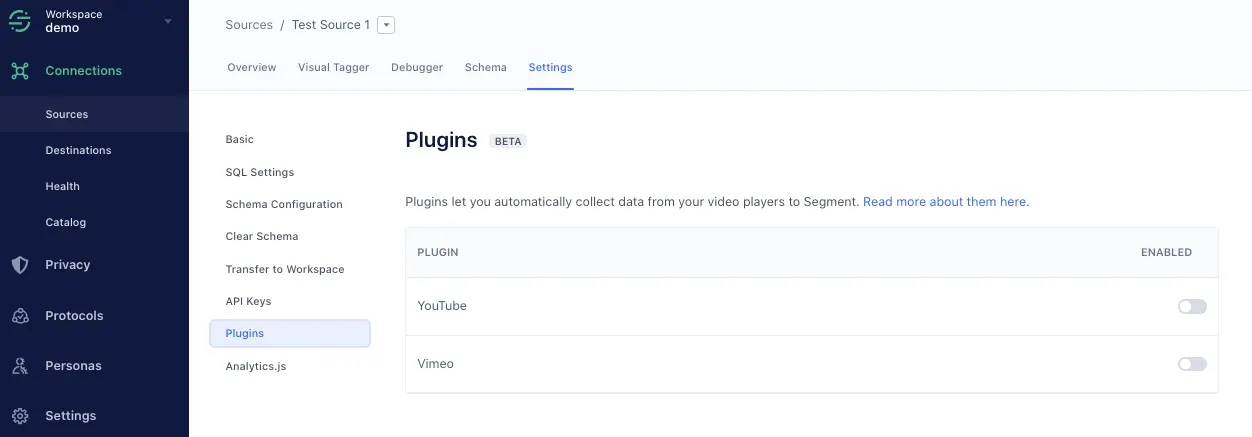
Note: Only JavaScript sources support plugins.
Initialize the plugin by giving it access to the YouTube video player instance(s) running on your page. Use the initialize method in the YouTube onYouTubeIframeAPIReady() function:
1var player;2function onYouTubeIframeAPIReady() {3player = new YT.Player('player', {4height: '390',5width: '640',6videoId: 'M7lc1UVf-VE'7});8<b>var ytAnalytics = new window.analyticsPlugins.YT(player, 'XXXXXXXXXXXXXXXXXXXXXXXXXXXX0365')9ytAnalytics.initialize()</b>10}
The plugin listens to the YouTube player for events, and fires the corresponding Segment Video Spec events on Analytics.js.
The following Segment Video Spec events are tracked by this plugin:
- Video Playback Started
- If playing a single video, this fires when the video starts
- If playing a playlist, this fires when the first video in the playlist starts
- Video Playback Completed
- If playing a single video, this fires when the video finishes
- If playing a playlist, this event fires when the final video in the playlist finishes
- Video Playback Paused/Resumed
- Video Playback Buffer Started/Completed
- Video Playback Seek Started/Completed
- Video Content Started/Completed
- For playlists, these events get fired for each individual video
The following Segment Video Spec properties are automatically attached to the above events:
'Playback' Events
- Total Length
- Position
- Quality
- Video Player
- Sound
'Content' Events
- Title
- Description
- Keywords
- Channel
- Airdate
- Duration