Amplitude Engage Event Source
Source Info
- The Amplitude Engage Event Source is an Event Cloud source. This means that it sends data as events, which are behaviors or occurrences tied to a user and a point in time. Data from these sources can be loaded into your Segment warehouses, and also sent to Segment streaming destinations. Learn more about cloud sources.
This Source is supported in US data processing regions.
This Source is only supported in workspaces configured to process data in the US region. Workspaces configured with data processing regions outside of the US cannot connect to this source. For more information, see Regional Segment.
This source combines Amplitude's analytics with Segment's rich connections ecosystem. This allows you to export Behavioral Cohorts from Amplitude to Segment so that you can better target users across their many downstream connections. You can sync Behavioral Cohorts to your Segment-connected raw data warehouses and downstream destinations that accept Segment identify events.
Success!
This page is about the Amplitude Engage Segment source, which sends data to Segment. For the Amplitude destination, which receives data from Segment, see the Amplitude Segment destination docs.
- From your Sources page in Segment, click Add source.
- Choose Amplitude Engage, then click Connect.
- Give the Source a nickname. The nickname is a label used in the Segment interface.
- From the new Source's Overview page, copy the Segment
writeKey. - To export users from Amplitude to Segment, first, in Amplitude, create the cohort of users you wish to export. You can read more about the different types of cohorts you can create in Amplitude's documentation.
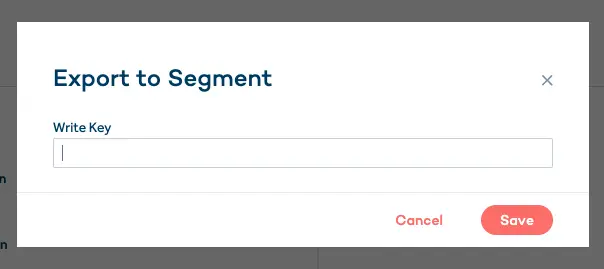
- In your Amplitude account, navigate to your Behavioral Cohort and paste the Segment
writeKeyunder "Sync to" -> "Add Integration" if the Segment integration is not already set up for your project.
Note: If you have just added the integration and do not see Segment in the list, refresh your page.
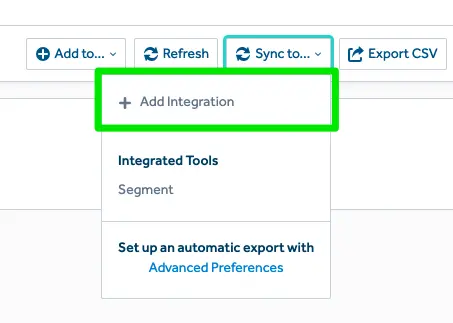
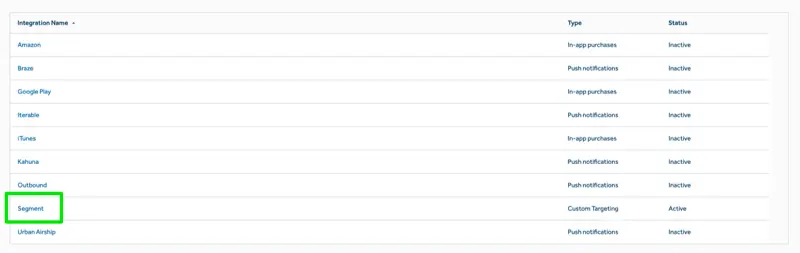
- If you would like to set up automated export on an hourly or daily basis, you can use Amplitude's Cohort Sync feature. Click Advanced Preferences, and select "Segment" as the integration.
- From your Segment account, click into your Amplitude Engage Source, and you'll be able to add other downstream destinations where you want to see your Behavioral Cohort data.
Behavioral Cohorts will now sync to Segment based on the sync schedule you defined in Amplitude.
Amplitude sends cohort data to Segment by triggering an Identify call for each user in the cohort being synced, for example:
1analytics.identify({2userId: <amplitude_user_id>,3traits: {4'[Amplitude] <some_cohort_name> (<cohort_id>)': true5},6context: {7integration: {8name: 'Amplitude Cohort Sync',9version: '1.0.0'10}11}12})
Upon subsequent cohort syncs (manual or scheduled), Amplitude syncs only new users and users whose cohort status has changed (for example, a user has left a cohort). When a user has left a cohort, Amplitude sends false as the cohort trait value, for example:
1analytics.identify({2userId: <amplitude_user_id>,3traits: {4'[Amplitude] <some_cohort_name> (<cohort_id>)': false5},6context: {7integration: {8name: 'Amplitude Cohort Sync',9version: '1.0.0'10}11}12})