Looker Source
Source Info
- The Looker Source is an Event Cloud source. This means that it sends data as events, which are behaviors or occurrences tied to a user and a point in time. Data from these sources can be loaded into your Segment warehouses, and also sent to Segment streaming destinations. Learn more about cloud sources.
This Source is supported in US data processing regions.
This Source is only supported in workspaces configured to process data in the US region. Workspaces configured with data processing regions outside of the US cannot connect to this source. For more information, see Regional Segment.
Looker is a business intelligence software platform that helps you explore, analyze and share real-time business insights easily. Create custom cohorts of customers in Looker's powerful and flexible exploration tool and pass your analysis into your marketing tools for activation and engagement using the Looker Source in Segment.
To enable the integration service in Looker, contact your Looker account representative, who will walk you through the implementation.
On Segment's end, you need to create a Looker source and copy your write key into the Looker integration admin settings.
Using this source, Looker sends Look (query) results into Segment as Identify calls. Any user trait that you include as a column in your Look will be included as a user trait on these Identify calls.
Segment doesn't support arrays
Segment supports properties that are strings or numbers.
When you set up your Look and generate new user traits (column names), avoid using trait names that may already exist in your marketing tools. If you create a new user trait in Looker (for example, "churn risk") and that trait already exists in your tools, syncing the user profile to the downstream tool overrides the existing trait value with the new one.
The following example is of a cohort of users in Looker who have been active on toastmates.com (an example website) at least once in the last 30 days.
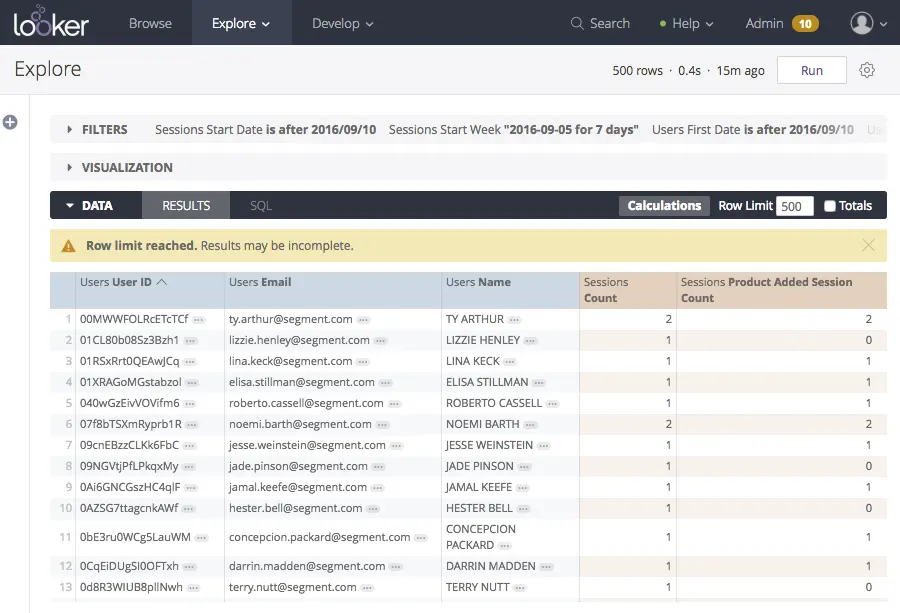
This is an example of the Identify call Looker will send to Segment for the first user in the Look:
1{2"type": "identify",3"traits": {4"name": "Ty Arthur",5"email": "ty.arthur@segment.com",6"sessions count": 27},8"userId": "00MWWFOLRcETcTCf"9}
If you don't like the formatting of field names as they appear in Segment, you can use Table Calculations to create a new version of the field with the desired name. Then you can hide the original field from the table visualization.
The end goal of using the Looker Source is to trigger actions in your marketing tools, or Segment destinations. These destinations require either a userId or an email with an Identify call. We recommend including userId and email whenever possible.
See the following table of all the server side Destinations that will accept Identify calls from Looker and any required identifiers you must pass through. Be sure to include the required trait(s) when setting up your Look, otherwise your user profiles will not make it into your Segment destinations.