Joining User Profiles
One of the first questions we get when our customers start querying all of their data is, how do I join all this data together? For example, let's say you'd like to know if support interactions in Zendesk increase revenue in Stripe, or which percentage of users opened your email campaign and visited your website or mobile app? The key to answering these advanced questions is tying your data together across these sources. To do that, you need a common user identifier.
Each SaaS tool you use has its own way of identifying users with a unique primary key. And, you will find each of these different IDs across different collections of tables in your database. So, when you want to start matching Joe Smith who entered a ticket in Zendesk and also clicked through a campaign in Mailchimp, it starts to get tricky.
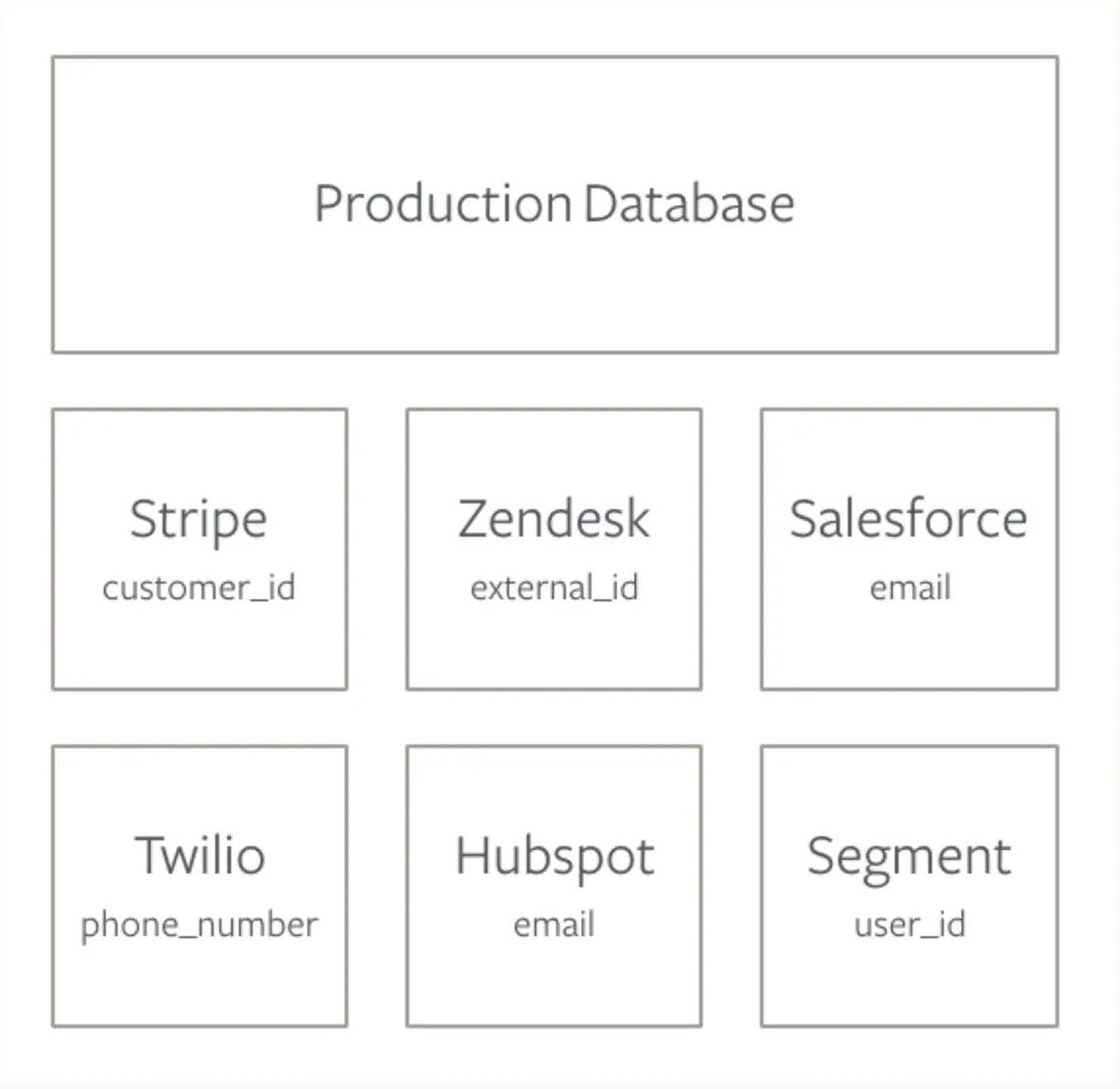
For example, Stripe keeps track of users with a customer_id, Segment requires auser_id, and Marketo uses email to uniquely identify each person.
To effectively join across these sources, you need to understand how each id maps to each other. The best way to do this is to create a common identifier across tools.
When you install a new tool (or use Segment to install all of them at once), you need to choose what you will put in the ID field. There are lots of different options for this: emails, twitter handles, usernames, and more.
However, we suggest using the same ID you generate from your production database when you create a new user. Database IDs never change, so they are more reliable than emails and usernames that users can switch at their leisure. If you use this same database ID across as many tools as possible, it will be easier to join identities down the road. (In MongoDB, it would look something like this 507f191e810c19729de860ea.)
1analytics.identify('1e810c197e', { // that's the user ID from the database2name: 'Jane Kim',3email: 'jane.kim@example.com'// also includes email4});
Though we wish you could use a database ID for everything, some tools force you to identify users with an email. Therefore, you should make sure to send email along to all of your other tools, so you can join on that trait as a fallback.
Integrating as many tools as possible through Segment will make your joins down the road a little easier. When you use Segment to identify users, we'll send the same ID and traits out to all the destinations you turn on in our interface. (More about Segment destinations.
A few of our destination partners accept an external ID, where they will insert the same Segment user ID. Then you can join tables in one swoop. For example, Zendesk saves the Segment User ID as external_id, making a Segment-Zendesk join look like this:
1SELECT zendesk.external_id, users.user_id2FROM zendesk.tickets zendesk3JOIN segment.usersusers4ON zendesk.tickets.external_id = segment.user_id
Here's a look at the Segment destinations that store the Segment User ID:
| Tool | Corresponding Trait | Corresponding Sources Table |
|---|---|---|
| Zendesk | external_id | zendesk.tickets.external_id |
| Mailchimp | unique_email_id | mailchimp.lists.unique_email_id |
| Intercom | user_id | intercom.users.user_id |
Whether you're using Segment or not, we suggest creating a master user identities table that maps IDs for each of your sources.
This table will cut down on the number of joins you have to do because some IDs may only exist in one out of many tables related to a source.
Here's sample query to create a master user identities table:
1CREATE TABLE user_identities AS (2select3segment.id as segment_id,4segment.email as email,5zendesk.id as zendesk_id,6stripe.id as stripe_id,7salesforce.id as salesforce_id,8intercom.id as intercom_id910from segment.users segment1112– Zendesk13leftjoin zendesk.users zendesk on14( zendesk.external_id = segment.id– if enabled through Segment15or zendesk.email = segment.email ) – fallback if not enabled through Segment1617– Stripe18left join stripe.customers stripe on19stripe.email = segment.email2021– Salesforce22left join salesforce.leads salesforce on23salesforce.email = segment.email2425– Intercom26left join intercom.users intercom on27( intercom.user_id = segment.id– if enabled through Segment28or intercom.email = segment.email ) – fallback if not enabled through Segment2930group by 1,2,3,4,5,63132)
You'll spit out a user table that looks something like this:
| segment_id | zendesk_id | stripe_id | salesforce_id | intercom_id | |
|---|---|---|---|---|---|
| mYhgYcRBC7 | ziggy@stardust.com | 1303028105 | cus_6ll4iGAO7X8u7L | 00Q31000014XGRcEAO | 55c8923f67b8d6524600037f |
| mYhgYcRBC7 | justin@biebs.com | 1303028105 | cus_6ll3xVVSLIZomI | 00Q31000014XGRcEAO | 55c8923f67b8d6524600037f |
| 7adt7XG27c | queen@beyonce.com | 1472230319 | cus_6u2ZcW3uC8VwZa | 00Q31000014sKCqEAM | 5626dfed2e028608710000ce |
| QZnP7cViH1 | kanye@kimye.com | 1486907299 | cus_6yrv9bwLgXN78s | 00Q31000015G7kIEAS | 55f6a142bd531ec6930005fa |
While creating this table in SQL is a good strategy, we'd be remiss not to point out a few drawbacks to this approach. First, you need to run this nightly or at some regular interval. And, if you have a large user base, it might take a while to run. That said, it's probably still worth it.
How to run a query with your joined data
So what can you do once you have all of your ID's mapped? Answer some pretty nifty questions that is. Here are just a few SQL examples addressing questions that incorporate more than one source of customer data.
Segment + Zendesk
1-- Which referral source is sending us the most tickets?2SELECTsegment.referral_source,3COUNT(zendesk.ticket_id) AS count_of_tickets4FROM zendesk.tickets zendesk5LEFT JOIN segment.userssegment6ONusers.segment_id = segment.user_id7GROUP BY 18ORDER BY 2 desc
Stripe + Zendesk
1-- How many tickets do we receive across each pricing tier?23SELECT stripe.plan_name AS plan_name,4COUNT(zendesk.ticket_id) AS count_of_tickets56-- Start with Zendesk7FROM zendesk.tickets zendesk89-- Merge Users10LEFT JOIN user_identities users11ON zendesk.id = users.zendesk_id1213-- Add Stripe14LEFT JOIN stripe.charges stripe15ON users.stripe_id = stripe.customer_id1617-- Group by plan name, from most tickets to least18GROUPBY119ORDERBY2desc
An alternative to the lookup user table in SQL would be writing a script to grab user IDs across your third-party tools and dump them into your database.
You'd have to ping the APIs of each tool with something like an email, and ask them to return the key or id for the corresponding user in their tool.
A sample script, to run on a nightly cron job, would look something like this:
1var request = require('superagent'); // https://www.npmjs.com/package/superagent23var username = '<your-username>';4var password = '<your-password>';5var host = 'https://segment.zendesk.com/api/v2/';67/**8* Gets the user object in Zendesk by email address.9*10* @param {String} email11* @param {Function} fn12*/1314functiongetUserIds(email, fn) {15request16.get(host + 'users/search.json?query=' + email)17.auth(username, password)18.end(fn);19}2021/**22* Get the first Zendesk user that matches 'kanye@kimye.com'23*/2425getUserIds('kanye@kimye.com', function(err, res) {26if (err) return err;27// res.body.users will be an Array28// res.body.users[0].id will return the `id` of the first user29});
Here is the documentation for Zendesk's API for more information.