Review and Resolve Event Violations
Upon connecting your Tracking Plan to a Source, you can view violations grouped by event. To view violations, click on the Violations button located on the Schema tab in a Source. A filter can be applied to only show events with violations within the past hour, 24 hours, and 7 days.
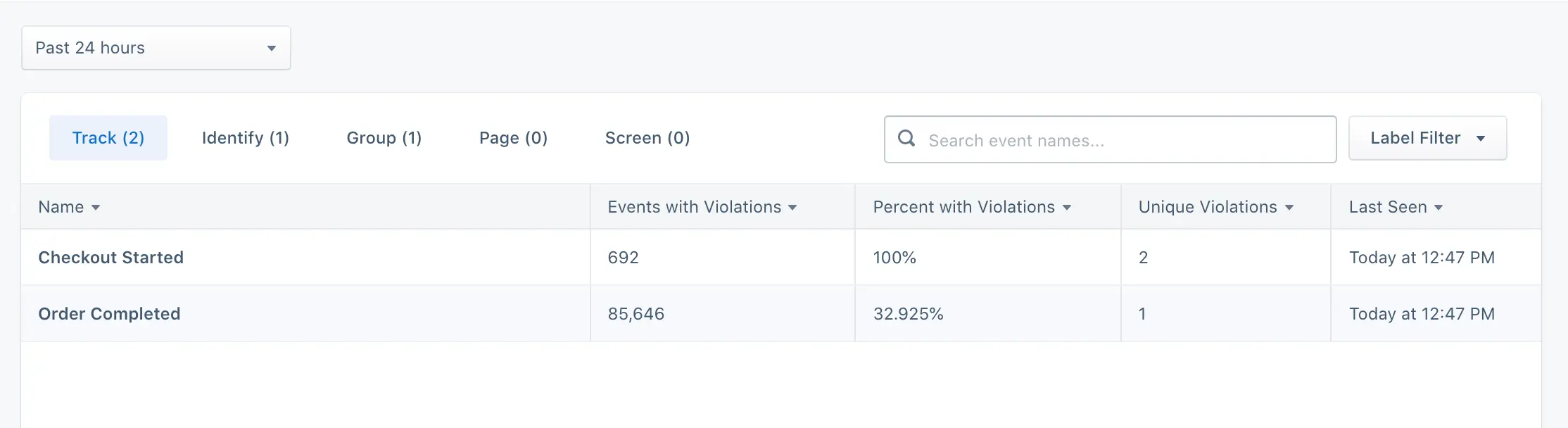
To view detailed violations for an event, click on the specific event. Specific violations include:
- Missing required properties
- Invalid property value data types
- Property values that do not pass applied conditional filtering
In the event detail violations view, a filter can be applied to only show violations in the past hour, 24 hours, and 7 days.
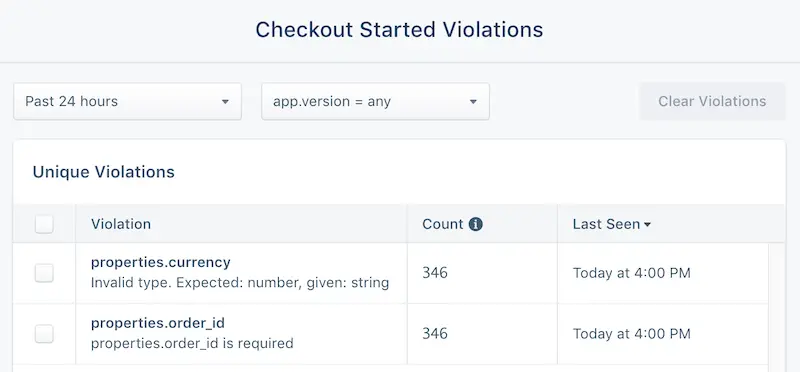
To view a specific violation, click on the violation to view recent sample payloads that generated the violation. These payloads can then be used to help engineering quickly pinpoint the root cause and release a fix.
If you want to analyze or build custom alerts based on inbound violations, you can enable violation forwarding.
Violations use specific fields for aggregation
Track violations use the event field for aggregation, while Page and Screen violations use the name field. If these are not properly implemented in your events, violations cannot be aggregated correctly.