Picking a secure password
Picking a strong password is one of the most important things you can do to protect your account.
Twilio Unified Login users can manage their password in their Twilio account
Twilio Unified Login users can manage their user settings, including name, email, password, and 2FA settings, directly in their Twilio account. To learn more about Twilio's user and password policies, review Twilio's Account Management documentation.
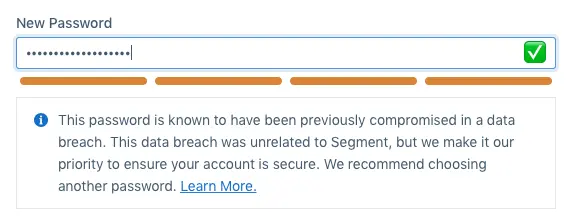
When you first create a Segment account, or when you reset or change the password of an existing account, you'll see some tools which Segment uses to help you choose a strong password. Segment uses zxcvbn to show your password strength, and Have I Been Pwned to notify you if your password has been found in any data breaches. Your password is never stored in plaintext, and is securely stored using the bcrypt password hashing function in Segment's database.
Here are some general password guidelines:
- Use a password manager like 1Password or LastPass to generate and store passwords.
- Passwords should be 8 or more characters. Consider using pass-phrases (for example,
customer data infrastructure), combinations of random characters (for example,9;ske%t!u9jdckd#s>), or other strategies that are difficult to guess, such asicOnsTent CaPitaliZation. - Use a different password for every website. If you use the same password on multiple websites and one is breached, your accounts on all of these websites may be affected.
- Do not share your password with anyone, even your co-workers. Once shared, they may use that password on another site or share it with another co-worker without telling you. If one of them leaves the company they will still be able to take actions under your account.
If you see a message that says "This password is known to have been previously compromised in a data breach", it means that the password you typed has been used before, and was in a database that was compromised and put on the internet. This does not mean that Segment has been compromised, or that someone has accessed your Segment account. Check out Have I Been Pwned for more information, and choose a different password.