Account Management
An account is associated to a single user and is attached to the email address you sign up with. A workspace houses all of your sources, and can have one or several user accounts as owners and/or read-only members.
You don't need to do anything if you change your domain name. If the new domain name will serve as the same Segment source, make sure you use the same Segment write key that you used with the old domain.
You may claim ownership of your domain for the purposes of single sign-on login association, but it has no bearing on data collection.
Some of Segment's previous plans, including the legacy API plan, limited integration usage. If you want to add an integration that's not available on your current plan, move to a new Team plan. Team plans include all integrations, along with other additional features.
No. Deleting your account only stops you from accessing workspaces through your login. The workspace is where the subscription is managed, and it will not be deleted. Data will still flow into Segment and your Destinations, and you will still be charged if you delete your account but don't delete your workspace.
If you access Segment using a Segment-specific account, you can navigate to the User Settings menu and click Delete Account at the bottom of the page.
If you access Segment using your Twilio account, follow the steps in the How to Close My Account and Refund The Balance documentation.
Once the account is deleted you will not have access to workspaces associated with your account that are attached to the email address you signed up with.
To delete your workspace, go to your Workspace Settings, click the General Settings tab, then click Delete Workspace. Segment will irrevocably delete your workspace 5 days after you initiate your deletion request.
If you want to revoke the workspace deletion request during the 5 days after you initiated your request, open the Workspace Settings page, select the General Settings tab and click Revoke Workspace Deletion.
You should also change your write keys for each source and remove all Segment snippets from your codebase.
To update the email address associated with your Segment account:
- Go to User Settings.
- Update your email address in the Email field.
- Click Update Profile.
You'll need to authenticate and verify your new email address for the change to take effect. Note that workspace owners can't make this change for other users.
Changing your workspace name or slug won't impact any sources or destinations you've already configured. If you're using Segment's Public API, you'll need to change the slug in your request URLs.
We were unable to save your changes, please try again
If you see this error message when trying to change a workspace slug, it often means the slug is already taken.
No. Deleted sources and workspaces cannot be recovered.
Though workspaces can't be merged, you can move an existing source to a single workspace to the same effect. For example, you might move existing sources to one workspace so that you can unify all of your data across teams and gain a broader view of your customer data tracking.
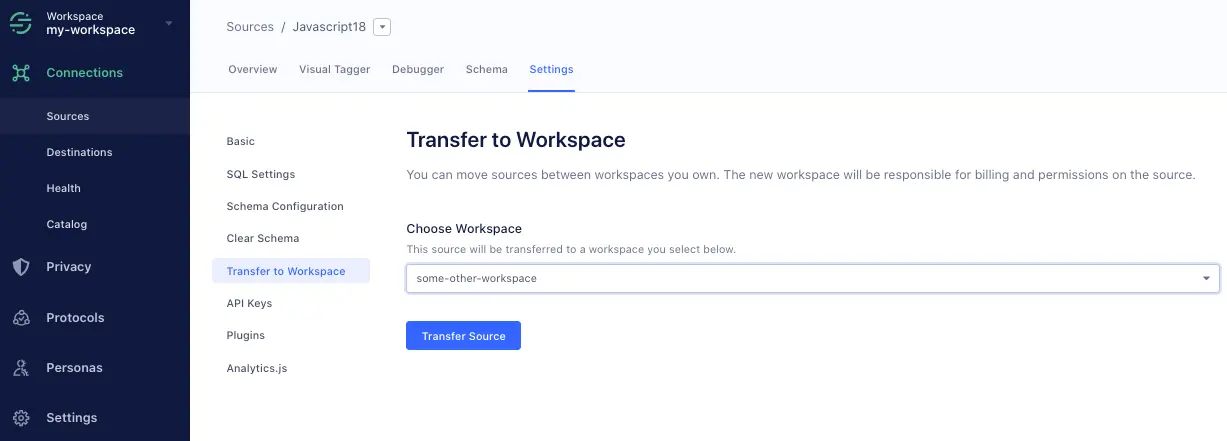
To move a source between workspaces, navigate to the source's Settings tab, then click Transfer to Workspace. Choose the workspace you're moving the source to, then click Transfer Source.
When you transfer a source from one workspace to another, Segment migrates all connected non-storage destinations.
Info
The person who transfers the source must be a workspace owner for both the origin and recipient workspaces, otherwise the recipient workspace won't appear in the dropdown list.
Tracking Plans do not transfer
Segment recommends that you disconnect Tracking Plans from Sources before you initiate a workspace transfer. Once the transfer is complete, add and reconnect your Tracking Plans in the new workspace.
Sources can't be transferred to EU workspaces
Though transferring sources to the EU workspace is not blocked in the UI, the transfer will not work as expected. This feature is not supported for cross region migration. Segment recommends that you re-create the source in the new workspace.