Create or Update Profile widget
Studio widgets represent various parts of Twilio's functionality that you can combine in your Studio Flow to build out robust applications that don't require you to do any coding.
Info
New to Twilio Studio? Check out our Getting Started guide.
Legal information
The Studio Profiles widgets are not PCI compliant or a HIPAA Eligible Service and should not be used in workflows that are subject to HIPAA or PCI.
These widgets are only available in the new Twilio Console. If your account hasn't been migrated, you'll be redirected to the legacy Console, where these widgets won't appear.
The Create or Update Profile widget writes trait data to Twilio Profiles from within a Studio Flow. Take information you learn about a customer during a flow execution — a preference, a callback number, a language selection — and write it to a profile for future flows to use, without writing a Function.
With this widget, you can:
- Create a new profile the first time you see a customer, using a phone number or email as the initial identifier.
- Update an existing profile's traits, such as recording a language preference collected through an IVR menu.
Before you configure the Create or Update Profile widget, you need:
- A Profile Store in Twilio Profiles, with the trait groups and traits you plan to write already registered.
- If you're updating an existing profile, its Profile ID — for example, from an earlier Resolve Profile widget in the same flow.
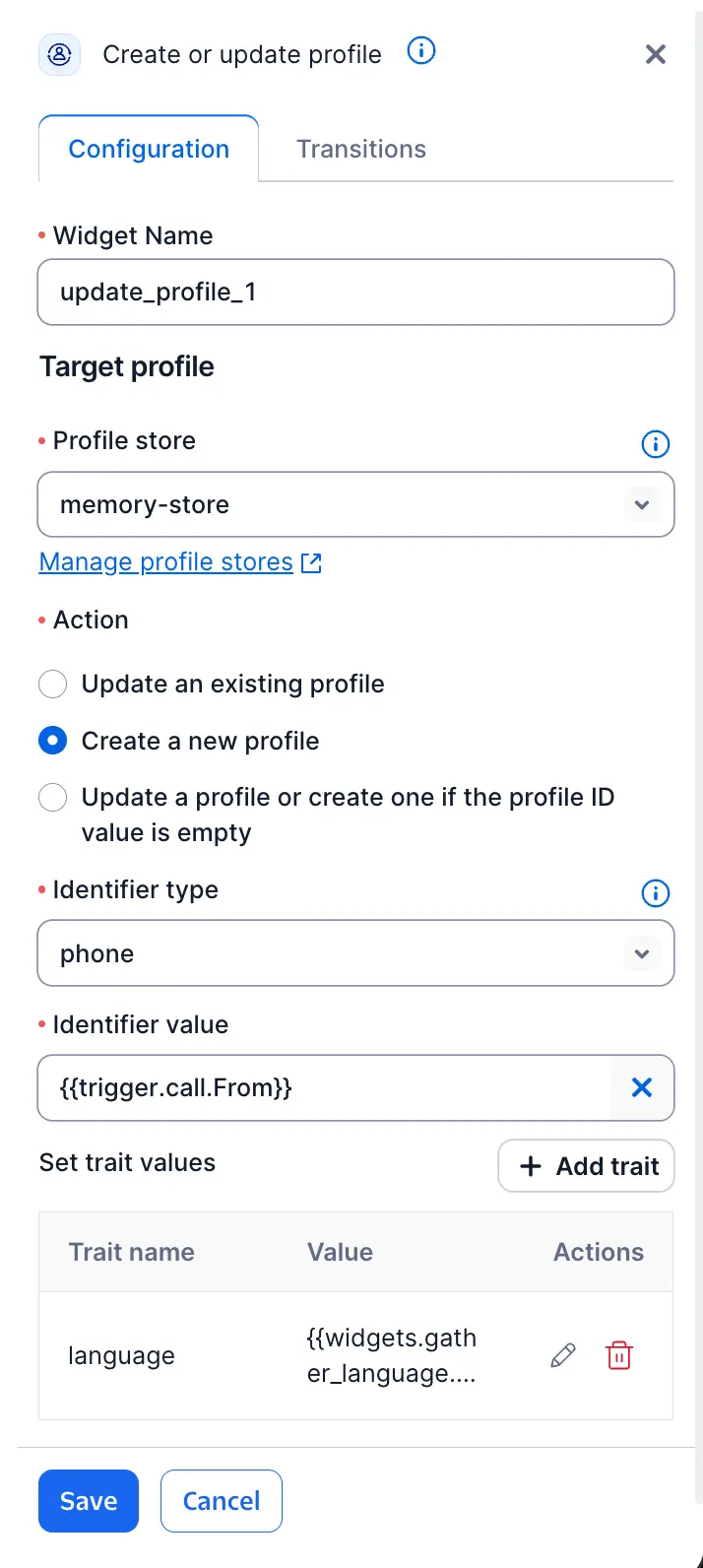
| Field | Type | Required | Description |
|---|---|---|---|
| Profile Store | Dropdown (account stores) | Yes | The Profile Store to write to. |
| Action | Dropdown: Create, Update, or Update or create | Yes | Which operation to perform. See Action modes. |
| Profile ID | Expression / variable | Conditional | The profile to update, such as {{widgets.resolve_profile_1.profiles.profile_id}}. Required when Action is Update or Update or create. |
| Identifier Type | Dropdown (from store configuration) | Conditional | Required when Action is Create or Update or create. |
| Identifier Value | Expression / variable | Conditional | Required when Action is Create or Update or create — for example, {{trigger.call.From}}. |
| Traits | Dynamic field set, organized by trait group | At least one required to create a profile | The trait values to write. Each field accepts a literal value or a {{variable}} expression. See Writing trait values. |
| Identity Details | Dynamic field set (identifier-promoting traits, such as phone and email) | No | Shown as a separate section from Traits. See Identity Details. |
| Action | What it does | Required fields |
|---|---|---|
| Create | Creates a new profile. | Identifier Type, Identifier Value |
| Update | Updates an existing profile. | Profile ID |
| Update or create | Updates the profile at Profile ID if one is found, or creates a new one otherwise. | Profile ID, Identifier Type, Identifier Value |
Info
If you create a profile using an identifier that already exists on another profile, Twilio Profiles resolves this automatically by returning the existing profile's ID rather than creating a duplicate. Retrying a create request after a network error is always safe for this reason.
The Create or Update Profile widget treats each trait field independently, based on how you configure it:
| Field state | Result |
|---|---|
| Resolves to a non-empty value | The trait is created or overwritten with that value. |
| Resolves to an empty value, or references a variable that isn't set | No change. The trait keeps its existing value. |
This behavior is the same for both the Traits section and the Identity Details section.
Info
The widget can't clear a trait or set one to an empty string. A field that resolves to nothing leaves the stored value untouched, so a mistyped variable name, or one that isn't set on every branch of your flow, can't delete profile data. To remove a trait, use the Profiles API or the Profiles Console.
Identity Details is a separate section for identifier-promoting traits, such as Contact.phone and Contact.email — traits that Twilio Profiles also uses to match and merge profiles.
Warning
Updating an Identity Details field can trigger a profile merge if the new value matches an existing profile. Merges happen asynchronously — the widget has no way to signal that a merge occurred, and this warning is the only indication you'll see in the canvas.
As with Traits, an Identity Details field that resolves to nothing leaves the existing identifier in place. To remove an identifier, use the Profiles API or the Profiles Console.
| Name | Description |
|---|---|
| Success | The profile was created or updated. See Create or Update Profile variables for how to tell which operation ran. |
| Failed | The create or update couldn't complete, such as an API error, a timeout, or a rate limit. |
| Name | Description |
|---|---|
{{widgets.MY_WIDGET_NAME.profiles.profile_id}} | The created or updated profile's ID. |
{{widgets.MY_WIDGET_NAME.profiles.store_id}} | The Profile Store ID written to. |
{{widgets.MY_WIDGET_NAME.profiles.operation}} | Either CREATE or UPDATE, depending on which action actually ran (relevant when Action is Update or create). |
{{widgets.MY_WIDGET_NAME.profiles.profile}} | The resulting profile. On create, this reflects the traits you submitted. On update, this is the full profile as it existed before the update, merged with your submitted traits. |
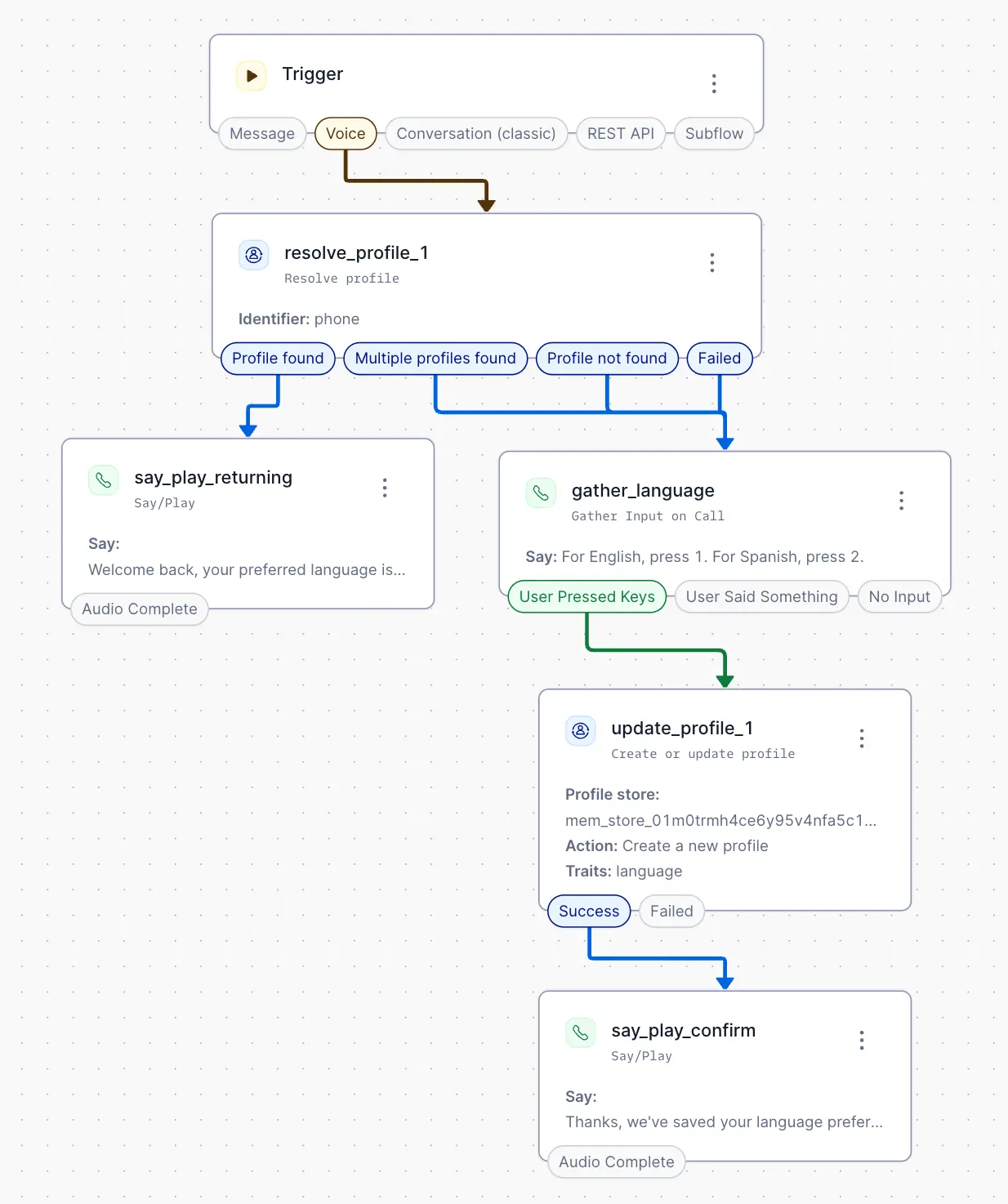
This example collects a language preference during a call and writes it to the caller's profile for future calls.
A Resolve Profile widget looks up the caller by phone number. If no profile is found, multiple profiles are found, or the lookup fails, a Gather widget asks the caller to select a language, and a Create or Update Profile widget writes the selection to a new profile's Preferences.language trait, using the phone number as the identifier. On the next call from the same number, Resolve Profile returns the stored preference and the flow skips the menu.