Resolve Profile widget
Studio widgets represent various parts of Twilio's functionality that you can combine in your Studio Flow to build out robust applications that don't require you to do any coding.
Info
New to Twilio Studio? Check out our Getting Started guide.
Legal information
The Studio Profiles widgets are not PCI compliant or a HIPAA Eligible Service and should not be used in workflows that are subject to HIPAA or PCI.
These widgets are only available in the new Twilio Console. If your account hasn't been migrated, you'll be redirected to the legacy Console, where these widgets won't appear.
The Resolve Profile widget looks up a customer profile in Twilio Profiles using an identifier, such as a phone number, email address, or account number. It can also fetch a profile directly by a Profile ID you already have from earlier in the flow. When a profile is found, the widget returns the profile's traits as flow variables, so the rest of your flow can route, personalize, or gate on them.
With this widget, you can:
- Greet a returning caller by name and route based on stored preferences, such as a saved language.
- Look up VIP status or loyalty tier to control queue priority.
- Branch new and returning customers into different flows — send someone with no profile straight to account setup, and someone with one directly to self-service.
Before you configure the Resolve Profile widget, you need:
- A Profile Store in Twilio Profiles, with the identifier types you plan to search by already configured through Identity Resolution. This can be a default type, such as phone or email, or a custom type you add, such as an account number or CRM ID.
- An identifier value available in your flow to search by, such as
{{trigger.call.From}}for an inbound call or an account number collected with a Gather Input widget, or a Profile ID from an earlier widget in the flow.
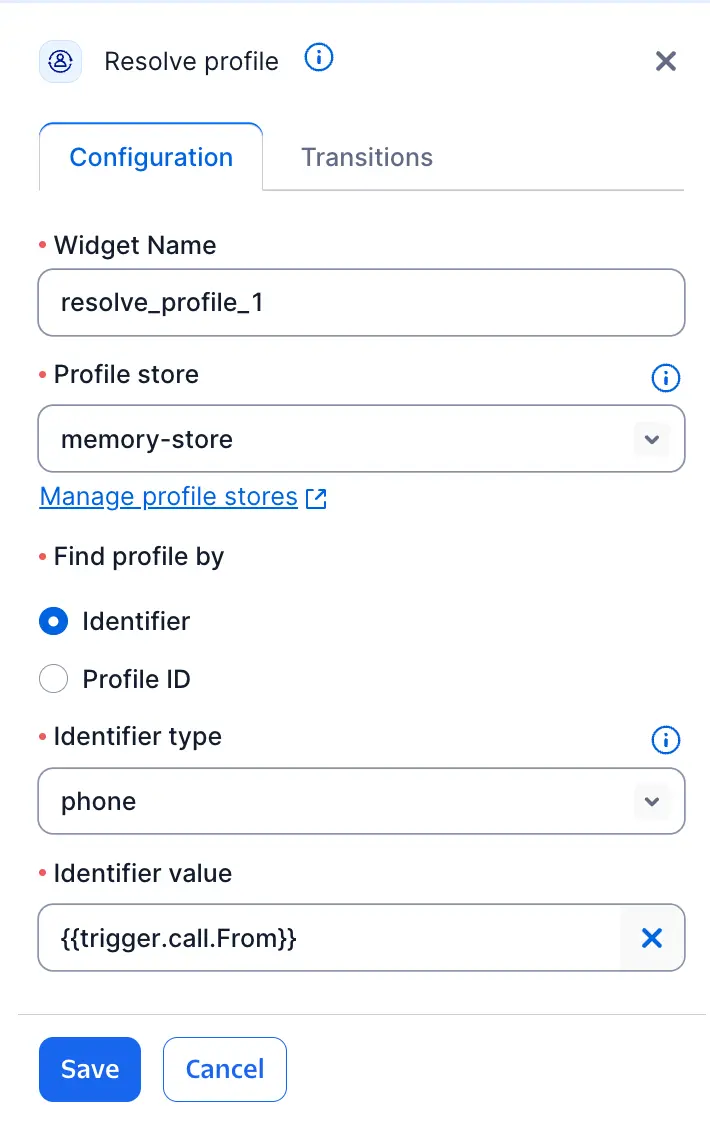
The Resolve Profile widget requires the following information:
| Field | Type | Required | Description |
|---|---|---|---|
| Profile Store | Dropdown (account stores) | Yes | The Profile Store to search. |
| Find Profile By | Radio selection | Yes | A selection between Identifier or Profile ID, determining whether Identifier Type and Identifier Value or Profile ID are required. |
| Identifier Type | Dropdown (from store configuration) | Conditional | The identifier type to search by. Lists every type configured in the Profile Store's Identity Resolution settings, including custom types. Required unless you provide a Profile ID. |
| Identifier Value | Expression / variable | Conditional | The identifier value to search for, such as {{trigger.call.From}}. Required unless you provide a Profile ID. |
| Profile ID | Expression / variable | No | A known profile ID, such as {{widgets.resolve_profile_1.profiles.profile_id}} from an earlier Resolve Profile widget. When you provide a Profile ID, the widget fetches that profile directly and skips the identifier lookup — Identifier Type and Identifier Value aren't required. |
The widget searches for an exact match to the identifier value after Twilio applies any normalization configured for that identifier type. It can't search by trait values, such as a name or date of birth.
Info
Channel identifiers such as phone numbers can change ownership over time. If you use this widget to gate access to sensitive information, verify that the returned profile's traits actually match the caller before you act on them.
| Name | Description |
|---|---|
| Profile found | Exactly one matching profile was found. |
| Multiple profiles found | Two or more profiles matched the identifier. See Resolve Profile variables for how to handle this. |
| Profile not found | No profile matched the identifier. |
| Failed | The lookup couldn't complete, such as an API error, a timeout, or a rate limit. |
When the Resolve Profile widget executes, it populates the following variables, where MY_WIDGET_NAME is the name of your widget:
| Name | Description |
|---|---|
{{widgets.MY_WIDGET_NAME.profiles.profile_id}} | The resolved or fetched profile's ID. |
{{widgets.MY_WIDGET_NAME.profiles.store_id}} | The Profile Store ID used for the lookup. |
{{widgets.MY_WIDGET_NAME.profiles.identifier_type}} | The identifier type used for the lookup, such as phone or email. |
{{widgets.MY_WIDGET_NAME.profiles.identifier_value}} | The identifier value used for the lookup. |
{{widgets.MY_WIDGET_NAME.profiles.profile}} | The full profile, including all trait groups and traits. Populated on the Profile found transition. |
{{widgets.MY_WIDGET_NAME.profiles.profiles}} | An array of matching profile IDs. Populated on the Multiple profiles found transition. |
Multiple profiles found
On the Multiple profiles found transition, profiles.profiles contains an array of profile IDs, not full profile data. To fetch each full profile, use a counter variable with a Split Based On (or Branch) widget loop:
- Set a counter variable to 0.
- Check whether the counter is less than
profiles.profiles.length. - Call Resolve Profile again, using
{{widgets.MY_WIDGET_NAME.profiles.profiles[counter]}}as the Profile ID input. - Increment the counter and repeat.
Each profile requires its own Resolve Profile call — there's no way to fetch all of them in a single request.
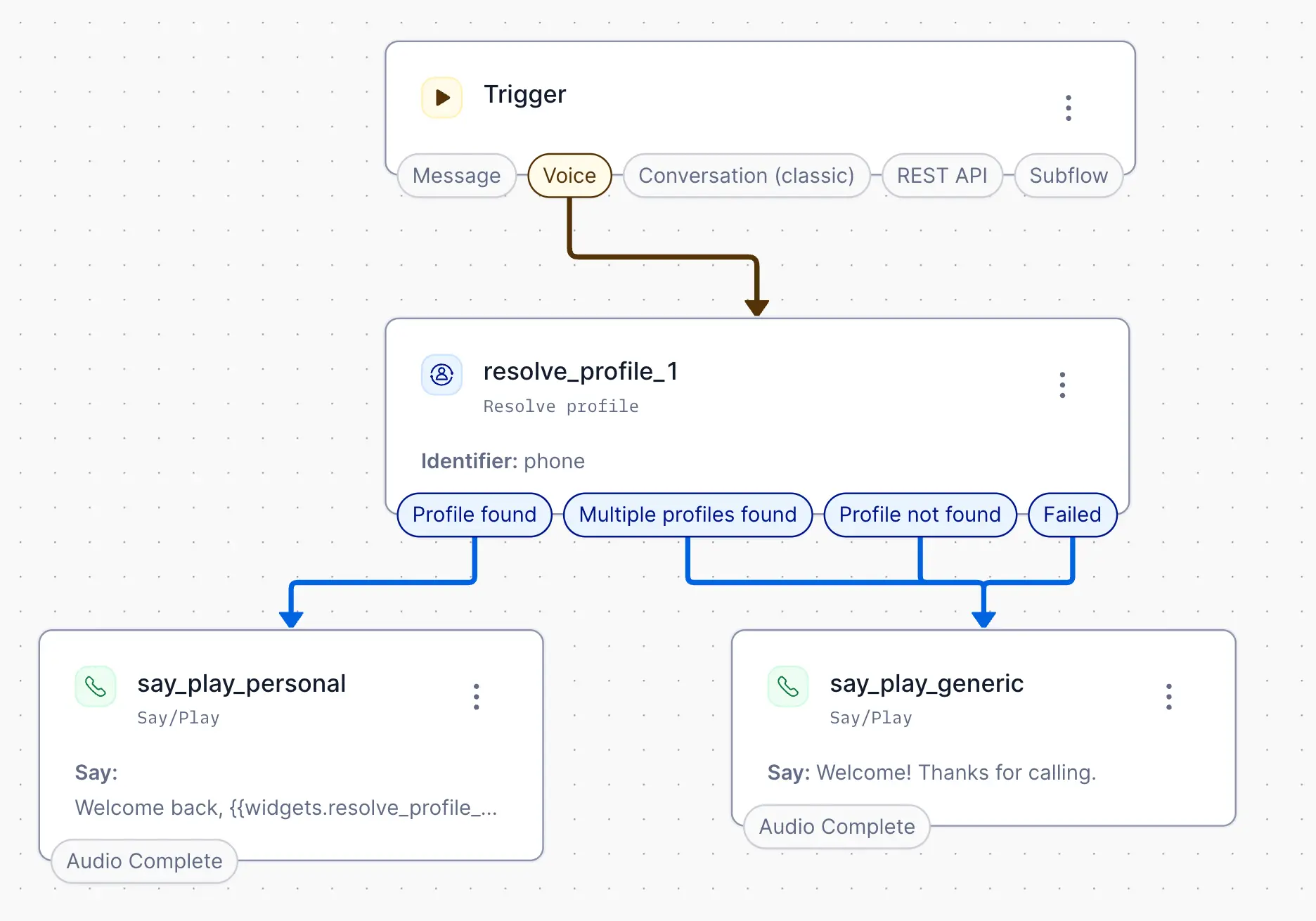
This example looks up a caller by phone number and branches based on whether a profile is found.
When a call comes in, a Resolve Profile widget searches by {{trigger.call.From}}. On the Profile found transition, the flow plays a greeting using the customer's stored Contact.firstName trait. On Profile not found, Multiple profiles found, or Failed, it falls back to a generic greeting.