Guide
Naming conventions: why you need them for clean data
Naming conventions keep analytics data clean and consistent. Learn what they are, why they matter, and how to implement the object-action framework.
Time to read:
AI generated summary
- Naming conventions ensure consistent, organized, and actionable analytics data across teams
- Without naming conventions, you risk duplicate events, unclear names, and inconsistent casing
- The object-action framework standardizes event naming for better data analysis and clarity
- Twilio Segment enforces naming conventions with tracking plans, automated validation, and schema enforcement
This summary was generated by AI.
Naming conventions: why you need them for clean data
Analytics data is only useful if it's consistent, organized, and easy to understand. But without naming conventions, your data becomes an absolute mess.
Different developers implement tracking at different times with different preferences, resulting in duplicate events, confusing names, and data nobody can analyze.
Take a simple action like a user signing up for a newsletter. You could track it as "Sign up," "Signup," "signed up," "User Signed Up," or dozens of other variations.
Without a standard, your team won't know which event actually corresponds to that action, and this confusion only gets worse as your company grows.
Naming conventions solve this problem by establishing consistent rules for how to name analytics events, properties, and attributes. When everyone follows the same framework, your data stays clean, readable, and actionable across engineering, product, analytics, and marketing teams.
This guide covers what naming conventions are and why they matter for analytics, the object-action framework for naming events, and how to document and enforce your conventions.
What are naming conventions?
Naming conventions are standardized rules for how to name things in a consistent, predictable way. In data analytics specifically, naming conventions are rules devised by data analysts to clearly identify and categorize the completion of events with your product or service.
A naming convention provides a framework that guarantees everyone in your organization names analytics events, properties, and attributes the same way. Instead of each developer choosing their own naming style, everyone follows the established pattern.
Why naming conventions matter for analytics
Analytics naming conventions are critical to ensuring the consistency and accessibility of your data. Without them, you end up with:
- Duplicate events: "Sign Up," "signup," "User Signed Up," and "signed_up" all tracking the same action
- Unclear event names: Is "Click" a button click, link click, or something else?
- Inconsistent casing: Some events in camelCase, others in snake_case, others in Proper Case
- Unreadable data: Events that made sense to one developer but confuse everyone else
- Impossible analysis: Can't build funnels or reports when you don't know which events to use
When implemented correctly, naming conventions make your data readable, your code maintainable, and your analysis reliable.
Common types of naming conventions
While this guide focuses on analytics event naming, naming conventions exist across many domains:
- Programming: camelCase, snake_case, PascalCase, MACRO_CASE for variables and functions
- File naming: Date formats, version numbers, descriptive file names
- Database: Table naming, column naming, relationship naming
- APIs: Endpoint naming, parameter naming, response structure
The principles are similar across all these domains: establish rules, document them, enforce them consistently.
Benefits of naming conventions
If you really want to make the most out of your data, you have to be thoughtful about how you name analytics events and where they live in your codebase. If you don't, your data management will get messy because different developers will implement tracking at different times with different preferences, resulting in a hodgepodge of events that are hard to read and analyze.
You might not realize, but there are actually a bunch of different ways to name the same user interaction. Take, for example, the simple action of a user signing up for a newsletter. You could implement the event as "Sign up," "Signup," or "User Signed Up."
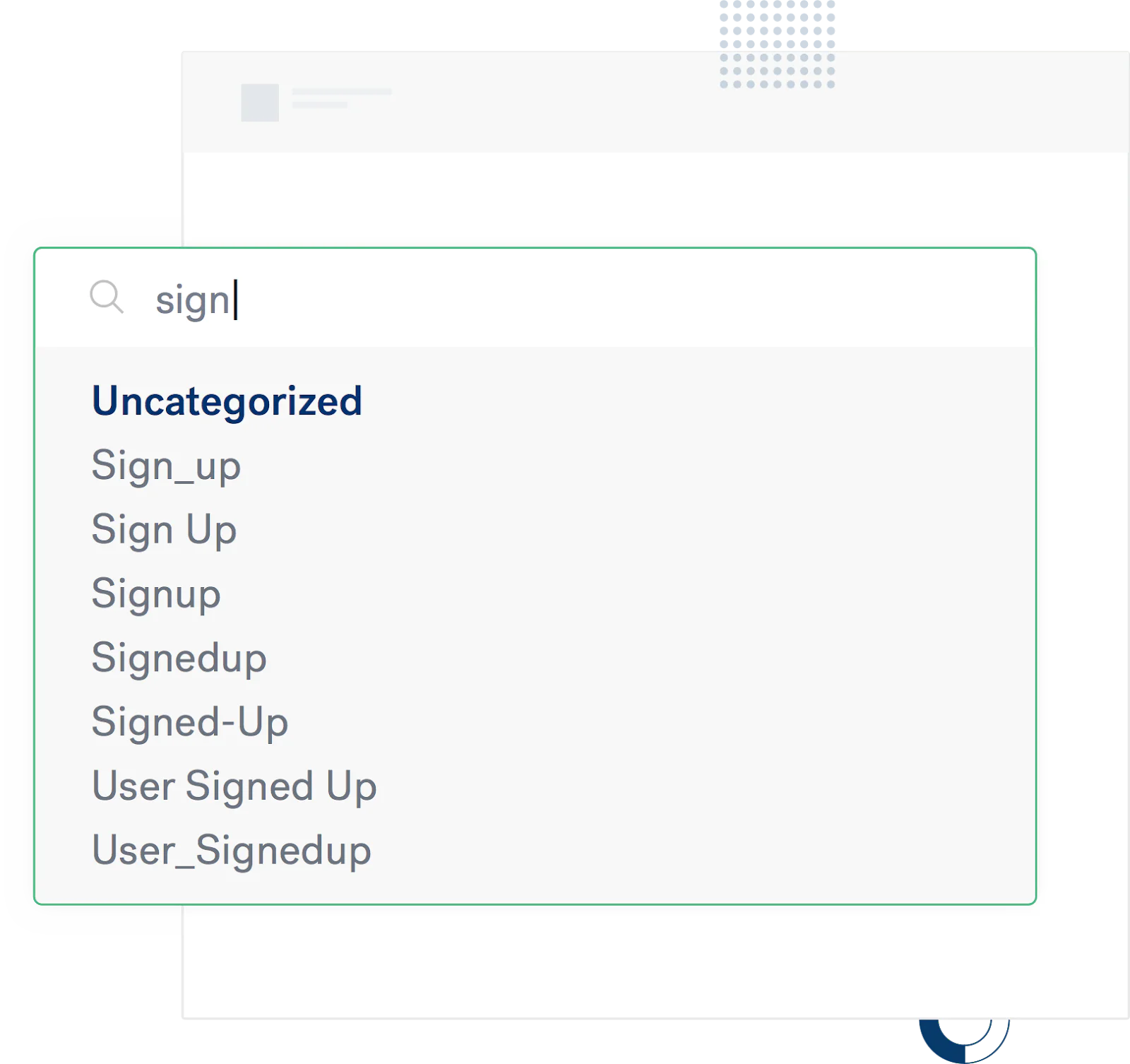
Without a consistent naming convention, your teammates will be left guessing which event actually corresponds to a user signing up for your newsletter. This may not seem like a big deal, but imagine how confusing this will become as your company grows over time.
To avoid getting into this situation and enable your company to actually use data, there are two simple things you can do today:
- Align on a framework for naming your events and properties (down to the casting).
- Put a process in place to enforce your company's framework
Getting these two things right will bring consistency, convenience, and clarity to your data and the decisions you make with it.
- Consistency: The biggest benefit of using a clear framework is data consistency. If all different data types and events are named the same way in each tool, it's easier for you to use those tools. One framework. No questions.
- Convenience: You're likely going to continue to add new tracking as your company ships new features and products. Having a standard naming convention means that each time a developer implements a new call, they won't have to think about how to do it
- Clarity: With engineering, product, analytics, and growth teams relying on the same data, enforcing standards means everyone can easily understand what each event means. This enables your teammates to run ad hoc analyses and launch experiments using data that is organized and easy to understand.
The object-action framework
If you only take away one thing from this lesson, remember that the most important thing to do is to pick a single naming framework and stick with it.
At Segment, we implement analytics using the object-action framework. Our success team developed this convention after working with thousands of customers on their analytics setup.
The idea is simple. First, choose your objects (e.g., Product, Application, etc.). Then define actions your customers can perform on those objects (e.g., Viewed, Installed, etc.). When you put it all together, your event reads Product Viewed or Application Installed.
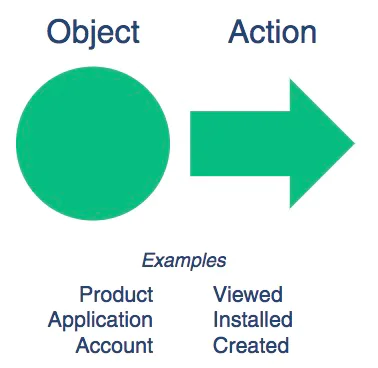
We like the object-action framework because it makes it easy to do the following:
- Analyze the performance of a particular feature: "I want to build a funnel to see how many people who view products also add them to their cart. Sweet!" The events related to products are all next to each other in alphabetical order.
- Quickly scan a list of events to find what you're looking for: "Where are all of the product events? Nope, Nope. Got it."
- Impose a standard any marketer, analyst, or developer can understand: "I'm guessing this event called Product Viewed is about folks viewing products."
Now that you've got the basics, here's a deep dive into how to use the object-action framework with some examples.
Choose your object
The first piece of the object-action framework is the object. These objects are the key "pieces" of your app and website that your customers are interacting with. It's probably easiest to understand what a business object looks like with a few examples.
|
Company |
Industry |
Example Objects |
|---|---|---|
|
Glossier |
E-commerce |
Product |
|
Hotel Tonight |
Mobile/Travel |
Application |
|
Twilio Segment |
SaaS |
Account |
List how users can interact with them
The next thing to figure out is how users can interact with those objects in your product. For example, a user can view a product or book a hotel.
|
Company |
Object |
Actions |
|---|---|---|
|
Glossier |
Product |
Clicked, Viewed, Added, Favorited |
|
|
Cart |
Viewed, Updated, Shared, Saved |
|
|
Order |
Completed, Updated, Cancelled, Refunded |
|
Hotel Tonight |
Application |
Installed, Opened, Updated |
|
|
Hotel |
Viewed, Favorited, Clicked |
|
|
Deal |
Viewed, Clicked, Applied, Shared |
|
Twilio Segment |
Account |
Created, Updated |
|
|
Source |
Created, Saved |
|
|
Destination |
Enabled, Disabled |
Choose the properties to collect with each object
We recommend tracking general events like Product Viewed along with properties that give you more details. With just the top-level event, you can analyze how often and how many people view your products. But you wouldn't be able to see which products and categories were the most popular.
When thinking about what properties to collect, you usually want to collect the same properties for the same object, no matter which action they are associated with.
For example, across events like Product Clicked, Product Viewed, and Product Shared, you'd want to collect a common set of properties related to products, for example: category, product_id, price, brand.
With these properties, you can easily figure out the most viewed and shared products and categories.
|
Company |
Object |
Properties |
|---|---|---|
|
Glossier |
Product |
ID, SKU, size, name, quantity |
|
Hotel Tonight |
Application |
Version, build |
|
Twilio Segment |
Account |
ID, slug, plan, email |
Be specific about casing
When you're documenting each of these events and the properties associated with them, you also want to be crystal clear about the casing. This might seem nitpicky, but it's imperative in the long run.
Here are the five most common options:
- all lowercase — account created
- snake_case — account_created
- Proper Case — Account created
- camelCase — account created
- Sentence case — Account created
We like Proper Case for events and snake_case for properties.
Put it all together
Putting this all together, it's really easy to construct your events.
Object Action:
- object_properties
Song Played:
- name
- artist_name
- album
- label
- genre
Document these events in your tracking plan and make sure to implement them in code with the same formatting.
In code, it would look something like this:
Other options
Of course the object-action framework isn't the only way to do this. You can use any order of actions and objects, and any type of casing. You can also do present or past tense.
The only thing that really matters is that you keep it consistent!
One other practice to avoid is dynamically creating new events with unique variables. You will never be able to make any sense of your funnels. Plus, your bills for your analytics tools will get out of control.
For example, sometimes we see people pass through the unique email with every sign up in the event name. You're much better off keeping those as properties.
Don't send sign up events as analytics.track('Sign Up - jake@segment.com');
Instead, send them as analytics.track('Sign Up', {email: 'jake@segment.com'});
Hopefully this deep dive into the object-action framework gave you some inspiration for keeping your data squeaky clean. We can't stress how much you will thank yourself down the road when all of your events adhere to the same naming convention.
Enforce naming conventions (the right way) with Twilio Segment
Establishing naming conventions is step one. Enforcing them consistently across your organization is step two (and often the harder part).
Twilio Segment helps you enforce naming conventions and maintain clean data through Protocols, a feature designed to ensure data quality and consistency.
How Segment helps with naming conventions:
- Tracking plans: Document your naming conventions in a centralized tracking plan that defines every event, property, and data type your organization uses.
- Automated validation: Segment validates incoming data against your tracking plan in real-time, blocking or flagging events that don't match your conventions.
- Schema enforcement: Define required properties, allowed values, and data types to ensure consistency across all events.
- Violations dashboard: See exactly where your data deviates from your naming conventions so you can fix implementation issues quickly.
- Team collaboration: Share tracking plans across engineering, product, and analytics teams so everyone implements tracking the same way.
Whether you're using the object-action framework or your own convention, Segment provides the infrastructure to enforce it automatically across all your data sources.
Try it for yourself. Sign up for free to get started.