Build a WhatsApp AI Agent with Node.js, Twilio Messaging, and OpenAI’s GPT-5
Time to read:
March 12, 2026
Written by
Reviewed by
AI generated summary
- Build a WhatsApp AI agent using Node.js, Twilio Messaging, and OpenAI's GPT-5 for nuanced, conversational interactions.
- Manage state, interpret intent, and design natural conversations to keep AI responses controlled and context-aware.
- Implement FAQ matching, reservation flows, and human escalation to create a versatile and responsive AI assistant.
This summary was generated by AI.
Have you ever wondered what it would look like if an AI agent could act as a host for a restaurant, a receptionist for your business, or a first line of support that takes pressure off your existing team?
Many businesses already use WhatsApp as a primary communication channel, but the systems behind those conversations are often either fully manual or powered by simple bots that struggle the moment a conversation becomes even slightly nuanced. Questions arrive in natural language. Details are shared out of order. Context matters. And customers expect responses that feel conversational, not transactional.
In this tutorial, we’ll walk through how to build a WhatsApp AI agent using Node.js, Twilio Messaging and the WhatsApp Business API, and OpenAI’s GPT-5 that can handle exactly those kinds of interactions. The agent can answer common questions, keep context across messages, guide users through a short reservation flow, and escalate to a human when appropriate. It behaves less like a scripted bot and more like a capable front-of-house assistant.
For this build, we’re using a restaurant as our concrete example, but the patterns apply broadly. The same approach works for appointment scheduling, inbound lead qualification, customer support triage, or any scenario where you want an AI agent to participate in real conversations over WhatsApp.
The focus here is on helping you understand how to build and reason about an AI agent end to end – not just how to call an API, but how to manage state, interpret intent, and design conversations that feel natural while remaining under your control.
Prerequisites
Before you start the build, you’ll need a couple accounts and a WhatsApp sender.
- Twilio account ( you can sign up here for free if you haven’t yet)
- A WhatsApp Sender
• Or, use the Twilio WhatsApp Sandbox for this tutorial - An OpenAI API Key
And with that, you’re ready to take orders start the build!
Quickstart: Clone and run the demo locally
If you’re eager to see how this works before digging into the concept and code, you can follow along with the hands-on demo.
Open a terminal and start with this:
Install all of the dependencies:
npm install
Copy the example environment file and set your own credentials:
cp.env.example.env
At a minimum, in your .env file you’ll need:
- Twilio Account SID and Auth Token (get them from the Twilio Console)
- WhatsApp sender (the Twilio Sandbox is perfect for playing around)
- Your OpenAI API key
- Your nGrok URL + “twilio/whatsapp” as your
PUBLIC_WEBHOOK_URLfor us to validate the Twilio webhooks.
The application runs on port 3000 by default and is statically set in the .env file. To receive inbound messages from Twilio, you’ll need to expose that port using a tunneling tool like ngrok:
ngrok http 3000
Copy the ngrok url that was generated and paste it into your .env file in the following format:
https://[YOUR_NGROK_URL]/twilio/whatsapp
Update .env and then start the server:
npm run start
Once that’s done, you can message the WhatsApp number and start interacting with the agent. If you don’t yet have an approved WhatsApp sender, in the next section, I’ll explain how to use the WhatsApp Sandbox for testing.
Using The Twilio WhatsApp Sandbox for testing
You do not need a fully approved WhatsApp sender to test this project. Twilio’s WhatsApp Sandbox is designed specifically for development and prototyping.
From the Twilio Console, navigate to the WhatsApp Sandbox page. Twilio will provide a sandbox phone number along with a short join code. Send that join code from your phone to the sandbox number to connect your device.
In the Sandbox configuration, set the When a message comes in webhook to:
POST https://YOUR_NGROK_URL/twilio/whatsapp
That’s all that’s required. From this point on, inbound WhatsApp messages from your phone will be delivered to your local Express server, and replies will be sent back through Twilio’s Messaging API.
Aside from the shared sandbox number and the join step, the behavior is the same as using a fully provisioned WhatsApp sender.
How the agent is structured
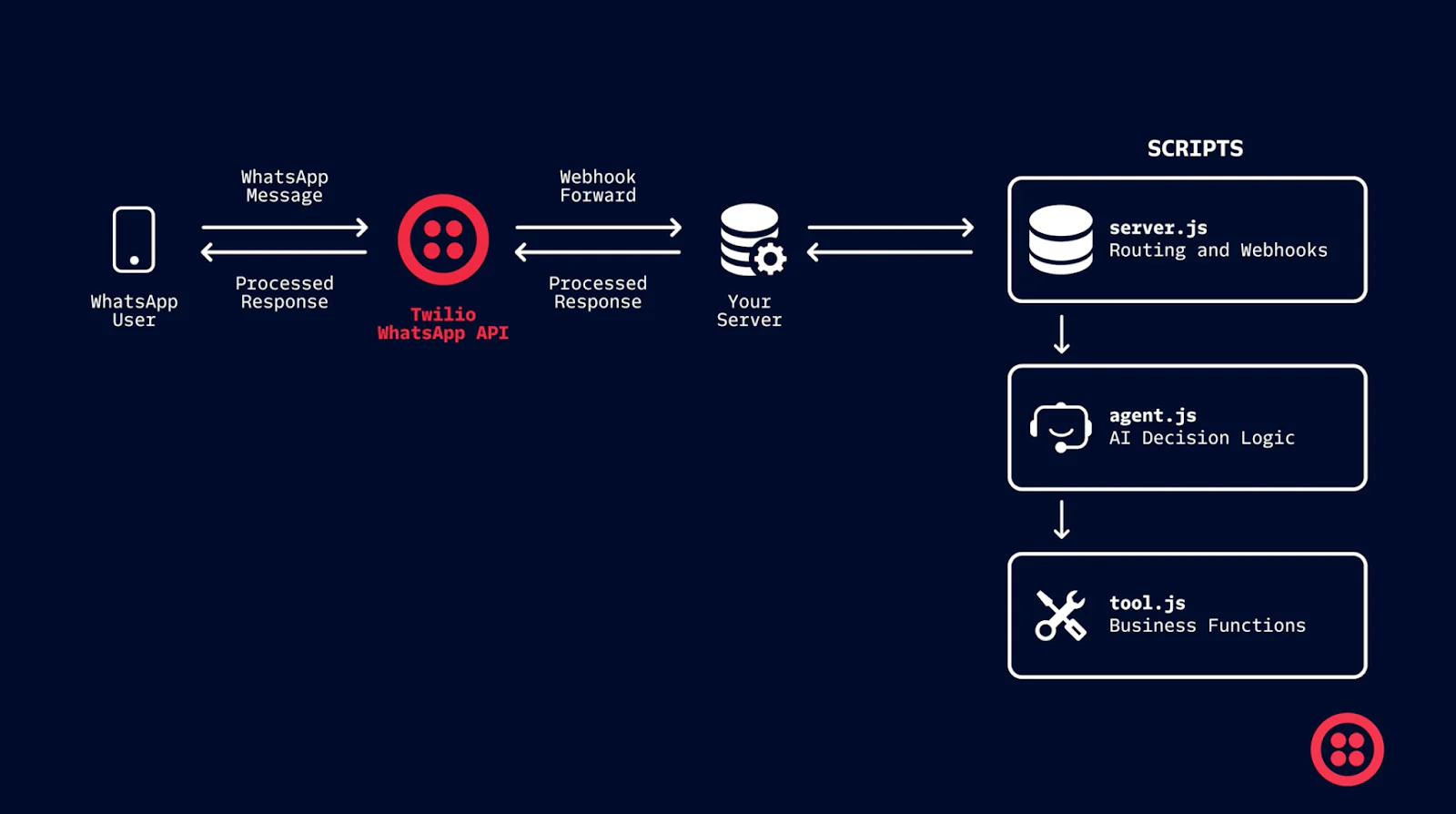
If you’re trying to understand this project quickly, start with three files: src/server.js, src/agent.js, and src/tools.js.
server.js is intentionally simple. It receives Twilio webhooks, validates the request, loads session state, calls the agent, and sends a reply.
In src/server.js, the webhook handler is the “front door”:
Everything interesting happens in the runAgent (src/agent.js) function. It decides whether the message is an FAQ, a reservation request, a human handoff, or something else. tools.js is where we put “side effects” – looking up FAQ answers, creating a mock reservation, or triggering a mock handoff.
That division is deliberate: the AI can interpret and extract intent, but your application code stays in control of what actually happens next.
Keeping conversation context across messages
WhatsApp conversations are multi-turn, and the demo needs to remember just enough context to feel coherent without turning into a framework. Session state is stored in memory in src/store.js and keyed by the sender number.
Here’s the shape of the session you’ll see in src/ store.js:
The flow flag is what makes multi-step behavior possible. When the user starts a reservation, we set flow = "RESERVATION". As they answer questions, we accumulate fields in reservationDraft. When we’re done, we clear the flow.
The server wires session state in and out of the agent in src/server.js:
And inside src/agent.js, the flow check is the gate:
That’s the core pattern: keep state explicit, pass it into the agent, update it, and write it back.
Answering questions with a JSON FAQ
For business information, you generally want deterministic answers. That’s why the agent checks a small FAQ knowledge base before it generates anything.
The FAQ data lives in data/faq.json, and it’s loaded and matched in src/tools.js. When the agent thinks something is an FAQ, it calls:
The matcher in lookupRestaurantFaq looks for the first FAQ entry whose regex (Regular Expression) patterns match the user’s text:
One important detail: the FAQ supports ${ENV_VAR} placeholders so you can keep things like hours and address in your .env file.
That replacement happens right before returning the answer in src/tools.js:
So an FAQ entry like:
"Hours:\nMon–Fri: ${BIZ_HOURS_MON_FRI}\nSat: ${BIZ_HOURS_SAT}\nSun: ${BIZ_HOURS_SUN}"
becomes a fully rendered answer at runtime.
The reservation flow
Reservations are where the agent starts to feel like an agent. The key behavior is this: when a user provides details up front, the system should not ignore them.
That’s why the reservation flow extracts details immediately on entry, using a constrained JSON “extractor” prompt.
In src/agent.js, when the model indicates a reservation intent, we enter reservation mode and immediately extract fields from the original user message:
The extractor itself is intentionally narrow. It’s not asked to write a friendly response – it’s asked to return structured fields:
Once we have a draft, we ask only for the next missing piece. The required fields are defined in missingReservationFields.
Then the agent asks one human-sounding question at a time:
When all required fields are present, we “book” the reservation via a stub in src/tools.js and return a confirmation message with a fake reservation ID:
Because this is a demo, createReservationStub also stubs the phone number automatically so the user doesn’t have to share it:
That keeps the flow fast and comfortable, while still leaving a clear placeholder for developers who want to wire phone collection back in.
Escalating to a human
For escalation, the agent does one simple thing: it checks whether a human is available based on configured business hours, then responds accordingly.
Business hours logic is implemented in src/bizHours.js and used in the handoff tool:
const available = isWithinBusinessHours();
In src/agent.js, when a handoff is requested, the agent calls the stubbed tool:
const result = await handoffToHumanStub({ from, summary });
Then it responds differently depending on availability:
In a production system this tool might create a ticket, notify Slack, or move the conversation to a live agent queue. In the demo, it returns a reference ID so you can show the concept end-to-end without external dependencies.
Where To Go From Here
This project is intentionally scoped. It demonstrated how to wire together the Twilio WhatsApp Business API, OpenAI’s GPT-5, and a small amount of state to build a functional WhatsApp AI agent without overengineering.
From here, you could:
- Persist sessions in a database
- Integrate a real reservation or scheduling API
- Expand the FAQ system or replace it with vector search
- Add analytics around intent and escalation
But even without those additions, the current structure provides a solid foundation for real-world experimentation.
If you’re building conversational systems on Twilio, this pattern – explicit state, constrained AI usage, and code-driven control flow – scales well as requirements grow.



Related Resources
Twilio Docs
From APIs to SDKs to sample apps
API reference documentation, SDKs, helper libraries, quickstarts, and tutorials for your language and platform.
Resource Center
The latest ebooks, industry reports, and webinars
Learn from customer engagement experts to improve your own communication.
Ahoy
Twilio's developer community hub
Best practices, code samples, and inspiration to build communications and digital engagement experiences.