Deliver Greater Precision, Context, and Efficiency with Enhancements to Twilio Segment Journeys
Time to read:
November 18, 2026
Written by
Deliver Greater Precision, Context, and Efficiency with Enhancements to Twilio Segment Journeys
Capturing a buyer at the exact moment of intent requires a workflow that adapts in real time, utilizing complete context no matter where that data lives. But as customer behavior shifts moment-to-moment, teams often miss the engagement window because they are blocked waiting on engineering workarounds to activate external systems.
Today, we’re announcing new journey orchestration capabilities in Twilio Segment Engage. These updates allow you to:
Enrich real-time journeys with external data.
Gain more control over entry conditions.
Validate who will enter a journey before you launch it.
Keep ad activations aligned with the customer’s current lifecycle stage.
Ultimately, these features empower you to deploy faster and deliver more relevant experiences that drive conversion, retention, and return on ad spend (ROAS).
Power smarter Journey decisions with real-time context
Advanced journey personalization depends on live context, but critical data often lives outside your data warehouse or CDP—locked away in internal systems behind APIs. Historically, activating this external data for real-time branching and next-step decisions required heavy engineering support and custom glue code.
With Journeys Run Function (Public Beta), we are making it easy to bring live context—no matter where it lives—directly into the journey so your logic can adapt in the moment. You can now pass journey context into a Function to fetch live external information, apply IF/THEN logic for calculated outputs, and then either orchestrate on that live context or instantly send that enriched data into the journey payload for downstream splits.
By using Run Functions in Journeys, you can personalize and route journeys using real-time external context. For example, when a user submits a "Contact Sales" form, Journeys can use their email domain to query external APIs for company data, automatically routing the profile to the correct sales rep based on real-time industry and geography insights. You could also use this feature to send personalized coupon codes as part of a customer journey by having the Function send profile specific information, like "UserID," to obtain a unique coupon code from an external API.
Launch every journey with precision and speed
Relying strictly on broad audience rules often means compromising on targeting—leaving marketers vulnerable to missing qualified customers or accidentally including the wrong ones.
To solve this, our new custom entry criteria and preview capabilities give you more control over who enters a journey, making it easier for you to target the right profiles from the start and launch journeys with greater velocity and confidence.
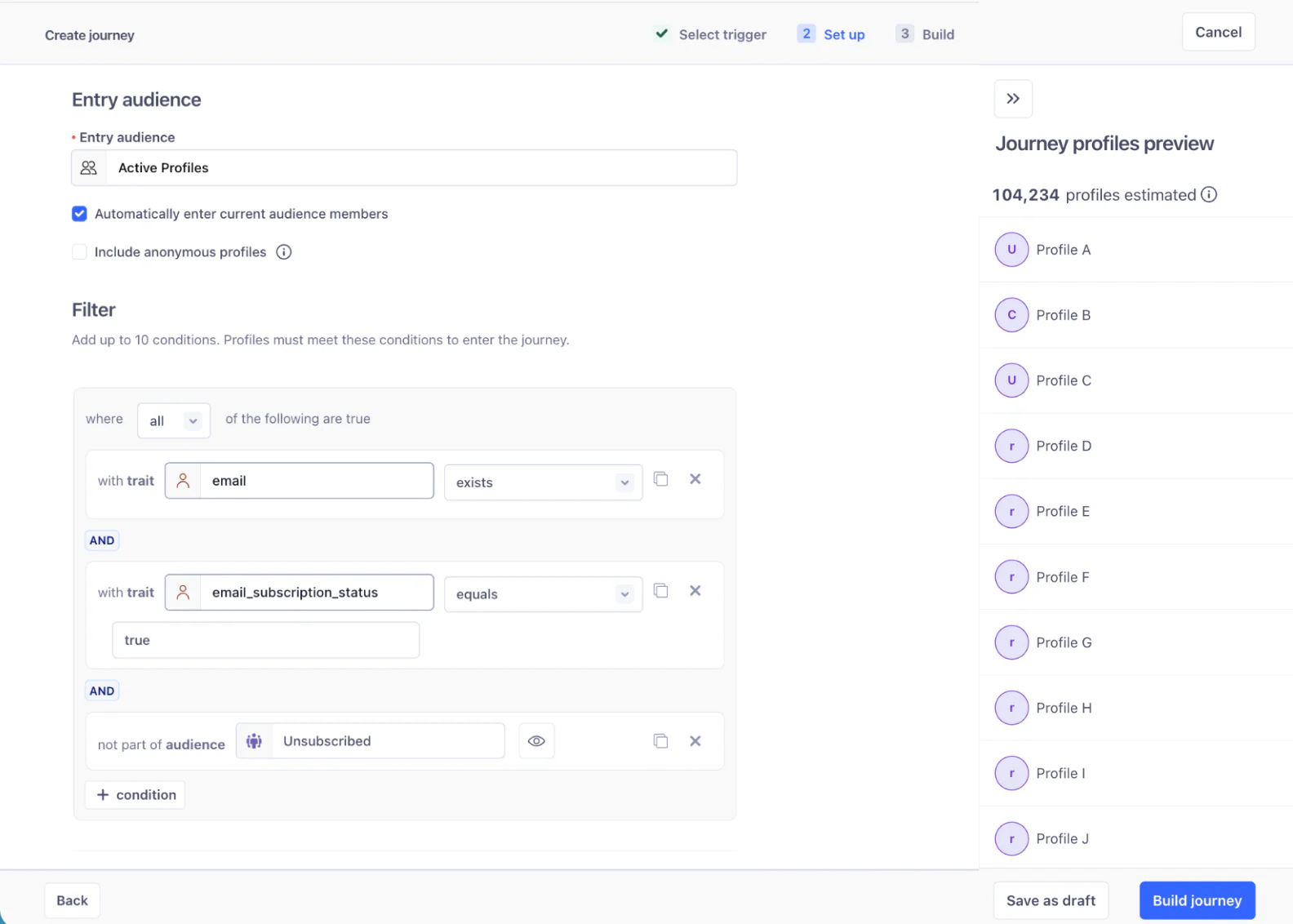
Custom Journey Entry Conditions (GA): You no longer have to rely on a selected audience as your only entry trigger. You can now build custom criteria right into the first step by adding up to 10 conditions based on Traits or Part of Audience parameters. For instance, if you are running a loan promotion to a broad audience of mortgage holders, you can instantly filter that entry down to profiles who live in a specific state and have a valid email address—all without leaving the setup flow to adjust the pre-existing Audience.
Journey Entry Preview (GA): To guarantee your entry conditions are perfect, this new validation tool lets you preview exactly who will enter the journey before you hit publish. By viewing the total number of matching profiles alongside a 50-profile sample, you can catch mismatches early and launch knowing your targeting is flawless.
Control Ad exposure to improve campaign efficiency
Once a profile moves into paid channels, marketers need tighter control over exposure and timing. Without it, you risk over-targeting, wasting ad spend, and driving down overall campaign performance.
Our new workflow controls help you avoid waste and overexposure by dictating exactly how long profiles stay in ad destinations, keeping paid activation perfectly aligned with the customer’s current lifecycle stage.
Show Ad Destination with Exit Controls (Currently Private Beta, Public Beta in December 2026): This net-new workflow step adds profiles to an Ad list and lets you define their exact retention window. Automatically remove users when they exit the journey or after a set timeframe to keep paid activation strictly aligned with the customer’s lifecycle stage. Ad destinations for Facebook, TikTok, Google Ads, DV360, Marketo, and Klaviyo are all supported. Plus, observability features ensure you can see and log when profiles have been removed from the Ad list destination right within the Profile Activity view.
<iframe width="560" height="315" src="https://www.youtube.com/embed/4mGoCTDSknA?si=HPmNBaezpkyt7l_3&start=245" title="YouTube video player" frameborder="0" allow="accelerometer; autoplay; clipboard-write; encrypted-media; gyroscope; picture-in-picture; web-share" referrerpolicy="strict-origin-when-cross-origin" allowfullscreen></iframe>
Start building
These capabilities are available now to help you scale more personalized, highly efficient customer interactions. Log into your Segment workspace and navigate to Journeys v2 under the Engage tab to orchestrate your next Journey. Don’t have Engage yet? Contact your account manager or talk to a Twilio Segment expert today to learn more.
FAQs
What are these Twilio Segment Journey enhancements used for?
These enhancements are used to help marketers build and manage more real-time, contextual Journeys with greater control in Twilio Segment CDP. They allow teams to refine audience or event-based entry, validate eligible profiles before launch, use live contextual data for personalization and routing, and better manage downstream activation—such as when customers enter or exit ad audiences.When should I use these new Twilio Segment Journeys features?
Use these enhancements when your journey benefits from responding to real-time customer behavior or when coordinating complex campaigns across channels. They’re especially useful for cart abandonment, onboarding, trial-to-paid, application workflows, re-engagement, and other “always on” lifecycle campaigns where timing, personalization, and downstream activation need to stay closely aligned.

Related Resources
Twilio Docs
From APIs to SDKs to sample apps
API reference documentation, SDKs, helper libraries, quickstarts, and tutorials for your language and platform.
Resource Center
The latest ebooks, industry reports, and webinars
Learn from customer engagement experts to improve your own communication.
Ahoy
Twilio's developer community hub
Best practices, code samples, and inspiration to build communications and digital engagement experiences.