Modern Bot Defense for Media Wiki Installs
Time to read:
May 14, 2026
Written by
Reviewed by
AI generated summary
- Update your MediaWiki installation and use Cloudflare to block unwanted bot traffic.
- Identify and monitor bot activity using your server logs to spot unusual patterns.
- Utilize MediaWiki tools and extensions, such as StopForumSpam, for targeted bot defense.
This summary was generated by AI.
Modern Bot Defense for MediaWiki Installs
Web development has gone through a lot of trends - from personal sites to web rings to blogs. Many builders these days running personal web sites opt for using an outside service for hosting. But some others are doing self-hosting on cloud platforms or personal servers.
The wiki format was invented in 2001, which is a long time on the internet. Wikis allow users to interactively and collaboratively edit the content of web pages. It makes them useful for long term projects, internet communities, and collecting a lot of data, which is why many wikis are still in use today.
But old formats can develop modern problems. In 2026, wiki installs are tempting targets for scraper bots. They offer a ton of text for bots to check out, and often have minimal built-in defense. I recently updated a MediaWiki install that was running on a legacy version of MediaWiki, and ran into a lot of problems trying to get my bandwidth to a normal level and stop bot activity from bringing down the site time and again. In this post I'll go over the problem, and lessons learned, hopefully to help anyone else out there who might be running into the same issues.
The problem
My MediaWiki site was running on an old version of MediaWiki - 1.26 to be precise. This is in contrast to the most up to date version of MediaWiki: 1.45. This is an old web site as far as the internet is concerned!
While the wiki platform’s stability is vital for preserving content, aging architecture acts as a beacon for automated threats. These legacy builds rely on older environments and unpatched extensions with well-documented vulnerabilities. This makes them prime targets for bots seeking to inject spam or scrape data. The challenge isn't just about closing security holes, but doing so without a forced version upgrade that could break your custom configurations or theme. The goal is to implement a modern "protective shell" around the site, neutralizing bot traffic at the edge to reduce server strain and database pollution while keeping your historical installation intact.
Identifying bot traffic in logs
My site first started having problems with overloading memory a couple weeks after DNS was activated. This traffic was persistent. It seemed erratic, hitting pages at random and hitting them hard. These scrapers were clearly not real users: they didn't look like logical human traffic, coming in too fast and hitting pages that humans don't normally visit. I peeked into the access logs for the wiki to find out what was killing my site, and saw a lot of suspicious traffic.
Depending on your userbase, bot activity might be very easy to notice. Or, your site might be popular enough that bot activity is more easily masked. If you aren't sure if the activity on your server is from bots, or legitimate users, there are a few different kinds of bot activity to be aware of:
Honest web-scrapers
Some bots are fairly well behaved and identify themselves cheerfully. This type of bot uses a clear User-Agent string. While some are "good" (Googlebot), many are scrapers looking to steal your wiki content for LLM training or SEO farms.
Finding bots like this can be straightforward. Look in the logs for User-Agent strings containing bot, spider, crawler, headless, or names like Bytespider or Amazonbot. These bots aren't too difficult to spot, but they are also less difficult to combat than other bots, since they generally hit your robots.txtconfiguration files and are willing to follow the rules you've set there.
"Imposter" bots (spoofers)
These robots are the ones that you will probably deal with the most. These bots look a bit like regular users and ignore your robots.txt, but they don't behave like real users. Rather than taking even 5–30 seconds to read a wiki page, like a normal human, a bot will hit 10 different Special:Random pages in 2 seconds. If you're seeing multiple GET requests from the same IP with identical timestamps down to the millisecond, that's not a human user.
To spot these imposters, look for the absence of secondary requests. When a human loads a page, the logs show the HTML load, followed immediately by CSS, JS, and Images. A "cheap" bot only requests the HTML. If you see 1,000 requests for .php pages but zero requests for .css or .png, it’s a bot.
Bots will often try to spoof old browsers, but they don't do so in a way that makes sense on the modern web. As an example, if the log shows a request from Internet Explorer 6, but the IP address belongs to a modern high-speed data center (like an AWS or DigitalOcean range), it’s a bot. Real humans on IE6 are usually on ancient residential ISPs.
Humans usually click a link (producing a Referer header). Bots often "teleport" directly to deep internal pages with no referrer information. Look for this behavior in your wiki logs.
The "POST" aggressors (spammers)
These bots actively try to interfere with your content. They want to create accounts or edit pages to drop backlinks. This is usually to fuel some SEO spam or advertising scam, and it can impact your data as well as your bandwidth. Blocking these bots is a must.
How to spot these intruders in your logs? Humans mostly GET (read). Bots will spam POST requests, often to high-bandwidth pages like Special:UserLogin, Special:CreateAccount, or to action=edit.
MediaWiki's tools for defense
MediaWiki itself offers a few ways to defend your site.
Robots.txt is a configuration file that tells bots how to behave on your site. This can tame some of the more "polite" scrapers, who are willing to follow the rules. But of course, bots with more malicious intent, such as spammers, will just ignore it.
Still, there are a few things you can do in your robots.txt to help block scrapers. As an example, blocking bots from looking at Special pages will cut down on a lot of bandwidth hitting your site. If your wiki is using short URLs, include these lines in your existing robots.txt file.
If you do not have short URLs enabled, use these lines (the standard URL formatting) instead:
If your wiki is for a small group of people and you don't want too many posters, you can limit who can post or even who can create an account. Your wiki setup has a file called LocalSettings.php that contains most of the settings for how to operate the wiki. Within this file are a lot of variables you can tweak such as showing where images are stored.
Here, you can disallow anonymous posting by adding these settings:
This means that any user that wants to post on the wiki will have to first make an account.
If your wiki is private and only for a small group of people, you can use stricter controls to combat spam by preventing account creation altogether. In your LocalSettings.php file for your wiki, add this line:
Be sure to add this near the end of the file so other permissions do not overwrite it. Now, only a wiki administrator can create a new user account, so bots can't make one and start spamming.
Finally, if your wiki is designed as an archive-only page, and no editing is needed at all, set this option in LocalSettings.php.
More information on configuration settings is located in the MediaWiki documentation.
MediaWiki also has several extensions you can install to help combat spam and spammers. A big one is the StopForumSpam extension. It does some automatic IP blocking of the most notorious spammer IPs. Another useful extension is CrawlerProtection, which prevents bots from trying to access pages that have a high bandwidth use. These wiki extensions can be installed at their respective pages.
If you want something a little more aggressive check out the BlockAI extension. This extension does block editing from anonymous users, but it ignores logged in users completely. It also forces an Error 418 on those aggressive bots, which, on a personal level, is my favorite HTTP error. Please note that this extension is experimental, so use with care!

Cloudflare - a proactive solution
Setting up your wiki correctly is your first line of defense, but sometimes it isn't enough. Cloudflare has become the number one line for bot defense for many web sites throughout the internet. It works as a shielding layer between your DNS and your actual IP, blocking unwanted traffic. Oftentimes its intervention is invisible.
You will see some results just from setting up Cloudflare without any additional tweaks. Cloudflare has a free plan that will help block a lot of traffic without adding to your costs. It also gives you more detailed logs about the traffic that you are getting. Cloudflare documentation will explain how to set up Cloudflare as your DNS.
Once Cloudflare is managing your site, blocking AI training bots is as simple as setting a toggle, located on your DNS page:
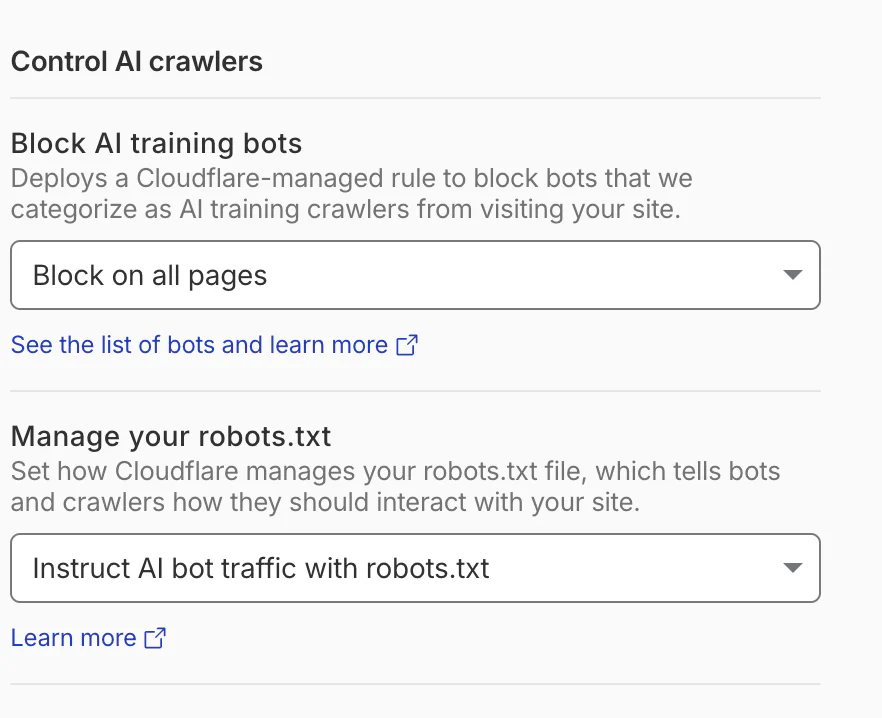
As you can see, Cloudflare can also manage your robots.txt for you, making sure that bots are blocked from that vector too.
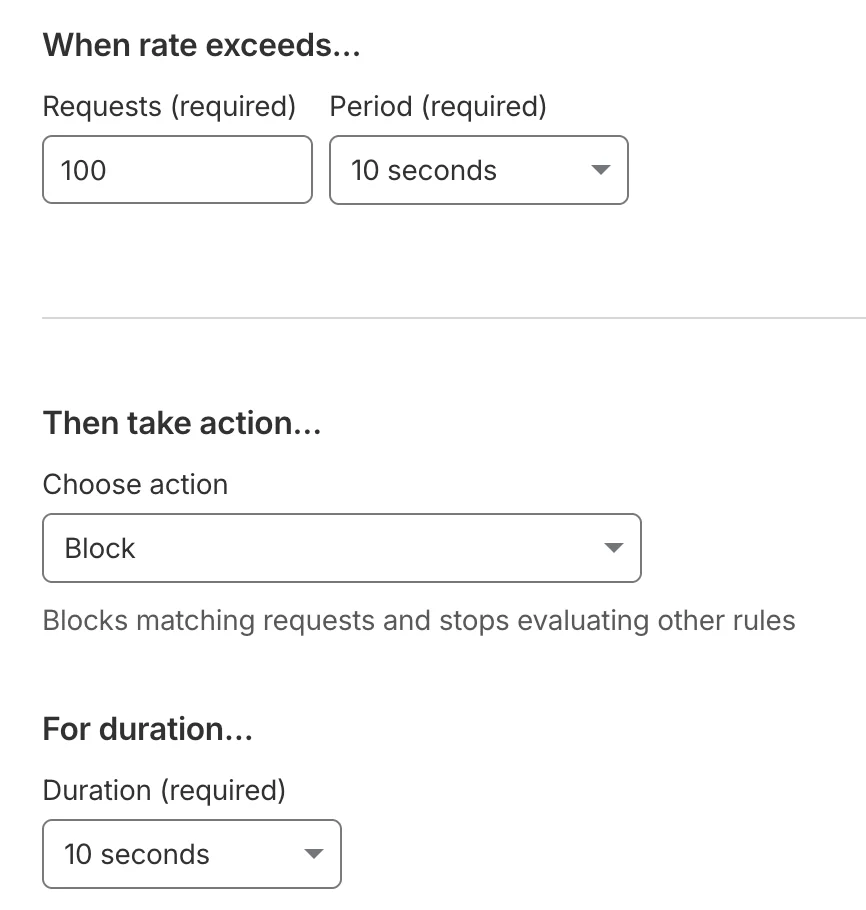
Bots can use a lot of bandwidth fast, but real users aren't usually that aggressive. Setting up a Rate Limiting Rule can help slow down attackers. To do this, look at the sidebar, and go to Security -> Security Rules. Now choose Create Rule -> Rate Limiting Rule. Rate limits will allow you to slow down access to your web site, making it harder for bots to send too many requests too fast.
As an example, setting When rate exceeds… to 100/10 seconds, and a 10 second duration, as shown in the screenshot below, means that anybody who makes more than 100 requests every 10 seconds will get blocked for 10 seconds. Most users don't use your wiki that quickly, even if they're making edits, so they should be all right. Bots will easily make that many requests very quickly.
After your site has been up for a while, you will have a better idea of how much traffic it's getting, and what type. You can view logs in Cloudflare by going to Security -> Analytics -> Events. See if there is an IP prefix showing up a lot here repeatedly that has suspicious bot-like activity, as flagged above. If so, you can set a custom rule to block specifically that IP prefix.
If you really end up getting attacked no matter what else you do, set Cloudflare to Under Attack Mode. Under Attack Mode means all visitors to your site will have to do a Managed Challenge to load your site. Usually this is a relatively quick pre-loading screen that verifies that your user is indeed human, before serving the site. Setting this challenge cuts down on bots a lot. However, you may not want to leave the challenge screen up for too long, because this will also slow things down a bit for human users.
Conclusion
Agentic AI has become more popular than ever, and AI needs data to train. Training agents who scrape text might use up a lot of bandwidth that should be used by human users. Other bots might just be using your wiki as a way to inject spam for advertising or creating garbage SEO. And because these bots use your bandwidth, they're going to cost you money, using up bandwidth and perhaps making spammy posts, at the cost of creating something for your actual human users.
If you want to save money on your hosting and you are hosting a wiki these approaches will make sense for you. By deploying these various different defenses you can decrease hits on your web site from scrapers. Your site will have better uptime, you'll save money, and your users will thank you.
We'd hope someone out there can benefit from this knowledge! We'd love to see what you build and want to help you throughout your builder journey, no matter what the project or where it leads.
Amanda Lange is a .NET Engineer of Technical Content. She is here to teach how to create great things using C# and .NET programming. She can be reached at amlange [ at] twilio.com.

Related Resources
Twilio Docs
From APIs to SDKs to sample apps
API reference documentation, SDKs, helper libraries, quickstarts, and tutorials for your language and platform.
Resource Center
The latest ebooks, industry reports, and webinars
Learn from customer engagement experts to improve your own communication.
Ahoy
Twilio's developer community hub
Best practices, code samples, and inspiration to build communications and digital engagement experiences.