Create High-Impact RCS Marketing Campaigns in Heymarket using Twilio
Time to read:
June 25, 2026
Written by
Reviewed by
AI generated summary
- Use Heymarket and Twilio to create interactive RCS campaigns.
- RCS offers branded, app-like messaging experiences, boosting engagement and conversions.
- Default to SMS/MMS fallback to ensure message delivery to all users.
This summary was generated by AI.
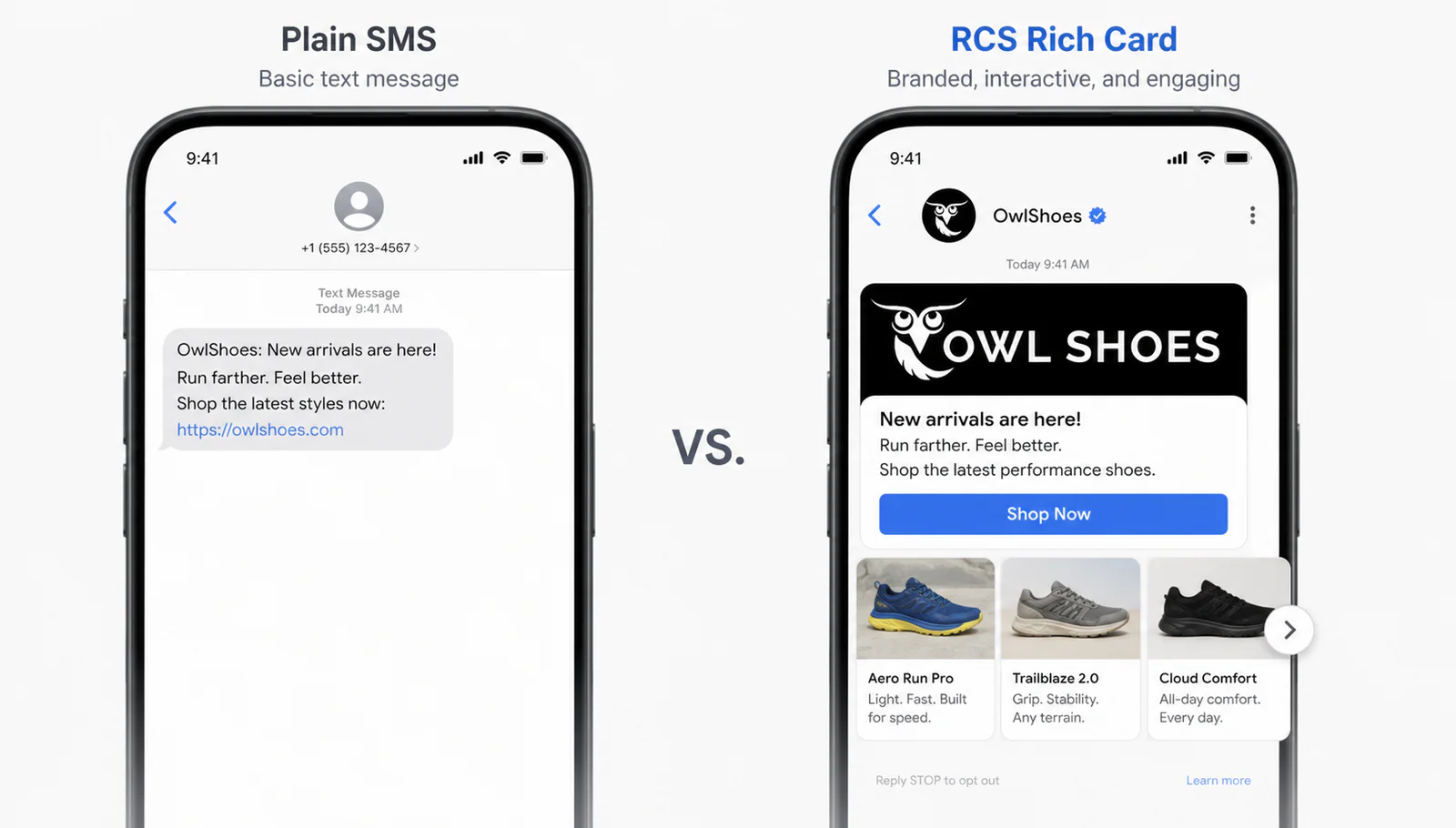
If you’re using Heymarket for business messaging, you likely want a more immersive way to engage customers than standard SMS. While SMS is great for alerts, Rich Communication Services (RCS) lets you send branded, interactive, app-like experiences directly to a user's native messaging app.
This tutorial shows how customers can use Heymarket, powered by Twilio under the hood, to deploy RCS campaigns that drive higher conversion through verified branding, carousels, and suggested actions. Heymarket handles the complexity of the messaging ecosystem and integrates directly with Twilio, creating a simplified onboarding and messaging experience directly within the Heymarket platform. With Apple's support for RCS since the iOS 18 launch in 2025, you can reach both Android and iPhone users with high-resolution media and interactive buttons with a single send.
In this tutorial, you will learn how to implement an RCS strategy by configuring:
- Verified Sender Profiles for brand trust
- Rich Card Carousels for product discovery
- Suggested Actions to streamline the customer journey
Heymarket and Twilio: The Messaging Framework
There are a few ways to use Heymarket with Twilio, and you can scale up the features and complexity of your implementation in stages based on your requirements. In this post, we’ll show you the Crawl phase. By the end of the post, you’ll be able to set up your environment for outbound RCS marketing.
- Crawl (this post): Basic RCS setup and one-way rich media campaigns
- Walk: Bi-directional RCS messaging with real-time CRM syncing (Salesforce or HubSpot)
- Run: Advanced AI-driven orchestration and automated drip campaigns based on customer behavior
How we built the RCS experience in Heymarket
Before walking through the setup, we’ll explain how Heymarket exposes RCS to marketers.
RCS is a fundamentally richer surface than SMS, but that richness can become an usability tax if the composer mirrors the underlying Twilio API. Our goal is to make the most expressive parts of RCS (cards, carousels, suggested actions) feel native to the Heymarket workflow our customers already use for SMS campaigns.
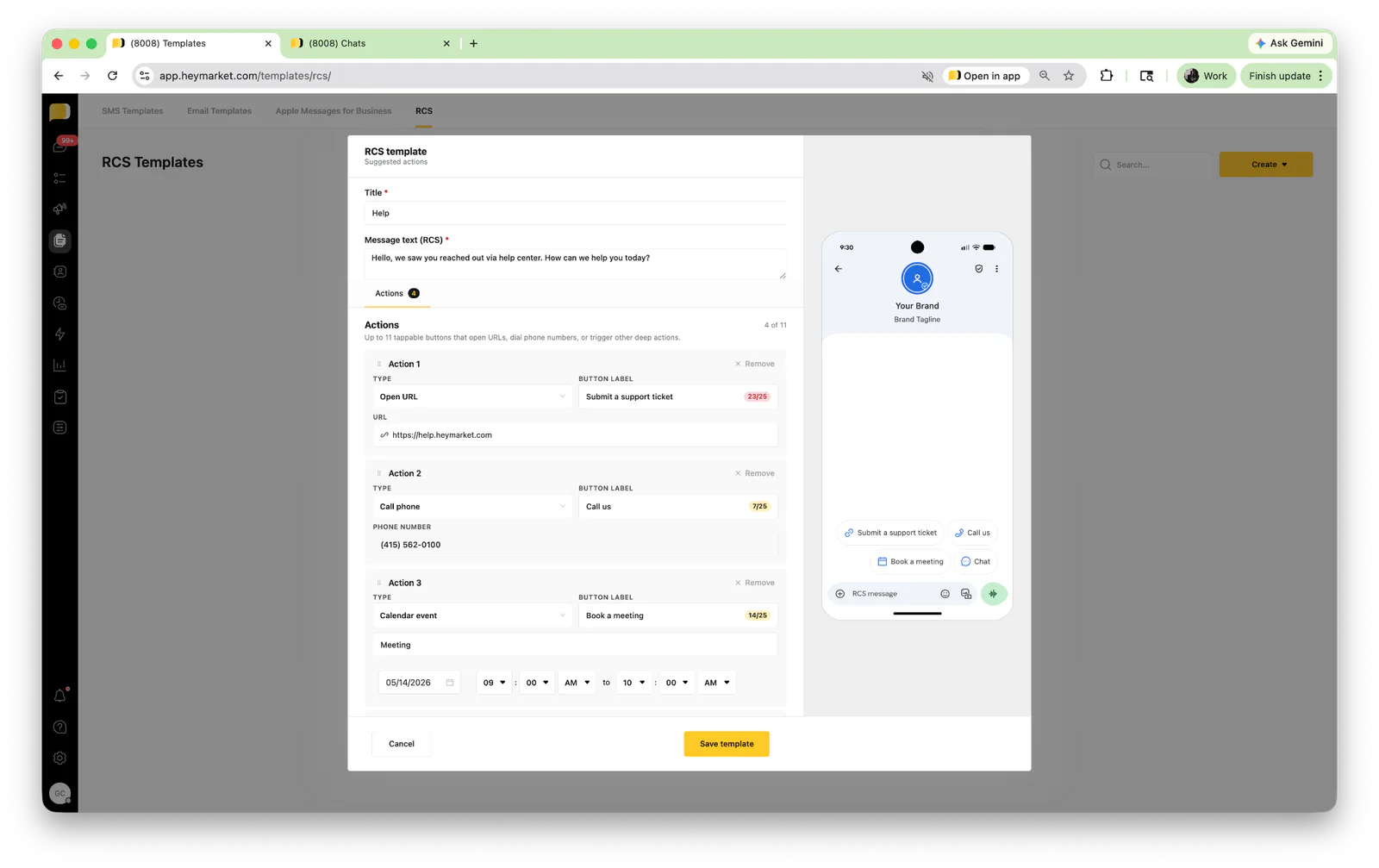
Designing the RCS Forms
We treated the RCS composer as a guided form rather than a freeform editor. Each content type ( standalone Rich Card, Carousel, Suggested Reply, Suggested Action) is its own structured block with inline validation for character limits, image dimensions, and button counts. Building the composer in this way prevents the most common cause of failed sends: payloads that pass Heymarket validation but get rejected downstream by Twilio or the carrier.
The Submission and Validation Pipeline
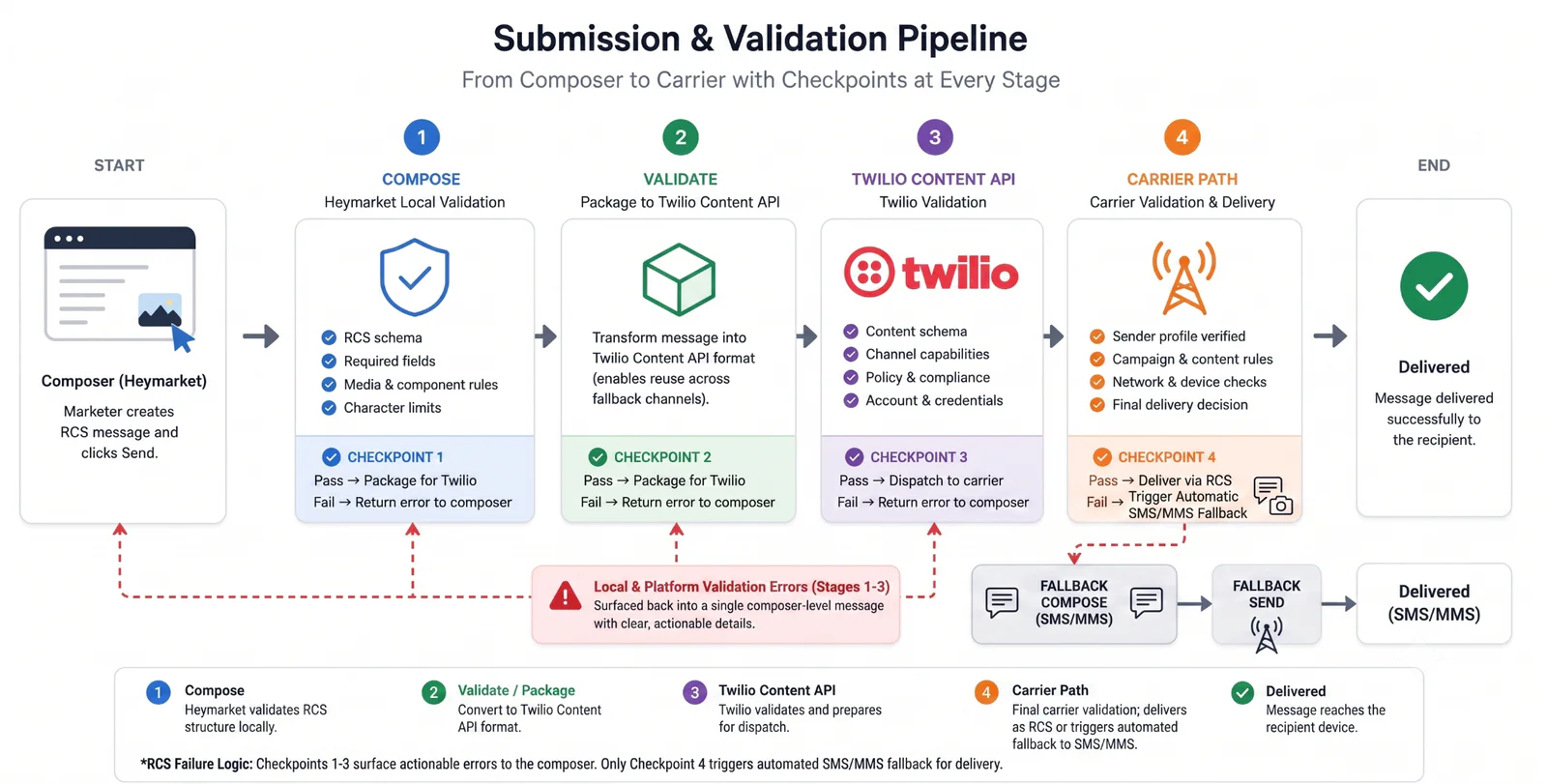
When a marketer hits Send, the payload moves through three stages before it ever touches a carrier:
- First, Heymarket validates the structure locally against the RCS schema.
- Second, we package the message into Twilio's Content API format, which lets us reuse the same template for fallback channels.
- Third, Twilio performs its own validation and dispatches to the carrier, which performs a final check against the verified sender profile.
Surfacing errors from any of these stages back into a single composer-level message was one of our harder design problems (and one we are most proud of).
Thinking behind the interactions
A few principles guided this interaction design:
- Default to the safest send. Fallback to SMS/MMS is on by default, so a marketer who forgets to toggle it still reaches every recipient.
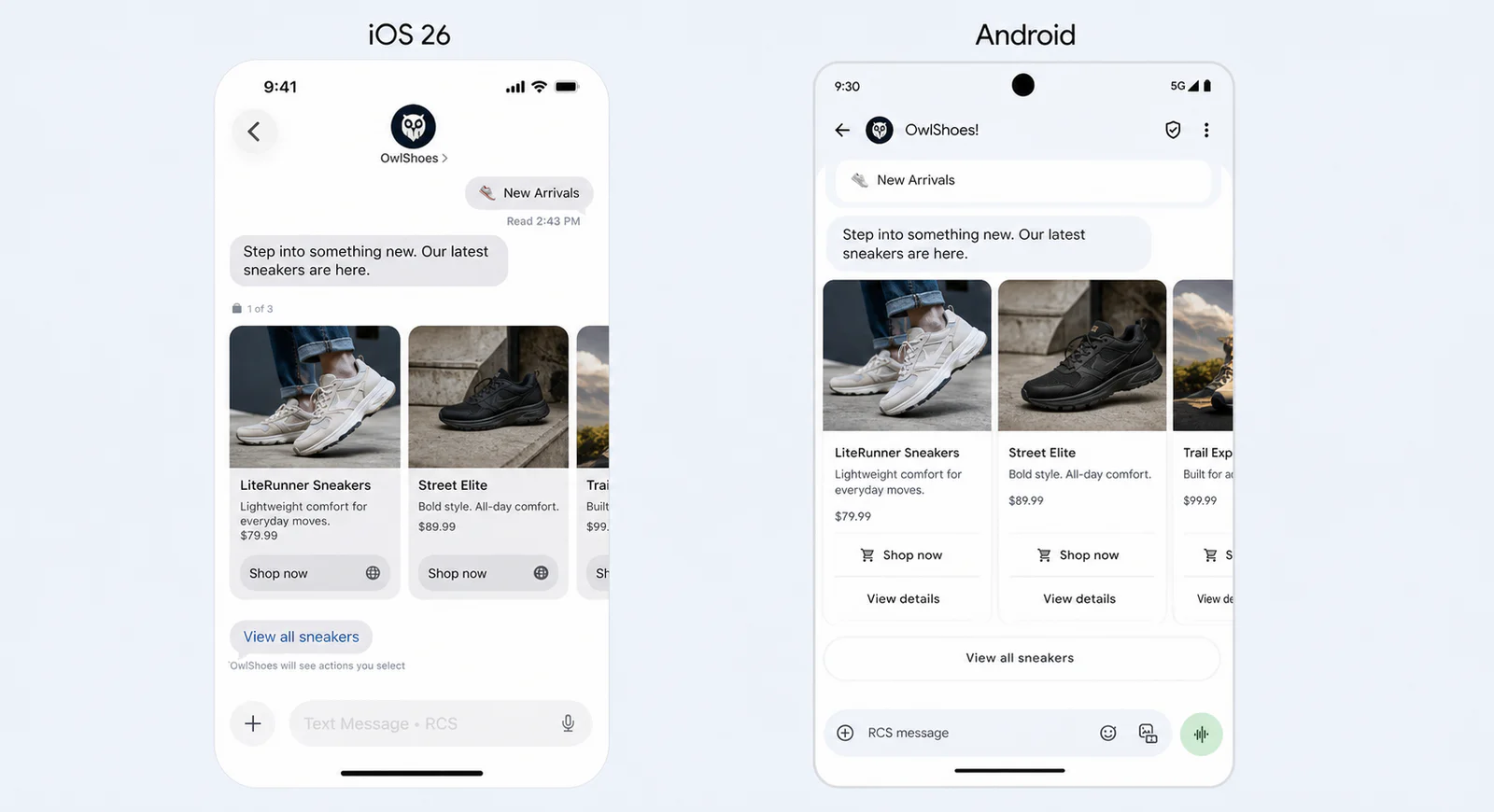
- Preview what the customer actually sees. The live preview pane renders the iOS 26 and Android variants side by side, because the same payload renders differently on each platform.
- Make destructive actions explicit. Editing a verified sender profile triggers a re-verification warning, since changes can pause sends for hours.
Now that you’ve seen a little more detail on our approach with our RCS experience, we’ll show you how to send one-way rich media campaigns with Heymarket and Twilio.
Prerequisites
Before you get started, you will need:
- A Heymarket account with Admin access on a Plus or Proplan
- RCS Sender requirements
- A square brand logo (224 x 224 px, PNG, under 50 KB) and a hero banner (1440 x 448 px, PNG or JPG, under 200 KB)
- A brand accent color in hex, plus your support phone number, support email, website, privacy policy URL, and terms of service URL
- Compliance registration details
Step 1: Sign Up for a Heymarket Account
If you don’t already have one, create your Heymarket account and complete the onboarding flow. Choose the Business or Enterprise plan, since RCS sending requires Admin-level permissions and access to the Campaigns module.
Step 2: Submit Your RCS Registration
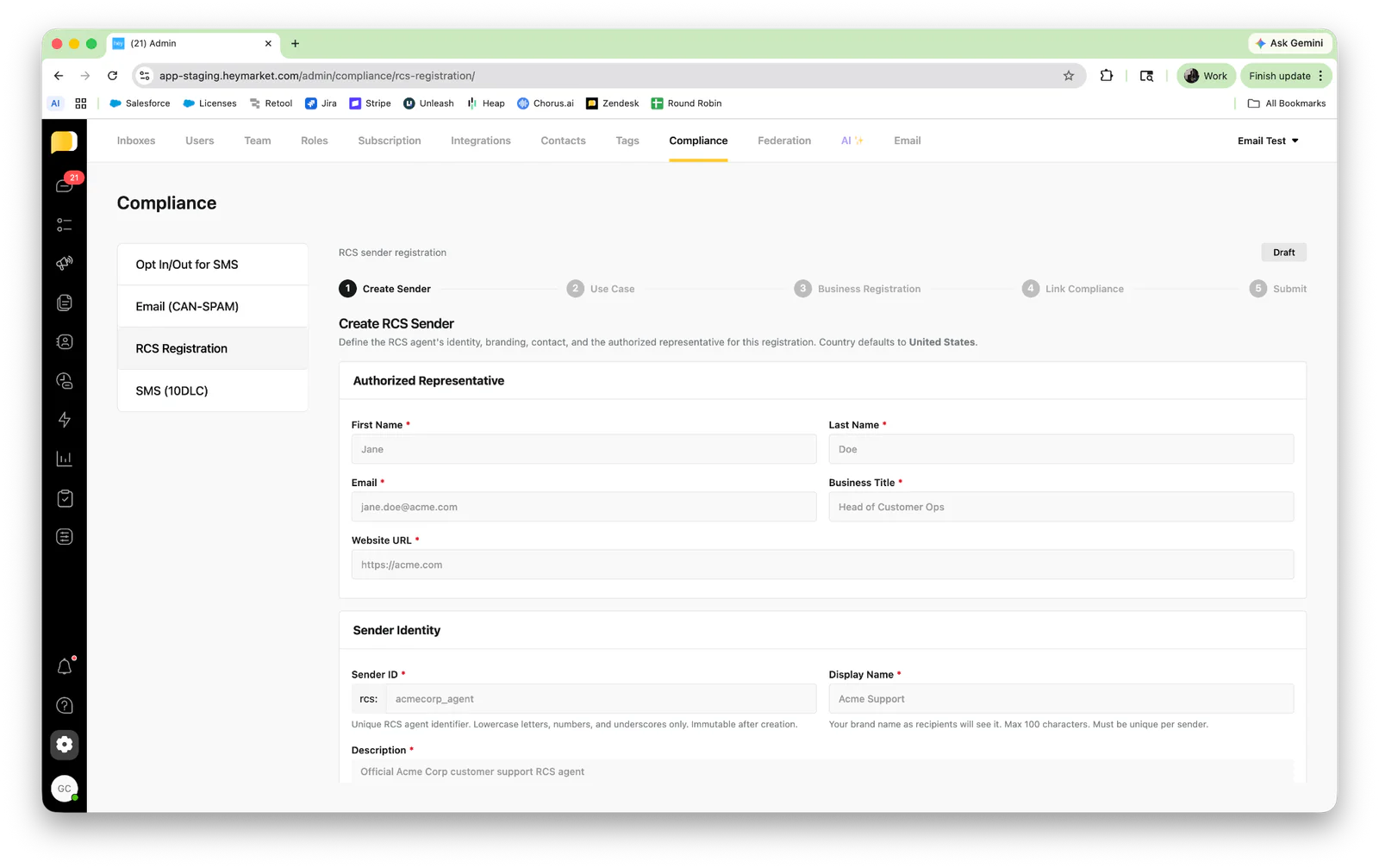
RCS replaces a random 10-digit number with your brand name and logo. Heymarket collects everything carriers need to verify your brand in a single form, so you never have to leave the product.
- In Heymarket, navigate to Administration > Compliance > RCS Registration.
- Upload your Square Logo (224 x 224 px, PNG, under 50 KB) and Hero Banner (1440 x 448 px, PNG or JPG, under 200 KB).
- Set your Accent Color as a hex value. Heymarket validates contrast against white text in real time and shows an AA pass indicator when the ratio is at least 4.5:1.
- Fill in the Contact section with your support phone number, email, and website.
- Fill in the Legal section with your privacy policy URL and terms of service URL.
- Click Continue to submit, or Save Draft to come back later.
After you submit and once carriers verify the registration, your messages will display a Verified checkmark, which significantly boosts open rates, especially during high-traffic periods like the holidays.
Step 3: Build Your First RCS Template
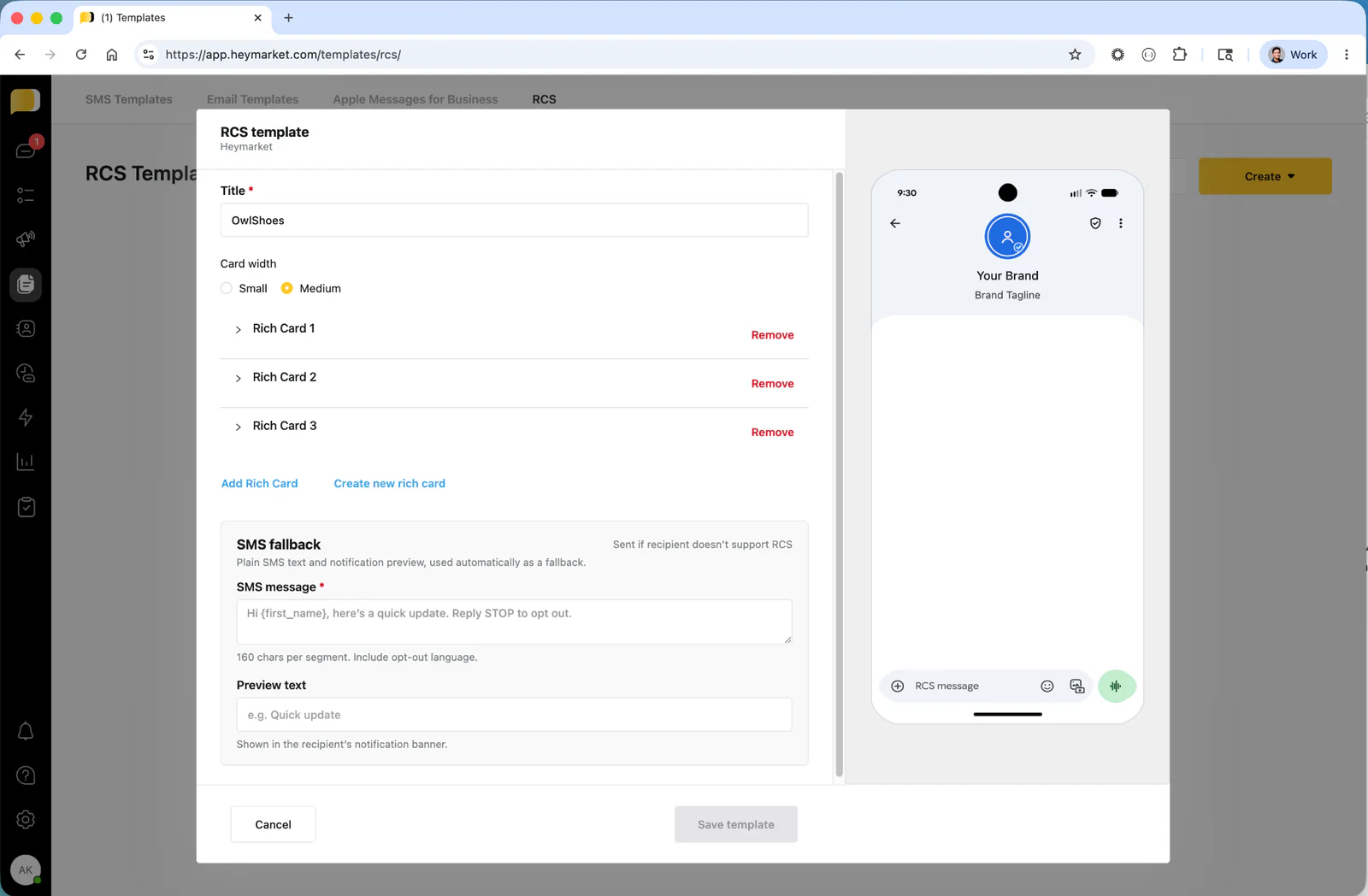
Now for the part that makes RCS messages feel different from SMS: the content. Unlike SMS, RCS allows Rich Cards and Carousels.
Create a Rich Card Carousel
Carousels allow users to swipe through up to 10 items.
- The Hero Strategy: Always place your best seller or most relevant offer in the first card. Shoppers make split-second decisions.
- Visuals: Use high-resolution images. Blurry photos kill conversions faster than bad copy.
Add Suggested Actions
Instead of asking a user to "Reply 1," give them a button.
- Suggested Replies: "See Best Sellers" or "Track My Order"
- Suggested Actions: "Open Website" (to a specific checkout page) or "Dial Support"
Write buttons like commands. "Buy Now" is more effective than "Would you like to buy this?"
Step 4: Launch and Fallback
Not every phone supports RCS yet.
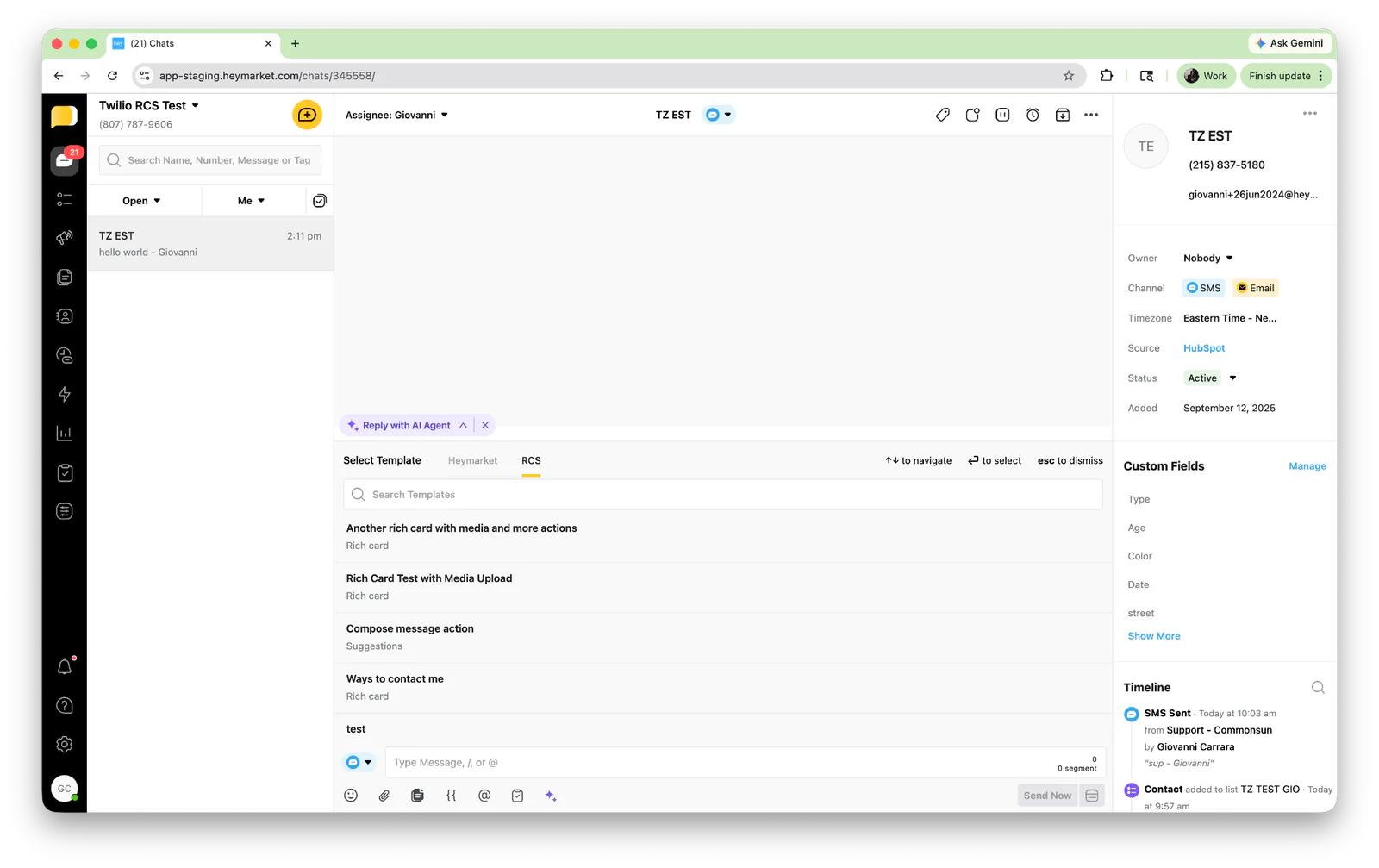
- Within Heymarket, compose your message using the Campaigns tool.
- Configure Fallback. Ensure your campaign is set to Fallback to SMS/MMS. If the recipient's device does not support RCS, they will receive a standard text with a link, ensuring 100% reach.
Testing the Integration
- Send a Test: Use a personal Android or iOS 26 device to verify the branding and button functionality.
In this example, we used a Heymarket sender and created a simple message for Heymarket HubSpot Support:
Conclusion
Using RCS via Heymarket and Twilio transforms your messages from notifications into destinations. By using verified branding and interactive carousels, you provide a professional experience that builds trust and simplifies the path to purchase.
Next Steps
And there you have it! You now have a working one-way RCS implementation with Heymarket and Twilio. Now, you can put RCS to work across your customer lifecycle, using it for everything from promotional campaigns to automated conversational flows.
After you have one-way RCS campaigns working, our next suggested stages are:
- Scale up: Increase your conversion potential by segmenting audiences based on purchase history to deploy personalized Abandoned Cart carousels.
- Automate: Leverage Heymarket Automations to instantly trigger an interactive rich card greeting whenever a new lead engages via keyword.
Additional Resources
- Twilio RCS documentation: https://www.twilio.com/docs/messaging/channels/rcs
- Heymarket Campaigns guide: https://www.heymarket.com/product/campaigns/
- Turn on RCS messaging on your iPhone: https://support.apple.com/en-us/122195
- Heymarket Automations and keyword triggers reference: https://www.heymarket.com/blog/new-automations/
Al Kiramoto is a Solutions Engineer at Twilio who enjoys working with customers and solving business problems. He lives in Dallas, TX and enjoys a good barbecue and TexMex food. He can be reached at akiramoto [at] twilio.com.
Giovanni Carrara is a Senior Product Manager at Heymarket, where he leads the RCS and rich messaging roadmap. He can be reached at giovanni [at] heymarket.com.
Related Resources
Twilio Docs
From APIs to SDKs to sample apps
API reference documentation, SDKs, helper libraries, quickstarts, and tutorials for your language and platform.
Resource Center
The latest ebooks, industry reports, and webinars
Learn from customer engagement experts to improve your own communication.
Ahoy
Twilio's developer community hub
Best practices, code samples, and inspiration to build communications and digital engagement experiences.