Integrate Deepgram Flux with Twilio's Conversation Relay
Time to read:
September 08, 2026
Written by
Twilio's ConversationRelay allows you to wire phone calls to your AI stack. It handles speech recognition (STT), speech synthesis (TTS), and the WebSocket session, so your code only deals with the Large Language Model (LLM) and the conversation logic.
ConversationRelay now supports Deepgram Flux as a speech model. Flux combines transcription and turn detection into a single model which cuts agent response latency by up to 200 to 600 milliseconds and reduces false interruptions by around 30%. Learn more about Deepgram Flux here.
In this tutorial, you'll enable Flux on a ConversationRelay app in Node.js and tune the attributes that Flux supports.
Prerequisites
- A Twilio account. Sign up for free.
- A voice-capable Twilio number. Here's how to buy one.
- Node.js v18 or higher.
- ngrok, for a public tunnel to your local server.
- An OpenAI account and API key.
How Deepgram Flux works
Most speech pipelines stack separate components: a Voice Activity Detection (VAD) layer watches for silence, an endpointing layer decides how much silence means the caller is done, and a speech model transcribes the audio. None of those components work together and understand the words and so they measure duration instead of meaning. "I need to check on something, one moment" has a pause in the middle. "Thanks so much." does not. A silence-based detector treats both the same way.
Flux is a Conversational Speech Recognition model which means transcription and turn detection happen inside the same model. Because it recognizes the words, it can tell a mid-sentence pause from a finished thought.
Here's what you get with using Deepgram Flux on a Conversation Relay call:
- Lower latency - Up to 200 to 600 milliseconds faster agent responses than an STT plus VAD pipeline.
- Fewer false interruptions - Around ~30% fewer cases of the agent talking over the caller.
- Stable transcripts. Conventional streaming models rewrite partial transcripts as more audio arrives.
- Ten languages - English, Spanish, French, German, Hindi, Russian, Portuguese, Japanese, Italian, and Dutch. It also supports callers that switch languages mid-sentence
- Tunable confidence - Flux exposes its end of turn confidence as a TwiML attribute (which you'll set in this tutorial).
- No accuracy tradeoff - Flux matches Nova-3 on word error rate (WER) while handling turn detection at the same time.
Flux also passed every condition in our background noise testing on its default configuration: How to Handle Background Noise When Using Conversation Relay.
Build the application
Step 1: Clone the demo app
To speed things up, you'll start from an existing ConversationRelay agent and change its speech model: the Voice Assistant with Twilio and Open AI (Node.js) repository. It's a Fastify server with one TwiML route, one WebSocket route, and an OpenAI call in between.
If you want to see how it was built, check out its tutorial blog here: Integrate OpenAI with Twilio Voice Using ConversationRelay.
Open your terminal, navigate to your preferred directory, and clone the repo:
Then, move into the project directory:
Once inside, download the the dependencies:
Step 2: Run an ngrok tunnel
Your ConversationRelay demo application will spin up a WebSocket server using Fastify, which will be used to communicate between your application and Twilio. However, this server is only hosted locally on your computer, meaning it isn't publicly accessible. ngrok will be used to connect your Fastify server to the internet by generating a public URL that tunnels all requests directly to your local server.
In a new terminal tab, start a tunnel to port 8080, where the server runs:
After executing the command, ngrok will print out the tunnel details:
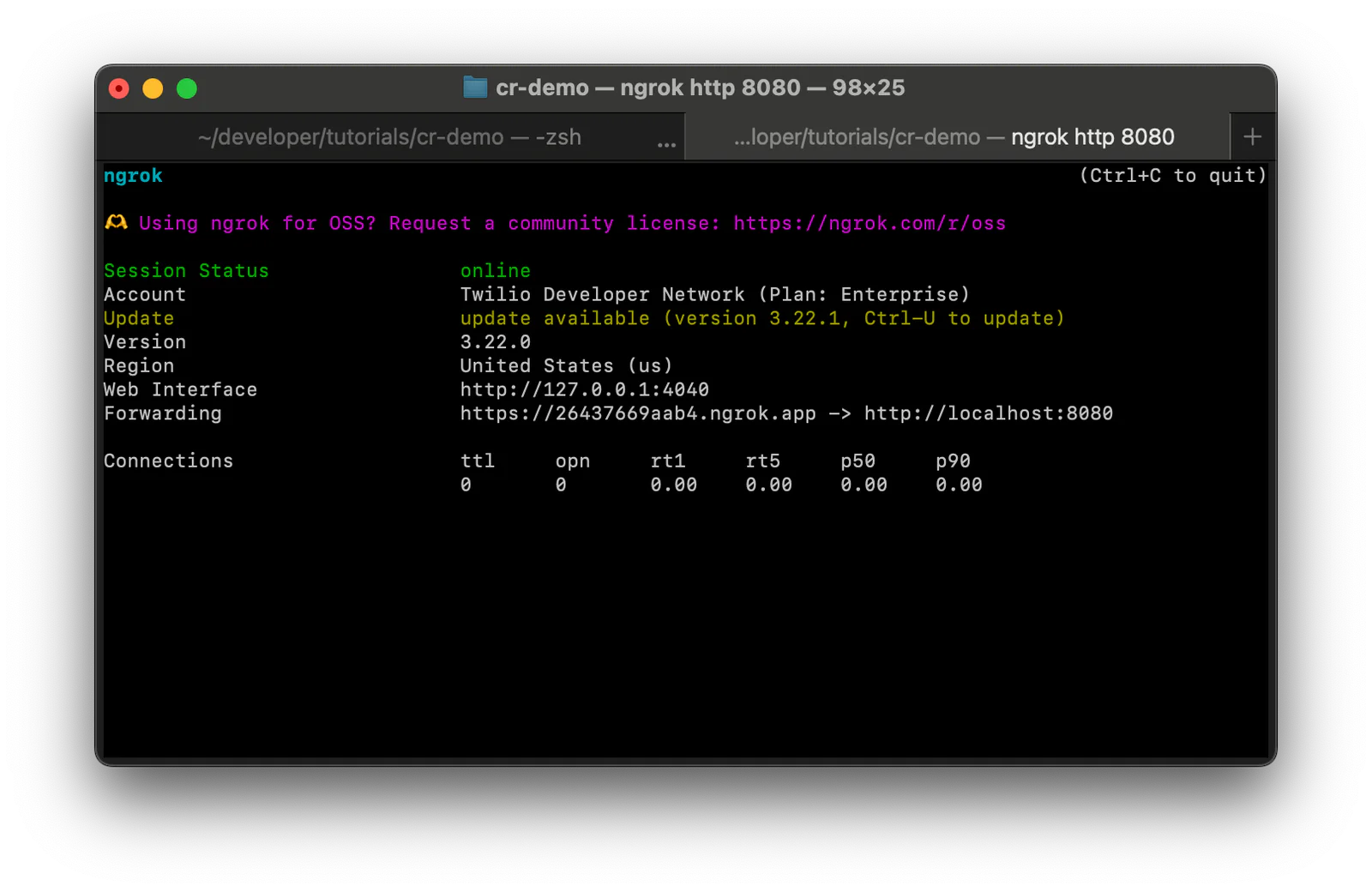
Copy the Forwarding URL and leave this tab running.
Step 3: Set your environment variables
Open the cr-demo directory in VS Code or your preferred IDE. Right-click .env.example, select Rename, and change the name to .env. Then, copy and paste in the following environment variables:
Replace sk-XXXXXX with a key from your OpenAI dashboard and abc123.ngrok-free.app with your Forwarding URL without https://.
Step 4: Switch the speech model to Flux
Open the server.jsfile. The /twiml route returns the TwiML that starts the call, and the /ws route handles the WebSocket that carries the conversation.
Locate lines 33 to 37:
You'll need to add two attributes on the ConversationRelay noun to switch you to Flux:
Deepgram is already the default transcriptionProvider (except on accounts created before September 12, 2025, which default to Google but setting it explicitly works on both).
speechModel picks the Deepgram model. The default is nova-3-general, or nova-2-general for languages Nova-3 doesn't cover. Setting it to flux also unlocks the three attributes below.
Flux-only attributes
These three attributes only apply when transcriptionProvider is Deepgram and speechModel is flux. Each one adjusts how the agent decides the caller is finished.
End-of-turn threshold
Every time the caller pauses, Flux scores how likely it is that their turn is over. eotThreshold is the score required before ConversationRelay finalizes the transcript and sends it to your WebSocket. Values range from 0.5 to 0.9, and the default is 0.8. Lower it for faster replies, raise it for more patience:
Keep the default for now:
Partial prompts
By default, your WebSocket only receives a prompt message once the turn is finalized. Setting partialPrompts to true also sends unfinalized prompts and eager end-of-turn events, both marked with last set to false.
An eager end-of-turn fires at lower confidence than a real one, typically 150 to 250 milliseconds earlier. Either the turn is confirmed and the final transcript matches, or the caller keeps talking and the guess is dropped.
This tutorial leaves partialPrompts at its default (false). If you want to enable it, you'll have to cancel LLM requests when Flux withdraws an eager guess and duplicate the response when the final transcript matches, which is a separate build. If you want to add it, see Deepgram's guide to eager end of turn for the pattern: Optimize Voice Agent Latency with Eager End of Turn.
Speech timeout
speechTimeout accepts a value between 600 and 5000 milliseconds and defaults to auto. Under Flux, Deepgram detects turn boundaries server-side, so speechTimeout becomes a ceiling: the longest silence Flux tolerates before forcing the turn closed regardless of confidence.
Three seconds works for a general assistant:
Other attributes worth setting
These aren't Flux-only, but they address the same problem and are shipped alongside it.
Ignore backchannel
ignoreBackchannel stops short conversational feedback like "uh huh", "yeah", and "mm hmm" from interrupting the agent mid-response. It defaults to false and works across multiple languages. Set this to true:
Smart formatting
deepgramSmartFormat converts dates, times, currency, numbers, and addresses into conventional written forms. It applies to all Deepgram models and defaults to true. A phone number transcribed as digits rather than spelled-out words is much easier for your LLM to act on.
Hints
hints takes a comma-separated list of words the caller is likely to say, which Flux uses as key terms to bias recognition. Product names, place names, and jargon are the highest-value entries.
Step 5: Apply the settings
Here are the values this tutorial uses:
transcriptionProvider: DeepgramspeechModel: fluxeotThreshold: 0.8speechTimeout: 3000ignoreBackchannel: true
Replace the /twiml route in server.js with the following:
Save the file.
Step 6: Connect your Application to Twilio
Go back to your ngrok tab and copy the Forwarding address, this time keeping the https://.
On the left tab of the Twilio Console, open Products & Services > Numbers & Senders > Overview and click your number. Click on the Voice and emergency address tab and click Edit configuration details.:
- Set the "Select your primary method" dropdown to Use webhook.
- Paste your Forwarding address into the URL field ("What is your webhook URL?") and add /twiml, for example
https://abc123.ngrok-free.app/twiml. - Set the HTTP dropdown to HTTP GET.
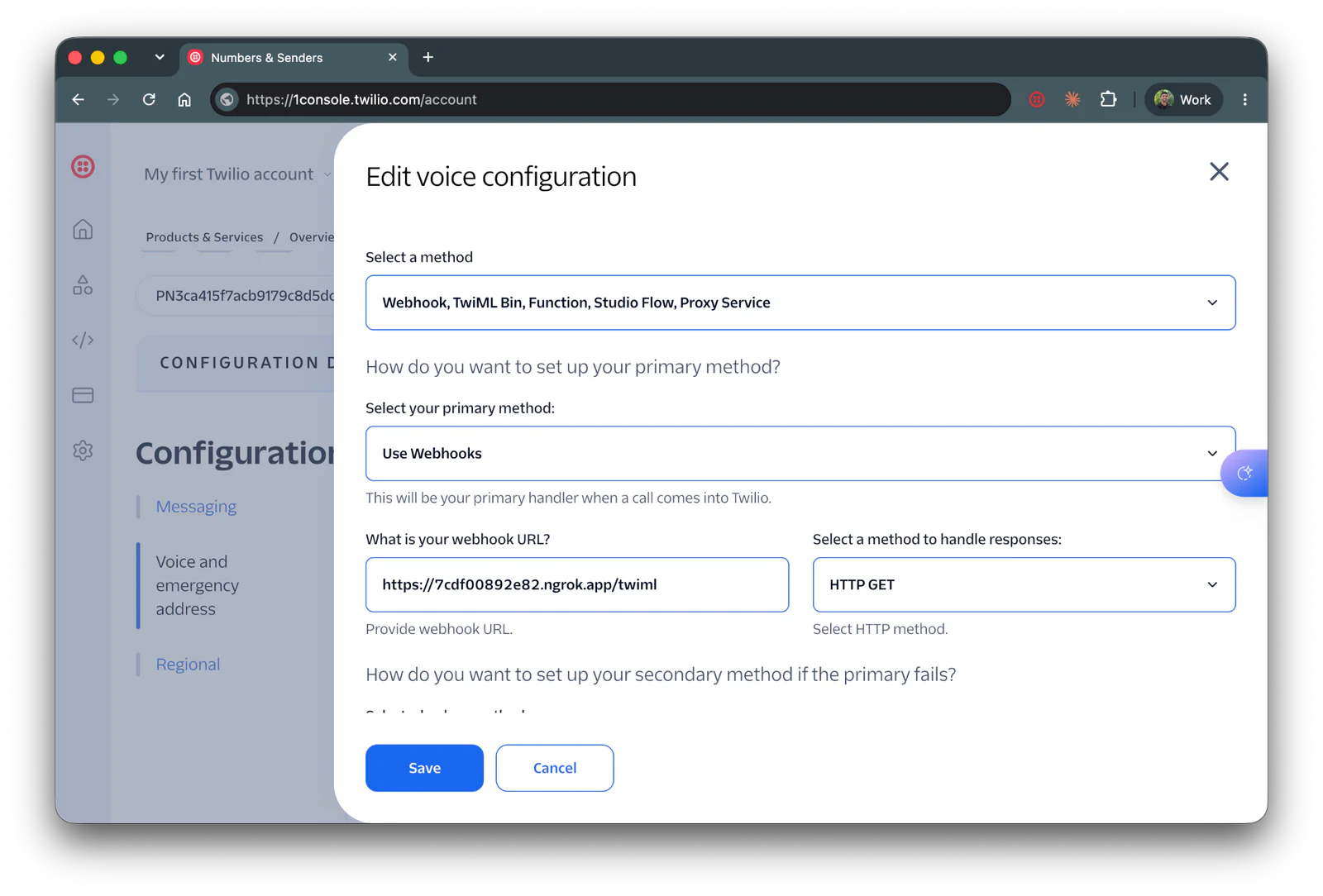
Scroll down and click Save.
Run and test the application
Leave ngrok running. In a new tab, from the cr-demo directory, start the server:
You should see both addresses it's listening on:
Now call your Twilio number to hear how your Deepgram Flux agent sounds! Feel free to adjust the settings, then restart your node server to hear the updated agent.
Conclusion
Switching to Deepgram Flux replaces a stack of separate turn detection components with one model that understands the words, and gives you three unique attributes: eotThreshold, partialPrompts, and speechTimeout.
Here are some ways to take it further:
- Optimize your agents latency with eager end-of-turn. See Deepgram's guide to eager end of turn.
- Serve callers in more than one language. Flux covers ten languages in one model and detects the language automatically. See Flux multilingual and language prompting.
- Use the
eventsattribute to subscribe and react to useful messages which you can use to build your own turn-taking analytics.
For the full attribute list, see the <ConversationRelay> TwiML noun documentation.
Dhruv Patel is a Developer on Twilio's Developer Voices team. You can find Dhruv working in a coffee shop with a glass of cold brew or he can be reached at dhrpatel [at] twilio.com.

Related Resources
Twilio Docs
From APIs to SDKs to sample apps
API reference documentation, SDKs, helper libraries, quickstarts, and tutorials for your language and platform.
Resource Center
The latest ebooks, industry reports, and webinars
Learn from customer engagement experts to improve your own communication.
Ahoy
Twilio's developer community hub
Best practices, code samples, and inspiration to build communications and digital engagement experiences.