Reverse ETL vs. The Private Cloud: A Conceptual Survival Guide
Time to read:
April 20, 2026
Written by
Reviewed by
AI generated summary
- Network isolation complicates direct connectivity between Segment Reverse ETL and a private Databricks SQL Warehouse.
- A custom proxy service bridges authentication and connectivity gaps, handling token exchanges and request routing.
- This solution maintains security while allowing Segment to access Databricks, ensuring secure data flows.
This summary was generated by AI.
Reverse ETL vs. The Private Cloud: A Conceptual Survival Guide
The "Unstoppable Force" Meets the "Immovable Object"
Modern data architectures often have a common goal: getting warehouse data into the hands of teams that need it. But when you’re working with strict network security, you often hit a stalemate.
On one side, you have Segment Reverse ETL, which needs a public HTTPS endpoint to do its job. On the other, you have a Databricks SQL Warehouse tucked safely inside a private Azure Virtual Network (VNet), invisible to the public internet.
This introduced two key constraints:
- Segment requires a publicly accessible HTTPS endpoint
- Databricks SQL Warehouse was not publicly accessible
This created a gap between connectivity requirements and network isolation, making direct integration infeasible. Security says "No public access." Segment says "I can't see you." Here’s how we built a bridge between them without breaking the rules.
Segment Reverse ETL in action: Three Ways to Fail (and One Way to Win
To address this challenge, multiple approaches were evaluated during the Proof of Concept (POC). We didn’t get it right on day one. We treated this POC as a sprint to find the specific "blockers" in the connectivity chain. Each step helped identify what was required for a working solution.
Direct Connectivity Attempt
We tried the straight line first. We attempted to connect Segment Reverse ETL directly to the Databricks SQL Warehouse.
- The Result: Total silence.
- The Lesson: You can't "handshake" a server that isn't on the guest list. Private endpoints are private for a reason.
This was not successful because:
- Databricks was not publicly accessible
- Segment could not reach private endpoints
This confirmed that direct connectivity was not feasible in a private networking setup.
The next approach involved using Segment’s Databricks connector with standard configuration.
Standard Connector Configuration
Next, we tried Segment’s Databricks connector with standard configuration. We hit two walls immediately:
OAuth Mismatch: Segment expected a specific authentication flow (Basic/Client Credentials), while Databricks wanted a full OAuth handshake that the current connector wasn't ready to juggle.
The Hostname Filter: The Databricks driver is picky. It uses a strings.Contains check to look for azuredatabricks.net in the hostname. If it’s not there, it won't even try to talk.
In the interest of expediency, introducing an external proxy layer was identified as the most practical approach.
Custom Hostname and DNS Mapping
To satisfy connector validation requirements, a custom hostname was introduced that included azuredatabricks.net.
Example pattern:
dev.staging.azuredatabricks.net.<custom-domain>
This hostname was mapped to the public IP of Azure Application Gateway.
This approach ensured:
- Successful DNS resolution
- Compatibility with connector hostname validation
Additionally, the Databricks SQL driver behavior was considered:
- The driver determines cloud provider context using hostname matching
- Since it uses substring matching (
strings.Contains), a compliant hostname could be constructed while still routing through custom infrastructure
However, this approach alone was not sufficient because:
- No backend logic existed to process requests
- Authentication handling was not implemented
- No request routing or transformation logic was present
This confirmed that DNS alignment was necessary for validation, but not sufficient for integration.
Application Gateway Only Approach
We added an Azure Application Gateway to handle the public ingress. This solved the "visibility" problem, but the Gateway isn't a brain - it couldn't handle the complex token exchange required to keep Databricks happy.
Application Gateway successfully provided:
- Public ingress
- TLS termination
- Request routing
However, this approach failed because:
- It could not perform OAuth token exchange
- It could not expose authentication endpoints
- It could not handle request-level transformations
This confirmed that routing alone was not sufficient to enable integration.
Authentication and Routing via Proxy Layer
A custom proxy service was introduced to bridge both authentication and connectivity gaps between Segment and Databricks.
The proxy was designed to align with Segment’s expectations while securely interacting with Databricks.
Authentication layer
- Exposes OIDC-compatible endpoints:
/oidc/v1/token/oidc/.well-known/oauth-authorization-server/oidc/jwks.json- Accepts Basic authentication from Segment
- Issues signed JWT tokens (RS256)
- Validates incoming JWT tokens using public/private key pairs
- Maintains token lifecycle using unique identifiers (
jti)
Token exchange with Databricks
- Retrieves access tokens from Databricks using
client_credentialsflow - Caches tokens to minimize repeated authentication calls
- Replaces incoming proxy-issued tokens with valid Databricks OAuth tokens
Request forwarding layer
- Routes requests to Databricks endpoints (
/api,/sql) - Normalizes and removes conflicting headers before forwarding
- Preserves compatibility with Databricks SQL APIs
Operational capabilities
- Health endpoint (
/health) for monitoring - TLS support for secure communication
- Request tracing with latency visibility (proxy vs upstream timing)
This resolved:
- Connector validation issues
- Authentication incompatibility
- Query execution failures
The proxy effectively acted as an authentication translation layer and controlled routing mechanism.
The Breakthrough: The "Identity-Swapping" Proxy
To win, we needed more than a pipe; we needed a translator. We built a custom proxy service to sit between the Gateway and Databricks.
The Secret Sauce
Our proxy performed a bit of technical "magic" to keep both sides happy:
- The DNS Mask: We gave the proxy a custom hostname like dev.staging.azuredatabricks.net.custom-domain.com. Because it contained the "magic string," the Databricks driver accepted the connection.
- The Token Exchange: The proxy exposes OIDC-compatible endpoints. It takes Segment’s credentials, runs to Databricks to get a "real" OAuth token, caches it for speed, and injects it into the request.
- Header Cleanup: It scrubs and normalizes headers on the fly, ensuring that by the time a request hits Databricks, it looks perfectly native.
The Final Architecture
Request Flow:
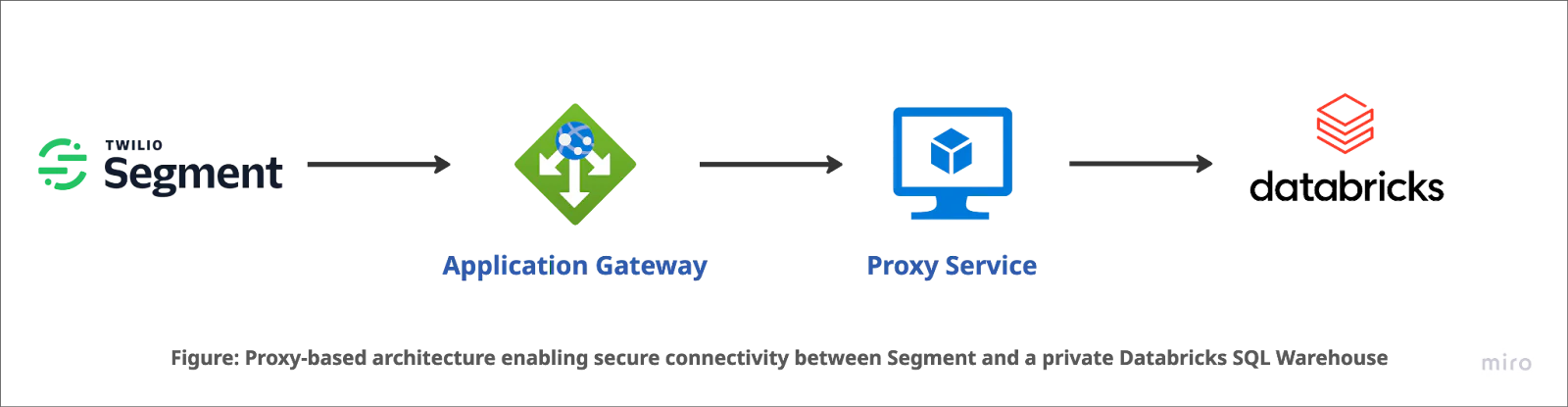
The request flow now looks like a well-choreographed dance:
- Segment sends a request to the Azure Application Gateway.
- The Gateway terminates TLS and hands the request to our Proxy Service (VM).
- The Proxy swaps the authentication tokens and forwards the query to the Private Databricks Warehouse.
- Data flows back, security stays intact, and the "Infeasible" becomes "Done."
The Outcome: Security ❤️ Connectivity
By building a controlled proxy layer, we proved that network isolation doesn't have to mean data isolation. We kept the SQL Warehouse off the public internet while still letting Segment pull the levers it needed.
What’s next? For production, we’re looking at auto-scaling the proxy layer and adding even deeper request tracing. Because in the world of Reverse ETL, the only thing better than moving data is moving it securely.
Closing note
This POC demonstrates a practical approach to integrating Segment Reverse ETL with Databricks in private networking environments. By systematically evaluating constraints across connectivity, authentication, and routing, a secure and functional solution was achieved.
Related Resources
Twilio Docs
From APIs to SDKs to sample apps
API reference documentation, SDKs, helper libraries, quickstarts, and tutorials for your language and platform.
Resource Center
The latest ebooks, industry reports, and webinars
Learn from customer engagement experts to improve your own communication.
Ahoy
Twilio's developer community hub
Best practices, code samples, and inspiration to build communications and digital engagement experiences.