What Is Twilio Conversation Memory? How to Give Your AI Agents Context Across Conversations
Time to read:
May 06, 2026
Written by
Reviewed by
AI generated summary
- Twilio Conversation Memory creates a persistent customer profile to give agents context across all interactions.
- It supports both human and AI agents by retrieving relevant past conversation details via a single API call.
- With cross-channel identity resolution, responses are grounded in actual business knowledge, enhancing personalization.
This summary was generated by AI.
What is Twilio Conversation Memory? How to give your AI agents context across conversations
AI agents are getting better at handling conversations. Human agents are also getting more efficient. But most of them still have a fundamental problem: they forget. Every interaction starts from scratch. The customer re-explains who they are, what they need, and what happened last time. Both human and AI agents have no memory of prior conversations, no understanding of preferences, no context about what's already been said. The experience feels transactional at best, frustrating at worst.
Memory is the missing component. Without it, agents can't personalize, can't build on prior interactions, and can't give customers the sense that they're important. With it, every conversation becomes an opportunity to deliver something better than the last.
Twilio Conversation Memory, now generally available, gives your agents that capability. It extracts what matters from every conversation, no matter the channel, ties it to a persistent customer profile, and surfaces the right context when your agent, AI or human, needs it. Developers get to focus on agent outcomes rather than managing a memory pipeline, from conversation threading, identity resolution, and vectorizing, reconciling, and recalling memories.
What is Conversation Memory?
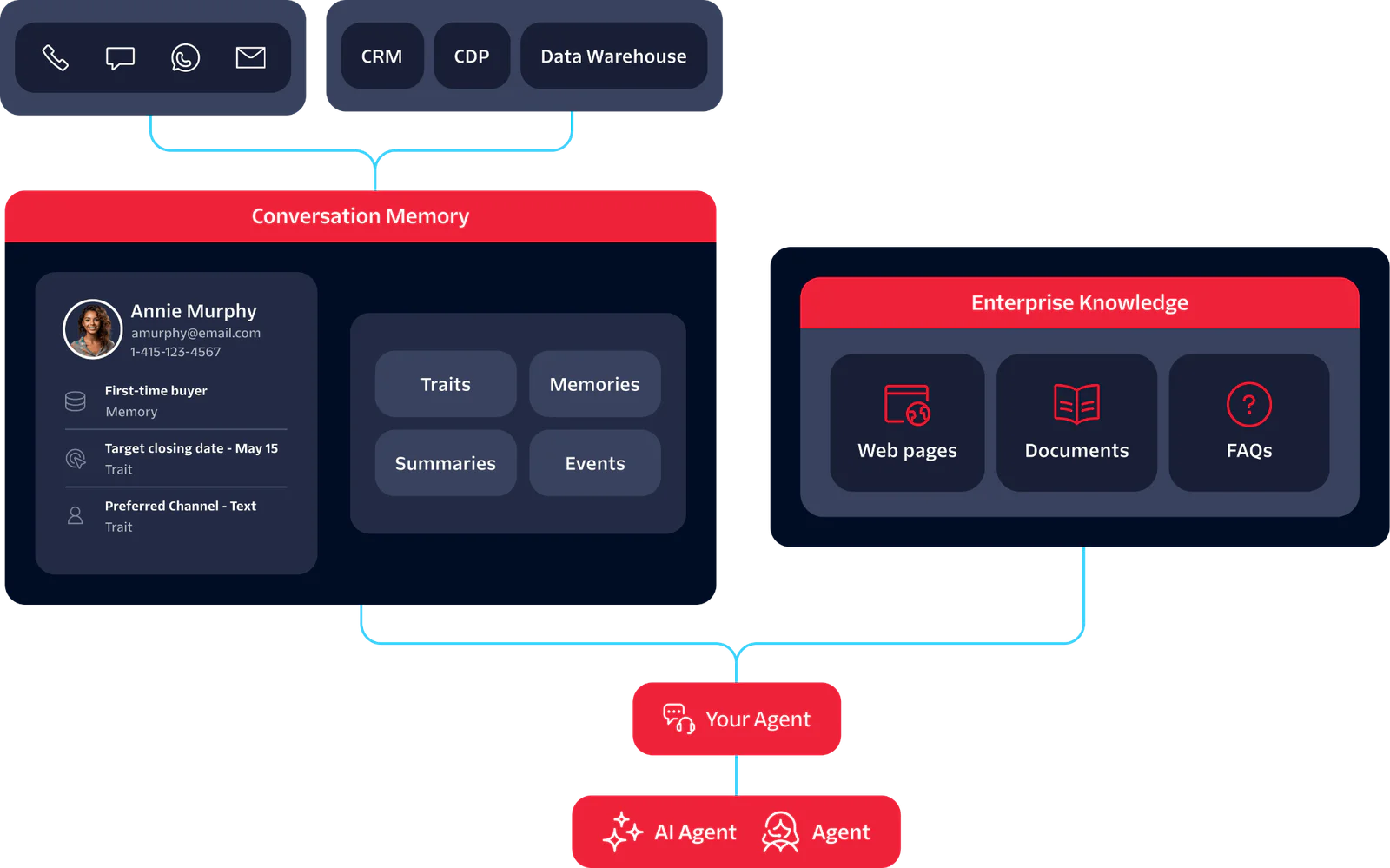
Twilio Conversation Memory is a managed memory service that gives your agents persistent context across every conversation, channel, and session. Every time a customer interacts with you, over Voice, SMS, WhatsApp, or RCS, Conversation Memory extracts what matters and stores it against that customer's profile. When they come back, your agent retrieves the relevant context through a single API call.
It resolves identity automatically, linking a customer's phone, email, and WhatsApp to a single profile across channels. It also works alongside Enterprise Knowledge, Twilio's complementary product for grounding agents in your actual business knowledge: product catalog, pricing, policies, FAQs.
What you can build
Surface context for human agents automatically. Digging through notes before every call, hoping nothing was missed: that prep is exhausting and it still leaves gaps. With Conversation Memory, agents open a call with a summary of previous interactions, open questions, and stated preferences already in front of them.
Give your AI agent memory across conversations. Let's say a customer reaches out on a new channel three days after an initial call. Your agent already knows the history. No re-introduction, no repeated questions.
Let customers move across channels without starting over. RCS to WhatsApp to voice. The customer's profile follows them so the agent always has the full picture.
Ground responses in what your business actually says. With Enterprise Knowledge, agents answer from your FAQs, policies, and product docs, not from whatever the model was trained on.
How Conversation Memory works
- Observations are extracted. When a conversation ends, Conversation Memory pulls out what mattered: not the raw transcript, but distilled observations stored against the customer's profile and indexed for semantic search.
- Identity is resolved. Multiple identifiers, phone, email, WhatsApp, are automatically linked to a single profile. One customer, one record, regardless of channel.
- Memory compounds. New observations join existing ones. If a conflict needs to be resolved it happens automatically.
- Context is recalled. Before your agent responds, the Recall API surfaces the most relevant context for the current conversation. Not the full history, just what matters right now.
- Knowledge grounds the response. Enterprise Knowledge is queried alongside customer memory, so the agent has both: what this customer has told you, and what your business actually says.
How to build with Conversation Memory
Five steps from setup to your first recall. Each maps to a single API call. Full reference docs at https://www.twilio.com/docs/conversations/memory.
Step 1: Create a Memory Store
Step 2: Create a Customer Profile
Identity resolution runs synchronously. If an existing profile matches the identifiers you provide, the API returns that profile rather than creating a duplicate.
Step 3: Add Observations
Tip: Observations update automatically. Every change traces back to its source conversation.
Step 4: Recall Context
The response returns ranked observations, summaries, and recent communications. Pass the relevant ones into your agent's context.
Step 5: Add Enterprise Knowledge
Index your FAQs, policies, and product docs so agents can ground responses in verified business facts. See the Enterprise Knowledge docs for setup.
Key Benefits of Conversation Memory
One integration replaces what most teams spend months building: cross-channel identity resolution, selective context retrieval, knowledge grounding, and governance controls, all managed and model-independent.
- One managed service replaces a custom build. Ingestion, extraction, identity resolution, storage, and recall are handled. You integrate once.
- Customers are recognized across channels. Phone, email, WhatsApp: one profile, automatically resolved.
- Your agent gets the right context, not all of it. Semantic search keeps prompts lean and token costs down.
- Responses come from your knowledge, not the model's. Enterprise Knowledge grounds answers in your docs, policies, and FAQs.
- Governance controls are built in. Partitioned stores, observation provenance, and profile-level deletion out of the box.
- Switch models without losing memory. Context is stored independently of any AI runtime.
Why this matters
Most teams building agents today already have a version of memory. It's the conversation transcript, passed into the context window on every call. It works when conversations are short and customers are new. But as interactions accumulate, that approach starts to break.
Every token in the prompt costs money and adds latency. Full transcript stuffing means your agent is processing an entire conversation history to answer a question that might only need three relevant details. As history grows, you either pay for all of it on every call or truncate and lose older context entirely. Neither scales well.
Selective retrieval changes the math. Instead of passing everything, the Recall API surfaces only the observations and summaries relevant to the current conversation. Prompts stay lean, responses stay fast, and older context is still available when it's needed rather than silently dropped when the window fills up.
But retrieval is only one piece. Even teams that solve the token problem still have to build identity resolution across channels, observation extraction from raw transcripts, conflict reconciliation when new information contradicts old, and governance controls before anything reaches production. From talking to customers, we've learned that building all of this from scratch can take up to six months, and that's before handling edge cases or scaling across channels.
Conversation Memory is the full lifecycle in one managed service: extract, resolve, store, recall, ground. You integrate once, and because memory is stored independently of any AI runtime, you can switch models without rebuilding what your agents depend on.
Frequently Asked Questions
How does identity resolution work?
When a profile is created or a new identifier is added, Conversation Memory checks for existing profiles with matching identifiers and resolves them to one profile. A customer who contacts you by phone today and email tomorrow is recognized as the same person.
What governance controls are available?
Memory Store partitioning isolates data across business units or environments. Every observation traces back to its source conversation. Profile-level deletion is available via API. Configurable retention windows and audit trails are on the roadmap for H2 2026.
What's the difference between observations, summaries, and traits?
Observations are distilled from conversations: preferences, behaviors, and context extracted at the end of each interaction. Summaries capture the key points and outcomes of a conversation as a whole. Traits are stable customer attributes stored as key-value pairs, like account tier or preferred language. The Recall API searches across all three to surface what's relevant.
Can I seed profiles with existing customer data?
Yes. You can import traits via CSV or API to populate profiles with data from your existing systems before any conversations happen. Identity resolution will link those profiles to incoming interactions automatically.
How does pricing work?
Conversation Memory is pay-as-you-go. See the pricing page for current rates.
Start building
Start building experiences where your agents already know what customers care about. Conversation Memory is generally available today, across every channel, and ready to implement.
Sign up for a Twilio account and follow the quickstart guide to go from setup to your first recall call. If you're bringing this into an existing deployment, talk to your account team about how it fits your architecture.


Related Resources
Twilio Docs
From APIs to SDKs to sample apps
API reference documentation, SDKs, helper libraries, quickstarts, and tutorials for your language and platform.
Resource Center
The latest ebooks, industry reports, and webinars
Learn from customer engagement experts to improve your own communication.
Ahoy
Twilio's developer community hub
Best practices, code samples, and inspiration to build communications and digital engagement experiences.