Orchestrate an AI-to-Human Agent Handoff with Twilio Agent Connect, Conversations Orchestrator, Studio, and Flex
Time to read:
May 07, 2026
Written by
Reviewed by
AI generated summary
- Ensure seamless transitions from AI to human agents to sustain customer context.
- Utilize Twilio Agent Connect, Conversations Orchestrator, Studio, and Flex for an optimized handoff.
- Empower human agents with AI-generated interaction summaries for better customer support.
This summary was generated by AI.
The rapid proliferation of highly capable AI agents handling initial interactions and complex workflows means the challenge for builders today is no longer deploying an intelligent virtual agent, it’s ensuring when a customer inevitably requests to speak with a person, the transition is smooth and contextual. A disconnected handoff that forces a customer to change channels or repeat their problem instantly degrades the customer experience.
To solve this, Twilio brings together a comprehensive suite of products to orchestrate a context-rich handoff from virtual agents to live human agents. By uniting our tools – Twilio Agent Connect (TAC), Conversations Orchestrator, Twilio Studio, and Twilio Flex – we enable a seamless AI-to-human escalation architecture.
In this guide, we will walk through the architecture, system components, and best practices for linking these Twilio platform services to build an optimized AI-to-human escalation flow and extend our quickstart. With this solution, the customer stays in the same call or chat window when transferring from a virtual agent to a live representative. Also, by using Conversation Intelligence, your live agents in Twilio Flex are equipped with an AI-generated summary of the interaction ensuring no context is lost.
TAC is the first step in the handoff process. This is where the virtual agent would reside, working with your preferred LLM provider to enable your bespoke customer engagement experience. It allows you to work with tools to add more capabilities to your virtual agent, and also comes with a built-in Studio handoff tool that can be used to orchestrate the conversation to a Studio flow and eventually handoff a conversation to a live agent in Flex.
Refer to the TAC quickstart to set up a virtual agent, then use the escalate to human agent guide to set up the handoff tool which is detailed below.
A key part of the process is setting the TWILIO_STUDIO_HANDOFF_FLOW_SID environment variable (refer to the Orchestrate the handoff: Inside Twilio Studio and Twilio Flex section below to create the Studio Flow).
The TAC SDK handles the heavy lifting by using this Twilio Studio Flow SID to automatically derive the necessary webhook and execution URLs for routing.
To use the built-in handoff tool in your application, generate the tool using the create_studio_handoff_tool function within your message handler and register it with your LLM.
The create_studio_handoff_tool function
The create_studio_handoff_tool function function takes three arguments: your TAC instance, the current conversation session, and an optional dictionary of routing attributes.
This optional attributes dictionary is useful for advanced routing: any metadata passed here will surface directly as TaskRouter task attributes in Twilio Flex, ensuring your downstream routing logic has the context it needs. You can see a demonstration in our Python handoff example, here.
By updating your agent's system prompt to recognize common escalation triggers, the LLM can intelligently decide when to hand off the conversation. When it does, the LLM calls the tool and passes a reason parameter – a string that explains why the customer needs a human agent.
Under the hood, how the handoff actually executes differs depending on the channel type :
- For Voice Channels: When the LLM invokes the handoff tool, it constructs a
HandoffPayloadcontaining the active conversation context and stores it on the session. The system waits for the AI's final response to play to the caller, then the Voice channel sends a WebSocket end message containing the payload, enabled by Twilio’s Conversation Relay. Twilio then routes the live call to your Studio Flow via the<Connect>action URL (refer to the Orchestrate the handoff: Inside Twilio Studio and Twilio Flex for details of the Studio Flow). - For Digital Channels (SMS, Chat): The execution is immediate. The handoff tool directly POSTs the
HandoffPayloadto the Studio Flow Executions API. This action instantly triggers a new flow execution for the customer, routing their ongoing messaging session to your target system.
The generated HandoffPayload is designed to prevent loss of context. It carries forward the conversation ID, memory store ID, profile ID, and any custom attributes you defined, ensuring your Studio Flow and your live Twilio Flex agents are synced with the customer's journey
Deep Dive: Synchronize Conversations (classic) and Conversation Orchestrator
To orchestrate an AI-to-human handoff, the underlying conversation state must be synchronized across your infrastructure. In our recommended solution, the Conversations (Classic) bridge acts as the connectivity piece, syncing conversation data between Conversations (classic) and Conversation Orchestrator in real-time.
The synchronization process begins at the edge with Inbound Auto-Creation. This feature must be configured directly within your Conversations (classic) Service to automatically generate a conversation the moment a customer sends their first message to your Twilio number.
Because the Conversations bridge is designed to sync existing Conversations (classic) conversations, enabling auto-creation is a prerequisite to ensure the Conversation object is properly instantiated before the first message payload is bridged to the Conversation Orchestrator. Refer to this guide to connect Conversations (classic).
Once linked via the Conversation Orchestrator Configuration using your Conversations (classic) Service SID (conversationsV1Bridge.serviceId), the bridge maintains a strict one-to-one mapping, ensuring each classic Conversation maps to exactly one Conversation Orchestrator Conversation.
For developers building these integration flows, the sources highlight how this synchronization operates under the hood:
- Delivery Channel Resolution: The bridge resolves the actual delivery channel such as SMS or Chat directly from the Conversations (classic) binding data before the communication is persisted to the database.
- Threaded on classic ConversationSid: Unlike standard Conversation orchestrator traffic where grouping types apply, Conversation (classic) traffic routing is always keyed directly on the classic
ConversationSid, which is exposed as a read-onlychannelIdon participant addresses for debugging and handoff integration. - Orchestrator Controlled Lifecycles: The state of the conversation (transitioning from
ACTIVEtoINACTIVEtoCLOSED) is controlled by thestatusTimeoutsdefined in your Conversation Orchestrator Configuration rather than the underlying classic conversation state. For Voice, ensure that the Closed timeout for Conversation lifecycle is set to On hangup. - Identity Resolution: If a
memoryStoreIdis defined in the configuration, the sync behavior includes profile resolution, linking customer participants to your Memory Store profiles for unified, cross-conversation identity tracking.
The Conversations Bridge handles the heavy lifting of state management. Both your AI agents and your human agents interact exclusively with standard Conversation Orchestrator APIs, seeing standard delivery channel addresses (like channel: "SMS", address: "+15551234567") without needing to know that classic Conversations is powering the backend
Orchestrate the handoff: Inside Twilio Studio and Twilio Flex
Once the Twilio Agent Connect (TAC) SDK generates the structured handoff schema, the baton is passed to Twilio Studio to resolve the full conversation context. To accelerate deployment, developers can use the Twilio Agent Connect -> Agent Handoff Studio template, which handles most of the routing logic required to transition an interaction from an AI to a human.
However, what happens inside this Studio Flow depends on the channel being routed:
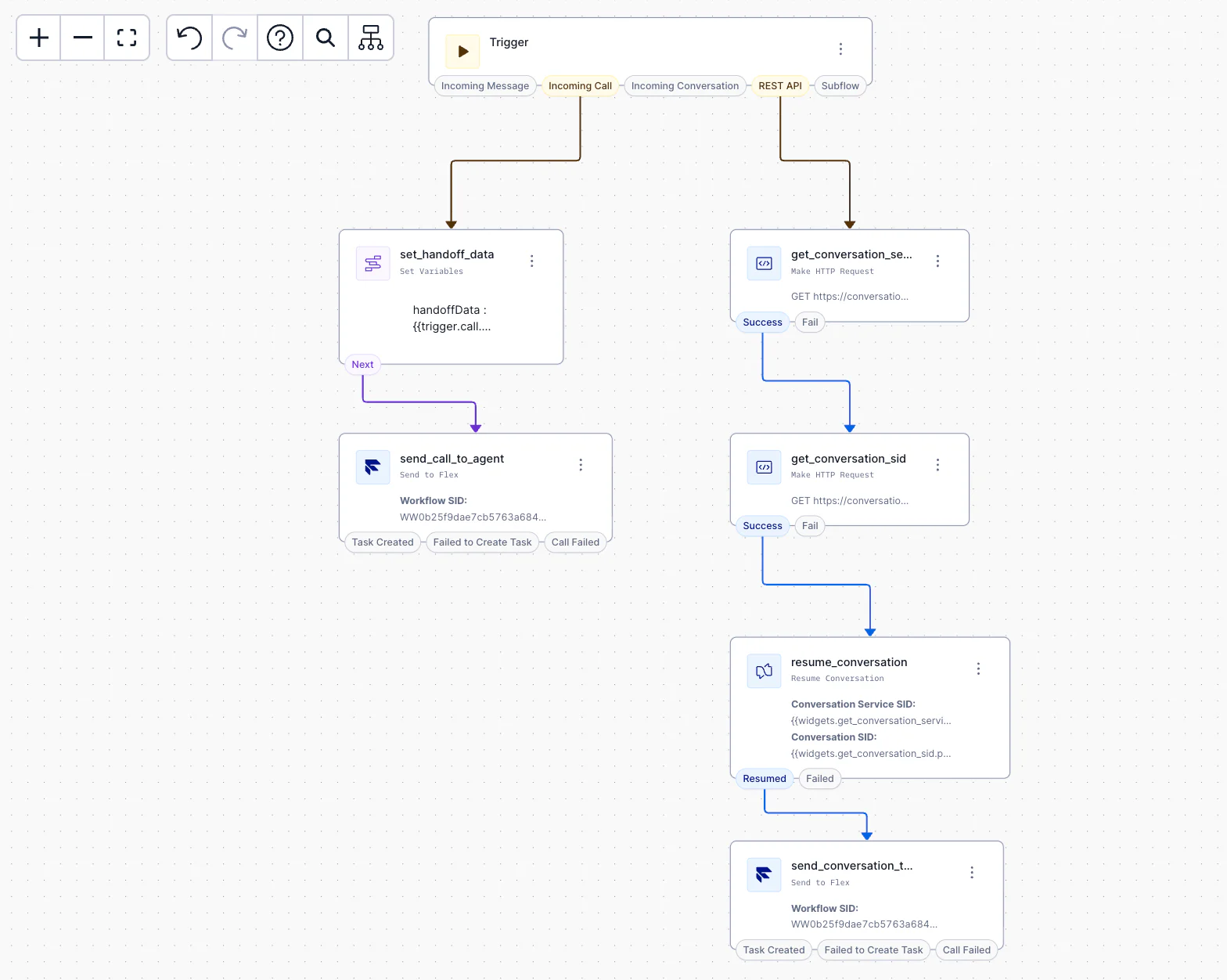
- For Voice Flows: The flow utilizes a Set Variables Widget to capture the handoff data and attributes from the AI session. Next, a SendToFlex Widget passes this context into Flex as Task attributes, routing the call to a human agent based on your defined workflow. The flow can be further enhanced to transcribe the voice call by calling this endpoint using an HTTP Request Widget.
- For Messaging Flows (SMS and Chat): The flow first executes an HTTP Request Widget to fetch the
conversationSidby parsing thechannelIdfrom the customer participant. A second HTTP Request Widget retrieves theserviceSidfrom theconversationsV1Bridgeobject. With these identifiers, a ResumeConversation Widget attaches the existing conversation to the Studio execution, validates the session, and establishes anonMessageAddedwebhook to route incoming messages. Finally, the SendToFlex Widget passes the context to Flex via the Interactions API. Upon execution, this updates the conversation status to "handed-off," which deletes theonMessageAddedwebhook to prevent "dual-delivery" interference once the human agent begins chatting.
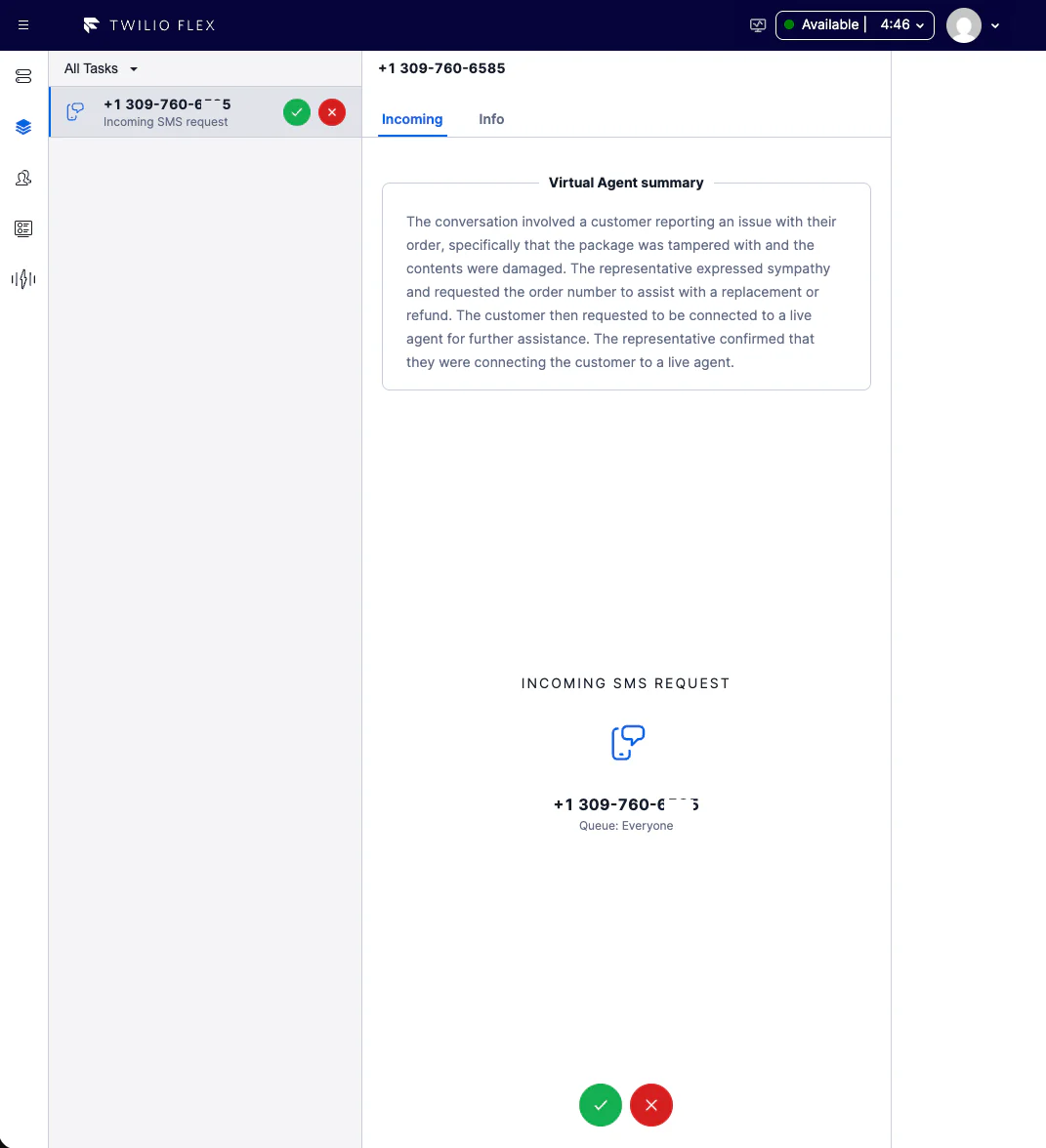
Empower the Live Agent with AI Summaries
By configuring Intelligence rules with the Summary language operator, the system is instructed to automatically generate a concise summary triggered either "At conversation end" or when the "Conversation moved to inactive".
For your human workforce to access this data, administrators need to navigate to their Flex Contact Center Settings and enable the Virtual agent summary for voice and Virtual agent summary for messaging beta features. Once opted in, your live agents will see the AI-generated summary immediately upon selecting an incoming task or while actively working on it. This means the moment a human joins the conversation, they are briefed on the customer's prior interaction with the virtual agent, completing the seamless and context-rich escalation.
The future of customer engagement is collaborative
Now you’ve seen some of the architecture, system components, and best practices we suggest for executing AI-to-Human Agent Handoff with Twilio Agent Connect, Conversations Orchestrator, Studio, and Flex.
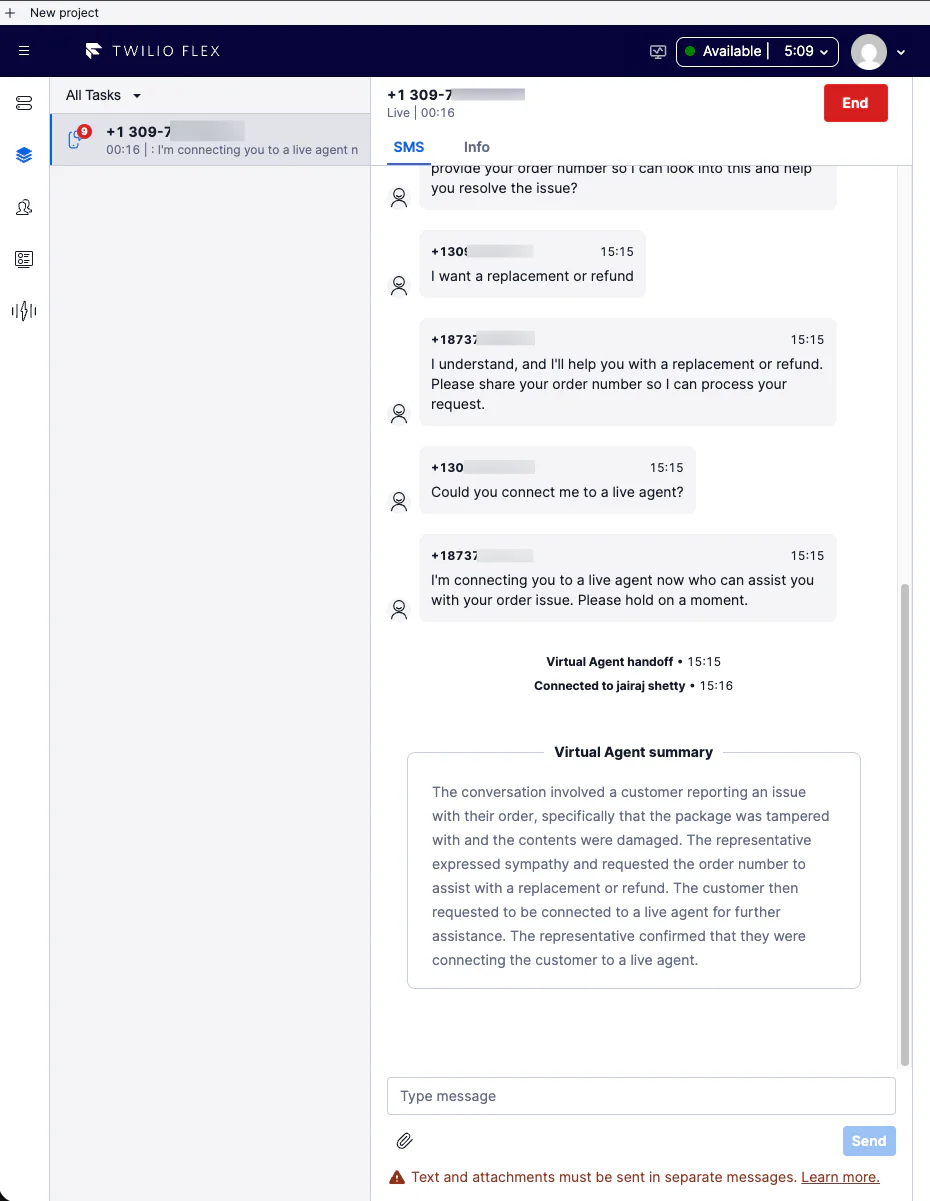
Picture a human agent receiving an incoming task in Twilio Flex: before they even type a greeting or say hello, they are already reviewing a concise, AI-generated summary of the customer's interaction with your virtual agent. The customer, meanwhile, has remained in the same chat window or phone call, entirely unaware of the complex backend transitions taking place.
This end-state is what defines a modern, customer-centric contact center. By looking at this final interaction, we can see that the true value of conversational AI is not just ticket deflection, but in how it gives your human workforce superpowers. Instead of building disparate AI and human agents silos, this architecture unites them to provide your customers one continuous journey.
Where to Next?
Ready to implement this seamless escalation architecture in your own environment?
- Start Building: Dive into the AI to Human agent handoff solution blueprint to configure your AI agent, and use the out-of-the-box Studio Handoff Tool in TAC and Twilio Agent Connect - Agent Handoff template in Twilio Studio to handle your routing logic.
- Empower Your Agents: Navigate to your Contact Center Settings in Flex and enable the Virtual agent summary for voice or Virtual agent summary for messaging beta features depending on which channels your virtual agents are setup.
Kinshuk Kar is a Principal Product Manager at Twilio Flex where he helps shape the user experience and channel orchestration capabilities. He is keenly interested in the space of customer engagement, especially how it evolves with conversational AI. In his free time, loves to travel, collect coins and read stories to his little one.
Sarang Shah is a Senior Software Engineering Manager at Twilio, where he leads the Studio team in building intuitive, low-code/no-code communication workflow solutions. An engineer by trade and a family man at heart, Sarang balances his passion for tech by cooking, working out, reading world news, and staying highly involved in his kids' daily adventures.
Brandon Herman is a Software Engineer on the Twilio Studio team, building low-code/no-code experiences that make communication workflows accessible to all. When he steps away from the keyboard, he's usually playing soccer or throwing the frisbee with his dog Watson.

Related Resources
Twilio Docs
From APIs to SDKs to sample apps
API reference documentation, SDKs, helper libraries, quickstarts, and tutorials for your language and platform.
Resource Center
The latest ebooks, industry reports, and webinars
Learn from customer engagement experts to improve your own communication.
Ahoy
Twilio's developer community hub
Best practices, code samples, and inspiration to build communications and digital engagement experiences.