A New Shape for Twilio Docs: Finding What You Need by Use Case
Time to read:
November 23, 2026
Written by
Reviewed by
If you’ve browsed our Programmable Voice documentation at twilio.com/docs/voice lately, you might have noticed something new. We’ve redesigned the documentation information architecture (IA), introducing curated use-case pathways and landing pages, but we also preserved navigation by product or feature.
This structure makes it easy to find content no matter your context, and because clear, well-structured docs help both humans and machines, it also improves the answers you get from AI coding assistants and search engines. Soon, this layout will expand across all Twilio documentation so you can learn the “shape” of our docs once and navigate every product effortlessly.
Why the shape of docs matters
While the new IA was primarily designed to meet developers where they are, the consistency and predictability in the new shape of docs boosts navigation speed. When docs navigation feels like second nature, you can focus less on wayfinding and more on shipping.
Modern applications rarely touch a single API in isolation. A workflow might initiate an outbound call with Voice, fall back to SMS via Messaging, and retrieve context with Conversations. When each product suite organizes sidebars differently, you have to relearn navigation every time you switch tabs.
Standardizing our IA fixes this. Moving from building an IVR in Voice to configuring short codes in Messaging requires zero recalibration. You’ll look in the exact same spot for quickstarts, guides, and API specs, no matter the product.
At the same time, the redesign preserves what many developers love: direct focus on a specific product. Whether architecting across channels or filtering out the noise of content you don’t need, this layout is great for all developers.
What’s changing
Standard overall shape
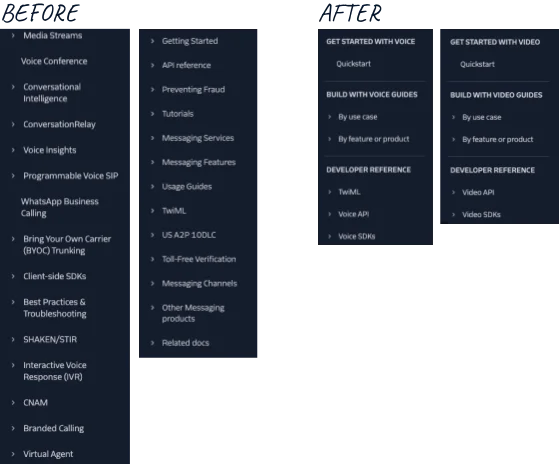
We are standardizing documentation into a consistent, three-part sidebar across every product:
- Quickstarts: Minimal setups designed to get a working sample running in your language of choice in about five minutes.
- Guides: Conceptual overviews and end-to-end how-to documentation.
- Reference: Complete API parameters, SDK specs, and TwiML reference.
Paths for guides
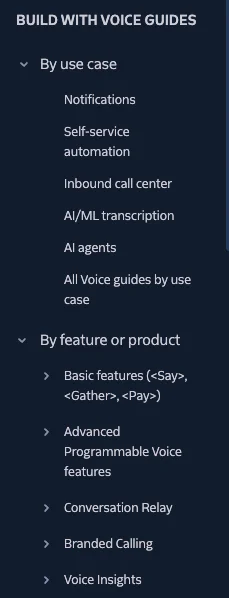
Guides navigation splits into two distinct, equal pathways:
- By Use Case: Curated for developers solving a specific problem (e.g., sending notifications, setting up self-service IVRs, creating an inbound call center). This path guides you through complete builds and highlights complementary tools you might not have known to look for.
- By Feature or Product: Preserved for builders who already know the exact product or configuration setting they need, bypassing the use-case lens.
Landing pages with built-in TL;DRs
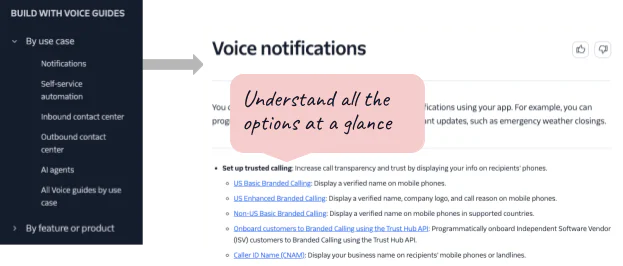
As we went to press, our voice documentation spans over 300 pages of deep technical material. Historically, finding the right guide may have meant guessing which branch of nested page trees held the relevant answer, and clicking into each guide to learn what it covers. And unless you knew what you were looking for, you might miss valuable capabilities, like Branded Calling to prevent your calls from being marked as spam.
We introduced landing pages to replace deep sidebar nesting. Instead of guessing what content you need based on product names, these landing pages assemble all the guides needed for a complete build in one place. You get a curated list of all the relevant docs, without the noise of hundreds of other pages.
Plus, every signpost page includes an actionable executive summary per link. This gives you more context than a sidebar can provide, letting you decide in 10 seconds whether the linked content is right for you well before committing to reading an entire guide. The landing pages also bridge product silos by surfacing cross-channel considerations when you’re still in the planning stage.
Get better answers from AI
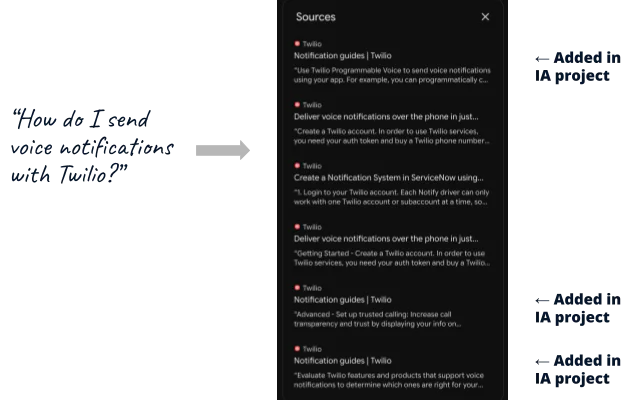
The value of our new documentation shape doesn’t end where you navigate the docs yourself. It also helps AI answer engines and Google answer your questions correctly.
When you ask modern LLMs (like ChatGPT, Claude, or Gemini) plain-language questions on how to build with Twilio, these models rely heavily on clear, crawlable structural context. We’ve already helped AI to navigate our docs by adding support for Markdown, but we found that AI might give imperfect answers when it didn’t effectively source from our docs.
By providing rich landing pages with standardized summarized content blocks, AI engines can readily determine which guides map to which use cases. The result: developer-facing AI tools can better ground their use-case-based suggestions in official, up-to-date Twilio Voice guidance rather than obsolete documentation or fragmented forum threads.
What this means for your next build
Whether spinning up a greenfield prototype or maintaining an existing production voice stack, you now have direct routes to what you need: one-click quickstarts, guides organized by use case or feature, and direct reference access.
Programmable Voice was the pilot for this documentation framework. Based on usage metrics and community feedback, we will soon refine the model and roll it out across the rest of Twilio’s documentation.
We’d love to hear what you think! Explore the redesigned Programmable Voice Docs today and share your feedback using the thumbs up/down icons on any page.
Sarah Simpers is a Staff Developer Educator at Twilio. She works on documentation strategies that solve developer problems and enable them to build great things. In her spare time, she builds Twilio apps to solve other problems, like organizing her life.
Related Posts

Related Resources
Twilio Docs
From APIs to SDKs to sample apps
API reference documentation, SDKs, helper libraries, quickstarts, and tutorials for your language and platform.
Resource Center
The latest ebooks, industry reports, and webinars
Learn from customer engagement experts to improve your own communication.
Ahoy
Twilio's developer community hub
Best practices, code samples, and inspiration to build communications and digital engagement experiences.