How to Detect SIM Swaps in Rust With Twilio's Lookup API
Time to read:
October 19, 2026
Written by
Reviewed by
How to Detect SIM Swaps in Rust With Twilio's Lookup API
In a world of increasing cyber security, 2FA (Two-factor Authentication) OTP (One-time Password) codes sent via SMS are increasingly essential for protecting access to online accounts. However, there's a big catch: phones are vulnerable to SIM Swap attacks.
What is a SIM Swap attack, you ask? According to the European Agency for Cybersecurity:
In a SIM swapping attack, an attacker takes over the mobile phone number of the real subscriber, by asking the mobile telecom provider to link that number to a SIM card under the attacker’s control.
And, it doesn't matter what type of SIM the victim has, as both physical and the newer eSIM (embedded SIM) are vulnerable.
When a SIM Swap attack occurs:
- The victim loses control of their number
- The malicious user can receive all calls and SMS sent to the victim's phone number. This allows them to receive any OTP codes delivered via SMS.
However, there is a solution! Twilio offers SIM swap detection through the Lookup API which reduces the impact of SIM swap attacks.
If you've read the Twilio docs, you'll know that:
Lookup SIM Swap provides real authoritative data, directly sourced from mobile network operators, telling you if the SIM linked to a mobile phone number has recently changed.
This gives you assurance that the mobile channel can be used for communications or authentication with your user. It also can help you assess the potential risk that a mobile phone number, and the associated user's account, has been potentially compromised.
If this sounds like something that you need to better protect your users, this tutorial is for you! You'll learn how to integrate SIM swap detection into your Rust applications.
Prerequisites
To follow along with this tutorial, you'll need the following:
- Rust and Cargo installed
- A Twilio account (either free or paid) with SIM swap support enabled. Sign up now if you don't have one already.
- A mobile/cell phone number that you want to check
- Your preferred Rust editor or IDE, such as Neovim, Visual Studio Code, or Rust Rover
- Some prior experience with both Rust and the command-line would be helpful, though not essential
Create the Rust project
The first step is to create a new Rust binary project and change into the new project directory, by running the following commands in your terminal, wherever you create your Rust projects:
Add the required crates
Next up is to add the crates that the application will need. There aren't many, just the following:
To add them, run the following command
|
Crate |
Description |
|---|---|
|
These simplify setting and retrieving the environment variables that the app will need. Doing this keeps credentials and configuration data separate from the Rust code. |
|
|
This simplifies interacting with Twilio's Lookup v2 API. |
|
|
serde and serde_json |
These simplify deserialising the response from the Lookup API requests. |
|
This simplifies writing async code. |
Set the required environment variables
The application makes use of three environment variables. These are:
- Your Twilio Account SID and Auth Token
- A mobile/cell phone number or two that you want to check for SIM Swaps
To set them, create a new file named .env and in that file paste the code below.
Next, log in to your Twilio Console, and load the Twilio Workbench by clicking the little arrow in the bottom right corner of your screen. From the popup that appears, copy the Account SID and Auth Token.
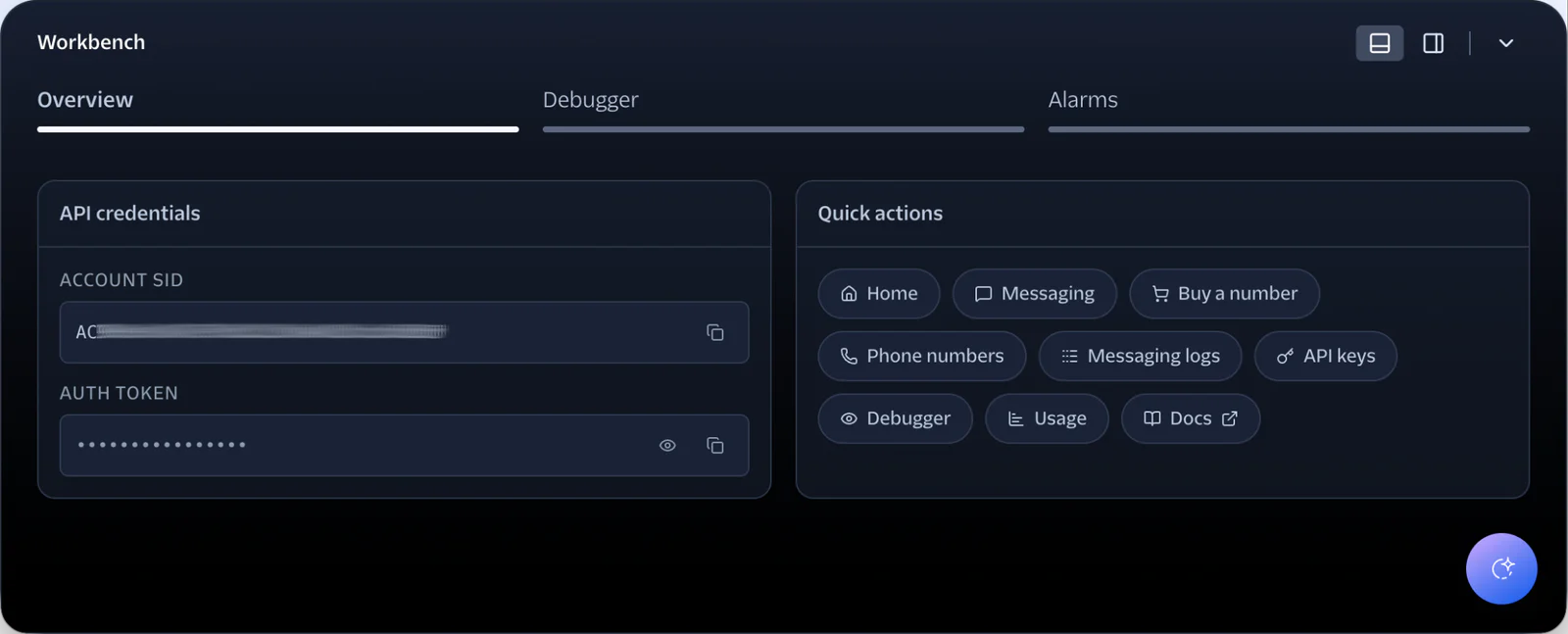
After that, paste the values into .env in place of <TWILIO_ACCOUNT_SID> and <TWILIO_AUTH_TOKEN>, respectively.
Write the Rust code
Now, let's get to the core of the tutorial and write the application's Rust code. To do that, replace the code in src/main. rs with the following:
Then, replace <<YOUR PHONE NUMBER>> with the phone number you want to look up.
The code starts by loading the variables in .env as environment variables. Then, through calling the lookup_phone_data() function, it looks up the details of the phone number that you specified, retrieving any available SIM swap data (as data_packages contains DataPackage::SmsPumpingRiskScore). If SIM swap data is available, it prints out that information. Otherwise, it prints out that no SIM swap data is available.
Test that the application works
Now, you're ready to use the application to detect potential SIM Swaps. To do that, run the following command in your terminal.
You should see output similar to the following printed to the terminal:
Keep in mind that there are legitimate reasons for SIMs to be swapped
As mentioned above, while SIM swaps can be suspicious, there are also legitimate reasons for a SIM to be swapped. For example:
- You lost your phone or it was stolen and you want to copy over your contacts and information
- You want to port your number to a different carrier, and still want to keep your data
- You might have purchased a new phone, and again want to carry your information across.
Please bear these in mind that these are legitimate cases for wanting to perform a SIM swap.
Given these reasons, it's hard to programmatically determine if a SIM swap is suspicious or not. The SIM swap data should always be used as part of a larger, more holistic determination.
That's how to detect SIM Swaps in Rust
Thanks to Twilio's SIM swap detection through the Lookup API functionality (and Rustlio), there's very little that you need to do to retrieve SIM swap data for a phone number and check if it has been recently swapped.
In doing so, you can reduce the likelihood that someone loses control of their number, or that a malicious user can receive all calls and SMS sent to someone's phone number.
I can't wait to see what you build with SIM swap detection!
Matthew Setter is a PHP and Go Editor in the Twilio Voices team. He’s also the author of Mezzio Essentials and Deploy with Docker Compose. You can find him at msetter@twilio.com. He's also on LinkedIn and GitHub.


Related Resources
Twilio Docs
From APIs to SDKs to sample apps
API reference documentation, SDKs, helper libraries, quickstarts, and tutorials for your language and platform.
Resource Center
The latest ebooks, industry reports, and webinars
Learn from customer engagement experts to improve your own communication.
Ahoy
Twilio's developer community hub
Best practices, code samples, and inspiration to build communications and digital engagement experiences.