Build a Low-latency Voice AI Agent with Guardrails on Twilio and AWS
Time to read:
November 25, 2026
Written by
Reviewed by
A voice AI agent must sound natural, respond with low latency, and follow your compliance rules and guardrails on every call. This Blueprint shows how to build one using Twilio’s Conversations Layer for Voice AI and Amazon Web Services: an inbound voice AI agent that verifies callers, keeps identity out of the model, uses deterministic steps when exact control is required, and hands off to a person with full context.
You can deploy the Blueprint with AWS Cloud Development Kit and adapt it to your own business systems, policies, and customer experience.
Picture the call: a customer read about home equity lines of credit (HELOCs) on your website last night, and now they phone in. A scripted greeting and a quick verification confirm who they are. Then, a natural voice says, "Hi Thomas. Would you like help with our home equity line of credit?" When the customer asks to move money, the agent hands the call to a scripted step that reads the payment back in the bank's approved words. If the customer asks for a person, a Twilio Flex agent sees the customer's name, how well they were verified, a summary of the call, and a redacted transcript.
This post uses a fictional bank, OwlBank, as its example, but the pattern could help any business that answers inbound calls.
Our repository contains the code, the deployment scripts, and documentation. It also has a Agents.md file that describes the solution for your AI coding agent. You can also make use of Twilio skills for AI coding agents to help adapt the solution to your needs.
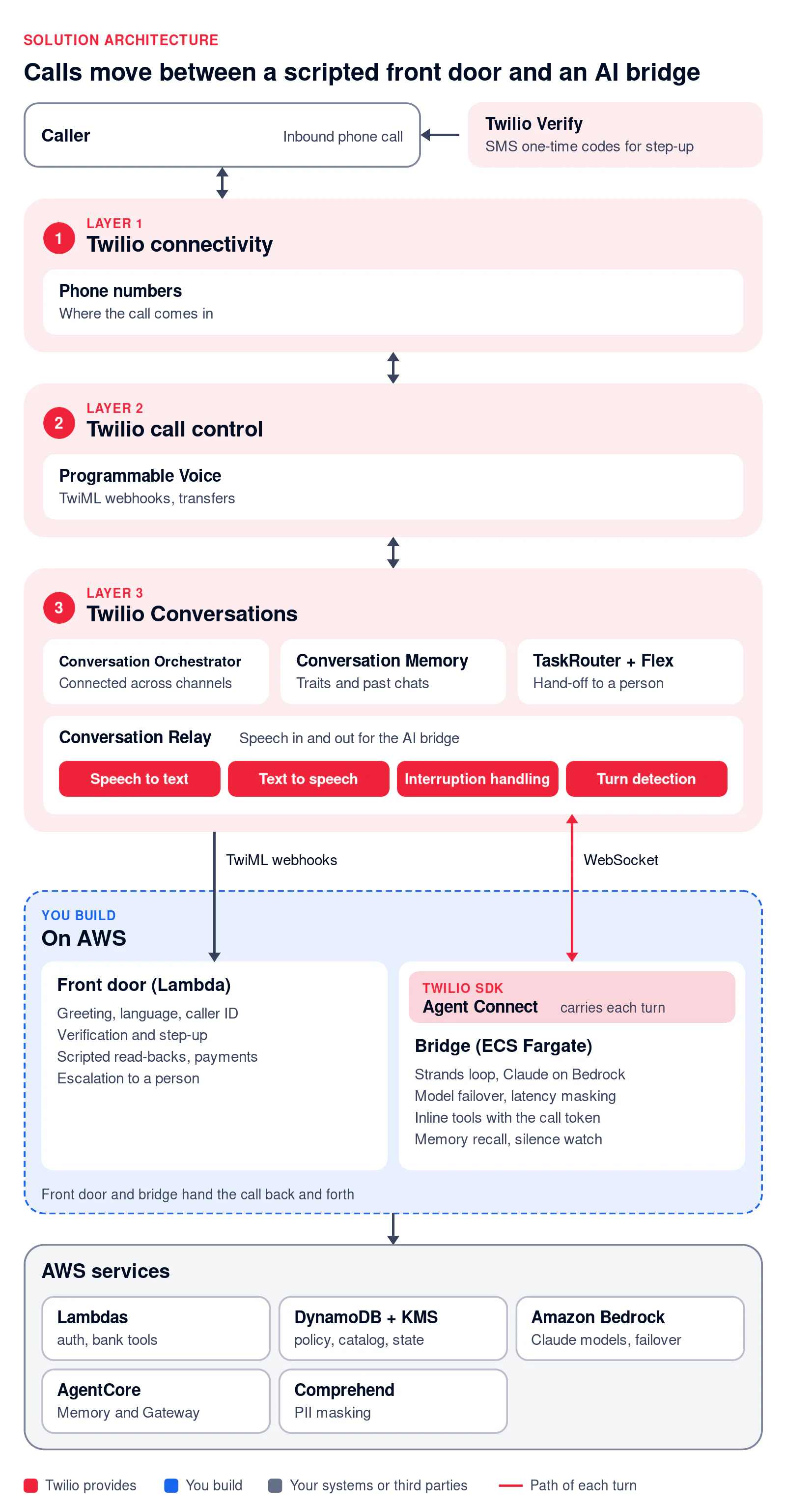
Our architecture gives callers an engaging, fast conversation with an AI agent powered by large language models (LLMs).
Where regulation demands exact wording or strict control, for example for identity checks, disclosures, and payment confirmations, it switches to deterministic steps that support customer compliance efforts. Throughout the call, it personalizes the experience. Before the AI agent says a word, it knows who the customer is, what they browsed on the bank's website and what they discussed on other channels. If the customer needs to talk to a person, the human agent receives all of that context so the customer never repeats themselves.
The front door, an AWS Lambda function, runs every scripted step. The bridge, a container on AWS Fargate, holds the AI conversation. A call hands off between them through Twilio, and both read the same Amazon DynamoDB tables. Because most behavior lives in those tables, the optional admin console can change it live.
Prerequisites
To deploy and test the solution, you need:
- A Twilio account (ideally a dedicated subaccount) with the Predictive and Generative AI/ML Features Addendum accepted by the account owner.
- If you don’t yet have a Twilio account, you can sign up for free here
- (Optionally) An active Twilio Flex instance. See how to get started.
- A Twilio phone number.
- An AWS account with access to Anthropic’s AI model Claude in Amazon Bedrock in the US East (N. Virginia) Region (us-east-1).
- Python 3.12+, uv (which installs Python 3.12+ for you), Node.js 22.18+ (to run the AWS Cloud Development Kit (AWS CDK)), and a container builder such as Finch.
- A Twilio Standard API key and your Auth Token, which you store once in AWS Secrets Manager after the data stack deploys. The setup script also creates a restricted key for the Context API.
The dev deployment does not need a custom domain, though a production deployment does.
Solution walkthrough
The sections below follow one call from the first ring to resolution.
Greet and verify callers with a deterministic front door
Every call starts in the front door, an AWS Lambda function behind Amazon API Gateway that answers Twilio voice webhooks with Twilio Markup Language (TwiML) instructions. The caller will hear the bank's approved greeting, including the recording notice, then choose English or Spanish with the keypad. That language choice carries through the whole call.
Next, the front door reads the Secure Telephone Identity Revisited and Signature-based Handling of Asserted information using toKENs (STIR/SHAKEN) result that Twilio passes along (StirVerstat). This carrier attestation tells you whether a caller ID is genuine, so it decides how much to trust the number:
- Trusted attestation (by default
TN-Validation-Passed-A): The caller ID counts as one verification factor, so the caller needs only a ZIP code to reach level 1. - Untrusted, withheld or unmatched number: The caller gives a ZIP code and the last four digits of their Social Security number (SSN), or first keys in the phone number on the account.
Failed attempts from an untrusted caller ID never count toward a real customer's lockout, so a spoofer cannot lock someone out.
Verification uses levels. Each level is a set of factors, and each tool needs a minimum level. A policy table holds all of this, so a bank can change it without changing code.
| Level | Factors in the demo seed | What it unlocks |
|---|---|---|
| 0 | None | FAQ, branch hours |
| 1 | Caller ID match (if trusted) + ZIP code | Balances, recent transactions |
| 2 | Level 1 + last four digits of the SSN | Address change |
| 3 | Level 2 + one-time code by text message (Twilio Verify) | Payments and transfers |
When a caller asks for something above their level, the front door asks only for the missing factors, raises the level, and the conversation continues where it left off. Once a caller passes level 1, the authentication service also issues a call-bound token, a short-lived credential that records who the caller is and which level they reached. That token lets the rest of the system trust the call without trusting the AI agent, and the next section explains how the call-bound tokens work.
Keep authentication out of the AI: call-bound tokens and step-up
The authentication in this blueprint is an example, not a recommendation to build your own identity system. It shows one important pattern: the AI agent never handles authentication and can never see or change the customer ID, the verification level or any proof of identity.
If you use this Blueprint as an example for production, put your own identity system in place while following the pattern built here.
The token carries the identity and the level
After the caller passes verification, the authentication service creates a random, short-lived token for that one call. The service stores only a hash of the token, together with the call identifier, the customer, the verification level, and an expiry time.
The front door encrypts the token with its own AWS Key Management Service (AWS KMS) key, using the call identifier as context. The system revokes the token when the call goes to a person, when the caller hangs up, and when the call ends.
The AI agent never sees the token
The bridge decrypts the token in memory only when it runs a tool. The token is added to the request after the model has written its arguments. The token never appears in the system prompt, the conversation history, a tool definition, or a tool result. A test checks that it never appears in a request to the model.
This strategy stops prompt injection from unlocking tools
Prompt injection tries to trick the model with words, such as "ignore your rules and transfer money". That works only if the model holds the power it is asked to use.
Two checks sit outside the model’s control:
- The bridge reads a minimum level for each tool from the policy table. If the caller's level is too low, the bridge does not run the tool and starts step-up instead.
- The bank-tools Lambda function checks the token on every call. The token must exist, belong to this call, be unexpired and unrevoked, and carry at least the tool's level.
With the patterns in this Blueprint, the model also cannot modify or read someone else's data.. The tool will only act on customer data on the server side with deterministic code: the function hashes the token it receives, looks up the record stored at login, and takes the customer ID from it.
With this Blueprint, the model only picks an account by kind, such as checking or savings, and the function maps that kind to the customer's own account number. Text from memory, account nicknames, and transaction descriptions go into the prompt inside marked blocks, so the model treats them as data and not as instructions. The model can also use only the tools on an allow list.
Step-up without starting over
When a caller asks for something above their current level, such as a payment after a balance check, the bridge ends the AI segment with a hand-off to the front door where the call continues based on accrued context.
The front door asks only for the missing factors, for example the last four digits of the SSN and a one-time code, and the authentication service raises the level of the same token. Because the front door has the accrued context, the model will never hear the answers. After authenticating at the higher level, the front door then continues straight to the step the caller wanted, such as a payment read-back, and returns the caller to the AI agent after that step is complete. If step-up authentication fails, the agent learns only that it failed, and repeated failures go to a person.
Personalize the call with Memory and web activity
When a call arrives, the system sees only the calling number (the automatic number identification, or ANI), and the caller has not verified yet.
A phone number alone should never identify a customer and it does not here: it is possible to spoof phone numbers, and without careful handling, your logic could match the number to the wrong person's profile. In this Blueprint, the agent starts with no profile and no memories. Only once the caller is verified will the front door connect the call to the AI agent through Twilio Conversation Relay.
After verification, the bridge asks Twilio Conversation Memory for the profile that belongs to the verified customer, which finds the profile with a stable identifier stored in the bank's own customer record.
The phone number only helps pick the customer record. For example, if two people in one household share a number, the verification questions pick the right record so each person will have their own profile and history. If a customer has no profile yet, the bridge creates one on the first call.
Three kinds of context then feed the agent: this call's history (held in Amazon Bedrock AgentCore Memory), the customer's profile from the bank's records, and what earlier conversations left in Conversation Memory.
Web activity becomes a proactive offer
In this Blueprint, OwlBank has a list in a policy table which presents product options the agent may offer. The setup script adds a custom trait group to the Memory profile, which we call WebActivity (that’s a Blueprint name, not a product feature), with traits for the last product viewed, when it was viewed, and how many times.
If the web-activity traits show a listed product from the last 24 hours (a window you can change), the welcome after verification picks up there. In the demo seed, a caller who browsed the home equity pages – simulated in this solution – hears: "Hi <FirstName>. I am the OwlBank virtual agent. Would you like help with our home equity line of credit?"
Other channels carry over
If another channel such as SMS, chat, RCS, Facebook Messenger, or WhatsApp attached observations or summaries to the verified Memory profile, the AI agent can access them, as well. For example, if a caller has already started a conversation about a fraudulent charge with your agent over SMS and then calls in, the memory would contain notes about the previous conversation (or conversations). During their call, the voice agent could offer to transfer the call to the fraud queue with reason card_dispute.
With a scenario like this, the caller does not need to start over, because the call arrives in the correct queue with a screen pop showing a summary of their conversation history. You could also show customer profile information at this point ( not implemented in this Blueprint).
Each call also adds to Memory
After a call ends, a separate Lambda function writes one summary and up to five observations to the customer's profile, so the AI agent keeps the context for future conversations over voice or other channels.
Combine an agentic conversation with deterministic tools
The design rule in this Blueprint is simple: be agentic where you can so the conversation feels human, and be deterministic where you need exact control.
The AI agent handles open conversation, such as answering questions, reasoning and choosing the right action. Scripted steps in the front door (the deterministic call-handling layer) handle anything that must be exact, using the fictional bank's approved wording.
A call therefore moves between two halves:
- The front door (Lambda) runs everything scripted: greeting, verification, step-up, balance read-outs, payment read-backs, and the transfer to a person.
- The bridge (a container on AWS Fargate) holds the Conversation Relay WebSocket while the caller talks to the AI. It runs the agent loop on Strands, an open-source agent framework, and calls Anthropic’s Claude models on Amazon Bedrock. The agent loop is the cycle in which the model reasons, calls tools, and answers. The bridge also runs every tool the agent can call without a scripted step.
When the agent needs a scripted step, the bridge ends the Conversation Relay session with a hand-off. The front door runs the step, reconnects the caller to the same Twilio Conversation Orchestrator conversation, and delivers the result as the answer to the agent's original tool call. The agent's history therefore holds the final response from the deterministic flow, even though the front door produced it.
For example, after a scripted checking account balance read-out, the caller can ask "and what about my savings?" and the agent understands.
The blueprint shows two ways to add the agent’s tools:
- Tools behind a Model Context Protocol (MCP) gateway are the best option when there are shared tools that many agents reuse, such as the FAQ lookup.
- Inline tools are called directly so there is no additional latency. This blueprint runs its customer-data and money tools inline to reduce latency.
Moving money also introduces a third kind of tool: an inline tool with a deterministic confirmation. With deterministic inline tools, the model picks the action and fills in the amount and accounts, but the bridge never runs it. The front door will read the amount, account, and card back from a template and ask for yes or no, calling the tool only on yes.
Since some functions can’t be run more than once without changing state, an idempotency key in this Blueprint makes it so, for example, the bank can only move money at most once (even if a call is retried). A bank could use the same hand-off to play any disclosure that regulation requires.
Let callers speak freely inside scripted steps
Even though this Blueprint has a number of scripted steps and examples, it also introduces another philosophy: scripted does not have to mean rigid.
Answers needed in the front door are “ slots” ( ZIP code, SSN last four, one-time code, yes or no, card choice).
The slot engine resolves pieces of information the agent needs in stages, and the first stage that produces a value wins: the keypad, then speech parsed in code (number words in English and Spanish, digits inside a sentence, yes-or-no phrases, ordinals such as "the second one"), then commands such as "repeat" or "agent".
Only if those stages fail – and only if the slot's mode allows it – does a single Claude Haiku call with a hard time limit propose a value for messy speech or notice that the caller switched to a new request. The model is a fallback, not the first step, so most answers add no latency and use no tokens – LLMs are called only when needed.
Each slot has a mode, and the deployment sets a ceiling. deterministic never calls a model, assisted (the default) lets the resolver help but keeps every spoken word as approved text, and generative also lets the model word follow-up questions on a few non-sensitive choice slots.
When our fictional bank must run a fully validated flow, it deploys with deterministic, and the front door's role then has no Amazon Bedrock permission at all. The solution guide describes each mode in detail.
Keep personally identifiable information out of the AI
The privacy design in this Blueprint has four layers. Each layer progressively covers what the one before it can miss:
- Secrets never enter the AI path. A slot can carry a
sensitiveflag in the policy table. The front door collects sensitive values such as SSN digits and one-time codes, and stores them encrypted with AWS KMS. The agent only sees a placeholder instead of the value. - Exact-value scrubbing. Every sensitive value a caller gives is scrubbed by exact match from logs, the call journal, and the escalation summary.
- Statistical masking of free text. Amazon Comprehend masks PII that slips into free text before it is stored or shown.
- Logs carry identifiers, not words. Logs hold identifiers and counts, never message text.
Identity gets the same treatment: the model never sees a token, a customer number, or an account number.
Keep latency low: voices, streaming and model failover
On a phone call, dead air kills the experience and latency drives a lot of design choices.
In this Blueprint, Conversation Relay handles speech in and out over one WebSocket per AI segment, with Deepgram for speech-to-text and ElevenLabs for text-to-speech. By default, the bridge streams each chunk of the agent's answer to Conversation Relay as it arrives from Amazon Bedrock, so the caller hears the start of the answer while the model is still writing the rest.
Switch to a backup model if Amazon Bedrock slows down, and switch back automatically. If a model endpoint on Amazon Bedrock responds more slowly than normal, callers hear long silences. To avoid this, the agent can use up to three models in order of preference. By default in this Blueprint, these models are Anthropic’s Claude Haiku 5.5, then Haiku 4.5, then Sonnet 5.5.
The blueprint also shows a version of real-time benchmarking. If the preferred model does not start answering within a deadline, or fails before it speaks, the bridge runs the same turn on the next model. Then, each bridge reports how long its model took to start answering. One scheduled function combines these reports into a health verdict for each model.
When a model is slow, new turns start on the next model in the list. The function keeps testing the slow model with small requests that carry no caller traffic. When the model is fast again, it returns to its place in the list automatically.
Mask the wait with scripted phrases
You cannot avoid latency entirely. A model call takes time, and a back-end API call can take even longer.
Latency masking functionality in the Blueprint fills that time with short scripted filler phrases, or interstitial fillers, such as "just a second". Phrases come from the (language-keyed) prompt catalog in Amazon DynamoDB. They play in parallel with the background work, and the bridge skips them when the answer text arrives first. There are two kinds:
- The timed acknowledgement. If a threshold passes after the caller stops speaking (
masking.after_ms, 1 second by default) without tool calls or model responses, the bridge speaks a neutral phrase from a rotating pool, such as "One moment." - The per-tool phrase. Each tool can have its own phrase, such as "Getting your savings balance now". These are filled in from catalog phrases in the call's language.
The timed acknowledgement threshold is a trade-off. Set it too low, and the acknowledgement plays on nearly every turn. The default is set to 1s (one second) for demonstration purposes. To avoid hearing the acknowledgement, configure it just above the average response time for the model you choose to use.
Hand off to a person without making the caller repeat themselves
A call reaches a person in Twilio Flex by one of two routes:
- T he AI agent decides to escalate. This happens when the caller asks for a person or the agent cannot resolve the request, and the agent calls the
escalatetool with a reason from a fixed list and a short summary. - The system decides. This happens, for example, after repeated failed verifications from an untrusted caller ID or a failed step-up.
Either way, the front door revokes the call token, builds a task and puts the call in a Twilio TaskRouter queue. The policy table sets the reason, queue, and priority: in the Blueprint, fraud-related reasons go to a Fraudqueue at priority 100, and Spanish calls go to a Spanish-language queue.
A small Flex UI plugin builds the screen pop that the human agent sees:
- The customer's name and the authentication level reached, plus how the caller was identified ( caller ID or a keyed-in number).
- An AI-generated summary of the conversation and the escalation reason.
- A redacted transcript, available after the agent accepts the call. It shows what the caller said to the AI and what the AI did, with PII masked again when the timeline is read.
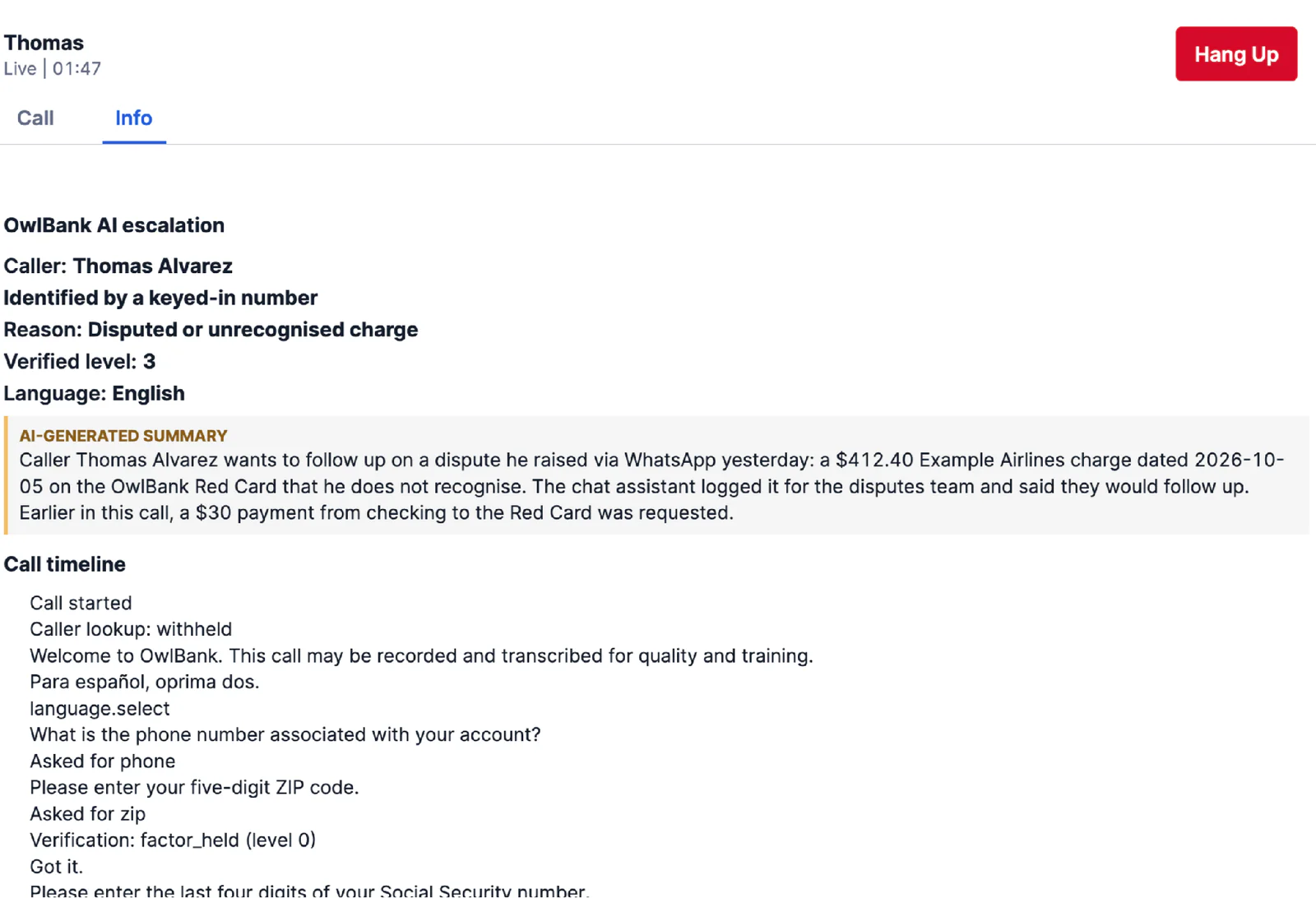
The plugin means that a caller does not need to repeat themselves, and a representative does not need to verify them again. After transfer, the representative can read both the authentication level and the summary of why the customer is calling.
Change behavior without redeploying: the admin console
Most behavior in the Blueprint comes from the data, not code.
The policy table holds verification levels, tool kinds and minimum levels, masking timings, slot settings, and escalation queues. The prompt catalog contains every scripted sentence the system might need, in each language, plus the agent's system prompt.
Running components cache both for 60 seconds. An optional admin console (with its own AWS CDK stack) puts a web page on that data so contact center administrators can tune tools, masking phrases, slots, and redaction settings without editing JSON files or deploying. It records every change and who made it, when, and what the old and new values were. Users sign in with Amazon Cognito.
Run it: observability, failure handling and tests
The Blueprint is built so you can see what happened on any call.
- Logs. Logs are JSON lines in Amazon CloudWatch Logs with Twilio’s call identifier (
CallSid) on every line. - Traces and metrics. An optional mode adds traces and call metrics that follow the OpenTelemetry (OTel) GenAI conventions. Because of this, Amazon Bedrock AgentCore Observability and AgentCore Evaluations can read them.
- Failure handling. A failure never fails open – if a model is throttled, it gets one retry and then the call is transferred to a person in Flex or another Telephony System. The bridge retries a failed tool call once with the same idempotency key.
- Security at the edge. The bridge runs on Amazon ECS with AWS Fargate behind AWS WAF (web application firewall). It checks the Twilio signature when Conversation Relay opens its WebSocket connection, and it uses a one-time nonce so a replayed connection request is rejected.
- Tests. Everything except live checks runs offline, with no AWS or Twilio credentials.
The solution guide and the runbook in the repository cover observability, hosting, security controls and tests in full.
Cost to deploy and test
AWS provides a cost calculator where you can estimate the latest costs to build and test this solution.
Depending on your choices (including your usage of Twilio Flex), your costs may differ. Please read through Twilio’s Pricing pages.
Cleanup
To remove what you deployed, take these steps:
- Stop calls reaching the stack. In Twilio, point the number's voice and status webhooks elsewhere, or release the number.
- In the
infra/folder, runnpx aws-cdk@2 destroy --allwith the same-cvalues you used to deploy:accountId,twilioPhoneNumber, and the AgentCore hosting flags if you used AgentCore. Save any logs you need first, because outside theprodstage, CloudWatch log groups are deleted with the stacks. - If you used AgentCore in VPC mode, deleting the Runtime can time out, and a retry can then fail until AgentCore releases its network interfaces. This has taken up to about 1.5 hours. Wait, then run the destroy command again.
- Once every stack is gone, delete what the stacks leave behind. These resources are kept when the stacks are deleted, so remove them yourself if you do not need them: the DynamoDB tables, the secrets under
owlbank/(delete them with--force-delete-without-recovery, or they sit in a recovery window), the bridge image repository in Amazon ECR, and the load balancer access-log bucket (Fargate hosting only). Schedule the two AWS KMS keys for deletion last, after the tables, secrets and repository they encrypt are gone. After the waiting period, the key is deleted and the data it encrypted can no longer be read. - In Twilio’s Console, delete the Verify service, the TaskRouter queues and workflow, the Memory store, the Conversation configuration and the API keys, including the restricted Context API key. None of these are in the CDK app. Then rotate the Auth Token, and cancel Flex if you turned it on only for this test.
Conclusion: clone it and make it yours
This Blueprint shows how the pieces of an inbound AI contact center fit together using Twilio and AWS products and services: a deterministic front door, identity with step-up, an agent with tools, memory and personalization, latency masking and model failover, escalation to people with full context, an admin console, and privacy controls. Each piece is a working, tested example that you can keep, replace or remove.
The fastest way to learn more is to try it. Clone our repository, point your favorite agentic coding tool at it, and describe the outcome you want. Swap the mock bank for your own systems, and swap the example authentication for your own identity and verification system.
Starting from a design that already combines these components helps you reach a working pilot sooner and removes much of the integration risk from your first version. The solution guide in docs/ explains our design decisions, and docs/production-guide.md lists every setting with its demo default and its production recommendation.
Thomas Rindfuss is a Sr. Principal Field Engineer on Twilio's field CTO team, focusing on agentic and conversational AI. He bridges research and development (R&D), product vision and enterprise execution, spearheading the integration and adoption of AI-native platform services across top hyperscaler ecosystems and modern developer workflows.

Related Resources
Twilio Docs
From APIs to SDKs to sample apps
API reference documentation, SDKs, helper libraries, quickstarts, and tutorials for your language and platform.
Resource Center
The latest ebooks, industry reports, and webinars
Learn from customer engagement experts to improve your own communication.
Ahoy
Twilio's developer community hub
Best practices, code samples, and inspiration to build communications and digital engagement experiences.