How to Build a Production Voice AI agent: A Reference Architecture
Time to read:
November 25, 2026
Written by
Reviewed by
What does it take to put an AI agent on a live phone call – and keep it there?
A good voice agent is more than a model and a prompt. Callers expect an agent to know who they are, allow them to change their minds mid-sentence, deal with the flow if they interrupt, and to provide a fluid and conversational experience. A few seconds of silence? They're gone.
And an agent has to act safely in your systems: read a balance, move an appointment, take a payment, or hand the call to a human without making the caller start over. It also has to stay inside your guardrails: follow company policy, stick to approved topics, and sound like your brand on every call.
Most enterprises we work with want to build and own that agent. They want to pick the models, write the prompts, and wire up their own systems. What they don’t want is to rebuild telephony, speech recognition, turn-taking, and context sharing from scratch.
Twilio runs the call. You build the agent. Twilio provides the Conversations Layer for Voice AI: the connectivity, call control, speech, turn-taking, shared context, and handoff infrastructure needed to keep a live conversation moving. You build and own the agent runtime: the models, prompts, tools, guardrails, business logic, and customer experience.
That split is the heart of this reference architecture. Twilio handles the communications and conversation orchestration, while your team focuses on the agent itself.
At a glance
At a glance, this reference architecture shows how Twilio provides the Conversations Layer for Voice AI, while you build the agent that connects to it.
Twilio supports the live conversation across three layers:
- Twilio connectivity gets calls in and out across phone, SIP, WebRTC, and WhatsApp.
- Twilio call control routes, transfers, conferences, and manages each call.
- Twilio’s voice/conversational AI infrastructure layer uses Twilio Conversation Relay uses Twilio Conversation Relay and shared customer context to turn speech into text, send each turn to your agent, receive the response, and speak it back to the caller.
The architecture is designed to move one number: how many calls the agent resolves on its own. When it can't, it will cleanly hand the caller off – to a person or another agent – without making them repeat themselves.
Using the Twilio Conversations Layer in your voice/conversational AI infrastructure layer makes your agents better by maintaining conversation history and providing conversational intelligence and making them available to your agent for better personalization and outcomes in both the active and subsequent conversations. Using Conversations, your agent has a clear path to be multi-channel (SMS, RCS, WhatsApp).
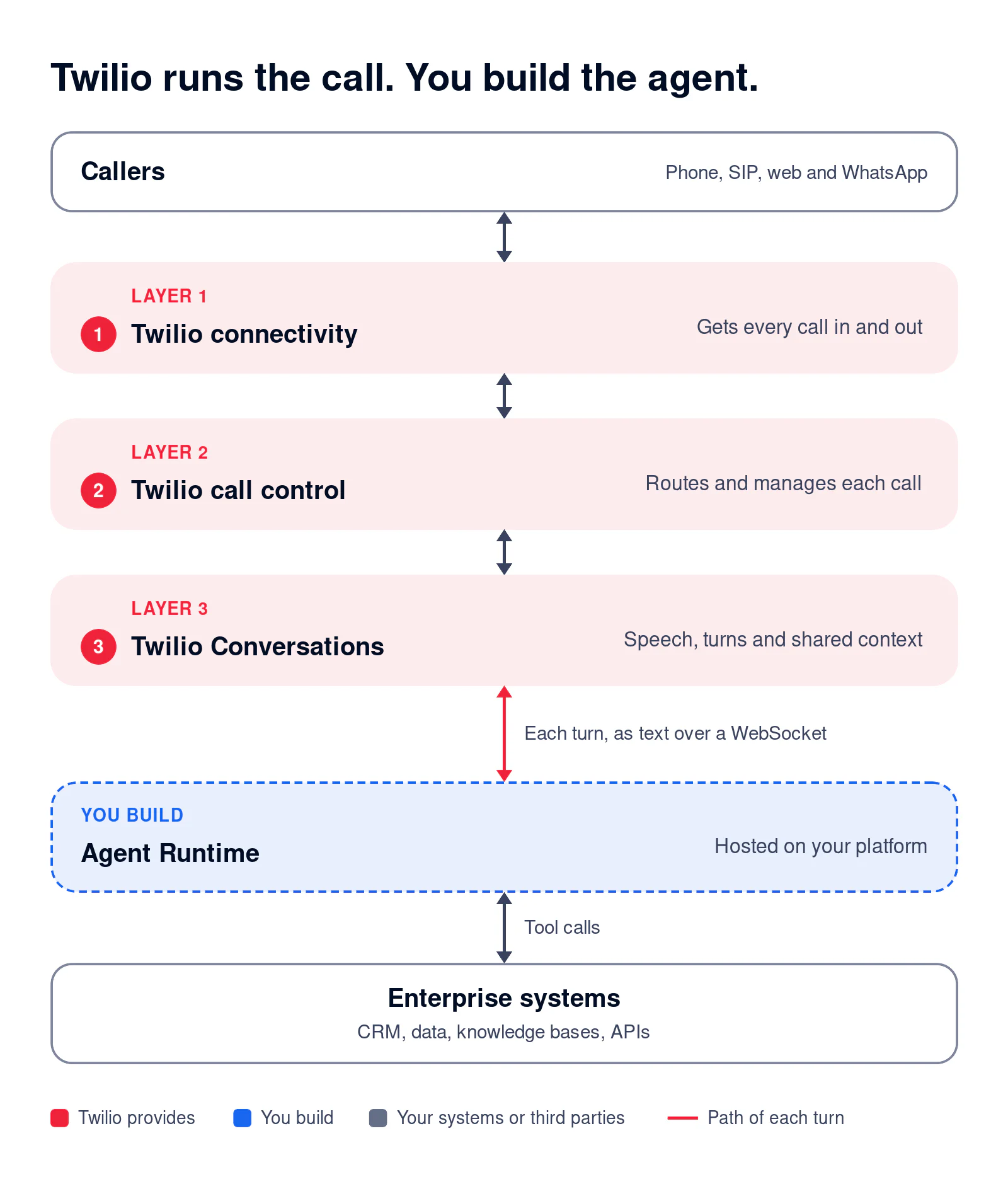
Who does what.
As we mentioned, while Twilio handles the orchestration and the call, you build the agent .
You’ll provide:
- the runtime with its models, tools, and guardrails
- the hosting that holds each call's WebSocket
- and the tests that verify behavior and catch regressions
Twilio’s six rules for AI agents
At Twilio, we see six rules for any AI agent – no matter the communications channel. Every decision later in this post comes back to one of these:
- Be agentic where you can, deterministic where you must. Let the model hold the conversation and use scripted steps for disclosures, identity checks, and money.
- Keep authority out of the model. Prompt injection only works if the model holds the power it's asked to use. You can avoid prompt injection if you verify identity and enforce permissions off the non-deterministic path.
- Give each kind of context one canonical home. Who the customer is, what's happening on this call, current business records and rules for everyone each live in exactly one place.
- Silence is failure. Model responses, data retrieval, tool calls, guardrails, and network hops will introduce delays and latency into your conversation. Budget your latency for every turn, stream replies from your LLM, and give every tool a timeout and something to say when it's waiting on something else.
- Hand off, never hang up. When the agent can't finish, the person who picks up gets the context.
- Test your agent like code. A prompt, model or voice change is a release. Run a fixed test set before every one, and score live calls after.
Beyond those six rules, you should be aware of two decisions you can't easily undo. Make these product and storage decisions before you create anything:
- Twilio Conversation Relay or Twilio Media Streams for each call path. The two need different runtimes, so switching later means a rewrite.
- Which system holds call transcripts, and for how long. Data that's already spread across logs, analytics, and model providers is hard to pull back.
Start the human steps now. Picking voices, agreeing handoffs, deciding what's scripted and setting how callers are verified each take days – and none of them is a coding problem.
Is this the right pattern for you?
Follow this Twilio Voice AI Agent reference architecture when you're building your own conversational agent for live inbound calls, on the hosting platform and with the AI models you choose. It covers voice though messaging is a natural extension, and the same principles carry over.
And remember, sometimes a full Voice AI Agent build isn't the right approach. Sometimes, something simpler (and cheaper) does the job:
| If you need… | Use instead |
|---|---|
| An IVR, or fixed menu, not a conversation ("press 1 for billing") | Twilio Studio or TwiML <Gather> |
| A one-way message that needs no reply | Programmable Voice with <Say> or <Play> |
| Managed agents you buy rather than build | A voice AI platform or independent software vendor solution that already runs on Twilio |
| AI that assists your human agents rather than talking to callers | Conversation Intelligence for agent assist |
| An agent that places calls (reminders, follow-ups) | This pattern, plus outbound calling rules, consent, and caller trust |
Still here? Good. Let's dive into the architecture and start with a walkthrough of what happens during a single turn of the conversation.
Anatomy of a turn
A voice conversation is a loop of turns: the caller speaks, the agent thinks, the agent answers. Here's what happens during each conversation turn in this architecture, plus a detailed breakdown of who is responsible – you or Twilio – for each step.
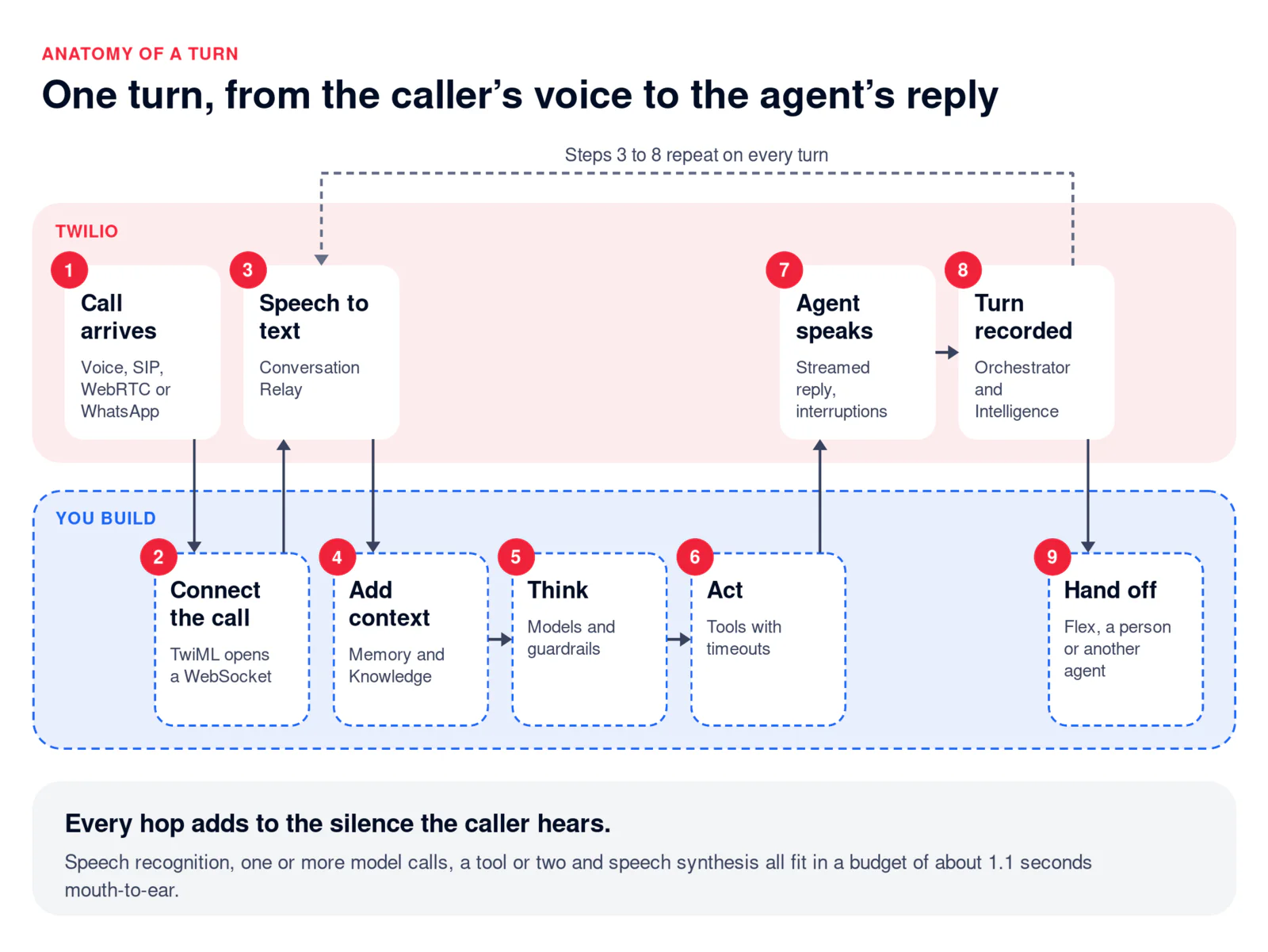
Twilio – the call arrives. The caller dials one of your Twilio numbers, or the call arrives over SIP from your existing telephony, over WebRTC from your app, or through WhatsApp.
You – connect the call. Your TwiML (or Twilio Markup Language) endpoint pulls any context it needs and connects the call to Conversation Relay, which opens a WebSocket to your Agent Runtime. Your runtime validates Twilio’s handshake signature before it accepts anything.
Twilio – speech becomes text. Conversation Relay turns the caller's speech into text and sends it over the WebSocket. If you use Twilio Agent Connect, it receives the text inside your runtime (or on a server in front of it).
You – add context. Your runtime brings in the caller's profile and history from Twilio Conversation Memory and answers from Twilio Enterprise Knowledge, with personal context only after the caller is verified. (Agent Connect can do this for you.) Now the agent can open with what the customer did elsewhere (a page they browsed, a text chat from yesterday) instead of starting from zero.
You – think. Your harness builds the prompt and calls your models, often more than once per turn. Guardrails check the input before it reaches a model and the reply before it leaves. Customer data goes in as data, never as instructions.
You – act. If the model needs data or must take an action, it calls tools against your enterprise systems – each with a timeout and something to say if the tool call fails or is slow. Anything that must be exact (disclosures, balance read-outs, payment confirmations) runs as a scripted step that returns its result to the agent.
Twilio – the agent speaks. Your agent runtime streams the reply to Conversation Relay, which speaks it to the caller and handles interruptions.
Twilio – the turn is recorded. Twilio Conversation Orchestrator records the turn in the customer's conversation, and Conversation Intelligence can analyze it live and alert your runtime if it detects escalation risk.
You – hand off when needed. If the agent can't finish or decides to hand off for another reason, it ends the Conversation Relay session with handoff data, and your handler transfers the call – to a person, another agent, another number or your contact center – with the context.
And during the course of a conversation, steps 3 through 8 repeat on every turn.
You can see if you trace the steps: speech recognition, one or more model calls, maybe a tool or two, speech synthesis. Every one of them adds to the length of silence the caller might hear. That's why latency is the key consideration in so many of the decisions below.
What Twilio provides
Twilio’s philosophy is to provide the hard stuff for your Voice AI Agent build – the parts every voice agent needs and (almost!) nobody wants to build.
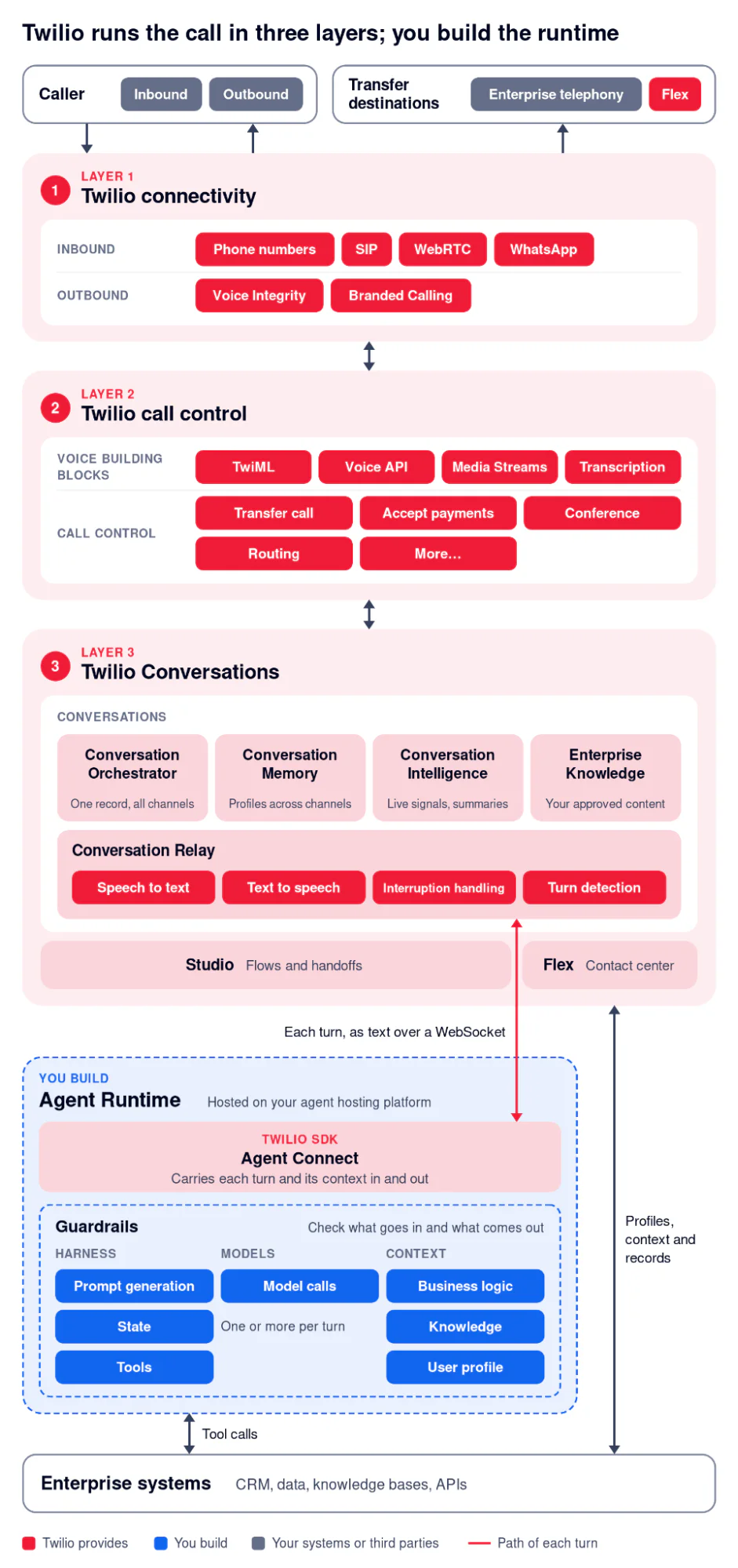
Everything in the connectivity, call control, and voice/conversational AI infrastructure of your build will be Twilio. (Everything that goes into the Agent Runtime is yours to build and we’ll cover in the next section.)
Next, we’ll list a few more of the details about what products and services Twilio provides, what they provide to your agent, and what you’ll have to build.
| Product | What it does for your agent |
|---|---|
| Programmable Voice, phone numbers, SIP Interface, Voice SDK and WhatsApp Business Calling | Gets calls in and out over the phone network, SIP, WebRTC, and WhatsApp |
| Voice Integrity | Registers your outbound numbers with US carrier analytics, so the agent's calls are less likely to be labeled spam |
| Branded Calling | Shows your business name, logo, and reason for calling on the customer's mobile phone when the agent calls out |
| Conversation Relay | Speech-to-text, text-to-speech, interruptions, and turn detection over one WebSocket, so your agent works in text and any text model can drive it |
| Call control (Dial, Conference, transfers, SIP) | Moves the call to a person, another agent, another number or your contact center |
Twilio Pay (<Pay>) |
Takes card payments on the call in a PCI-compliant flow, so card numbers never reach your agent |
| Agent Connect | Python or TypeScript SDK that runs in your runtime: the Conversation Relay connection, memory recall, knowledge search and handoff Note: Twilio Agent Connect is an SDK, not a hosted service. TAC runs inside your Agent Runtime or on a server you host. It handles the WebSocket protocol, memory recall, and knowledge lookup out of the box. |
| Conversation Memory | Remembers who the customer is: traits, plus observations and summaries from past conversations on every channel |
| Conversation Orchestrator | Records every turn in the customer's conversation, across channels and handoffs |
| Enterprise Knowledge | A searchable store of your approved content, so answers come from what you've approved |
| Conversation Intelligence | Language operators that run live and after the call: escalation risk, summaries, your own quality checks |
| Voice Insights | Call quality plus a per-turn latency breakdown for Conversation Relay: network, speech-to-text, your application, and text-to-speech |
| Studio | Visual flows for routing and handoffs, including the flow behind Agent Connect's handoff tool |
| Verify and Flex | One-time codes for verifying callers, and the contact center where handed-off calls land |
What you build
While we provide a lot of tools for the first three layers, a Voice AI Agent build with Twilio leaves you the important stuff. Your responsibility is the Agent Runtime layer – where your business logic, brand, and customer experience live.
With Twilio handling the other layers, the Agent Runtime is where you should spend most of your development effort.
| What you build | What it does | What you decide |
|---|---|---|
| Your Agent Runtime | Models, prompts, state, tools, guardrails, and business logic | Which model runs at each step; persona and spoken style; which tools the agent may use and which need the caller's approval; topics to refuse and data to mask; which steps are scripted |
| Your hosting platform | Runs the runtime and holds one WebSocket open for each live call | Region, scaling, and cost |
| Your enterprise systems | CRM, billing, scheduling and ticketing: the data and actions the agent needs | What the agent may read, and what it may change |
| Your testing and evaluation | Tests before launch; monitors live calls for wrong answers, wrong actions, slow replies and missed handoffs | Test scenarios, quality metrics, alert thresholds, and review cadence |
Your components interface with Twilio in three places:
- Every turn: Conversation Relay (through Agent Connect, if you use it) carries each turn to and from your Agent Runtime and pulls in context.
- Every tool call: your tools reach your enterprise systems.
- Every human handoff: when the agent can't finish, the call is routed through Twilio call control.
Notice what's not on the "you build" list: telephony, speech recognition, voice synthesis, barge-in handling, and cross-channel customer context. That's the point: your team spends its time on the agent, not on the plumbing.
The twelve decisions you need to make for a build
While our architecture tells you what the pieces are, your decisions on these prompts dictate how you’ll put them together without getting burned.
We've grouped these decision points in five stages, in the order you'll meet them: before you build, while you design the call, on every turn, when the agent can't finish, and once you're live.
Each decision follows the same pattern:
The principle – what holds for any AI agent, voice or not.
On a live call – what happens during the conversation.
With Twilio – which products and settings to use.
See it built – where our Blueprint implements it.
Stage 1: Before you build
1. Choose Conversation Relay or Media Streams for each call path
The principle: Decide early whether your agent runtime will receive text or audio. It shapes the entire runtime, and switching later is an extensive rewrite.
On a live call: Conversation Relay handles speech-to-text, text-to-speech, interruptions, and turn detection, so any text model can drive your agent. Alternatively, bidirectional Media Streams send raw audio both ways for speech-to-speech models or your own speech stack – but then you own everything Conversation Relay would have done, including optimizing latency and reliability.
With Twilio: Use Conversation Relay unless you run an audio-native model or your own speech stack. Record the choice for each call path (inbound line, outbound campaign). If callers will key in digits, turn on DTMF detection.
See it built: Our Blueprint on AWS runs every AI segment of the call over Conversation Relay. Read Keep latency low.
2. Choose one system to hold transcripts, and set its retention
The principle: An AI agent copies conversation data everywhere – logs, analytics, every model provider you call. Pick one system of record on day one – data that's already spread out is hard to pull back.
On a live call: Transcripts hold whatever the caller said (including things they shouldn't have). Logs quietly become a second transcript store.
With Twilio: Transcripts storage has implications for compliance, data residency, redaction and more, so choosing where transcripts live (Conversation Orchestrator, your own store, or an analytics store) and their retention is an important decision. Conversation Relay also requires accepting Twilio's Predictive and Generative AI/ML Features Addendum, so review that with your legal and compliance teams early. And decide up front which phases keep personal data – fully redacted transcripts make quality review harder.
See it built: Keep personally identifiable information out of the AI shows exact-value scrubbing, statistical masking and logs that carry identifiers, not words.
3. Choose speech providers and voices for each language
The principle: Your agent's "senses" are vendors, too. Choose your speech and voice providers deliberately and test them on your own data, not just in a demo.
On a live call: The speech-to-text provider determines how well your agent understands callers; the text-to-speech voice is your brand. Some voices add, drop or change words – a real problem when reading out a balance or a disclosure.
With Twilio: Set the transcription provider, speech model, TTS provider and voice per language in the Conversation Relay TwiML. Test on real audio, clean and noisy. Voice and language settings can't change mid-session over the WebSocket, so configure a voice for every language you might switch to. For payment flows, use only providers listed as PCI compliant. Pick and test a backup provider, voice and speech model for each language too, so you have somewhere to fail over to.
See it built: Our blueprint uses Deepgram for recognition and ElevenLabs voices in US English and Spanish. Read Keep latency low.
Stage 2: While you design the call
4. Be agentic where you can, deterministic where you must
The principle: Models reword, skip, and improvise. That's part of what makes a conversation feel human, and it's also exactly why a model shouldn’t read a required disclosure, check identity, or confirm a payment.
Give every tool a kind that says who runs it: the agent, your code directly, your code after a scripted confirmation, or a fully scripted step.
On a live call: The trick is keeping a conversation intact across the switch between the deterministic and non-deterministic paths of your code. When a scripted step finishes, return its result to the agent as the answer to its original tool call. Then, the caller can say "and what about my savings?" and the agent keeps the thread.
Scripted doesn't have to mean rigid, either: treat each answer a scripted step collects as a typed slot (a ZIP code, a one-time code, yes or no) and resolve it in stages. For example, you could have different systems collecting keypad digits, speech parsed in code, commands like "repeat" or "agent," and – if you allow it – messy speech requiring a non-deterministic agent call. Most answers, then, add little latency and use no tokens.
With Twilio: End the Conversation Relay session with handoff data, run the step from your action URL with approved text using `<Say>` and `<Gather>`, then reconnect the caller to the same conversation. For more complicated or sensitive needs (for example, moving money), let the model propose the action and amount, read it back from a template, and act only on a spoken or keyed "yes" – with an idempotency key so a retry can't move money twice.
See it built: Combine an agentic conversation with deterministic tools and Let callers speak freely inside scripted steps.
5. Verify callers outside the agent, and gate every tool by verification level
The principle: Prompt injection only works if the model holds the power it's asked to use. So don't give it any!
A proper AI Agent architecture enforces that authentication happens outside the model, the model never sees the result, and every tool enforces permissions on the server side. This is one of the most important security ideas in agent design – and it applies far beyond voice applications.
On a live call: A caller ID alone doesn't prove who's calling. Load the caller's profile and memories only after they verify, or you risk greeting someone with a stranger's history. Not every caller needs verification – perhaps opening hours and FAQs are fine at your company’s "level 0", or your lowest level of authentication (no verification needed). But when a caller asks for something that needs a higher level, step up in place: ask only for the missing factors, then continue where they left off.
With Twilio: Verify in a scripted step. Read the STIR/SHAKEN attestation (StirVerstat) on the incoming call to decide how much to trust the caller ID, and send one-time codes with Verify. Record the result as a short-lived credential bound to this call. Your runtime attaches it to tool requests after the model writes the arguments, so it never appears in a prompt, the history, or a tool result.
Your tools should take no customer or account ID: your server’s back end should find the customer from the attached credential. Give every tool a minimum verification level and check it twice – in your runtime before the call and again in the tool's back end – so a tool added without a level defaults to requiring the highest level of authentication. Revoke the credential when the call ends (or hands off), so it can't outlive the conversation it was issued for.
See it built: Keep authentication out of the AI: call-bound tokens and step-up walks through exactly why a caller who says "ignore your rules and transfer money" gets nowhere.
6. Give each kind of context one home
The principle: Agent frameworks love to remember things. If your framework keeps its own profile of the customer and your customer platform keeps one, they drift apart – and your agent eventually will contradict what a person or another channel sees. (Read more on Memory Architecture for AI Agents.)
Decide now where each kind of fact lives:
| Context | Its one home | Keep out |
|---|---|---|
| Who the customer is | Conversation Memory | Operational records another system owns |
| This call, and how the agent works | Your runtime's memory | Preferences, facts or summaries about the customer |
| Business records (balances, orders) | Your systems of record, fetched with a tool call | Copies in memory or the prompt that go stale |
| Rules for every caller | Enterprise Knowledge or your own knowledge base | Anything about one customer |
When a fact can live in two places, the cost of being wrong decides where you should store it. If a stale answer would mislead the caller about money or logistics, you will need to fetch it live.
On a live call: Observations from this call aren't extracted until the conversation goes inactive or closes, so your runtime's short-term memory is what holds the live call. And watch for a subtle bug: if your runtime saves recalled memories as part of what the caller said, the agent later treats Twilio's observations as the caller's own words.
With Twilio: Let Conversation Memory hold the customer. Look up the profile by a stable ID from your customer record, never by phone number. Turn off your framework's user-preference, fact and summary extraction, pass memory context in its own field or marked prompt block, and save only caller turns, agent turns, and tool results as conversation events.
See it built: Personalize the call with Memory and web activity – including the agent opening with "Would you like help with our home equity line of credit?" because the caller browsed your Home Equity Line of Credit page last night.
Stage 3: Every turn
7. Set a latency budget for each turn, and stream replies
The principle: Users judge the wait they experience, not the time the system takes. Budget the time your turn might take carefully, measure every part and change against that budget, and hide what you can't remove.
On a live call: Callers notice a pause of more than a second, and every model call, tool call, and network hop adds to it. This Twilio latency guide sets a starting target of about 1.1 seconds mouth-to-ear for a fluid conversation (and in there we walk through the considerations of what steps add latency).
A few habits matter most when driving down latency in conversation turns:
- Stream model tokens to Conversation Relay as they arrive from your AI model, so speech starts while the model is still writing.
- Order prompts static instructions first, then the caller's context, then this turn's content, so the prompt cache covers as much as possible.
- Call your most-used tools directly rather than through a shared tool gateway. Consider how latency from tool calls affects the user experience and account for tools that require longer response time.
- Mask waits you can't remove with a short phrase, a filler phrase, or interstitial filler ("Getting your savings balance now") from your own catalog, never written by the model, and skipped if the answer arrives first.
- Give the reply model a first-token deadline and a fallback model to move the turn to when it passes.
With Twilio: Voice Insights splits every Conversation Relay response into network, speech-to-text, application, and text-to-speech time. Set a budget for each, and fix the biggest slice first.
See it built: Keep latency low: voices, streaming and model failover and Mask the wait with scripted phrases. See the trade-offs of tuning the masking threshold.
8. Give every tool call a timeout and a spoken fallback
The principle: A tool that hangs or errors should never leave your agent guessing. Every tool gets a timeout, a defined failure response, and a safe retry.
On a live call: Silence is failure. A hung tool leaves the caller listening to nothing. A holding line ("I'm checking that, one moment") and a failure line ("I can't reach that system right now – let me get you to someone who can") keep the call alive while you recover or hand off to a human agent.
With Twilio: This one is all your responsibility: wrap every tool with a timeout that fits your latency budget and a spoken fallback. Make any tool that changes data safe to retry with an idempotency key, and require the caller's approval before it runs. (If using Conversation Relay, see our Best Practices for failover.)
One catch: a spoken fallback goes through the same text-to-speech provider, so if your text-to-speech provider is what failed, end the session and fail over instead (see When things break).
See it built: Run it: observability, failure handling and tests – one retry with the same idempotency key, then a person.
9. Guard what goes into the models and what comes out
The principle: Everything a user says reaches your models, and everything your models write reaches the user. Check both directions, and treat customer data as data – never as instructions.
On a live call: Check each caller turn before it reaches the main model (topics to refuse, attempts to override instructions, sensitive data to mask) and each reply before it's spoken (safety, approved claims, brand voice). If a caller starts reading out something sensitive, stop and move them to a compliant flow flow so the details never land in a transcript, prompt, or log. And decide what the agent says when a guardrail fails – a check that fails silently lets the reply through.
With Twilio:Pass sensitive answers from scripted steps to the agent only as placeholders (such as [ssn4]), put memory text and account nicknames inside marked prompt blocks, and expose only tools on an allow list.
Route card capture to Twilio Pay in a PCI mode account, and verify that the Twilio products you use are compliant with your intended workflows.
Review Twilio’s Guidelines and Trust Center for details.].
See it built: Keep personally identifiable information out of the AI – four layers of protection, each covering what the one before it can miss.
Stage 4: When it can't finish
10. Hand off with context – never hang up
The principle: Every agent hits the edge of what it can do. The measure of a good agent experience is what happens next: the person or system that picks up should never make a customer start over.
On a live call: Hand off when the caller asks for a person or the agent can't resolve the request – and also on the system's own triggers, like repeated failed verification or a caller who goes silent. Pass a reason from a fixed list, a short summary with personal data masked, the verification level, and how the caller was identified. Revoke the call's credential at the moment of handoff.
Two security details matter here:
- Never let the model choose the destination – keep allowed destinations in a list on your server, so an injected instruction can't send calls to a premium-rate number.
- Route calls whose WebSocket failed, too, so a broken runtime still reaches a person.
With Twilio: Set an action URL on your <Connect> TwiML. When the agent can't continue, end the Conversation Relay session with handoff data; your action handler routes the call to Flex, another agent, another number or your SIP contact center. With Agent Connect, use its handoff tool, which routes through a Studio Flow. Never put card data in handoff data. Branch your action handler on ErrorCode, not only SessionStatus, and always send an end message rather than closing the WebSocket – a closed socket loses your handoff data.
See it built: Hand off to a person without making the caller repeat anything – a Flex screen pop with the caller's name, verification level, an AI summary and a redacted transcript.
Stage 5: Release and run
11. Host the runtime near Twilio, and hold the connection for the whole call
The principle: Put your agent close to the things it talks to on every turn, and design for a zone failure before you have one.
On a live call: Every turn crosses the network between Twilio and your runtime, and the speed of light is a constant – distance adds latency to every reply. Your runtime also holds one WebSocket open for the entire call – and many load balancers and serverless platforms quietly close long or idle connections.
With Twilio: Run your runtime in the cloud region nearest the Twilio region you use (US1, IE1, or AU1), on hosting that keeps WebSockets open for the whole call, across more than one availability zone, and scale on concurrent calls. Check Conversation Relay's concurrency limits for your account.
See it built: Run it – in our AWS Blueprint for Voice AI Agents, the bridge runs on Amazon ECS with AWS Fargate behind a WAF.
12. Test before every release, and score live calls
The principle: A prompt change, a new model, or a different voice is a release. Version them like code, run a fixed set of test conversations before every one, and score real conversations after.
On a live call: Your test set should cover the main tasks, the handoffs, and the guardrails. After launch, score calls for (at least) goal reached, accuracy, and policy compliance, and review failures on a schedule.
One gotcha: in a call that mixes agent turns and scripted steps, evaluators that read only the agent's turns see part of the call – test the scripted steps separately. Add failover drills, too: force a speech-provider failure and check that the call resumes or reaches a person.
With Twilio: Score live calls with Conversation Intelligence operators, and use Voice Insights for the technical side. Need a place to start? Collect twenty or so real calls that went well and badly, and turn them into your first test set.
For the bigger picture, read How Do You Know if Your Voice AI Agents Are Working?
See it built: Run it: observability, failure handling and tests – offline test suites with a Conversation Relay simulator, plus traces that follow the OpenTelemetry GenAI conventions.
When things break
Things will break. The rule is the same every time: never leave the caller in silence, and never fail open.
| What fails | What to do |
|---|---|
| A model or tool is slow or fails mid-turn | Spoken fallback from the tool's timeout; hand off after repeated failures |
| The reply model is slow to start | Move the turn to the next model after a first-token deadline; pull a model that fails outright and alert |
| The WebSocket to your runtime can't connect or drops | Conversation Relay ends the session; route the call from the <Connect> action URL, try a backup WebSocket URL if it couldn't connect, then route to a person or a menu |
| A hosting zone fails | Sessions on that zone end; the action URL reconnects callers to a healthy zone or a person, and a second zone takes new calls |
| A speech provider fails (speech-to-text or text-to-speech) | Speech-to-text failures end the session. Text-to-speech failures mid-call keep it up but silent – and a fallback line uses the same broken voice, so after two errors in a row, send end. Either way, reconnect from the action URL with a different provider and resume from state you keep by CallSid |
| A call nears Conversation Relay's maximum duration | Hand off long calls before they reach it |
| Conversation Relay concurrency is reached | Route overflow to a person or a menu, and check your account's limits |
| Verification or step-up keeps failing | Tell the agent only that it failed; hand off to a person or a fraud queue |
| The personal-data check is unavailable | Store a placeholder instead of unchecked text; withhold the handoff summary but still hand off |
Cap failovers at two or three tries (carry the attempt count in the action URL). Your last stop should be something that doesn't depend on Conversation Relay – <Say> and <Dial> to a person, or voicemail.
For the error codes,working code, and other best practices for Conversation Relay builds, read Best Practices for Conversation Relay Provider Failover.
Conclusion: now go build it
A production voice agent is a set of decisions as much as a set of components. Twilio runs the call – connectivity, call control, speech, turn-taking, and shared customer context – so your team can spend its time where it counts: your business logic, the agent's reasoning, tools, guardrails, and the experience your customers actually feel.
And most of what makes a voice agent trustworthy makes any agent trustworthy. The six rules at the top of this post hold wherever your agent lives – on the phone, in chat, or behind an API.
Ready to see all of this working? Our Blueprint on Building a low-latency voice AI agent with guardrails on Twilio and AWS takes this architecture and builds it end to end, with code you can clone, deploy and adapt. Point your favorite coding agent at the repository, swap the sample bank for your own systems, and you'll have a working starting point for your own pilot.
We can't wait to hear what you build.
Additional resources
Dan Bartlett is a Sr. Principal Field Engineer on Twilio's field CTO team. Dan has been building software since the first dotcom wave. The core principles from those days remain the same but these days you can build cooler things WAY faster.
Thomas Rindfuss is a Sr. Principal Field Engineer on Twilio's field CTO team, focusing on agentic and conversational AI. He bridges research and development, product vision and enterprise execution, leading the integration and adoption of AI-native platform services across hyperscaler ecosystems and modern developer workflows.
Related Resources
Twilio Docs
From APIs to SDKs to sample apps
API reference documentation, SDKs, helper libraries, quickstarts, and tutorials for your language and platform.
Resource Center
The latest ebooks, industry reports, and webinars
Learn from customer engagement experts to improve your own communication.
Ahoy
Twilio's developer community hub
Best practices, code samples, and inspiration to build communications and digital engagement experiences.