On-Demand Masked Sessions with Twilio Proxy, Voice and Serverless
Time to read:
September 16, 2026
Written by
Reviewed by
In this post, you'll learn how to build a Just-in-Time (JIT) Masked Session Creation system to securely connect users on demand. When phone numbers can't be pre-associated due to inventory constraints, this architecture intercepts inbound calls to a central Twilio number powered by Twilio Voice, uses an IVR to collect a tracking code, and dynamically creates a private proxy session on the fly with Twilio Proxy.
Let’s build it!
Solution overview
For on-demand delivery, ridesharing, and marketplace services, connecting two users securely is a standard operational requirement.
Typically, customer and courier interactions are managed using masked communications, allowing both parties to call or text each other without revealing their personal phone numbers. Twilio Proxy simplifies this task by dynamically mapping intermediate phone numbers and bridging active sessions. However, a traditional implementation assumes that the identity of both parties is known beforehand to pre-allocate a static session. What happens when a delivery courier is standing outside an apartment complex trying to reach a customer, but their phone numbers cannot be pre-associated due to scaling or inventory constraints?
This tutorial introduces a customized architecture called Just-in-Time (JIT) Masked Session Creation. By intercepting inbound calls on a single reserved Twilio number, prompting the caller with an interactive voice response (IVR) to key in a short tracking code, and querying a lightweight backend, you can resolve and stand up private sessions on the fly.
High-level solution architecture
This dynamic architecture runs entirely on Twilio Serverless Functions.
The core challenge occurs when Twilio Proxy intercepts a call on a number with no active session, triggering an Out-of-Session Callback. That callback's payload does not contain the digits pressed on the keypad, so we implement a '2-Bounce' out-of-session workflow using a redirect and Twilio Sync to carry state across the bounces.
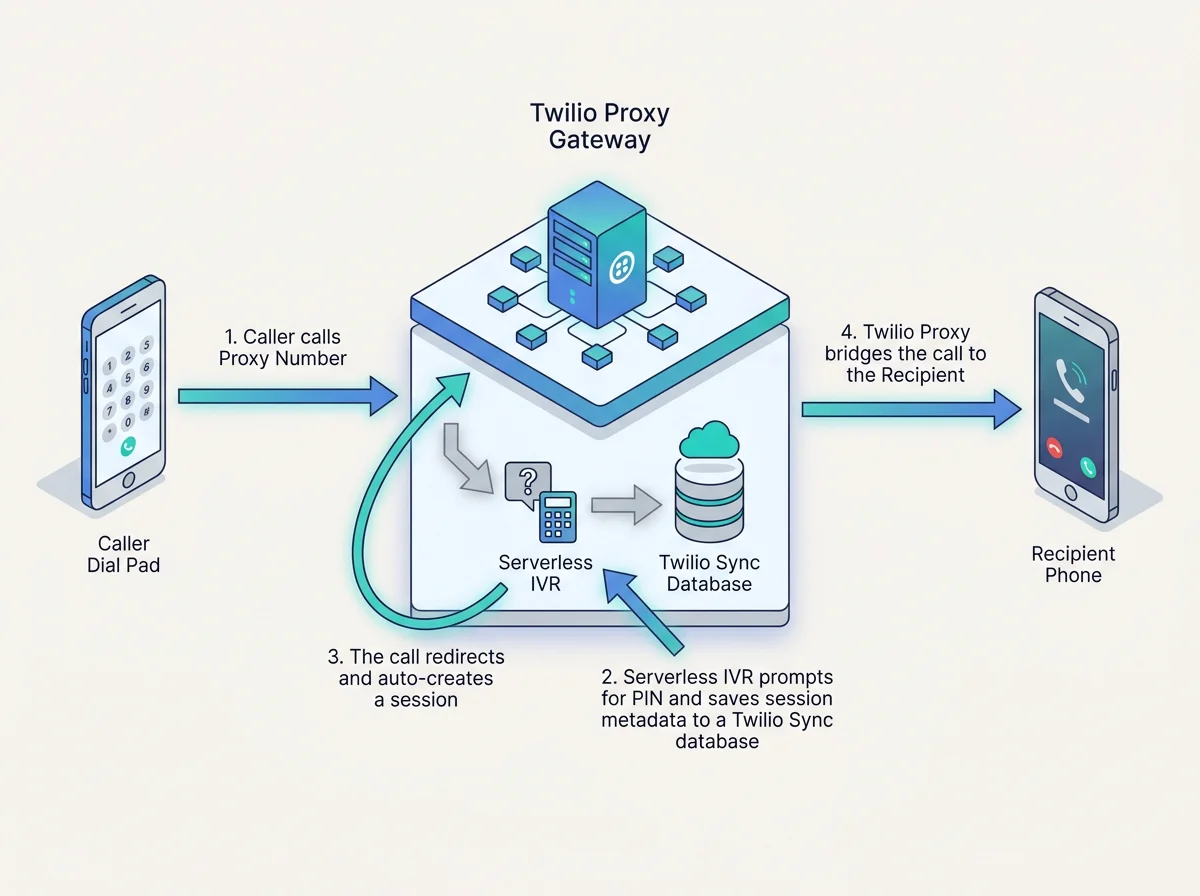
The sequential diagram above illustrates how a single call is bounced twice to achieve dynamic session creation:
- First Bounce (Out-of-Session): The caller dials the reserved Proxy number. Since no session exists, Twilio Proxy fires a callback to
/out-of-session. The endpoint checks Twilio Sync for an existing call resolution. Finding none, it returns TwiML with a<Gather>prompt asking the caller to enter their 6-digit code. - Digits Collection & Bidirectional Lookup: The caller enters the code via DTMF. Twilio posts the digits and
CallSidto/gather-action. This endpoint calls an internal/lookupAPI. The/lookupendpoint performs a bidirectional search: it finds the mapping by the tracking code, determines which of the two mapped parties is calling, and returns the other party's phone number. - Stashing the Resolution in Sync: Since the second bounce needs to know the destination number but won't have access to the entered digits, the resolved phone number is stored out-of-band in a temporary Twilio Sync Document, using
res-+CallSidas the unique key with a short TTL (e.g., 900 seconds). - The Redirect Bounce: After stashing the resolution,
/gather-actionreturns a<Redirect>pointing the live call back to the Proxy Service Call URL. Since no session has been created yet, Proxy intercepts the call again and fires its Out-of-Session Callback a second time. - Second Bounce & Session Auto-Creation: On this second bounce,
/out-of-sessionqueries Twilio Sync using theCallSid. It finds the stashed phone number, deletes the Sync Document, and returns anapplication/jsonpayload instructing Proxy to auto-create the session, adding the caller and bridging them to the resolved destination.
Business objectives solved
This architecture addresses three critical business challenges:
- Zero-Friction Courier Experience: By dialing a single proxy phone number and responding to a clear voice prompt using their dialpad, couriers can securely bridge the call.
- Enable Flexible Marketplace Communications: Restaurants or any assigned drivers can initiate contact using the same workflow which starts by dialing a Proxy number.
- Support Third-Party Contact: By allowing any caller to provide an order-specific tracking code, this architecture facilitates secure, authorized connections regardless of whether their personal number was pre-registered, allowing third-party contacts to reach support.
Prerequisites
To follow along with this tutorial, you'll need the following:
- A Twilio Account: You must have an active Twilio account. You can sign up for a free Twilio account here.
- Twilio Phone Numbers: You must have a minimum of 2 voice-enabled phone numbers purchased ( Guide)
- Twilio Proxy: You will need to have a Twilio proxy service created, and have added a minimum of 2 phone numbers into the Twilio Proxy’s phone number pool. One of the phone numbers must be marked as a reserve phone number ( Guide).
- Twilio Sync:To set up Twilio Sync, in your Console navigate to Twilio Console > Develop > Sync > Services, where you can either create a new Twilio Sync Service or confirm that "Default Service" is listed.
- Node.js and npm: Ensure Node.js (version 22 or higher) and npm are installed on your local machine.
- Twilio CLI & Serverless Toolkit: Used for local testing and serverless deployment. Install via
npm install -g twilio-cliandnpm install -g @twilio-labs/plugin-serverless
Building the app
This section walks through the step-by-step implementation – you will build the five key serverless endpoints and their helper functions.
Want to skip the build? The full source code used in this guide can be found over here.
Clone Prebuilt App
In your terminal, run the following commands:
Configuring environment variables
Begin by setting up the environment variables. These variables provide the SDK client with authentication details and define which services the endpoints interact with.
Create a .env file in your project root and configure the following variables:
If you need help finding your Twilio account credentials, this page shows where to find your Account SID, while this page shows how to find your Auth Token.
Implementing helper functions in Twilio Sync
To keep our serverless handlers clean, we move all Twilio Sync interactions into a shared asset helper file (src/assets/helpers.private.ts). We will break down this file step-by-step.
SDK Types and Global Constant
First, define the minimal TypeScript shape for the Twilio Sync API SDK alongside your global application constants.
Notice resolutionKey: Sync rejects a uniqueName that matches standard 34-character Twilio SIDs (like a CallSid starting with CA). To bypass this constraint, we explicitly prefix the SID with res-.
Document CRUD: Managing Call Resolutions
When handling out-of-session call bounces, the incoming webhook payload does not retain user-entered digits. These helper functions handle saving, fetching, and removing the destination number inside temporary Sync Documents using the prefixed CallSid key.
Sync Map Lookups and Counterparty Resolution
These helpers extract paired metadata from a persistent Sync Map. resolveCounterparty resolves bidirectional calls, matching the incoming caller against a pair of numbers and returning the other party's number.
Sync Stream Event Publishing
Finally, we define the event schemas and publish a handler for streaming live events to the frontend UI via a Twilio Sync Stream. The publisher uses a self-healing pattern: if the target Sync Stream doesn't exist yet, it creates it auto-magically on the first publish failure.
Intercepting the Inbound Call (The First Bounce)
When a call is placed to the reserved Proxy number, Proxy fires its Out-of-Session Callback. Our /out-of-session endpoint acts as the primary traffic controller. On the first bounce, it checks Twilio Sync for a pre-resolved destination number. Since the caller has just dialed and hasn't entered a code yet, Sync returns null. The endpoint then returns a <Gather> TwiML verb to prompt the caller for their tracking code.
Stashing the resolution and executing the redirect
After the caller enters their 6-digit code, Twilio posts the digits to the /gather-action endpoint. The endpoint calls an internal lookup routine to resolve the recipient's number. Once resolved, the application stashes the target number in Twilio Sync (keyed by the CallSid) and redirects the still-live call back into Twilio Proxy's voice webhook URL.
Creating the bidirectional lookup engine
The lookup engine maps a single code to a pair of users, resolving the recipient's phone number relative to who called first. If Party A (the courier) calls, the lookup returns Party B's (the customer) number. If Party B calls, it returns Party A's number. This elegant bidirectional routing is handled by the /lookup endpoint, which reads mapping data from a Twilio Sync Map.
Configuring session lifecycle cleanups
To maximize the efficiency of the phone number pool, release numbers as soon as active interactions terminate. Point Twilio Proxy's Callback URL to the /callback endpoint. When an outbound call leg reaches a terminal state (such as completed, busy, or no-answer), the serverless function intercepts the event, validates the secure Twilio signature, and issues an API command to close the Proxy session instantly.
Deploy to Twilio Serverless Functions
On your terminal, enter the following command
Configure Twilio Proxy
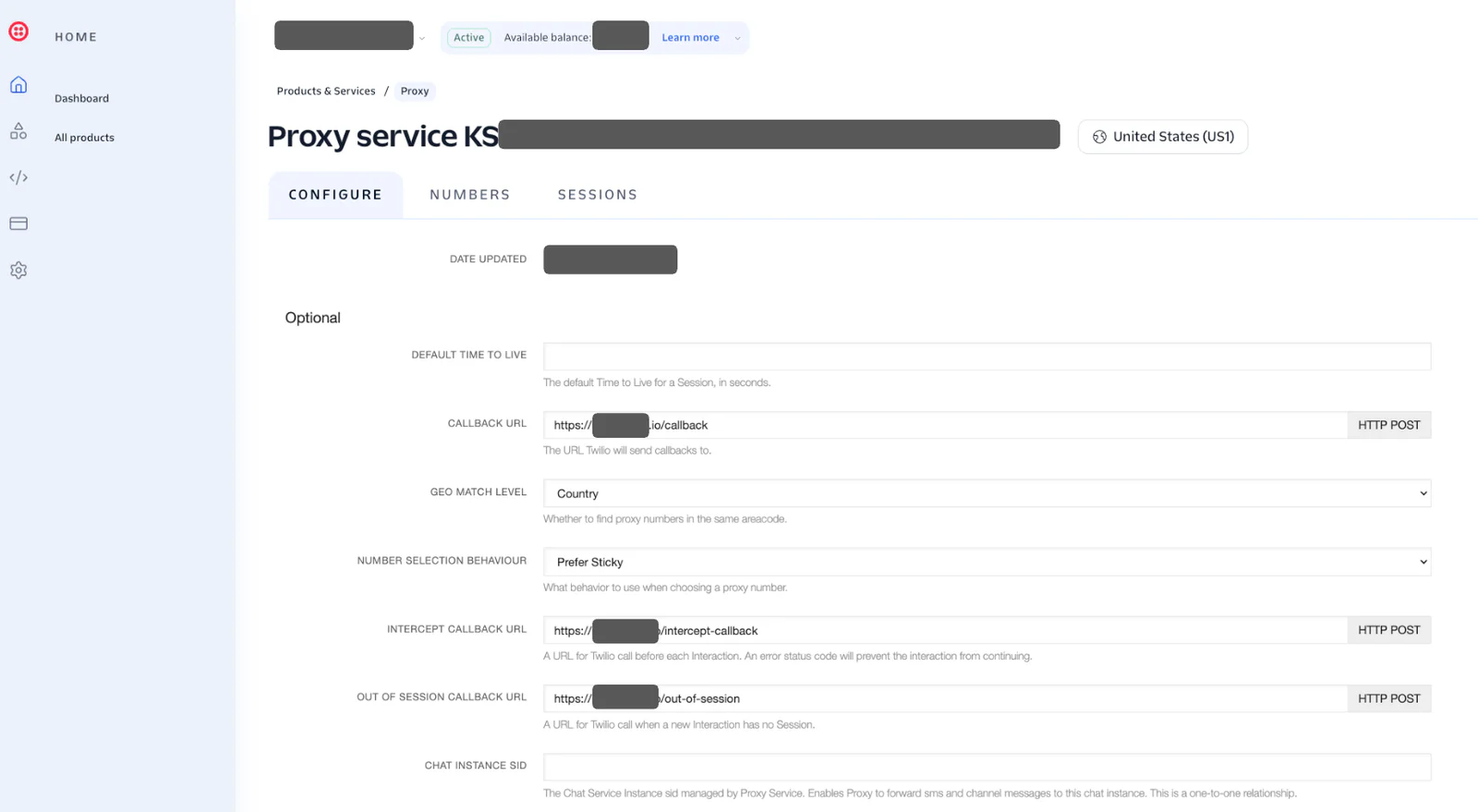
In the Twilio Console, navigate to Twilio Console > Products & Services > Twilio Proxy > Select Created Proxy > Configure
Based on the output of Step 8, fill up the following details:
- Callback URL
- Intercept Callback URL
- Out Of Session Callback URL
Get ready to test
Congratulations, you are now ready to start testing the dynamic session creation!
To start testing,
- Call the reserved phone number that you have in your Twilio Proxy’s phone number pool
- Enter the 6 digit code that you have configured in Step 2
- Call your reserved number to trigger the IVR, which will route and connect your call directly to the destination number defined in your
LOOKUP_MAPenvironment variable.
Conclusion
By implementing a serverless Just-in-Time (JIT) Masked Session workflow, you eliminate the operational inefficiencies of statically pre-allocating phone numbers. This '2-bounce' redirect pattern using Twilio Functions and Twilio Sync creates a highly secure, private, and frictionless communication bridge that works across standard cellular connections. Your number pool is preserved, customer trust is reinforced, and your infrastructure scales elastically.
As a next step, you can elevate your contact center experience by building real-time translation with OpenAI’s Realtime API or implementing ultra-low-latency, speech-to-speech AI assistants using Twilio Media Streams with NVIDIA PersonaPlex. We’re excited to see what you build next!
Leroy is a seasoned presales solution architect with a knack for designing scalable architectures on the cloud. He is currently part of the Solution Engineering team for APJ. Leroy can be reached at lechan [at] twilio.com.


Related Resources
Twilio Docs
From APIs to SDKs to sample apps
API reference documentation, SDKs, helper libraries, quickstarts, and tutorials for your language and platform.
Resource Center
The latest ebooks, industry reports, and webinars
Learn from customer engagement experts to improve your own communication.
Ahoy
Twilio's developer community hub
Best practices, code samples, and inspiration to build communications and digital engagement experiences.