Build a Video Chat App with ASP.NET Core and Angular using Twilio Video

September 03, 2026
Written by
Reviewed by
Paul Kamp
Twilion

Video is everywhere now, from telehealth visits to virtual banking to online exams. With Twilio Programmable Video, you can add multi-party video to your own app without running any media servers yourself.

In this tutorial, you will build a small but complete group video chat app: an ASP.NET Core Web API that mints Twilio access tokens and lists active rooms, and an Angular single-page app that joins a room, shows every participant, and lets you pick your camera and microphone. To keep the room list current for everyone, the server pushes updates over SignalR instead of making the browser poll.

By the end you will have a working two-participant call running locally, with device selection and a live room list that updates the moment someone joins or leaves.

This post is based on a tutorial by David Pine, rebuilt for current .NET and Angular versions.

What you will build

The app has two parts that run side by side:

  • An ASP.NET Core Web API which will hand the browser a Twilio access token, report which rooms currently have people in them, and relay a "rooms changed" signal to every connected client over SignalR.
  • An Angular SPA that uses the twilio-video library to capture the camera and microphone, connect to a room, and render each participant, plus the @microsoft/signalr client to keep its room list live.

Twilio mints the access token's signature from your API Key Secret, so the token endpoint never has to call Twilio at all. The room and participant lookups call the Twilio REST API.

Prerequisites

To follow along you will need:

  • A Twilio account.
  • The .NET SDK 10 or later.
  • Node.js 22 LTS or later. The Angular CLI requires a current Node version.
  • The Angular CLI, installed globally with npm install -g @angular/cli. (If you would rather not install it globally, replace every ng command below with npx @angular/cli.)
  • A code editor such as Visual Studio Code with the C# Dev Kit.

Everything here runs on macOS, Linux, and Windows alike.

Create a Twilio Video API Key

The server signs access tokens with a Twilio API Key SID and API Key Secret. To create one, in the Twilio Console, go to Account > API keys & tokens and create a new Standard API key. Copy the SID (it starts with SK) and the Secret shown once at creation time.

You will also need your Account SID (it starts with AC), shown on the Console dashboard.

Keep these three values handy: AccountSid, ApiKey, and ApiSecret. Treat the secret like a password and never commit it to source control.

Build the ASP.NET Core Web API

Start by scaffolding a minimal Web API. From the folder where you want the project to live, run:

dotnet new webapi -o Server -n VideoChat.Server

This creates a Server project using .NET's minimal hosting model, where everything is configured in Program.cs with no Startup.cs. You will replace Program.cs entirely below, which removes the sample WeatherForecast endpoint the template generates.

Next, add the Twilio .NET helper library. Pin the version so the tutorial stays reproducible as new majors ship:

cd Server
dotnet add package Twilio --version 8.0.0

Pin the development port

dotnet new webapi writes a random local port into Properties/launchSettings.json – so note the port on your machine will differ from mine. The Angular dev proxy you set up later points at a fixed port, so pin the API to http://localhost:5216 now. Open Server/Properties/launchSettings.json and set the http profile's applicationUrl:

"http": {
  "commandName": "Project",
  "dotnetRunMessages": true,
  "launchBrowser": false,
  "applicationUrl": "http://localhost:5216",
  "environmentVariables": {
    "ASPNETCORE_ENVIRONMENT": "Development"
  }
}

dotnet run uses this http profile by default, so the API will listen on port 5216.

Again, the Angular dev proxy will point at a fixed port, so if you prefer a different port, use it consistently here, in the test URL below, and in proxy.conf.json later.

Bind the Twilio credentials to a typed options class

Rather than reading configuration strings by key throughout the app, define a small options class and bind it once. Create TwilioOptions.cs:

namespace VideoChat.Server;
/// <summary>
/// Strongly typed Twilio credentials, bound from the "Twilio" configuration section.
/// The API Key and Secret are used both to mint access tokens and to authenticate
/// REST calls to the Video API; the Account SID scopes those REST calls to your account.
/// </summary>
public sealed class TwilioOptions
{
    public const string SectionName = "Twilio";
    public string AccountSid { get; set; } = string.Empty;
    public string ApiKey { get; set; } = string.Empty;
    public string ApiSecret { get; set; } = string.Empty;
}

Add a matching (empty) section to appsettings.json so the shape is documented in the repo, but leave the real values out of the file. Merge this Twilio key into the existing JSON object alongside Logging and AllowedHosts; do not replace the file:

{
  "Logging": {
    "LogLevel": {
      "Default": "Information",
      "Microsoft.AspNetCore": "Warning"
    }
  },
  "AllowedHosts": "*",
  "Twilio": {
    "AccountSid": "",
    "ApiKey": "",
    "ApiSecret": ""
  }
}

Store the credentials with the Secret Manager so they don’t touch your source tree:

dotnet user-secrets init
dotnet user-secrets set "Twilio:AccountSid" "ACxxxxxxxxxxxxxxxxxxxxxxxxxxxxxxxx"
dotnet user-secrets set "Twilio:ApiKey"     "SKxxxxxxxxxxxxxxxxxxxxxxxxxxxxxxxx"
dotnet user-secrets set "Twilio:ApiSecret"  "your-api-key-secret"

Define a model for the room list

The client needs a simple shape describing each active room. Create Models/ RoomDetails.cs:

namespace VideoChat.Server.Models;
/// <summary>
/// A lightweight view of a Twilio Video room returned to the Angular client so it
/// can render the list of active rooms and how many people are in each one.
/// </summary>
public sealed record RoomDetails(
    string Name,
    string Sid,
    int MaxParticipants,
    int ParticipantCount,
    IReadOnlyList<string> Participants);

Wrap Twilio in a service

Put the two pieces of Twilio logic, minting tokens and reading rooms, into one service. Create Services/TwilioVideoService.cs:

using Microsoft.Extensions.Options;
using Twilio;
using Twilio.Jwt.AccessToken;
using Twilio.Rest.Video.V1;
using VideoChat.Server.Models;
using ParticipantResource = Twilio.Rest.Video.V1.Room.ParticipantResource;
namespace VideoChat.Server.Services;
/// <summary>
/// Wraps the Twilio .NET helper library: it mints Video access tokens (signed
/// locally with your API Secret) and reads the list of in-progress rooms and their
/// connected participants from the Twilio REST API.
/// </summary>
public sealed class TwilioVideoService
{
    private readonly TwilioOptions _options;
    public TwilioVideoService(IOptions<TwilioOptions> options)
    {
        _options = options.Value;
        // Authenticate REST calls with the API Key/Secret, scoped to the account.
        TwilioClient.Init(_options.ApiKey, _options.ApiSecret, _options.AccountSid);
    }
    /// <summary>
    /// Mints a short-lived JWT that grants the given identity access to Twilio Video.
    /// The token is signed locally, so no network call to Twilio is needed here.
    /// </summary>
    public string GetAccessToken(string identity)
    {
        var grant = new VideoGrant();
        var grants = new HashSet<IGrant> { grant };
        var token = new Token(
            _options.AccountSid,
            _options.ApiKey,
            _options.ApiSecret,
            identity,
            grants: grants);
        return token.ToJwt();
    }
    /// <summary>
    /// Returns every in-progress room along with its currently connected participants.
    /// </summary>
    public async Task<IReadOnlyList<RoomDetails>> GetRoomsAsync()
    {
        var rooms = await RoomResource.ReadAsync(status: RoomResource.RoomStatusEnum.InProgress);
        var details = new List<RoomDetails>();
        foreach (var room in rooms)
        {
            var participants = await ParticipantResource.ReadAsync(
                pathRoomSid: room.Sid,
                status: ParticipantResource.StatusEnum.Connected);
            var identities = participants.Select(p => p.Identity).ToList();
            details.Add(new RoomDetails(
                Name: room.UniqueName,
                Sid: room.Sid,
                MaxParticipants: room.MaxParticipants ?? 0,
                ParticipantCount: identities.Count,
                Participants: identities));
        }
        return details;
    }
}

A VideoGrant with no room name lets the token holder join any room, which is what we want for this demo. Token.ToJwt() signs the token with your API Key Secret and returns the JWT string. TwilioClient.Init sets up the credentials the REST calls use; RoomResource.ReadAsync and the nested ParticipantResource.ReadAsync then fetch the in-progress rooms and who is connected to each.

Add the API controllers

The token controller returns a token for a supplied identity, or generates a guest identity if none is given. Create Controllers/ TokenController.cs:

using Microsoft.AspNetCore.Mvc;
using VideoChat.Server.Services;
namespace VideoChat.Server.Controllers;
[ApiController]
[Route("api/[controller]")]
public sealed class TokenController : ControllerBase
{
    private readonly TwilioVideoService _videoService;
    public TokenController(TwilioVideoService videoService) => _videoService = videoService;
    /// <summary>
    /// Returns a Twilio Video access token for the given identity. If no identity is
    /// supplied the server generates a random one, so a visitor can join without
    /// signing in.
    /// </summary>
    [HttpGet]
    public IActionResult GetToken([FromQuery] string? identity)
    {
        identity = string.IsNullOrWhiteSpace(identity)
            ? $"guest-{Guid.NewGuid().ToString("N")[..8]}"
            : identity.Trim();
        var token = _videoService.GetAccessToken(identity);
        return Ok(new { token, identity });
    }
}

The rooms controller exposes the active-room list. Create Controllers/ RoomsController.cs:

using Microsoft.AspNetCore.Mvc;
using VideoChat.Server.Models;
using VideoChat.Server.Services;
namespace VideoChat.Server.Controllers;
[ApiController]
[Route("api/[controller]")]
public sealed class RoomsController : ControllerBase
{
    private readonly TwilioVideoService _videoService;
    public RoomsController(TwilioVideoService videoService) => _videoService = videoService;
    /// <summary>
    /// Lists every in-progress room and its connected participants, so the client can
    /// show which rooms already have people in them.
    /// </summary>
    [HttpGet]
    public async Task<IReadOnlyList<RoomDetails>> GetRooms() =>
        await _videoService.GetRoomsAsync();
}

Add the SignalR hub

Polling /api/rooms on a timer would work, but it is wasteful and slow to react. Instead, use a SignalR hub so any client can announce that the rooms have changed, and the server would relay that message to the others. Create Hubs/ NotificationHub.cs:

using Microsoft.AspNetCore.SignalR;
namespace VideoChat.Server.Hubs;
/// <summary>
/// A tiny SignalR hub the browser clients connect to. When a participant joins or
/// leaves a room, the client calls <see cref="RoomsUpdated"/>, and the hub pushes a
/// "RoomsUpdated" message to the other connected clients so their room lists refresh
/// in real time without polling.
/// </summary>
public sealed class NotificationHub : Hub
{
    public Task RoomsUpdated(bool notifySelf) =>
        notifySelf
            ? Clients.All.SendAsync("RoomsUpdated")
            : Clients.Others.SendAsync("RoomsUpdated");
}

The notifySelf flag lets the caller decide whether it also wants the echo. The Angular client passes true so the person who just joined refreshes their own list too.

Wire everything up in Program.cs

Replace the contents of Program.cs with the following:

using VideoChat.Server;
using VideoChat.Server.Hubs;
using VideoChat.Server.Services;
var builder = WebApplication.CreateBuilder(args);
// Bind the "Twilio" configuration section to a strongly typed options object.
builder.Services.Configure<TwilioOptions>(
    builder.Configuration.GetSection(TwilioOptions.SectionName));
// One TwilioVideoService for the app: it initializes the Twilio REST client once.
builder.Services.AddSingleton<TwilioVideoService>();
builder.Services.AddControllers();
builder.Services.AddSignalR();
builder.Services.AddOpenApi();
// During development the Angular dev server runs on its own origin, so allow it to
// call the API and open the SignalR websocket (which requires credentials).
const string DevCorsPolicy = "AngularDev";
builder.Services.AddCors(options =>
    options.AddPolicy(DevCorsPolicy, policy =>
        policy.WithOrigins("http://localhost:4200", "https://localhost:4200")
            .AllowAnyHeader()
            .AllowAnyMethod()
            .AllowCredentials()));
var app = builder.Build();
if (app.Environment.IsDevelopment())
{
    app.MapOpenApi();
    app.UseCors(DevCorsPolicy);
}
app.UseHttpsRedirection();
// In production the compiled Angular app is served from wwwroot, with a fallback to
// index.html so client-side routes resolve.
app.UseDefaultFiles();
app.UseStaticFiles();
app.MapControllers();
app.MapHub<NotificationHub>("/hub/notifications");
app.MapFallbackToFile("index.html");
app.Run();

This registers the services, maps the two controllers and the SignalR hub, and sets up static-file serving with a fallback to index.html.

In development, you will run the Angular app on its own dev server, so the CORS policy allows requests from http://localhost:4200. In production the API serves the built Angular files directly, so no CORS is needed.

Run dotnet run and browse to http://localhost:5216/api/token?identity=alice. You should get back a JSON object with a token and an identity. If you paste the token into jwt.io, you will see a grant containing video.

Build the Angular app

With the API in place, scaffold the Angular front end. From the repository root:

ng new videochat --directory ClientApp --style css --ssr false --routing false

This creates a current Angular workspace in a ClientApp folder, using standalone components and signals with no NgModules. Then install the Twilio Video and SignalR client libraries:

cd ClientApp
npm install twilio-video@2.35.0 @microsoft/signalr@8

Proxy API calls to the backend in development

During development the Angular dev server (port 4200) and the API (port 5216) run separately. Tell the dev server to forward API and SignalR requests to the backend by creating ClientApp/proxy.conf.json:

{
  "/api": {
    "target": "http://localhost:5216",
    "secure": false
  },
  "/hub": {
    "target": "http://localhost:5216",
    "secure": false,
    "ws": true
  }
}

The "ws": true on /hub is important: it lets the SignalR websocket pass through the proxy. Then point the serve target at this file, send the production build into the API's wwwroot, and allow the CommonJS twilio-video package, by editing ClientApp/angular.json.

Next, add these to the build options:

"outputPath": {
  "base": "../Server/wwwroot",
  "browser": ""
},
"allowedCommonJsDependencies": [
  "twilio-video"
]

The twilio-video library is sizable, so the default production bundle budget would emit a warning. Raise the initial budget under configurations > production > budgets so the production build stays clean:

{
  "type": "initial",
  "maximumWarning": "1MB",
  "maximumError": "2MB"
}

And add the proxy to the serve options:

"serve": {
  "builder": "@angular/build:dev-server",
  "options": {
    "proxyConfig": "proxy.conf.json"
  },
  ...
}

Describe the API responses

Create ClientApp/src/app/models.ts with interfaces matching what the API returns:

/** Shape of the room list returned by the ASP.NET Core API (`GET /api/rooms`). */
export interface RoomDetails {
  name: string;
  sid: string;
  maxParticipants: number;
  participantCount: number;
  participants: string[];
}
/** Shape of the access-token response (`GET /api/token`). */
export interface TokenResponse {
  token: string;
  identity: string;
}
/** A camera or microphone the browser exposed via `enumerateDevices`. */
export interface MediaDeviceOption {
  deviceId: string;
  label: string;
}

Provide the HTTP client

The services use Angular's HttpClient, so register it in ClientApp/src/app/ app.config.ts:

import { ApplicationConfig, provideBrowserGlobalErrorListeners } from '@angular/core';
import { provideHttpClient } from '@angular/common/http';
export const appConfig: ApplicationConfig = {
  providers: [
    provideBrowserGlobalErrorListeners(),
    provideHttpClient(),
  ]
};

The video chat service

This service owns the Twilio Video session. It fetches a token, lists cameras and microphones, connects to a room, and exposes the local tracks and remote participants as signals so the UI reacts as people come and go. Create ClientApp/src/app/ videochat.service.ts:

import { Injectable, inject, signal } from '@angular/core';
import { HttpClient } from '@angular/common/http';
import { firstValueFrom } from 'rxjs';
import {
  connect,
  createLocalTracks,
  LocalTrack,
  Room,
  RemoteParticipant,
} from 'twilio-video';
import { MediaDeviceOption, TokenResponse } from './models';
/**
 * Owns the browser-side Twilio Video session: it fetches an access token from the
 * API, enumerates cameras and microphones, connects to a room, and keeps the local
 * tracks and remote participants in signals so the UI updates as people come and go.
 */
@Injectable({ providedIn: 'root' })
export class VideoChatService {
  private readonly http = inject(HttpClient);
  /** The room we are currently connected to, or null in the lobby. */
  readonly room = signal<Room | null>(null);
  /** Remote participants currently in the room. */
  readonly participants = signal<RemoteParticipant[]>([]);
  /** Our own published camera/microphone tracks. */
  readonly localTracks = signal<LocalTrack[]>([]);
  /** Requests a Twilio access token for the given identity from the API. */
  getToken(identity: string): Promise<TokenResponse> {
    const params = identity ? { identity } : undefined;
    return firstValueFrom(this.http.get<TokenResponse>('/api/token', { params }));
  }
  /**
   * Lists the available cameras and microphones. Labels are only populated once the
   * user has granted media permission, so callers should request it first.
   */
  async listDevices(): Promise<{ cameras: MediaDeviceOption[]; microphones: MediaDeviceOption[] }> {
    if (!navigator.mediaDevices) {
      return { cameras: [], microphones: [] };
    }
    const devices = await navigator.mediaDevices.enumerateDevices();
    const toOption = (d: MediaDeviceInfo, fallback: string): MediaDeviceOption => ({
      deviceId: d.deviceId,
      label: d.label || `${fallback} ${d.deviceId.slice(0, 6)}`,
    });
    return {
      cameras: devices.filter((d) => d.kind === 'videoinput').map((d) => toOption(d, 'Camera')),
      microphones: devices.filter((d) => d.kind === 'audioinput').map((d) => toOption(d, 'Microphone')),
    };
  }
  /** Connects to the named room with the chosen camera and microphone. */
  async connectToRoom(
    token: string,
    roomName: string,
    devices: { videoDeviceId?: string; audioDeviceId?: string },
  ): Promise<Room> {
    const tracks = await createLocalTracks({
      video: devices.videoDeviceId
        ? { deviceId: { exact: devices.videoDeviceId } }
        : true,
      audio: devices.audioDeviceId
        ? { deviceId: { exact: devices.audioDeviceId } }
        : true,
    });
    this.localTracks.set(tracks);
    const room = await connect(token, { name: roomName, tracks });
    this.room.set(room);
    this.participants.set(Array.from(room.participants.values()));
    room.on('participantConnected', (participant) =>
      this.participants.update((list) => [...list, participant]),
    );
    room.on('participantDisconnected', (participant) =>
      this.participants.update((list) => list.filter((p) => p !== participant)),
    );
    room.on('disconnected', () => this.cleanup());
    return room;
  }
  /** Leaves the current room and stops the local camera and microphone. */
  disconnect(): void {
    this.room()?.disconnect();
    this.cleanup();
  }
  private cleanup(): void {
    for (const track of this.localTracks()) {
      if (track.kind === 'video' || track.kind === 'audio') {
        track.stop();
      }
    }
    this.localTracks.set([]);
    this.participants.set([]);
    this.room.set(null);
  }
}

createLocalTracks opens the camera and microphone (optionally the exact devices the user picked), and connect joins the room with those tracks. The participantConnected and participantDisconnected events keep the participants signal in sync. Because Angular's zoneless change detection reacts to signal writes, the UI updates on its own.

The rooms service

This service keeps the active-room list current. It loads the list from the API and opens the SignalR connection; whenever the hub sends RoomsUpdated, it re-fetches. Create ClientApp/src/app/ rooms.service.ts:

import { Injectable, inject, signal } from '@angular/core';
import { HttpClient } from '@angular/common/http';
import { firstValueFrom } from 'rxjs';
import { HubConnection, HubConnectionBuilder, LogLevel } from '@microsoft/signalr';
import { RoomDetails } from './models';
/**
 * Keeps the list of active rooms in sync. It fetches the list from the API and
 * opens a SignalR connection to the notification hub, so when anyone joins or leaves
 * a room every client refreshes its list in real time instead of polling.
 */
@Injectable({ providedIn: 'root' })
export class RoomsService {
  private readonly http = inject(HttpClient);
  private hub?: HubConnection;
  readonly rooms = signal<RoomDetails[]>([]);
  /** Opens the SignalR connection and loads the initial room list. */
  async start(): Promise<void> {
    this.hub = new HubConnectionBuilder()
      .withUrl('/hub/notifications')
      .withAutomaticReconnect()
      .configureLogging(LogLevel.Warning)
      .build();
    this.hub.on('RoomsUpdated', () => this.refresh());
    await this.hub.start();
    await this.refresh();
  }
  /** Re-fetches the active rooms from the API. */
  async refresh(): Promise<void> {
    const rooms = await firstValueFrom(this.http.get<RoomDetails[]>('/api/rooms'));
    this.rooms.set(rooms);
  }
  /** Tells the hub that the rooms changed, so every client (including us) refreshes. */
  async notifyRoomsChanged(): Promise<void> {
    await this.hub?.invoke('RoomsUpdated', true);
  }
}

The participant component

Each participant, local or remote, gets a tile. This component attaches the participant's Twilio video and audio tracks into a container element and listens for tracks being added or removed. Create ClientApp/src/app/ participant.ts:

import {
  AfterViewInit,
  Component,
  ElementRef,
  OnDestroy,
  input,
  viewChild,
} from '@angular/core';
import { LocalTrack, Participant, RemoteTrack } from 'twilio-video';
/** A Twilio audio or video track we can attach to (and detach from) the DOM. */
type AttachableTrack = (LocalTrack | RemoteTrack) & {
  kind: 'audio' | 'video' | 'data';
  attach?: () => HTMLMediaElement;
  detach?: () => HTMLMediaElement[];
};
/** twilio-video track publications carry the track once it is available. */
interface PublicationWithTrack {
  track: AttachableTrack | null;
}
/**
 * The twilio-video Participant is a Node-style event emitter. Its typings only
 * declare `on`, so we cast to this shape to remove listeners on teardown.
 */
interface ParticipantEmitter {
  removeListener(event: string, listener: (...args: unknown[]) => void): unknown;
}
/**
 * Renders a single participant's video (and audio, for remote participants) by
 * attaching Twilio track elements into a container. It attaches whatever tracks are
 * already available and then listens for tracks being subscribed or unsubscribed.
 */
@Component({
  selector: 'app-participant',
  template: `
    <div class="participant">
      <div class="video" #media></div>
      <span class="label">{{ label() }}</span>
    </div>
  `,
  styles: `
    .participant { position: relative; background: #1b1f2a; border-radius: 12px; overflow: hidden; aspect-ratio: 4 / 3; }
    .video { width: 100%; height: 100%; }
    .video :is(video) { width: 100%; height: 100%; object-fit: cover; display: block; }
    .label { position: absolute; left: 8px; bottom: 8px; padding: 2px 8px; border-radius: 6px; background: rgba(0,0,0,0.55); color: #fff; font-size: 0.85rem; }
  `,
})
export class ParticipantComponent implements AfterViewInit, OnDestroy {
  readonly participant = input.required<Participant>();
  readonly label = input('');
  readonly local = input(false);
  private readonly media = viewChild.required<ElementRef<HTMLDivElement>>('media');
  ngAfterViewInit(): void {
    const participant = this.participant();
    participant.tracks.forEach((publication) => {
      const track = (publication as unknown as PublicationWithTrack).track;
      if (track) {
        this.attach(track);
      }
    });
    participant.on('trackSubscribed', this.onTrackSubscribed);
    participant.on('trackUnsubscribed', this.onTrackUnsubscribed);
  }
  ngOnDestroy(): void {
    const emitter = this.participant() as unknown as ParticipantEmitter;
    emitter.removeListener('trackSubscribed', this.onTrackSubscribed as (...args: unknown[]) => void);
    emitter.removeListener('trackUnsubscribed', this.onTrackUnsubscribed as (...args: unknown[]) => void);
  }
  private readonly onTrackSubscribed = (track: RemoteTrack) =>
    this.attach(track as AttachableTrack);
  private readonly onTrackUnsubscribed = (track: RemoteTrack) =>
    this.detach(track as AttachableTrack);
  private attach(track: AttachableTrack): void {
    if (track.kind === 'data' || !track.attach) {
      return;
    }
    // Skip our own audio so we don't hear an echo of ourselves.
    if (this.local() && track.kind === 'audio') {
      return;
    }
    const element = track.attach();
    if (this.local() && track.kind === 'video') {
      element.setAttribute('style', 'transform: scaleX(-1);'); // mirror local preview
    }
    this.media().nativeElement.appendChild(element);
  }
  private detach(track: AttachableTrack): void {
    track.detach?.().forEach((element) => element.remove());
  }
}

Twilio's track.attach() creates a ready-to-play <video> or <audio> element, and track.detach() returns the elements it created so you can remove them. We skip our own audio track to avoid hearing an echo, and mirror the local video preview so it feels like a mirror.

The in-call room view

This component shows the local tile plus a tile for every remote participant, and a button to leave. Create ClientApp/src/app/ video-room.ts:

import { Component, inject } from '@angular/core';
import { ParticipantComponent } from './participant';
import { RoomsService } from './rooms.service';
import { VideoChatService } from './videochat.service';
/**
 * The in-call view: shows the local camera tile plus a tile for every remote
 * participant, and a button to leave the room.
 */
@Component({
  selector: 'app-video-room',
  imports: [ParticipantComponent],
  template: `
    @let room = video.room();
    @if (room) {
      <div class="room">
        <header>
          <h2>{{ room.name }}</h2>
          <button type="button" class="leave" (click)="leave()">Leave</button>
        </header>
        <div class="grid">
          <app-participant [participant]="room.localParticipant" [local]="true" label="You" />
          @for (participant of video.participants(); track participant.sid) {
            <app-participant [participant]="participant" [label]="participant.identity" />
          }
        </div>
        @if (video.participants().length === 0) {
          <p class="hint">Waiting for someone else to join {{ room.name }}…</p>
        }
      </div>
    }
  `,
  styles: `
    .room { display: flex; flex-direction: column; gap: 1rem; }
    header { display: flex; align-items: center; justify-content: space-between; }
    h2 { margin: 0; }
    .grid { display: grid; grid-template-columns: repeat(auto-fit, minmax(280px, 1fr)); gap: 1rem; }
    .leave { background: #d64545; color: #fff; border: none; border-radius: 8px; padding: 0.6rem 1.2rem; font-size: 1rem; cursor: pointer; }
    .hint { color: #6b7280; }
  `,
})
export class VideoRoomComponent {
  protected readonly video = inject(VideoChatService);
  private readonly rooms = inject(RoomsService);
  async leave(): Promise<void> {
    this.video.disconnect();
    await this.rooms.notifyRoomsChanged();
  }
}

Notice the built-in control flow: @let names the current room, @if shows the call only while connected, and @for renders one app-participant per remote participant, tracked by participant.sid. When you leave, the component tells the rooms service to notify everyone so their lists update.

The device picker

Before joining, the user should be able to choose a camera and microphone. This component enumerates the devices and binds the chosen IDs back to the parent through two-way model signals. Create ClientApp/src/app/ device-select.ts:

import { Component, OnInit, inject, model, signal } from '@angular/core';
import { MediaDeviceOption } from './models';
import { VideoChatService } from './videochat.service';
/**
 * Lets the user pick which camera and microphone to use before joining. It asks for
 * media permission once so the device labels are populated, then binds the chosen
 * device IDs back to the parent through two-way model signals.
 */
@Component({
  selector: 'app-device-select',
  template: `
    <div class="devices">
      <label>
        Camera
        <select [value]="videoDeviceId()" (change)="videoDeviceId.set($any($event.target).value)">
          @for (camera of cameras(); track camera.deviceId) {
            <option [value]="camera.deviceId">{{ camera.label }}</option>
          }
        </select>
      </label>
      <label>
        Microphone
        <select [value]="audioDeviceId()" (change)="audioDeviceId.set($any($event.target).value)">
          @for (mic of microphones(); track mic.deviceId) {
            <option [value]="mic.deviceId">{{ mic.label }}</option>
          }
        </select>
      </label>
    </div>
  `,
  styles: `
    .devices { display: flex; flex-wrap: wrap; gap: 1rem; }
    label { display: flex; flex-direction: column; gap: 0.35rem; font-size: 0.9rem; color: #374151; }
    select { padding: 0.5rem; border-radius: 8px; border: 1px solid #cbd5e1; min-width: 220px; }
  `,
})
export class DeviceSelectComponent implements OnInit {
  private readonly video = inject(VideoChatService);
  readonly videoDeviceId = model('');
  readonly audioDeviceId = model('');
  protected readonly cameras = signal<MediaDeviceOption[]>([]);
  protected readonly microphones = signal<MediaDeviceOption[]>([]);
  async ngOnInit(): Promise<void> {
    // Requesting permission first ensures device labels are available.
    try {
      const stream = await navigator.mediaDevices?.getUserMedia({ video: true, audio: true });
      stream?.getTracks().forEach((track) => track.stop());
    } catch {
      // The user can still try to join; connect() will surface any permission error.
    }
    const { cameras, microphones } = await this.video.listDevices();
    this.cameras.set(cameras);
    this.microphones.set(microphones);
    if (!this.videoDeviceId() && cameras.length > 0) {
      this.videoDeviceId.set(cameras[0].deviceId);
    }
    if (!this.audioDeviceId() && microphones.length > 0) {
      this.audioDeviceId.set(microphones[0].deviceId);
    }
  }
}

Browsers only reveal device labels after the user grants media permission, so the component asks for the camera and microphone once, stops those tracks immediately, and then enumerates the now-labeled devices.

The active-rooms list

This component renders the live room list and emits the chosen room name when one is clicked. Create ClientApp/src/app/ rooms-list.ts:

import { Component, inject, output } from '@angular/core';
import { RoomsService } from './rooms.service';
/**
 * Shows the rooms that currently have people in them, driven by the SignalR-backed
 * room list. Clicking a room emits its name so the lobby can pre-fill it.
 */
@Component({
  selector: 'app-rooms-list',
  template: `
    @let rooms = roomsService.rooms();
    <div class="rooms">
      <h3>Active rooms</h3>
      @if (rooms.length === 0) {
        <p class="empty">No one is in a room yet. Start one above.</p>
      } @else {
        <ul>
          @for (room of rooms; track room.sid) {
            <li>
              <button type="button" (click)="roomSelected.emit(room.name)">{{ room.name }}</button>
              <span class="count">{{ room.participantCount }} in call</span>
            </li>
          }
        </ul>
      }
    </div>
  `,
  styles: `
    .rooms { margin-top: 1.5rem; }
    h3 { margin-bottom: 0.5rem; }
    .empty { color: #6b7280; }
    ul { list-style: none; padding: 0; margin: 0; display: flex; flex-direction: column; gap: 0.5rem; }
    li { display: flex; align-items: center; gap: 0.75rem; }
    li button { background: #eef2ff; border: 1px solid #c7d2fe; border-radius: 8px; padding: 0.4rem 0.9rem; cursor: pointer; font-size: 0.95rem; }
    .count { color: #6b7280; font-size: 0.85rem; }
  `,
})
export class RoomsListComponent {
  protected readonly roomsService = inject(RoomsService);
  readonly roomSelected = output<string>();
}

The root component

Finally, tie it together. The root component shows the lobby (name, device picker, room name, join button, and room list) until you are connected, then swaps to the call view. Replace ClientApp/src/app/app.ts with:

import { Component, OnInit, inject, signal } from '@angular/core';
import { FormsModule } from '@angular/forms';
import { DeviceSelectComponent } from './device-select';
import { RoomsListComponent } from './rooms-list';
import { VideoRoomComponent } from './video-room';
import { RoomsService } from './rooms.service';
import { VideoChatService } from './videochat.service';
@Component({
  selector: 'app-root',
  imports: [FormsModule, DeviceSelectComponent, RoomsListComponent, VideoRoomComponent],
  templateUrl: './app.html',
  styleUrl: './app.css',
})
export class App implements OnInit {
  protected readonly video = inject(VideoChatService);
  protected readonly rooms = inject(RoomsService);
  protected readonly identity = signal('');
  protected readonly roomName = signal('');
  protected readonly videoDeviceId = signal('');
  protected readonly audioDeviceId = signal('');
  protected readonly connecting = signal(false);
  protected readonly error = signal('');
  async ngOnInit(): Promise<void> {
    try {
      await this.rooms.start();
    } catch {
      this.error.set('Could not reach the server. Is the API running?');
    }
  }
  async join(): Promise<void> {
    const roomName = this.roomName().trim();
    if (!roomName) {
      this.error.set('Enter a room name to join.');
      return;
    }
    this.error.set('');
    this.connecting.set(true);
    try {
      const { token } = await this.video.getToken(this.identity().trim());
      await this.video.connectToRoom(token, roomName, {
        videoDeviceId: this.videoDeviceId(),
        audioDeviceId: this.audioDeviceId(),
      });
      await this.rooms.notifyRoomsChanged();
    } catch (err) {
      this.error.set(err instanceof Error ? err.message : 'Failed to join the room.');
    } finally {
      this.connecting.set(false);
    }
  }
}

Replace ClientApp/src/app/app.html with the template:

<main class="shell">
  <h1>Twilio Video Chat</h1>
  @if (video.room()) {
    <app-video-room />
  } @else {
    <section class="lobby">
      <p class="tagline">Pick your devices, name a room, and join. Share the room name so someone can join you.</p>
      <label class="field">
        Your name (optional)
        <input type="text" [(ngModel)]="identity" placeholder="e.g. Alex" />
      </label>
      <app-device-select [(videoDeviceId)]="videoDeviceId" [(audioDeviceId)]="audioDeviceId" />
      <label class="field">
        Room name
        <input type="text" [(ngModel)]="roomName" placeholder="e.g. daily-standup" (keyup.enter)="join()" />
      </label>
      <button type="button" class="join" (click)="join()" [disabled]="connecting()">
        {{ connecting() ? 'Joining…' : 'Join room' }}
      </button>
      @if (error()) {
        <p class="error">{{ error() }}</p>
      }
      <app-rooms-list (roomSelected)="roomName.set($event)" />
    </section>
  }
</main>

The root component starts the SignalR connection in ngOnInit, so the room list is live as soon as the page loads. When video.room() is set, the template swaps the lobby for the call view. You can add the styles from the companion repository's app.css to taste.

The scaffold generated a src/app/app.spec.ts that asserts a title property the new App component no longer has, so ng test would fail against it. If you plan to run the tests, update that spec to match the new component (the companion repo has a working version), or delete it.

Run and test the app

Run the two pieces in separate terminals. First the API:

cd Server
dotnet run

Then the Angular dev server:

cd ClientApp
npm install
npm start

Open http://localhost:4200. To test a real call, open the app in two browser tabs:
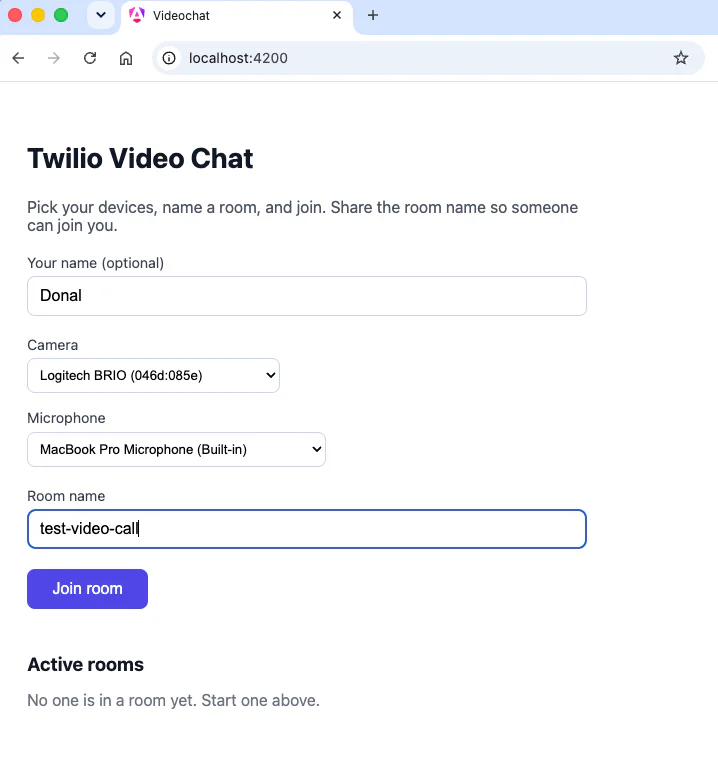
Twilio video chat setup with options to choose name, camera, microphone, and room name before joining.

The video chat lobby: the camera and microphone selectors, a room name field, and the live Active rooms list.

  • In each tab, allow camera and microphone access and confirm the Camera and Microphone dropdowns list your devices.
  • Enter the same room name in both tabs and click Join room in each.
  • Each tab shows your own mirrored preview plus the other participant's live video and audio. That is your two-participant call.
  • Watch the Active rooms list. It updates the instant someone joins or leaves, pushed over SignalR, with no page refresh. Click Leave in one tab and the count drops in the other.
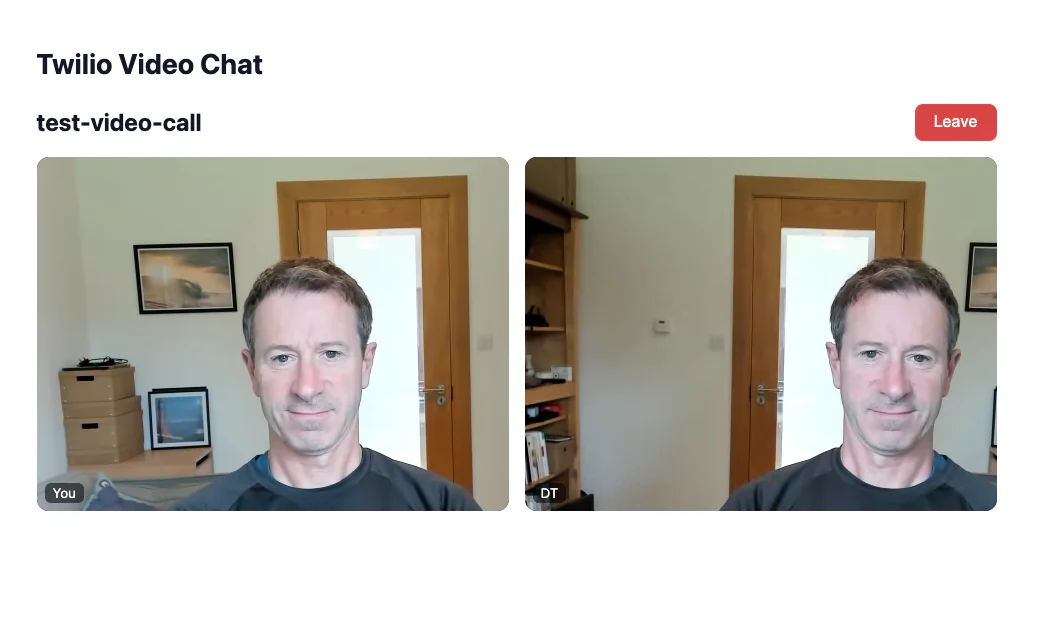
Two participants in a Twilio video chat, both in front of wooden doors with similar backgrounds.
A two-participant call: your mirrored local preview beside the remote participant's live video tile.

Build for production

For production, you want a single deployable that serves both the API and the SPA. You already pointed angular.json at ../Server/wwwroot, so an Angular production build lands in the API's wwwroot. The last piece is to run that Angular build automatically as part of a Release build, so dotnet publish produces everything in one step.

Open Server/VideoChat.Server.csproj and add a SpaRoot property and an MSBuild target that compiles the Angular app on a Release build. Add the SpaRoot line to the existing <PropertyGroup>:

<PropertyGroup>
  <TargetFramework>net10.0</TargetFramework>
  <Nullable>enable</Nullable>
  <ImplicitUsings>enable</ImplicitUsings>
  <SpaRoot>../ClientApp</SpaRoot>
</PropertyGroup>

Then add this target inside the <Project> element:

<!--
  For a production build ('dotnet publish' / Release), compile the Angular app so
  its output lands in wwwroot and ships with the API. In development you instead run
  'ng serve' alongside 'dotnet run', so this target is skipped for Debug builds.
-->
<Target Name="BuildAngular" BeforeTargets="Build" Condition="'$(Configuration)' == 'Release'">
  <Exec WorkingDirectory="$(SpaRoot)" Command="npm ci" Condition="!Exists('$(SpaRoot)/node_modules')" />
  <Exec WorkingDirectory="$(SpaRoot)" Command="npm run build" />
</Target>

Now a Release publish builds the SPA and bundles it with the API:

cd Server
dotnet publish -c Release

The published app serves the compiled Angular files from wwwroot, with MapFallbackToFile handling client-side routes, and exposes the same /api and /hub endpoints, all from one origin. Because the target only runs for Release builds, your day-to-day dotnet run in development stays fast and leaves the SPA to ng serve.

Conclusion

You now have a working group video chat app on current .NET and Angular: an ASP.NET Core Web API that mints Twilio access tokens and lists rooms, an Angular SPA that captures media and renders participants, and SignalR keeping every client's room list live. From here you could add screen sharing, a text chat data track, recording, or authentication so tokens are tied to real users.

The complete source code is available on GitHub at github.com/donaltoomey/build-video-chat-app-dotnet-angular.

Additional resources