How to evaluate AI agents in production
Time to read:
November 18, 2026
Written by
How to evaluate AI agents in production
Your AI agent passed every test before launch. That’s normal. But two weeks into production, it's telling customers the refund window is 60 days…It's 30. And nobody even notices until the refund requests pile up.
That's the gap production evaluation closes. It doesn’t matter how well your agent runs in testing if it breaks in production. Customers notice, too.
86% of companies believe customers are satisfied with their AI-powered service, but only 51% of consumers agree.
19% of consumers say an AI agent has made an outright mistake, with inaccurate answers and misinformation the top drivers of dissatisfaction.
The mistakes customers notice rarely show up in a demo. They show up when real customers ask things your test set never covered. That’s why you need to always evaluate customer-facing AI agents in production.
Below, we show you what to measure, how to catch wrong answers, and how to compare your AI agents with your human team, with Twilio.
What is AI agent evaluation?
AI agent evaluation is the practice of measuring whether an AI agent completes tasks correctly and accurately, using metrics, automated judges, and human review of real or simulated conversations.
It happens in two phases:
Pre-production: You test the agent against scripted or simulated conversations before customers ever reach it. Twilio's tutorials pair ConversationRelay with testing partners like Cekura, which runs synthetic conversations against your agent at volume.
Production: You score real conversations after launch, where customers ask things your test set never covered.
We’ll be focusing on production instead of pre-production here.
Most AI observability tools look inside the agent, at traces, tool calls, and latency. We recommend a different approach: Twilio starts from the conversation.
Metrics for evaluating AI agents
It’s not enough to just measure whether an AI agent is up. An AI agent could still be serving customers wildly inaccurate information while still reporting perfect uptime. These are the metrics that tell you whether a customer-facing AI agent is working (the right way), and where each one comes from in Twilio.
|
Metric |
What it tells you |
How to measure it with Twilio |
|---|---|---|
|
Task completion rate |
How often the agent resolved the customer's task |
Task Completion operator (public beta) |
|
Escalation rate |
How often conversations ended up with a human |
Task Completion's escalated label |
|
Hallucination rate |
How often the agent said something inaccurate |
Hallucination Detection operator (public beta) |
|
AI vs. human resolution |
Whether AI agents resolve tasks as often as people |
Conversation Insights (public beta) |
|
Sentiment |
How customers felt in AI and human conversations |
Sentiment operator in Conversation Intelligence |
|
Time to first audio |
How long voice callers wait for the agent to respond |
ConversationRelay Insights |
|
Interruption rate |
How often voice callers talk over the agent |
ConversationRelay Insights |
Task completion also gives you a cleaner containment rate. Count only conversations the agent resolved, and customers who gave up stop inflating the number. Our guide to contact center analytics covers the rest of the dashboard, from CSAT to handle time.
How to evaluate AI agents in production with Twilio
We’ll be using the following Twilio tools to evaluate AI agents in production:
Conversation Orchestrator: Routes and records your AI agent's conversations.
Task Completion (public beta): Labels whether the agent resolved the customer's task.
Hallucination Detection (public beta): Flags statements that conflict with your sources.
Enterprise Knowledge: Holds the articles your agent should follow.
Conversation Insights (public beta): Aggregates results across conversations.
ConversationRelay Insights: Tracks voice-specific metrics like latency and interruptions.
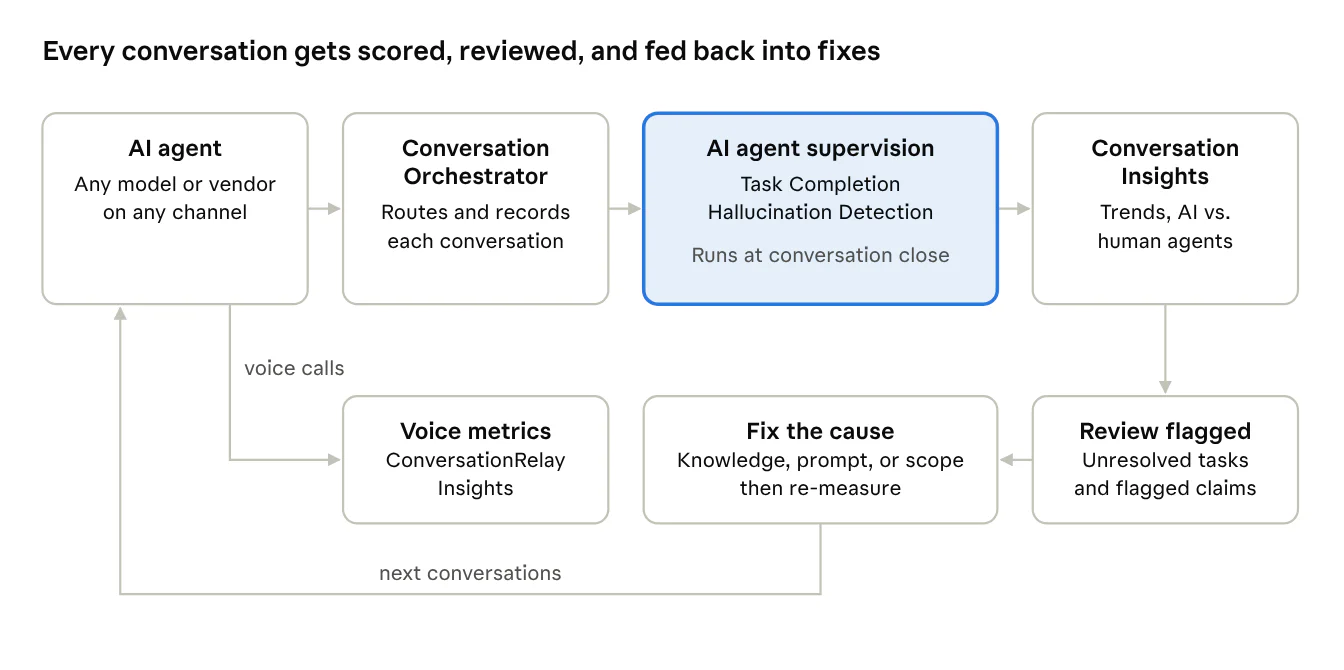
1. Route your AI agent's conversations through Conversation Orchestrator
Supervision runs on conversations routed through Conversation Orchestrator, so start there. You'll need a conversation configuration and a memory store, and the setup lives in the new Twilio Console.
Your agent itself can run anywhere. Supervision works whether your agent runs on one model, several models, or an external agent platform. If you're bringing your own model, see our guide to bringing your own LLM.
2. Measure task completion
The Task Completion operator answers the first question: did the agent do what the customer needed? It labels each conversation with one of four outcomes:
Resolved: The agent addressed the customer's task, and the customer confirmed it explicitly or implicitly.
Unresolved: The conversation ended without the task being addressed.
Escalated: The conversation was handed off to a human.
Agent declined: The agent deliberately refused because of a policy, compliance, or scope guardrail.
Each label comes with a one-sentence reason that cites the moment behind the decision. However, the operator only evaluates the primary task and ignores follow-ups. And if a customer’s intent is too vague to judge, it returns unresolved. Design your agent to decline out-of-scope requests explicitly, so those conversations land in the right bucket.”
3. Catch hallucinations against your source of truth
The Hallucination Detection operator answers the second question: was everything the agent said accurate? It checks the agent's statements against your Enterprise Knowledge base, Conversation Memory, and the conversation itself, and flags three types of findings:
External context conflict: The claim contradicts your knowledge base, the customer's memory, or both.
Conversation context conflict: The claim contradicts something the agent said earlier, or is clearly fabricated.
Context gap: The claim can't be verified against anything you provided. Context gaps aren't counted as hallucinations.
Each finding includes the agent's exact words and, when available, what your source actually says. In our example, the agent told a customer refunds are available for 60 days, and the knowledge base says 30. The operator never searches the web, so connect the knowledge base your agent is supposed to follow. Without one, it only catches contradictions within the conversation.
Both operators run once, after the conversation closes, and results arrive about 15 to 20 minutes later. You can view them in the Console, receive them by webhook, or query them in Conversation Insights.
4. Track trends and compare AI and human agents
One conversation tells you what went wrong once, but trends tell you what to fix. Conversation Insights (an API in public beta) aggregates supervision results across conversations. Twilio's aggregation docs walk through the questions it answers:
How often do AI agents resolve the customer's task? Group by task completion label, filtered to conversations with an AI agent.
How often do they give incorrect information? Count conversations with a flagged hallucination.
How do AI and human agents compare? Split by whether an AI agent, a human agent, or both took part. Handed-off conversations form their own group.
Which hallucination types come up most? Break findings down by type.
Queries need a date filter and cover up to 31 days at a time. For longer histories, Data Destinations (private beta) sends one summary record per conversation to tools like Snowflake, BigQuery, Databricks, or Datadog. You can also register up to three numeric scores from your own operators as custom measures, like a QA score built from Twilio's Conversation Scoring example.
5. Add voice metrics for voice AI agents
Voice agents fail in ways a transcript can't show. The ConversationRelay Insights dashboard tracks:
Time to first audio: How long callers wait for the agent to start speaking, with calls over 1.2 seconds flagged.
Interruption rate: How often callers talk over the agent.
Silent calls and errors: Calls where one side went silent, and calls that hit ConversationRelay errors.
Who hung up: Whether the customer or the agent ended the call.
A call summary view lines up the event timeline with the recording, so you can hear where a call went sideways. For fixes, see our guide to handling interruptions in AI voice agents.
6. Review flagged conversations, fix, and re-measure
Automated judges are a filter for what to review. Like any model, a judge can be wrong, so use the results to find conversations worth reviewing, not as a final verdict. The judge runs separately from your agent's model, so your agent isn't grading its own work.
A weekly loop works well:
Pull the review queue: Unresolved and escalated conversations, plus any with a flagged hallucination.
Read the evidence: Each result includes a reason or the flagged utterance, so reviews go fast.
Fix the cause: Update the knowledge article, the prompt, or the agent's scope.
Re-measure: Compare task completion and hallucination rates against the previous period.
For tracing where a specific answer came from, see our guide to building an AI audit trail.
Before you rely on the results…
Knowing how these tools work and what they can do gives you results you trust (and understand):
Results arrive after the conversation: Supervision runs once the conversation closes, so it finds problems to fix. It doesn't stop a wrong answer mid-conversation.
They're in public beta: Task Completion, Hallucination Detection, and Conversation Insights aren't covered by Twilio's SLA yet.
One task per conversation: Task Completion scores the primary task, so multi-request conversations need human review.
Your sources set the bar: Hallucination Detection is only as good as the knowledge base you connect.
Check the compliance scope: The supervision operators, Conversation Insights, and Data Destinations aren't HIPAA Eligible Services or PCI compliant.
Measure (and improve) your customers’ real experiences
An AI agent that tests well and performs badly costs you once in the conversation, and again when the customer calls back. Production evaluation catches it early. Score every conversation for task completion and accuracy, compare AI agents with your human team, and review what the judges flag.
Start for free and set up AI agent supervision with Conversation Intelligence, or talk to sales about evaluating the AI agents in your contact center.
Frequently asked questions
What is AI agent evaluation?
AI agent evaluation measures whether an AI agent completes tasks correctly and accurately. Twilio supports it in production with operators that score task completion and detect hallucinations in every conversation.
How do you measure containment rate for AI agents?
Twilio's Task Completion operator, in public beta, labels each AI agent conversation resolved, unresolved, escalated, or declined, so containment can count only the conversations the agent resolved.
What tools score whether an AI agent resolved the customer's issue?
Twilio Conversation Intelligence includes a Task Completion operator, in public beta, that labels each conversation's outcome with a one-sentence reason. Conversation Insights aggregates the results by channel and agent type.
How do you detect AI agent hallucinations in production?
Twilio's Hallucination Detection operator, in public beta, checks what an AI agent said against your Enterprise Knowledge, Conversation Memory, and the conversation, and flags each statement that conflicts.
Can you evaluate an AI agent built on another platform?
Twilio's AI agent supervision evaluates conversations routed through Conversation Orchestrator, whichever model or vendor powers the agent, so you can score agents built on other platforms.

Related Resources
Twilio Docs
From APIs to SDKs to sample apps
API reference documentation, SDKs, helper libraries, quickstarts, and tutorials for your language and platform.
Resource Center
The latest ebooks, industry reports, and webinars
Learn from customer engagement experts to improve your own communication.
Ahoy
Twilio's developer community hub
Best practices, code samples, and inspiration to build communications and digital engagement experiences.