How to Confirm Phone Number Ownership with Lookup Identity Match in PHP
Time to read:
August 31, 2026
Written by
There's a lot you can learn from a phone number. Lookup Identity Match uses phone numbers as an identity to provide a zero-knowledge match against authoritative data sources like mobile carrier records. This allows you to build real-time confirmation that you're interacting with a real person linked to the phone number provided.
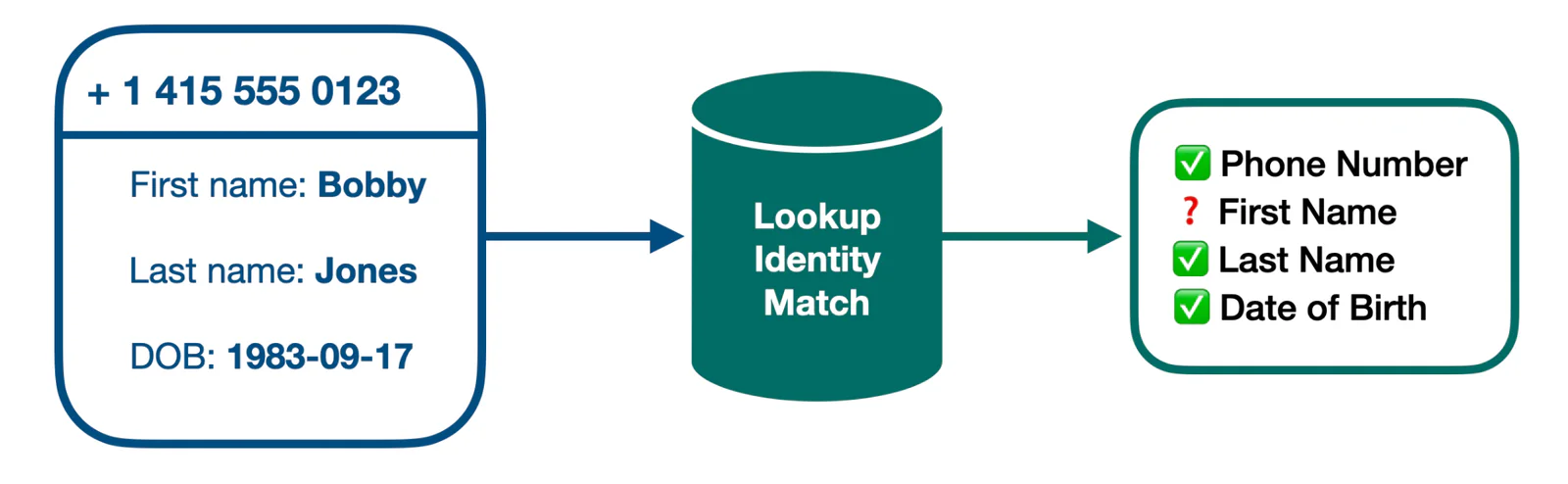
Use Identity Match to prevent fake accounts and improve trust with legitimate, unique users. Customers can use Identity Match at sign up, login, and even during account changes or checkout. Best of all, Identity Match happens seamlessly in the background, with lower costs and friction than alternatives like credit bureau and document verification used to satisfy Anti-Money Laundering (AML) rules.
This blog post will show you how to use Twilio Lookup Identity Match to confirm phone number ownership and reduce sign up fraud.
Here's a sneak peak at what the Identity Match request looks like. Learn more about accepted parameters and coverage in the documentation.
Prerequisites
To code along with this post you'll need:
- A Twilio account. Sign up or sign in.
- Submit this form for Identity Match approval (Outside the US and Brazil only; takes 2-4 weeks)
- PHP 8.5
- Composer installed globally
Build the app
This post uses the international telephone input Code Exchange project as a starting point, but you could use your own sign up form instead. The base project relies on the excellent intl-tel-input plugin for collecting phone numbers in E.164 format.
Step 1: Clone the starter Code Exchange project
Start by creating a new PHP project from the Twilio Slim Base Project, add in the other required directories, and install the slim/twig-view package to add Twig template support:
Open up the newly created identity-match-php directory in your preferred text editor and navigate to the .env file to set the value of your Account SID and Auth Token; you can find them on the front page of your Twilio Console.
Step 2: Extend your sign up form with Identity Match
Identity match needs information about the phone number owner to match against. Parameters can be any combination of name, address, national ID or date of birth.
This example is going to use first and last name, so you need to start by making sure there are fields to collect those details:
Create a new file named index.html.twig in src/templates file, and paste the code below into the file:
This will render a small form allowing for your first name, last name, and phone number to be submitted.
Now, download the application's CSS file to public/css, naming it styles.css.
Then, replace the existing code in public/index.php with the following:
The code initialises a new Slim Framework object. It passes that to a new Application object; which contains all of the functionality for handling requests to the application's various default route. The Application object is also initialised with a Twilio Rest Client object for making requests to Twilio's APIs before Twig middleware is instantiated, setting a Twig object in the application's request that will retrieve template files from the src/templates directory.
Now, update the code in src/Application.php with the following:
The Application object's constructor:
- Adds the ability to parse JSON request bodies, as that is how Twilio packages request and response information
- Loads the application's routing table (defined in
setupRoutes()) - Adds error middleware for handling fatal errors and exceptions
The setupRoutes() function defines a single route (/), handled by the handleDefaultRoute() function, accessible with GET and POST requests. Currently, that function renders and returns src/templates/index.html.twig, which we saw earlier.
Step 3: Interpret the results of a Lookup Identity Match response
After calling the Lookup API, you need to decide what to do with the information in the response. Here's what the identity match portion of a sample response looks like:
Possible responses include exact_match, no_match, and no_data_available. Name and address fields also support partial matches. Learn more about match scores in the documentation. The API will respond null if you don't provide an input to match on.
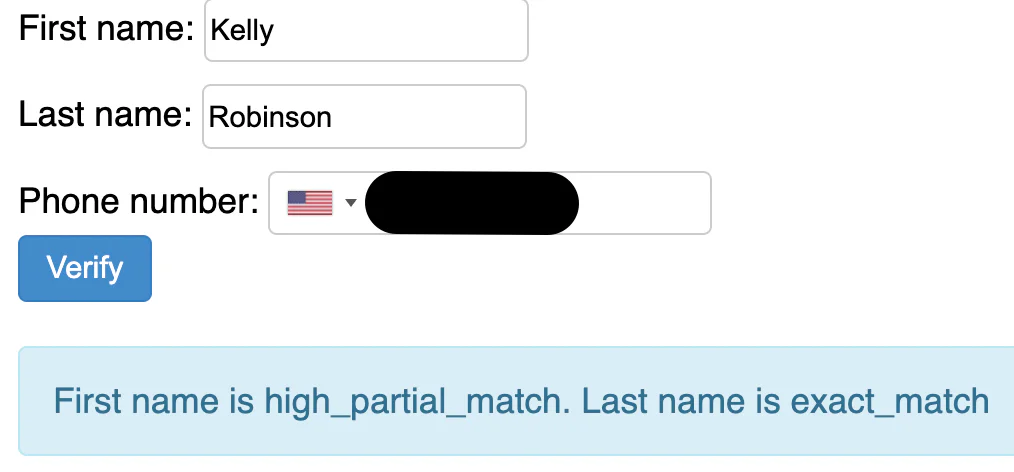
This application is only looking at name matches and will consider the match a success if it's an exact match or high partial match (e.g., Kelly instead of Kelley – happens all the time).
Back in src/Application.php, replace handleDefaultRoute() with the following implementation:
This new version uses the Twilio Rest Client to call Twilio's Lookup API, to retrieve Lookup data on the provided phone number. If the phone number is valid, and the first and last names are an exact or high partial match, it sets a template variable named msg that shows the matches values of the first and last names. Otherwise, it sets the variable to "Cannot register with the information provided. Please ensure you're using a phone number you own.".
Run the application
Navigate back to your terminal, and start the application with composer serve. Now head back over to http://localhost:3000/index and test it out!!
Next steps for identity verification
You can extend your application with other Lookup packages like Line Type Intelligence, SIM swap detection and more. Check out our documentation to learn more about what's possible with the Lookup API.
Another way to prevent invalid phone numbers is to do phone verification - we also have an API for that! I can't wait to see what you build and secure.
Matthew Setter is a PHP, Go, and Rust Editor in the Twilio Voices team. He’s also the author of Mezzio Essentials and Deploy with Docker Compose. You can find him at msetter@twilio.com. He's also on LinkedIn and GitHub.

Related Resources
Twilio Docs
From APIs to SDKs to sample apps
API reference documentation, SDKs, helper libraries, quickstarts, and tutorials for your language and platform.
Resource Center
The latest ebooks, industry reports, and webinars
Learn from customer engagement experts to improve your own communication.
Ahoy
Twilio's developer community hub
Best practices, code samples, and inspiration to build communications and digital engagement experiences.