How to Orchestrate Multi-Call Conversations with an LLM and Twilio Conversation Memory

September 15, 2026
Written by
Reviewed by
Twilio guide on managing multi-call conversations using LLM and conversation memory.

Have you ever been on the phone with an AI voice agent and gotten frustrated with its lack of memory? Maybe your agent hung up on you, or it got disconnected, forcing you to start a conversation all over again. This kind of interruption can waste time for you and your users, and cause a lot of frustration.

Twilio Conversation Memory is your solution. Conversation Memory allows context to be persisted between calls. This means that if you call the Twilio agent back, it won't lose the context of what you were talking about when you hung up, and can pick up right where you left off. This can save you a lot of frustration and help you get things done better and faster when you're talking to an agent.

In this tutorial, you will make a C# .NET 9 ASP.NET Core service that retains caller context, preferences and action history across multiple separate inbound calls.

This tutorial is geared towards .NET developers, but you can find other languages below:

Prerequisites

To complete this tutorial you will need:

  • A free Twilio account with a voice-capable phone number
  • .NET 9 SDK or later
  • An OpenAI APIkey
  • ngrok to expose local webhooks to Twilio
  • An IDE or text editor such as Visual Studio 2022 or Visual Studio Code

Building the app

Step 1 - Set up the ASP.NET Core project

To get started, create a new C# Web API project via the .NET CLI:

dotnet new web -n TwilioMultiCallMemory
cd TwilioMultiCallMemory

Step 2 - Install required dependencies

Install the Twilio, OpenAI, and dotenv.net packages via NuGet.

dotnet add package Twilio
dotnet add package DotNetEnv
dotnet add package OpenAI

The Twilio package will allow your application to interface with Twilio's services. The dotnetenv package allows you to import your environment variables into your solution using a .env file. You will add those variables in the next step. The OpenAI package will be used to connect your solution to OpenAI.

Step 3 - Create a Twilio Memory Store

For this tutorial, you will need a Conversation Memory Store. Go into your Twilio console and look for Memory Stores. You can use the console search, or look for Data > Conversation Memory > Memory stores.

Memory Stores use machine learning, and you may have to agree to a warning before proceeding. Keep in mind that Conversation Memory is not intended for use with sensitive information. Conversation products are only available on the new Twilio Console, so make sure your account has been migrated. For more information about Conversation Memory, you may want to read the documentation, including the Getting Started Guide.

Once you have found the correct tab, click on Create New Store.
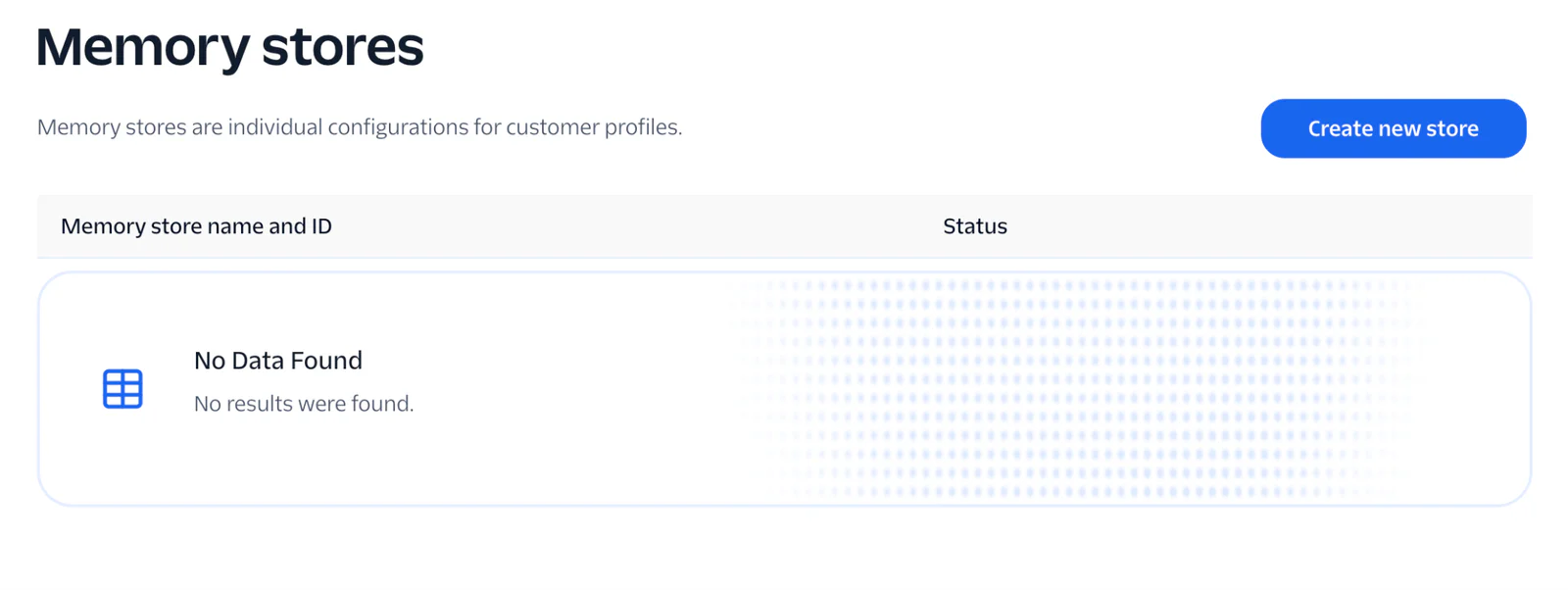
Memory Stores in 1console

Now follow the steps to set up your memory store.

The console gives you a setup checklist to get you started. Click on Connect Conversation Orchestrator, and give it a friendly name. Write a short description (this can be anything), then you can move on to Messaging and Chat Traffic. For the remainder of the items in this checklist, you can select the default values for now.

You don't have any customer profiles yet, so you can skip the rest of the checklist. However, you will need your memory store ID, which is at the top left of the memory store screen. There should be a convenient button to copy-paste that ID. Keep that ID for the next step.

Step 4 - Configure environment variables

Now that you have a memory store created, you will need to be able to access that from your application. For this, you will need to get your Memory Store ID and paste that into your secrets file. Create a .env file in the root directory of your project. Add the following values, replacing the placeholders.

OPENAI_API_KEY=sk-...
TWILIO_API_KEY=SK...
TWILIO_API_SECRET=...
TWILIO_CONFIGURATION_ID=cnv_config_...
TWILIO_MEMORY_STORE_ID=mem_store_...
TWILIO_PHONE_NUMBER=+15551234567

Get your API key from your Twilio console, created under Settings > Account Settings > API Keys & Auth Tokens. Because other types of API keys do not have access to the Conversation Memory features, creating a Main API key is required for this tutorial. Keep in mind that the secret key will only be shown once, so be sure you save it. You get your memory store key from the previous step and paste it in here. Your OpenAI API Key is generated from OpenAI's dashboard. You will also need your Twilio voice-capable phone number, which is in 10DLC format.

Save the file, and move on to the next step, creating your services.

Step 5 - Set up the OpenAI service

This demonstration uses the fiction of an auto repair shop as the agent that you are calling. However, Conversation Memory would be useful in lots of different scenarios, such as tech support, travel, and more. Feel free to adjust the audio prompts as you see fit for your own personal projects.

Create an OpenAiService.cs class to handle interaction with gpt-4o-mini.

Paste the following into your new class:

using System.Net.WebSockets;
using OpenAI;
using OpenAI.Chat;

namespace TwilioMultiCallMemory;
public sealed class OpenAiService
{
   const string Model = "gpt-4o-mini";
   const string BaseSystemPrompt = """
       You are the phone assistant for Owlbert's Auto Repair. You are friendly, concise, and speak naturally as if on the phone.
       Do not use lists, bullet points, or emojis — respond in plain sentences.
       If the caller mentions their name, vehicle, or a problem with their car, remember it and refer back to it naturally as the conversation continues.
       If you do not know something, say so honestly rather than guessing.
       You have access to memory of previous conversations with this caller, which may include their name, vehicle, and prior issues.
       Use that information to provide helpful and personalized responses.
       """;
   readonly ChatClient _client;
   readonly ILogger<OpenAiService> _log;
   public OpenAiService(ILogger<OpenAiService> log)
   {
       _log = log;
       var apiKey = Environment.GetEnvironmentVariable("OPENAI_API_KEY")
           ?? throw new InvalidOperationException("OPENAI_API_KEY is not set.");
       _client = new OpenAIClient(apiKey).GetChatClient(Model);
   }
   public async Task<string> StreamResponseAsync(
       WebSocket ws,
       string? callSid,
       string? memoryContext,
       List<ConversationMessage> messages)
   {
       var systemPrompt = string.IsNullOrWhiteSpace(memoryContext)
           ? BaseSystemPrompt
           : $"{BaseSystemPrompt}\n\nPrior context on this customer (from previous calls):\n{memoryContext}";
       var openAiMessages = new List<OpenAI.Chat.ChatMessage>
       {
           new SystemChatMessage(systemPrompt)
       };
       foreach (var m in messages)
           openAiMessages.Add(m.Role == "user"
               ? new UserChatMessage(m.Content)
               : new AssistantChatMessage(m.Content));
       var fullResponse = "";
       try
       {
           var options = new ChatCompletionOptions { MaxOutputTokenCount = 400 };
           var stream = _client.CompleteChatStreamingAsync(openAiMessages, options);
           await foreach (var update in stream)
               foreach (var part in update.ContentUpdate)
                   if (!string.IsNullOrEmpty(part.Text))
                   {
                       fullResponse += part.Text;
                       await ConversationRelayHandler.SendJsonAsync(ws,
                           new { type = "text", token = part.Text, last = false });
                   }
       }
       finally
       {
           await ConversationRelayHandler.SendJsonAsync(ws,
               new { type = "text", token = "", last = true });
       }
       _log.LogInformation("[{CallSid}] Assistant: {Response}", callSid, fullResponse);
       return fullResponse;
   }
   const string SummarizerPrompt = """
       You are summarizing a phone call between a caller and Owlbert's Auto Repair.
       Write a concise summary in 4-8 sentences that captures: the caller's name if given, their vehicle if mentioned, the reason for the call, any symptoms or diagnostic detail discussed, any prices or estimates mentioned, and any commitments or next steps agreed upon.
       Write in plain prose (no lists or bullets). If the caller did not share meaningful information (e.g. the call was very short or unclear), respond with a single sentence noting that.
       Maximum 4000 characters.
       """;
   public async Task<string> SummarizeConversationAsync(List<ConversationMessage> messages, CancellationToken ct = default)
   {
       if (messages.Count == 0) return "";
       var transcript = string.Join("\n", messages.Select(m => $"{m.Role.ToUpperInvariant()}: {m.Content}"));
       var msgs = new List<OpenAI.Chat.ChatMessage>
       {
           new SystemChatMessage(SummarizerPrompt),
           new UserChatMessage($"Transcript:\n{transcript}\n\nSummary:"),
       };
       var options = new ChatCompletionOptions { MaxOutputTokenCount = 500 };
       var result = await _client.CompleteChatAsync(msgs, options, ct);
       var summary = result.Value.Content.Count > 0 ? result.Value.Content[0].Text ?? "" : "";
       _log.LogInformation("Call summary ({Chars} chars): {Summary}", summary.Length, summary);
       return summary;
   }
}

This code handles your initial connection to OpenAI. Its function is to parse the information from a caller and stream it to the OpenAI API. Notice the system prompt here, which explains the functionality of the agent. It contains some useful instructions for the agent, such as to avoid bullet points and emojis when speaking on the phone. It also reminds the agent that it will have access to memory, in case the call is dropped.

This code also has an additional call to OpenAI to summarize the call itself. This will parse the conversation into a quick summary that will be stored in Twilio's Conversation Memory. You can adjust this prompt according to your application's needs. Keep in mind that if you don't say anything meaningful, nothing will be stored.

Next, create the webhook for Twilio's connection.

Step 6 - Build the Twilio webhook and Conversation Memory pipeline

Create another new file called ConversationRelayHandler.cs. Paste in this code:

using System.Net.WebSockets;
using System.Text;
using System.Text.Json;
using TwilioMultiCallMemory;
public record ConversationMessage(string Role, string Content);
public static class ConversationRelayHandler
{
   public static async Task HandleAsync(
       WebSocket ws,
       OpenAiService openAi,
       ConversationMemoryService memory,
       ILogger logger)
   {
       string? callSid = null;
       string callerPhone = "";
       string? profileId = null;
       string? conversationId = null;
       string? memoryContext = null;
       var messages = new List<ConversationMessage>();
       var buffer = new byte[8192];
       var closed = false;
       try
       {
           while (ws.State == WebSocketState.Open && !closed)
           {
               using var ms = new MemoryStream();
               WebSocketReceiveResult result;
               do
               {
                   result = await ws.ReceiveAsync(buffer, CancellationToken.None);
                   if (result.MessageType == WebSocketMessageType.Close)
                   {
                       await ws.CloseAsync(WebSocketCloseStatus.NormalClosure, null, CancellationToken.None);
                       logger.LogInformation("[{CallSid}] Call ended", callSid);
                       closed = true;
                       break;
                   }
                   ms.Write(buffer, 0, result.Count);
               } while (!result.EndOfMessage);
               if (closed) break;
               var json = Encoding.UTF8.GetString(ms.ToArray());
               using var doc = JsonDocument.Parse(json);
               var root = doc.RootElement;
               var msgType = root.TryGetProperty("type", out var t) ? t.GetString() : null;
               switch (msgType)
               {
                   case "setup":
                       callSid = root.TryGetProperty("callSid", out var sid) ? sid.GetString() : null;
                       callerPhone = root.TryGetProperty("from", out var f) ? f.GetString() ?? "" : "";
                       logger.LogInformation("[{CallSid}] Call connected from {Phone}", callSid, callerPhone);
                       try
                       {
                           var ctx = await memory.StartCallAsync(callerPhone);
                           if (ctx is not null)
                           {
                               conversationId = ctx.ConversationId;
                               profileId = string.IsNullOrWhiteSpace(ctx.ProfileId) ? null : ctx.ProfileId;
                               memoryContext = ctx.MemoryContext;
                               logger.LogInformation("[{CallSid}] Conversation {ConvId}, profile {ProfileId}, memory {Chars} chars",
                                   callSid, conversationId, profileId ?? "(none)", memoryContext?.Length ?? 0);
                           }
                       }
                       catch (Exception ex)
                       {
                           logger.LogWarning(ex, "[{CallSid}] StartCallAsync failed — continuing without memory", callSid);
                       }
                       break;
                   case "prompt":
                       if (!root.TryGetProperty("last", out var last) || !last.GetBoolean()) break;
                       var userText = root.TryGetProperty("voicePrompt", out var vp) ? vp.GetString() ?? "" : "";
                       logger.LogInformation("[{CallSid}] Caller: {Text}", callSid, userText);
                       messages.Add(new ConversationMessage("user", userText));
                       var responseText = await openAi.StreamResponseAsync(ws, callSid, memoryContext, messages);
                       messages.Add(new ConversationMessage("assistant", responseText));
                       break;
                   case "interrupt":
                       var spoken = root.TryGetProperty("utteranceUntilInterrupt", out var u) ? u.GetString() ?? "" : "";
                       logger.LogInformation("[{CallSid}] Interrupted after: '{Spoken}'", callSid, spoken);
                       if (messages.Count > 0 && messages[^1].Role == "assistant")
                           messages.RemoveAt(messages.Count - 1);
                       break;
                   case "error":
                       var desc = root.TryGetProperty("description", out var d) ? d.GetString() : "";
                       logger.LogWarning("[{CallSid}] Conversation Relay error: {Desc}", callSid, desc);
                       break;
               }
           }
       }
       catch (WebSocketException)
       {
           logger.LogInformation("[{CallSid}] Call ended (socket closed)", callSid);
       }
       if (profileId is not null && conversationId is not null && messages.Count > 0)
       {
           try
           {
               var summary = await openAi.SummarizeConversationAsync(messages);
               if (!string.IsNullOrWhiteSpace(summary))
                   await memory.FinishCallAsync(profileId, conversationId, summary);
           }
           catch (Exception ex)
           {
               logger.LogWarning(ex, "[{CallSid}] Failed to persist call summary to memory", callSid);
           }
       }
   }
   public static Task SendJsonAsync(WebSocket ws, object payload)
   {
       var text = JsonSerializer.Serialize(payload);
       var bytes = Encoding.UTF8.GetBytes(text);
       return ws.SendAsync(bytes, WebSocketMessageType.Text, true, CancellationToken.None);
   }
}

ConversationRelayHandler is the bridge between Twilio's WebSocket and the rest of the app. When Twilio opens the socket after a <ConversationRelay> TwiML directive, HandleAsync loops reading frames one at a time, assembling multi-part messages into a MemoryStream before parsing each as JSON. A prompt frame carries the caller's transcribed speech. It appends the text to an in-memory conversation history and hands the whole history plus the memory context off to OpenAiService.StreamResponseAsync, which streams tokens back out through the same socket.

The code also contains interruption handling for your agent. If the agent is interrupted during a conversation, it pops the last message off of the history so the agent realizes the full message was not sent and was incomplete. This will allow the customer to continue talking and handle the interruption in a more human way, without your user missing context.

Step 7 - Process multi-turn historical context

Now you will create one more class to handle the context and memory processing. You'll call this file ConversationMemoryService.cs. Paste the following into the file:

using System.Net;
using System.Net.Http.Headers;
using System.Text;
using System.Text.Json;
using TwilioMultiCallMemory;

public sealed class ConversationMemoryService
{
   const string MemoryBase = "https://memory.twilio.com";
   const string ConversationsBase = "https://conversations.twilio.com";
   readonly HttpClient _http;
   readonly string _storeId;
   readonly string _configurationId;
   readonly string _twilioNumber;
   readonly ILogger<ConversationMemoryService> _log;
   public ConversationMemoryService(HttpClient http, ILogger<ConversationMemoryService> log)
   {
       _http = http;
       _log = log;
       var apiKey = Environment.GetEnvironmentVariable("TWILIO_API_KEY")
           ?? throw new InvalidOperationException("TWILIO_API_KEY not set.");
       var apiSecret = Environment.GetEnvironmentVariable("TWILIO_API_SECRET")
           ?? throw new InvalidOperationException("TWILIO_API_SECRET not set.");
       _storeId = Environment.GetEnvironmentVariable("TWILIO_MEMORY_STORE_ID")
           ?? throw new InvalidOperationException("TWILIO_MEMORY_STORE_ID not set.");
       _configurationId = Environment.GetEnvironmentVariable("TWILIO_CONFIGURATION_ID")
           ?? throw new InvalidOperationException("TWILIO_CONFIGURATION_ID not set.");
       _twilioNumber = Environment.GetEnvironmentVariable("TWILIO_PHONE_NUMBER")
           ?? throw new InvalidOperationException("TWILIO_PHONE_NUMBER not set.");
       var basic = Convert.ToBase64String(Encoding.UTF8.GetBytes($"{apiKey}:{apiSecret}"));
       _http.DefaultRequestHeaders.Authorization = new AuthenticationHeaderValue("Basic", basic);
   }
   public record CallContext(string ConversationId, string ProfileId, string MemoryContext);
   public async Task<CallContext?> StartCallAsync(string callerPhone, CancellationToken ct = default)
   {
       if (string.IsNullOrWhiteSpace(callerPhone)) return null;
       var conversationId = await CreateConversationAsync(callerPhone, ct);
       if (conversationId is null) return null;
       var profileId = await EnsureProfileAsync(callerPhone, ct);
       if (profileId is null) return new CallContext(conversationId, "", "");
       var memory = await RecallAsync(profileId, ct);
       return new CallContext(conversationId, profileId, memory);
   }
   public async Task FinishCallAsync(string profileId, string conversationId, string summary, CancellationToken ct = default)
   {
       if (string.IsNullOrWhiteSpace(profileId) || string.IsNullOrWhiteSpace(conversationId) || string.IsNullOrWhiteSpace(summary))
           return;
       var body = JsonSerializer.Serialize(new
       {
           summaries = new[]
           {
               new
               {
                   conversationId,
                   content = summary.Length > 4096 ? summary[..4096] : summary,
                   occurredAt = DateTimeOffset.UtcNow.ToString("o"),
                   source = "voice-agent",
               }
           }
       });
       using var req = new HttpRequestMessage(
           HttpMethod.Post,
           $"{MemoryBase}/v1/Stores/{_storeId}/Profiles/{profileId}/ConversationSummaries")
       {
           Content = new StringContent(body, Encoding.UTF8, "application/json"),
       };
       using var resp = await _http.SendAsync(req, ct);
       var respBody = await resp.Content.ReadAsStringAsync(ct);
       if (!resp.IsSuccessStatusCode)
       {
           _log.LogWarning("ConversationSummaries write failed ({Status}): {Body}", (int)resp.StatusCode, respBody);
           return;
       }
       _log.LogInformation("Saved conversation summary for profile {ProfileId} (conv {ConvId}, {Chars} chars)",
           profileId, conversationId, summary.Length);
   }
   async Task<string?> CreateConversationAsync(string callerPhone, CancellationToken ct)
   {
       var payload = new
       {
           configurationId = _configurationId,
           name = $"Voice call {DateTimeOffset.UtcNow:o}",
           participants = new object[]
           {
               new
               {
                   name = "Caller",
                   type = "CUSTOMER",
                   addresses = new[] { new { channel = "VOICE", address = callerPhone } },
               },
               new
               {
                   name = "Owlbert Agent",
                   type = "AI_AGENT",
                   addresses = new[] { new { channel = "VOICE", address = _twilioNumber } },
               },
           },
       };
       var body = JsonSerializer.Serialize(payload);
       using var req = new HttpRequestMessage(HttpMethod.Post, $"{ConversationsBase}/v2/Conversations")
       {
           Content = new StringContent(body, Encoding.UTF8, "application/json"),
       };
       using var resp = await _http.SendAsync(req, ct);
       var respBody = await resp.Content.ReadAsStringAsync(ct);
       if (resp.StatusCode == HttpStatusCode.Conflict)
       {
           var existing = ExtractConversationIdFromConflict(respBody);
           if (existing is not null)
           {
               _log.LogInformation("Reusing existing conversation {ConvId} (previous call still open)", existing);
               return existing;
           }
           _log.LogWarning("Create Conversation 409 but could not extract existing id: {Body}", respBody);
           return null;
       }
       if (!resp.IsSuccessStatusCode)
       {
           _log.LogWarning("Create Conversation failed ({Status}): {Body}", (int)resp.StatusCode, respBody);
           return null;
       }
       try
       {
           using var doc = JsonDocument.Parse(respBody);
           if (doc.RootElement.TryGetProperty("id", out var id)) return id.GetString();
           if (doc.RootElement.TryGetProperty("conversationId", out var cid)) return cid.GetString();
       }
       catch (JsonException) { }
       _log.LogWarning("Create Conversation: could not extract id from response: {Body}", respBody);
       return null;
   }
   static string? ExtractConversationIdFromConflict(string body)
   {
       var match = System.Text.RegularExpressions.Regex.Match(
           body, @"conv_conversation_[0-9a-z]+");
       return match.Success ? match.Value : null;
   }
   async Task<string?> EnsureProfileAsync(string callerPhone, CancellationToken ct)
   {
       var existing = await LookupProfileIdAsync(callerPhone, ct);
       if (existing is not null) return existing;
       var body = JsonSerializer.Serialize(new
       {
           traits = new
           {
               Contact = new { phone = callerPhone },
           },
       });
       using var req = new HttpRequestMessage(
           HttpMethod.Post,
           $"{MemoryBase}/v1/Stores/{_storeId}/Profiles")
       {
           Content = new StringContent(body, Encoding.UTF8, "application/json"),
       };
       using var resp = await _http.SendAsync(req, ct);
       var respBody = await resp.Content.ReadAsStringAsync(ct);
       if (!resp.IsSuccessStatusCode)
       {
           _log.LogWarning("Create Profile failed ({Status}): {Body}", (int)resp.StatusCode, respBody);
           return null;
       }
       try
       {
           using var doc = JsonDocument.Parse(respBody);
           if (doc.RootElement.TryGetProperty("id", out var id)) return id.GetString();
       }
       catch (JsonException) { }
       _log.LogWarning("Create Profile: could not extract id from response: {Body}", respBody);
       return null;
   }
   async Task<string?> LookupProfileIdAsync(string phone, CancellationToken ct)
   {
       var body = JsonSerializer.Serialize(new { idType = "phone", value = phone });
       using var req = new HttpRequestMessage(
           HttpMethod.Post,
           $"{MemoryBase}/v1/Stores/{_storeId}/Profiles/Lookup")
       {
           Content = new StringContent(body, Encoding.UTF8, "application/json"),
       };
       using var resp = await _http.SendAsync(req, ct);
       if (resp.StatusCode == HttpStatusCode.NotFound) return null;
       var json = await resp.Content.ReadAsStringAsync(ct);
       if (!resp.IsSuccessStatusCode)
       {
           _log.LogWarning("Profile lookup failed ({Status}): {Body}", (int)resp.StatusCode, json);
           return null;
       }
       _log.LogInformation("Profile lookup raw response: {Body}", json);
       try
       {
           using var doc = JsonDocument.Parse(json);
           var root = doc.RootElement;
           var idFromRoot = ExtractProfileId(root);
           if (idFromRoot is not null) return idFromRoot;
           if (root.ValueKind == JsonValueKind.Object
               && root.TryGetProperty("profiles", out var arr)
               && arr.ValueKind == JsonValueKind.Array)
           {
               foreach (var el in arr.EnumerateArray())
               {
                   var found = ExtractProfileId(el);
                   if (found is not null) return found;
               }
           }
       }
       catch (JsonException ex)
       {
           _log.LogWarning(ex, "Could not parse profile lookup response: {Body}", json);
       }
       return null;
   }
   static string? ExtractProfileId(JsonElement el)
   {
       if (el.ValueKind == JsonValueKind.String)
       {
           var s = el.GetString();
           return string.IsNullOrWhiteSpace(s) ? null : s;
       }
       if (el.ValueKind != JsonValueKind.Object) return null;
       foreach (var name in new[] { "profileId", "id", "profile_id" })
       {
           if (el.TryGetProperty(name, out var v) && v.ValueKind == JsonValueKind.String)
           {
               var s = v.GetString();
               if (!string.IsNullOrWhiteSpace(s)) return s;
           }
       }
       return null;
   }
   async Task<string> RecallAsync(string profileId, CancellationToken ct)
   {
       var body = JsonSerializer.Serialize(new
       {
           observationsLimit = 20,
           summariesLimit = 5,
           communicationsLimit = 0,
       });
       using var req = new HttpRequestMessage(
           HttpMethod.Post,
           $"{MemoryBase}/v1/Stores/{_storeId}/Profiles/{profileId}/Recall")
       {
           Content = new StringContent(body, Encoding.UTF8, "application/json"),
       };
       using var resp = await _http.SendAsync(req, ct);
       var json = await resp.Content.ReadAsStringAsync(ct);
       if (!resp.IsSuccessStatusCode)
       {
           _log.LogWarning("Recall failed ({Status}): {Body}", (int)resp.StatusCode, json);
           return "";
       }
       _log.LogInformation("Recall raw response: {Body}", json);
       return FormatRecall(json);
   }
   static string FormatRecall(string json)
   {
       var lines = new List<string>();
       try
       {
           using var doc = JsonDocument.Parse(json);
           var root = doc.RootElement;
           if (root.TryGetProperty("summaries", out var sum) && sum.ValueKind == JsonValueKind.Array)
           {
               foreach (var s in sum.EnumerateArray())
               {
                   var text = ExtractText(s, "content", "text", "summary", "value");
                   if (!string.IsNullOrWhiteSpace(text)) lines.Add($"Summary: {text}");
               }
           }
           if (root.TryGetProperty("observations", out var obs) && obs.ValueKind == JsonValueKind.Array)
           {
               foreach (var o in obs.EnumerateArray())
               {
                   var text = ExtractText(o, "text", "content", "observation", "value");
                   if (!string.IsNullOrWhiteSpace(text)) lines.Add($"- {text}");
               }
           }
       }
       catch (JsonException)
       {
           return "";
       }
       return lines.Count == 0 ? "" : string.Join("\n", lines);
   }
   static string ExtractText(JsonElement el, params string[] candidates)
   {
       if (el.ValueKind == JsonValueKind.String) return el.GetString() ?? "";
       if (el.ValueKind != JsonValueKind.Object) return "";
       foreach (var name in candidates)
       {
           if (el.TryGetProperty(name, out var v) && v.ValueKind == JsonValueKind.String)
               return v.GetString() ?? "";
       }
       return "";
   }
}

This part of the code is what will handle your multi-turn conversation.

The first thing this code does is bring in all your environment variables from .env. It then creates a record using ConversationId, ProfileId, and MemoryContext to store some information about the call. Making an API call to Conversation Summaries, it stores a Customer ID to the Memory Store that you created earlier. It also creates a profile for your caller that stores their phone number. When the call is disconnected, the summary of the call generated by OpenAI will be stored to Twilio.

If the caller calls the number back too soon, the previous call memory may still be active and trying to log. This code accounts for that by checking to see if a call is finished with FinishCallAsync. If the old call has closed out, but it recognizes the caller's profile, the API will retrieve the summary and context of the previous call from the Memory Store. The conversation can then resume on the same topic right where it left off!

Step 8 - Finalize your application

To complete your project you will need to edit the Program.cs file to call the services that you've created. Replace the text in Program.cs with the code below:

using TwilioMultiCallMemory;
using DotNetEnv;

Env.TraversePath().Load();

var builder = WebApplication.CreateBuilder(args);
builder.Services.AddSingleton<OpenAiService>();
builder.Services.AddHttpClient<ConversationMemoryService>();
var app = builder.Build();
app.UseWebSockets();
app.MapPost("/voice", (HttpRequest req) =>
{
  var host = req.Host.Value;
  var twiml = $"""
      <?xml version="1.0" encoding="UTF-8"?>
      <Response>
          <Connect>
              <ConversationRelay url="wss://{host}/ws" welcomeGreeting="Thanks for calling Owlbert's Auto Repair. How can I help you today?" />
          </Connect>
      </Response>
      """;
  return Results.Content(twiml, "application/xml");
});
app.Map("/ws", async (HttpContext ctx, OpenAiService openAi, ConversationMemoryService memory, ILoggerFactory lf) =>
{
  if (!ctx.WebSockets.IsWebSocketRequest)
  {
      ctx.Response.StatusCode = StatusCodes.Status400BadRequest;
      return;
  }
  using var ws = await ctx.WebSockets.AcceptWebSocketAsync();
  var logger = lf.CreateLogger("ConversationRelay");
  await ConversationRelayHandler.HandleAsync(ws, openAi, memory, logger);
});

app.Run();

This sets up the websockets to call your ConversationRelayHandler, and includes the initial greeting for your user. Feel free to change the greeting according to your needs.

Testing, troubleshooting, or product demonstration

It is now time to test your voice application. Save your files and run the project with:

dotnet run

Once your webhook is running, you will need to expose it to the internet by using ngrok or another tunneling service.

ngrok http localhost:5000

Replace 5000 with whatever port your application is running on if you have a different port shown.

Now ngrok will provide you with a url for utilizing in your Twilio console. Go into your Twilio console and find the Twilio phone number that you prepared. Under the option A Call Comes In, choose Webhook, and fill in your ngrok URL followed by /voice, as shown in the graphic below:

configuration for webhooks in the Twilio console

To put your AI to the test, you'll have to make two phone calls and check the conversation memory.

  1. Make call #1: Talk to the agent about a car repair issue, including some details such as make and model.
  2. Hang up and make call #2 from the same phone number.
  3. Verify the agent greets you and remembers the details of your first call without any prompting.

If your Conversation Memory feature is working properly, you should also see details and a summary of the conversation saved to your Twilio dashboard. Check your Memory Store and it should show you the logged number you called from, as well as a stored conversation under Summaries:
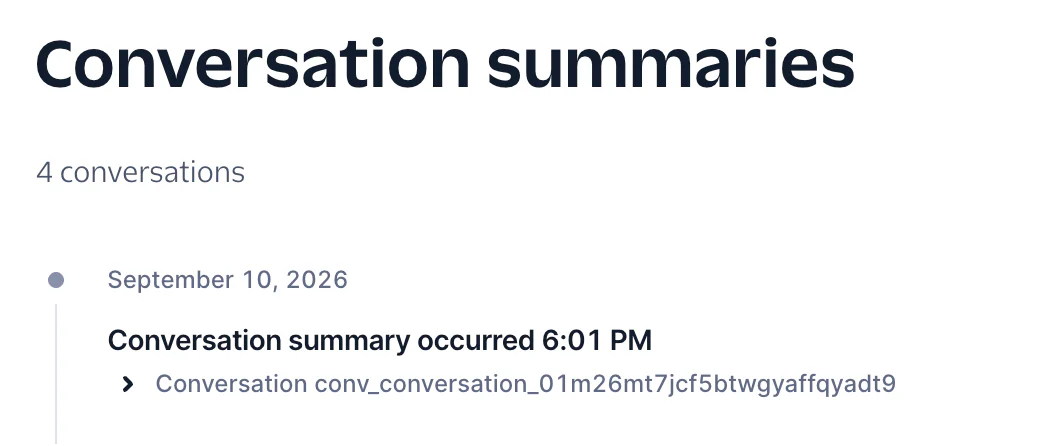
screenshot showing conversation summary

Conclusion

Today you have learned how Twilio Conversation Memory simplifies maintaining state across separate voice calls in .NET. This should provide value to any phone AI agent, storing information that keeps conversations feeling more convenient and human.

Do you want to do more with Twilio Conversations? Explore the possibilities by checking out the conversations documentation, where you can find blueprints for Conversational Agents, AI-to-Human handoff, and more.

If you want to view this solution in a completed form, you can look for this project on Github.

Amanda Lange is a .NET Engineer of Technical Content. She is here to teach how to create great things using C# and .NET programming. She can be reached at amlange [ at] twilio.com.