19 best email fonts that won't let you down in 2026
Time to read:
October 18, 2026
Written by
Reviewed by
- Email-safe fonts are the safest bet: Arial, Helvetica, Georgia, and Verdana are installed on nearly every device, so they render correctly in almost every inbox.
- Web fonts need a fallback: Fonts like Open Sans and Roboto load in Apple Mail but often fail in Gmail and Outlook. Set a font stack so a missing font falls back to an email-safe font instead of Times New Roman.
- Signatures should stick to email-safe fonts: Gmail and Outlook won’t load custom web fonts in a signature, so pick Arial, Helvetica, Verdana, or Georgia.
- Readability beats personality: Use two fonts at most, keep body text at 14px or larger (16px on mobile), and test every send across clients before it goes out.
This summary was generated by AI.
19 Best Email Fonts That Won't Let You Down in 2026
Your emails are a collection of sentences and words. Words are a collection of characters, and characters are a collection of email fonts.
That’s why you need to put the same amount of time and attention toward your email fonts as your copywriting—it’s the foundation of your messages.
However, not all fonts are equal, especially with your email program. The best email-friendly fonts will make your campaigns shine, while the not-so-safe web fonts can make your designs go unnoticed.
Fortunately, you don’t have to guess when choosing the best email font for your campaigns. Whether designing a brand-new email newsletter or updating your business email signature, we have the fonts you need.
What are email-safe fonts?
Email-safe fonts are accessible on the widest range of computers, devices, and applications. These fonts load in your recipients’ email inboxes, whether it’s Outlook, Gmail, Android, or iPhone.
When an email client doesn’t have your font, it swaps in its own. That can shift your line breaks, spacing, and layout without warning. Email-safe fonts sidestep the problem because they’re already installed on nearly every device.
Benefits of using the right email font
The average email attention span is 11.1 seconds per email, although it’s (surprisingly) increasing. So in addition to design and branding considerations, it’s crucial to understand these data-backed reasons for finding the right email font for your campaigns:
- Increase your recipient’s likelihood to commit: People estimate that tasks will take twice as long when the instructions are in fancy fonts rather than a plain font. You achieve greater motivation to commit when you present a task that requires less time or effort.
- Boost your conversion rate: Click Laboratory increased form conversion by 133% just by changing the font size from 10 point to 13 point and adding a bit of line spacing—that’s it.
- Impact reader judgment: Certain fonts affect how people feel about the content they read. In this study, using the Baskerville font resulted in an increase of people agreeing with a statement by 1.5%. Now that might not sound significant, but 1.5% could make a difference to your bottom line.
- Improve readability: Most people experience no change in speed or retention when reading serif vs. sans-serif fonts. However, children, older people, people with limited sight, and those living with dyslexia tend to read sans-serif fonts better.
However, don't judge a font by its...font. While a font helps define your brand, your brand also defines the font. Not sure how that works? Watch this "explainer" video on font choice:

We recommend the following email-friendly and web-safe fonts. Use these email fonts to increase the chances of your text rendering correctly with your recipients:
- Arial
- Courier New
- Georgia
- Helvetica
- Lucida Sans
- Tahoma
- Times New Roman
- Trebuchet MS
1. Arial
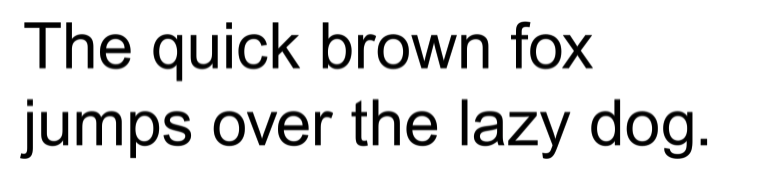
Arial is a contemporary sans-serif email-safe font option. With it, you’ll find curves that give it a modern feel. Arial is an excellent font for body copy or headlines across email campaigns.
2. Courier New
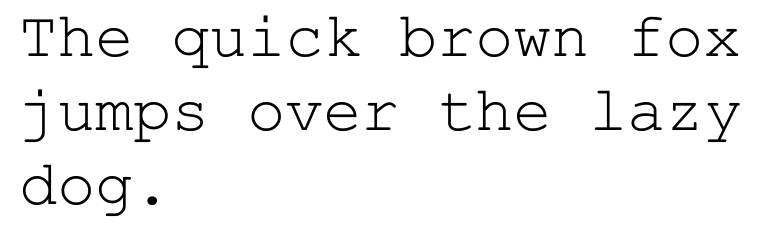
Courier New has a typewriter-like appearance with serifs. It doesn’t have a modern look and feel, making it more appropriate for movie scripts and manuscripts than email.
3. Georgia
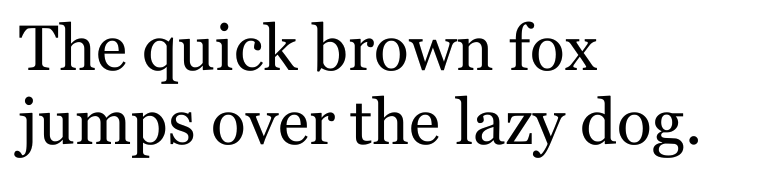
Georgia is a classic serif font from Microsoft used in newspapers and magazines. It gives an authoritative (and formal) appearance to your emails and is an excellent option to enhance the readability of densely worded content.
4. Helvetica
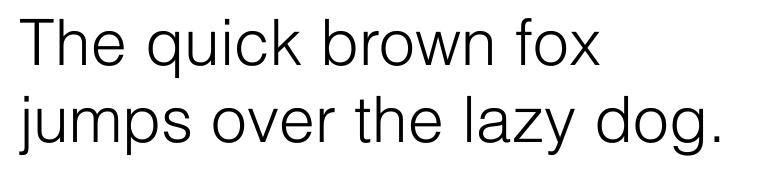
Helvetica is the most popular digital font for titles, brand names, taglines, slogans, and headlines. It’s not particularly distinctive but is a good option for more than emails.
5. Lucida Sans Unicode
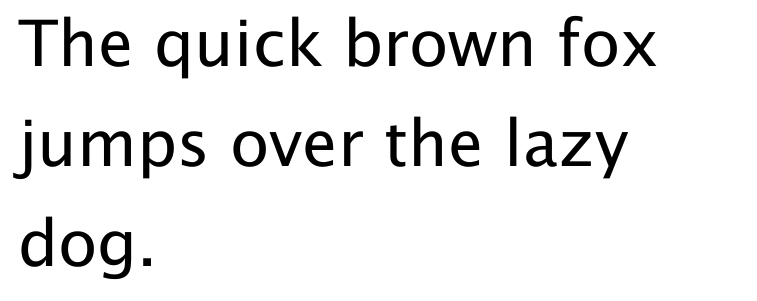
Lucida Sans Unicode is a basic sans-serif variant of the Lucida font that doesn’t have bold or italics versions.
6. Tahoma
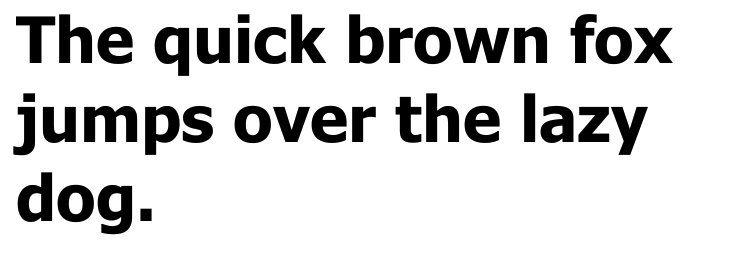
Tahoma is a font designed by Microsoft to improve the visibility of small text on screens. It translates well to the compact layout of emails.
7. Times New Roman
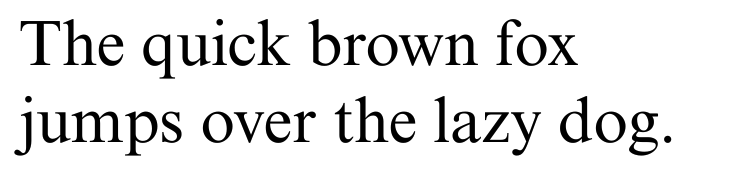
Times New Roman is an email-safe font appropriate for just about anywhere. It’s not a contemporary font—it’s been around for almost 100 years—but it’s space efficient, legible, and familiar.
8. Trebuchet MS
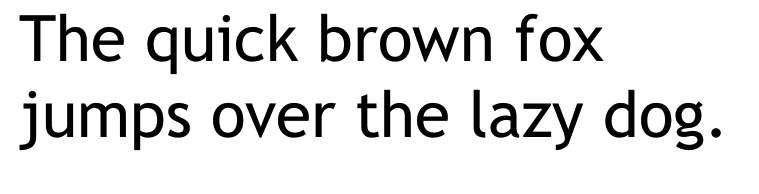
Trebuchet MS is a bold, digital-friendly font with an unmistakable look. While some characters appear classic and typical, others get creative (see the “g”).
What is a web-safe email font?
Web-safe fonts are fonts preinstalled on most operating systems, like Arial, Georgia, and Verdana. In email, that makes them the same thing as email-safe fonts.
Most email clients support several web-safe email fonts, but there isn’t overlap between all of them. For example, Gmail supports Open Sans and Roboto web fonts, but Outlook and Apple Mail don’t. However, each email client has a default font to revert to if it doesn’t support a web font. Here are a few:
- Apple Mail and iOS Mail: Support web fonts.
- Gmail: Limited support, so most web fonts fall back.
- Outlook for Windows: Doesn’t support web fonts and often falls back to Times New Roman unless you specify a fallback.
So rather than designing one email for Helvetica, another for Roboto, and another for Calibri, use email-safe fonts that work universally across most email clients.
11 custom HTML email fonts

If you use a web-safe email font instead of an email-safe font, we recommend selecting (and testing) a font alternative. Consider one of the following options:
- Raleway
- Roboto
- Open Sans
- Poppins
- Oswald
- Ubuntu
- Merriweather
- Rubik
- Quicksand
- Oxygen
- Lato
1. Raleway

Raleway is a sans-serif font with thin, font-weight lines and generous letter spacing for a comfortable reading experience without compromising page space.
2. Roboto

Roboto uses friendly, open curves with natural widths. It’s the default font on Android, Google Play, YouTube, Google Maps, and Google Images.
3. Open Sans

Open Sans is a font optimized for print, web, and mobile interfaces, thanks to its neutral, friendly look. The upright nature and letter spacing prioritize legibility.
4. Poppins

Poppins has a clean look and font style that make it perfect for headings, subheaders, and standout paragraph copy. It has a great balance between playful and professional.
5. Oswald

Oswald is a tight, condensed font that lets you incorporate more characters without compromising readability. Use Oswald in headlines to make a bold statement while maintaining a balanced appearance vertically and horizontally.
6. Ubuntu

Ubuntu font features a contemporary style with a unique flair, balancing a distinct design with professional use cases.
7. Merriweather

Merriweather is an open-source serif font designed for digital reading. The characters stretch tall but remain compact to increase legibility without wasting space.
8. Rubik

Rubik uses slightly rounded corners and low-stroke contrast. Access this open-source typeface for free on Google Fonts.
9. Quicksand

Quicksand, originally designed for display purposes, is a sans-serif font that does well in small print sizes too. It works great for body text in emails.
10. Oxygen

Oxygen is a web-safe font for web browsers, desktop computers, and mobile devices. It pairs nicely with Oswald and Quicksand.
11. Lato

Lato is a font with 18 styles and weights and 3,000+ glyphs per style. Its semi-rounded edges make it one of Google’s most popular fonts.
Best email fonts for use cases
Don’t limit yourself to a single email font for all your communications—certain ones perform better as headers, body copy, or signatures. Below, we’ve listed the best fonts for several email use cases.
Best fonts for email signatures
Stick with email-safe fonts for signatures. Your signature gets pasted into Gmail, Outlook, and Apple Mail compose windows, and most of them won’t load a custom web font. Our picks:
The following web-safe email fonts are our recommendations for email signatures:
- Poppins
- Open Sans
- Roboto
- Oswald
- Lato
As alternative options, we recommend:
- Arial
- Helvetica
- Tahoma
Best professional email fonts for business
Some fonts are playful, while others are more professional—and some unique ones have a balance between both. For professional email fonts for business, we recommend choosing fonts that display trust and class:
- Ubuntu
- Poppins
- Arial
- Helvetica
- Georgia
Best fonts for email newsletters
Email newsletters often must fit a lot of content into a small space. If you struggle with this when designing your campaigns, we recommend the following fonts for email newsletters:
- Raleway
- Oswald
- Tahoma
Best fonts for email marketing campaigns
Your email marketing campaigns should use multiple fonts to separate (and distinguish) headlines from the body copy. The following fonts pair well for email marketing campaigns:
- Raleway and Merriweather
- Open Sans and Times New Roman
- Lato and Merriweather
- Roboto and Lato
Best Gmail fonts
Gmail is the most popular email platform with 1.8 billion active users, so there’s a high likelihood that much of your audience uses it. Using one of these web-safe fonts optimized for Gmail (with alternative options in case recipients use other inboxes) is our recommendation::
- Arial
- Open Sans
- Roboto
How to optimize your fonts for email

Once you’ve chosen a font, it’s time to optimize your fonts for email campaigns. This includes using them appropriately, increasing the readability, and improving the customer experience.
1. Keep it simple
Remember, the purpose of your font isn’t to entertain: it’s to get recipients to read your emails and take action. So keep things direct and on brand.
While it’s crucial to embrace creativity to create emails that strengthen your brand and engagement, prioritize readability, comprehension, and user experience.
2. Don’t stuff your email inside images
One way to get your fonts (any font) to show up correctly in an email is to add them to embedded images. However, sending image-only emails is inadvisable. Here’s why from Litmus:
- Subscribers might turn off images.
- Visually impaired recipients might not be able to read the email.
- Recipients might not be able to find your email later because your email text isn’t searchable.
- Emails stuffed with images will load slowly (or not at all).
- Responsive images that look good across every device are a challenge to create.
- Dark mode can invert colors or otherwise distort images.
- Copy edits become cumbersome. Instead of just fixing a misspelled word, you’ll have to edit, download, and re-upload a new image.
3. Select an alternative font
Choose and test alternative fonts for your email campaigns, especially if you use web fonts instead of email-safe fonts. Each email client has default alternative options, but these are flexible.
To avoid choosing the wrong alternative font, find fonts with similar heights, serifs (or sans-serifs), and letter spacing.
4. Don’t forget font size
Font size can help or hinder your email campaign. If it’s too big, the necessary text won’t all fit. But if it’s too small, subscribers will struggle to read it.
Email on Acid recommends using a font size of 14 pixels or larger. However, some email marketers will increase the font size on mobile devices to 16 or 18 pixels to improve readability.
5. Test your emails before sending
Test your emails before sending them to ensure a desirable look across clients, browsers, and devices (iOS and Android). However, instead of creating accounts on Gmail and Outlook and sending yourself test emails to review on desktop and mobile, use Twilio SendGrid’s email testing tool.
It’s integrated into our email builder tool to streamline the testing process during the design stage. SendGrid’s email testing will also analyze your email to find broken links, display issues, and even spam content.
6. Limit your email fonts
Using too many fonts can create a distracting, disjointed experience. We recommend using a maximum of two fonts that work well together.
Consistency in your email is also crucial. For example, if you use one font in a headline and another in the body copy, don’t alternate between them halfway through the email.
7. Pay attention to line and letter spacing
Regardless of your font choice, consider line and letter spacing when designing your emails. Too little or too much spacing makes reading difficult.
We recommend using letter spacing for all uppercase text because capital letters can sometimes blend into each other. Also, consider adding letter spacing for smaller-than-usual text to ensure readability.
Create strong email designs with Twilio SendGrid
Ready to send better-designed emails? Get started with our email designer:
- Our design editor helps you create beautiful, responsive emails.
- Our code editor allows you to fine-tune every detail.
- Our drag-and-drop widgets enable you to build emails efficiently.
Sign up for a free account today to see our email design tool in action.
FAQs
What is the best font for email?
Arial, Helvetica, and Georgia are the safest picks because they display correctly in nearly every email client. Using a web font like Open Sans? Pair it with Arial as a fallback.
Is Calibri or Arial more professional?
Both read as professional. Arial is the safer pick for marketing email because it’s installed almost everywhere. Calibri may fall back on devices without Microsoft Office, and newer Outlook versions default to Aptos.
What is the most popular font used in emails?
Arial is one of the most widely used email fonts. It’s preinstalled on almost every device, it reads cleanly at small sizes, and Gmail uses it as its default sans-serif font.
What font size should I use for email?
Use at least 14px for body text and 16px or larger for mobile readers. Headlines usually work best between 22 and 28px.
What is the best font for an email signature?
Use an email-safe font like Arial, Helvetica, Verdana, or Georgia. Gmail and Outlook won’t load custom web fonts in a signature, so a web font will fall back to something else anyway.


Related Resources
Twilio Docs
From APIs to SDKs to sample apps
API reference documentation, SDKs, helper libraries, quickstarts, and tutorials for your language and platform.
Resource Center
The latest ebooks, industry reports, and webinars
Learn from customer engagement experts to improve your own communication.
Ahoy
Twilio's developer community hub
Best practices, code samples, and inspiration to build communications and digital engagement experiences.