Recipe
How to accelerate new user signups to drive growth
Implement a campaign using Twilio Segment to track and increase new user signups, helping you expand your user base and enhance engagement.

What do you need?
-
Twilio Segment Connections
-
An paid advertising destination e.g. Facebooks Ads or Google Ads
On this page
Executing this use case will likely enhance user acquisition rates and optimize your marketing efforts, allowing for better tracking of user engagement and conversion metrics throughout the signup funnel.
Step 1: Add the required Sources
In your workspace, add a new prod or dev source for your website and (optional) another for your order processing system. This should be your website where checkout events will be tracked and the system that captures completed orders. These sources will be responsible for collecting the required Track Events and sending them to Twilio Segment.
Sign Up or Log In to Twilio Segment
First, access the Twilio Segment platform by signing up or logging into your existing account.
Create a Source for Your Website
A source in Twilio Segment acts as the origin of data you collect, such as user interactions on your website.
In your Twilio Segment workspace, navigate to the Sources section.
Click the Add Source button.
From the catalog of sources, select JavaScript (for websites)
Provide a name for your source, e.g., "i.e. Company Website - Dev or Prod".
Optionally, add labels for organization.
Enter your website URL.
Click Create Source button
Install the Twilio Segment Snippet
After creating your source, Twilio Segment will provide you with a JavaScript snippet.
Copy the JavaScript snippet provided by Twilio Segment.
Paste the snippet into the <head> tag of your site to install Twilio Segment.
If you need to connect your website, mobile app, or server as a source please refer to our documentation on these touchpoints.
Step 2: Track your events
In order to build the funnels needed to encourage new user signups, you'll need to track three key events: 'Page Viewed', “Page Scrolled", “Signed Up” and “Identify” from your website or app.
Page Viewed: This event will start sending to Twilio Segment once Analytics.js is added to the site.
Page Scrolled: This event will start sending to Twilio Segment once Analytics.js is added to the site.
Signed Up: Manually add this event to your site (See Spec: Track documentation)
In this example, we're not only tracking events like 'Page Viewed', but also sending additional properties like 'page_category' and 'page_name'. These properties provide important context about the event and can be extremely valuable in your analysis. Learn more about properties.
It should be noted that ‘Signed Up’ should trigger an Identify call because this event allows you to tie a user to their actions and record traits about them i.e., first_name, last_name, user_id. This can further be used for personalized messaging in your signup lookalike campaign.
Only Identify calls can add and update user traits to a profile. For connections-only customers, the Identify event can still be mapped to downstream destinations to create/update user profiles.
Step 3: Add Destinations
Choose where you want to send the collected data—for this use case we recommend using in-app messaging or connecting to a paid media destination like Facebook Ads or Google Ads.
In your Twilio Segment workspace, add a new destination.
Select your preferred tool from the catalog. This destination will use the collected data as needed.
Step 4: Test your setup
Finally, test your setup to ensure data is being collected and sent correctly. You can do this by performing the actions you're tracking on your dev website and checking if the corresponding events appear in your Twilio Segment debugger and analytics tool.
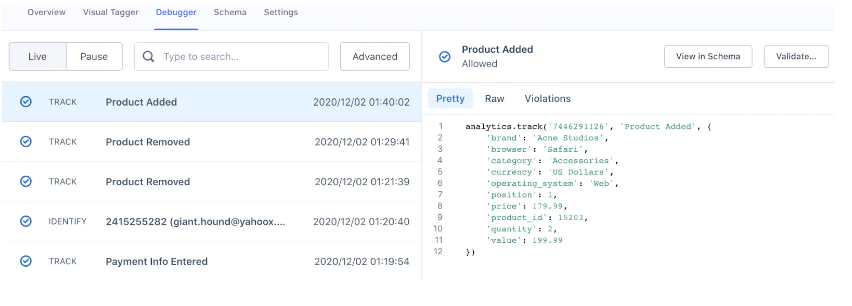
The Source Debugger is a tool that helps you confirm that API calls made from your website, mobile app, or servers arrive to your Twilio Segment Source, so you can troubleshoot your Twilio Segment setup even quicker.
Your data may not show up instantaneously and there may be a delay, but once the data is flowing you are ready to move to the next step.
Step 5: Analyze and activate
With a platform like Braze you can use the data that you’ve collected to activate your campaign with a targeted email to re-engage cart abandoners as pictured in the example below. . With accurate setup and data flow:
Analyze the data to understand user behavior throughout the signup process.
Identify drop-off points and optimize them to improve conversion rates.
Deploy targeted engagement strategies to convert interested users into active signups.
Offering a relevant coupon, discount, or newsletter as value in return for users' information is a valuable trade.
Final thoughts
When you convert anonymous visitors into registered users, you not only expand your user base but also deepen your reservoir of actionable data. This transformation from anonymity to known users enables more personalized interactions, which can significantly enhance user engagement and retention. With the rich data that registered users provide, companies can tailor their services and marketing efforts more precisely, resulting in higher conversion rates and a more robust bottom line.
Easily personalize customer experiences with first-party data
With a huge integration catalog and plenty of no-code features, Twilio Segment provides easy-to-maintain capability to your teams with minimal engineering effort. Great data doesn't have to be hard work!