Recipe
Digital Account Opening & Deposit Growth Accelerator for Credit Unions Using Twilio Segment & HubSpot
Credit unions risk losing 40-60% of new members due to outdated forms and impersonal onboarding. This recipe shows how credit unions can drive member expansion by unifying data and automating personalized member experiences with Twilio Segment + HubSpot. With these solutions in place, credit unions can expand their membership base by capturing every member interaction (web, mobile app, branch) in real time, feeding them into HubSpot, and then triggering targeted campaigns (welcome series and deposit offers) that drive conversions and increase product adoption.

What do you need?
-
Twilio Segment Connections
-
Twilio Segment Protocols
-
Twilio Segment Unify & Engage
-
HubSpot Marketing Hub
-
Analytics & Data Warehouse (Optional)
On this page
Step 1: Track Key Onboarding Events in Twilio Segment
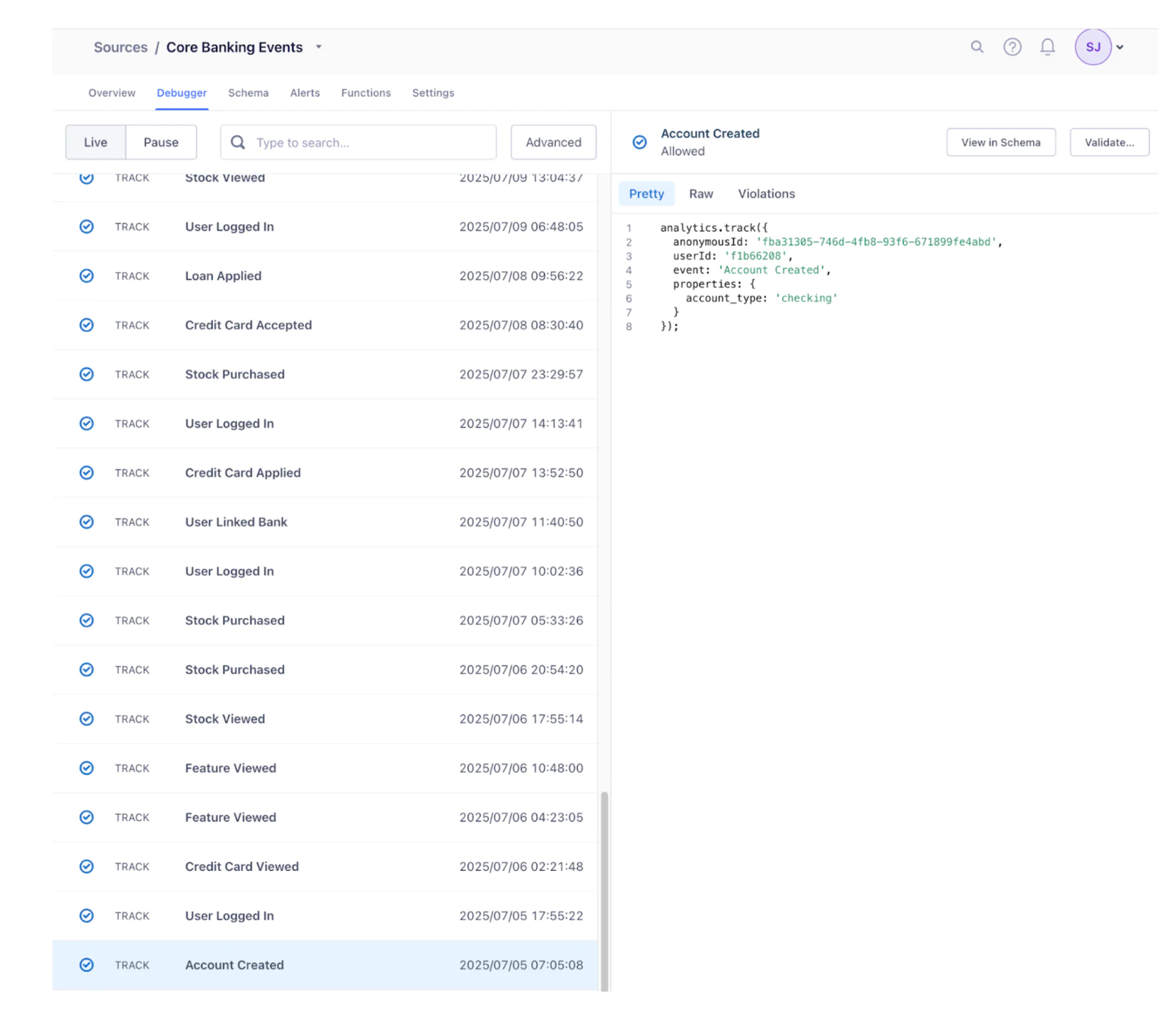
Start by instrumenting the event collection of a digital account opening flow via Twilio Segment. A complete, real-time feed of every onboarding action helps you trigger the perfect next step, before the member abandons. Top digital banks achieve high conversion by tracking every interaction and responding instantly.
Web & Mobile SDKs: Instrument Twilio Segment SDKs (Analytics.js for Web, iOS/Android SDKs for mobile apps) to capture onboarding events such as Application Started, Application Submitted, Account Opened, Deposit Initiated, and Direct Deposit Set Up.
Server-side Events: Utilize Twilio Segment’s server-side APIs to track critical events directly from core banking and backend systems, such as Account Opened and Deposit Posted.
Cross-Channel Identity: Use Twilio Segment’s identify calls to tie anonymous browsing to known profiles once a user completes signup. For example, when a prospect submits the membership application (providing an email or member ID), all prior actions (even anonymous ones) link to the member’s profile as soon as identity is known.
By fully instrumenting the application journey, Twilio Segment will have a complete log of each member’s onboarding funnel and deposit actions. This data-driven foundation enables tailored campaigns like targeting members who applied but didn’t fund an account.
Step 2: Build Rich Member Profiles and Audiences
Collecting clean, standardized events is essential, but impactful onboarding experiences only occur when those events are stitched into a single profile of each member. With Twilio Segment Unify, every click, tap, and transaction across channels is automatically merged into one cohesive profile.
If a prospective member is browsing the credit union’s high-yield savings page on their laptop as an anonymous visitor. And two days later, they download the mobile app, begin an application, and enter the same email they used earlier on the web. That shared identifier lets Twilio Segment immediately merge their previous anonymous browsing with their authenticated mobile activity, producing a seamless 360° view of their journey. This happens in real time using Twilio Segment’s identity graph and matching rules defined in Unify.
Next, these profiles can be enriched with computed traits and leveraged to build robust audiences.
Computed traits such as “has funded account” (flips to true the instant the first deposit posts), “direct deposit set”(flips to true when a payroll deposit lands), “initial deposit amount” (captures the dollar value of that first funding), “preferred channel” (records the member’s most recently engaged channel Email, SMS, or Push), and “digital wallet enabled” (turns true when the debit card is added to Apple or Google Pay) give every record a living, self-updating set of facts.
Audiences, which are built off of those traits and events, become instantly actionable segments. An “Application Abandoners” audience can catch prospects who started onboarding but never opened an account within 24 hours, while “Unfunded Accounts” hones in on members whose accounts exist but still lack an initial deposit. “Direct-Deposit Pending” isolates funded accounts that haven’t routed a paycheck, “High-Value Funders” captures members whose first deposit meets a VIP threshold (say ≥ $50,000), and “Digital-Wallet Holdouts” flags anyone funded but still missing Apple/Google Pay activation.
- Linked Audiences can connect member profiles with their accounts, loans, and transactions from the warehouse to create targeted groups. For example, find members with high credit scores who just opened checking accounts, then offer them a credit card.
Step 3: Integrate Twilio Segment with HubSpot
Next, set up the Twilio Segment + HubSpot integration so member data, events, computed traits, and audience can flow into HubSpot.
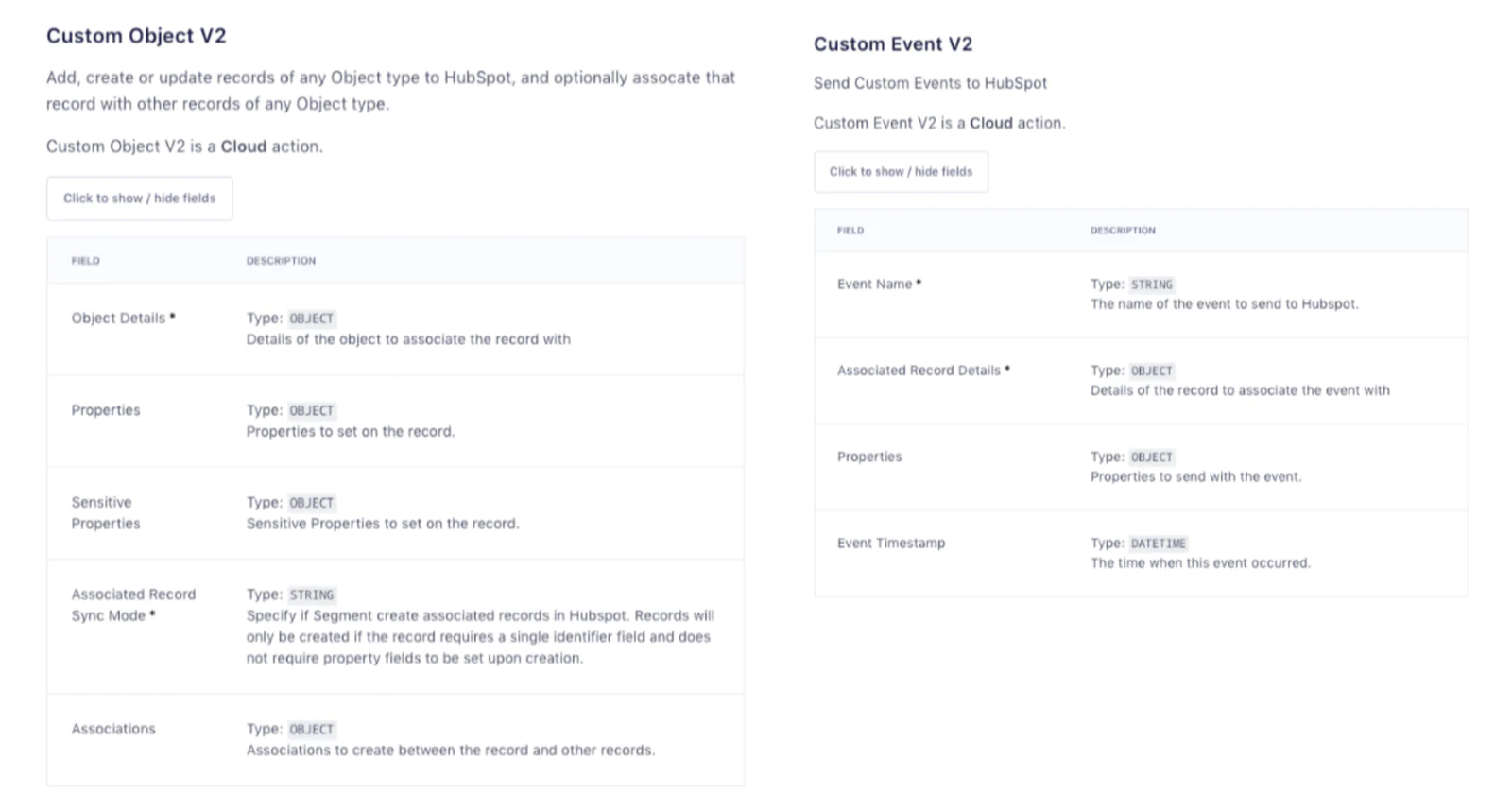
In the HubSpot destination settings, map the Twilio Segment events to the available actions in HubSpot fields/actions. For example:
|
Action Mapping |
Example |
|---|---|
|
Upsert Contact |
Any identify or trait update event containing a verified email address updates or creates a Contact with fields like preferred channel, initial deposit amount, and has funded account so HubSpot always reflects the latest profile data. |
|
Custom Object V2 |
When a "Loan Application Started" event fires, upsert or create it missing a "Loan Application" custom object that stores application ID, requested amount, product type, and current status. |
|
Custom Event V2 |
Translate the real-time Twilio Segment event "Direct Deposit Posted" into a HubSpot custom event that records deposit amount, payroll provider, and frequency so campaigns can trigger the moment a paycheck first lands. Map the Twilio Segment event "Application Step Completed" to a HubSpot behavioral event called "CU Application Checkpoint", passing the ster name so marketers can pinpoint where applicants struggle. |
Step 4: Deliver Truly Personalized Emails, Pages, and CTAs through HubSpot
With real-time traits, events, and audiences flowing from Twilio Segment, business users can rely on the fresh data that Twilio Segment pushes into HubSpot to make every piece of content feel handcrafted for each member.
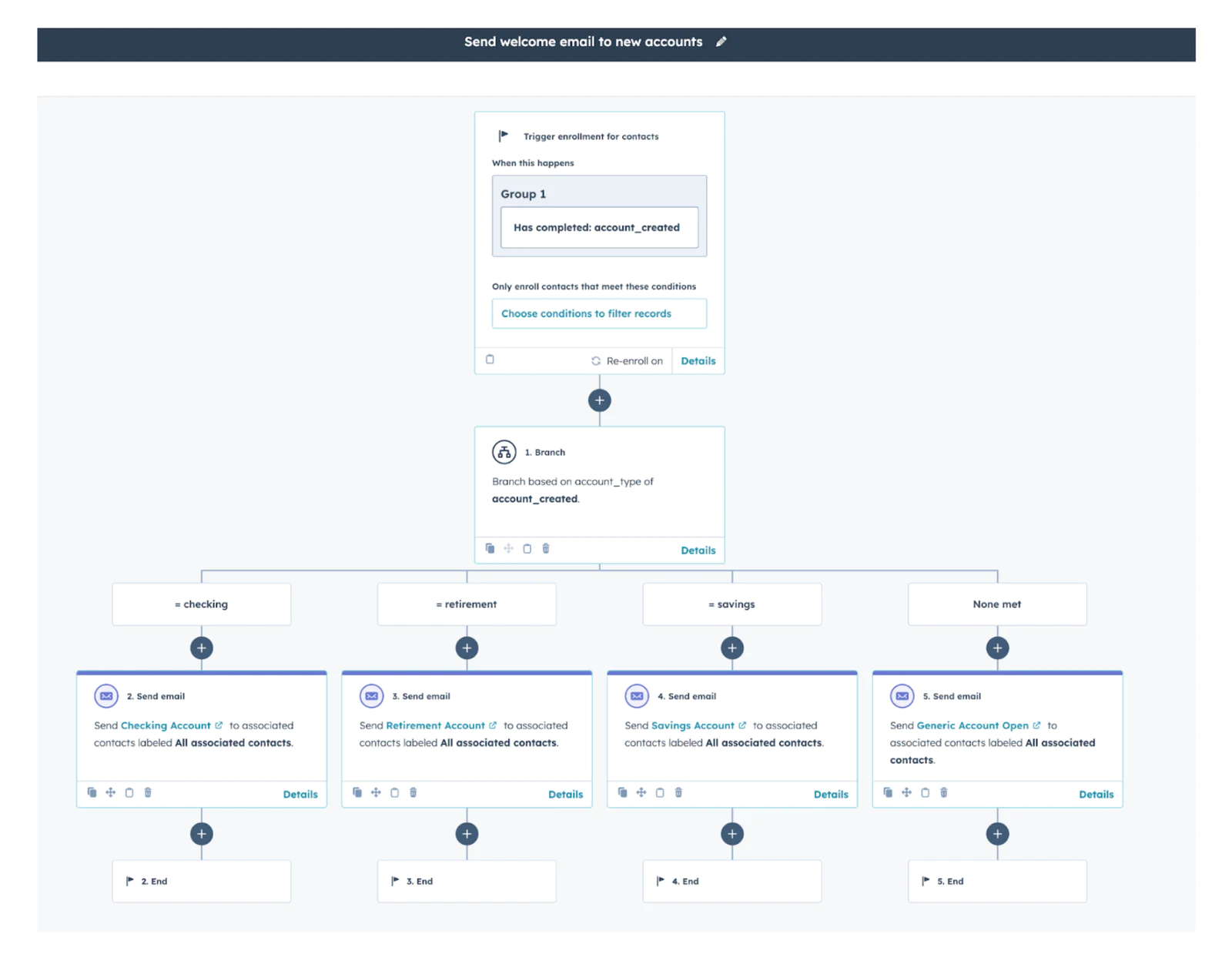
Start with the welcome email: Handle account-type targeting with a HubSpot workflow: add an branching on the Twilio Segment synced account created events based on the account_type property. Route "savings" to a savings-themed welcome/nurture email and so on, so that each customer only gets personalized welcome emails based on the account they opened. To set up the Workflow, first create personalized and themed emails for each account type with personalization tokens to pull in contact-specific data from the CRM (e.g. {{ contact.firstname }}, {{ contact.account_number }}). And then go to Automation → Workflows → Create (From scratch) and set enrollment to Has completed: account_created. Add an If/Then branch on account_type (from the account_created event) with equals conditions: checking → Send “Checking Account” email, retirement → Send “Retirement Account” email, savings → Send “Savings Account” email; use the None met branch to Send “Generic Account Open”.
Move on to funding reminders: the “Unfunded Accounts” audience in Twilio Segment can automatically populate a property in the contact for each member. Twilio Segment will flip that has_funded_account property to true the instant a deposit posts, a member will receive at most one follow-up reminder. This field can be used to create a list to drive further actions.
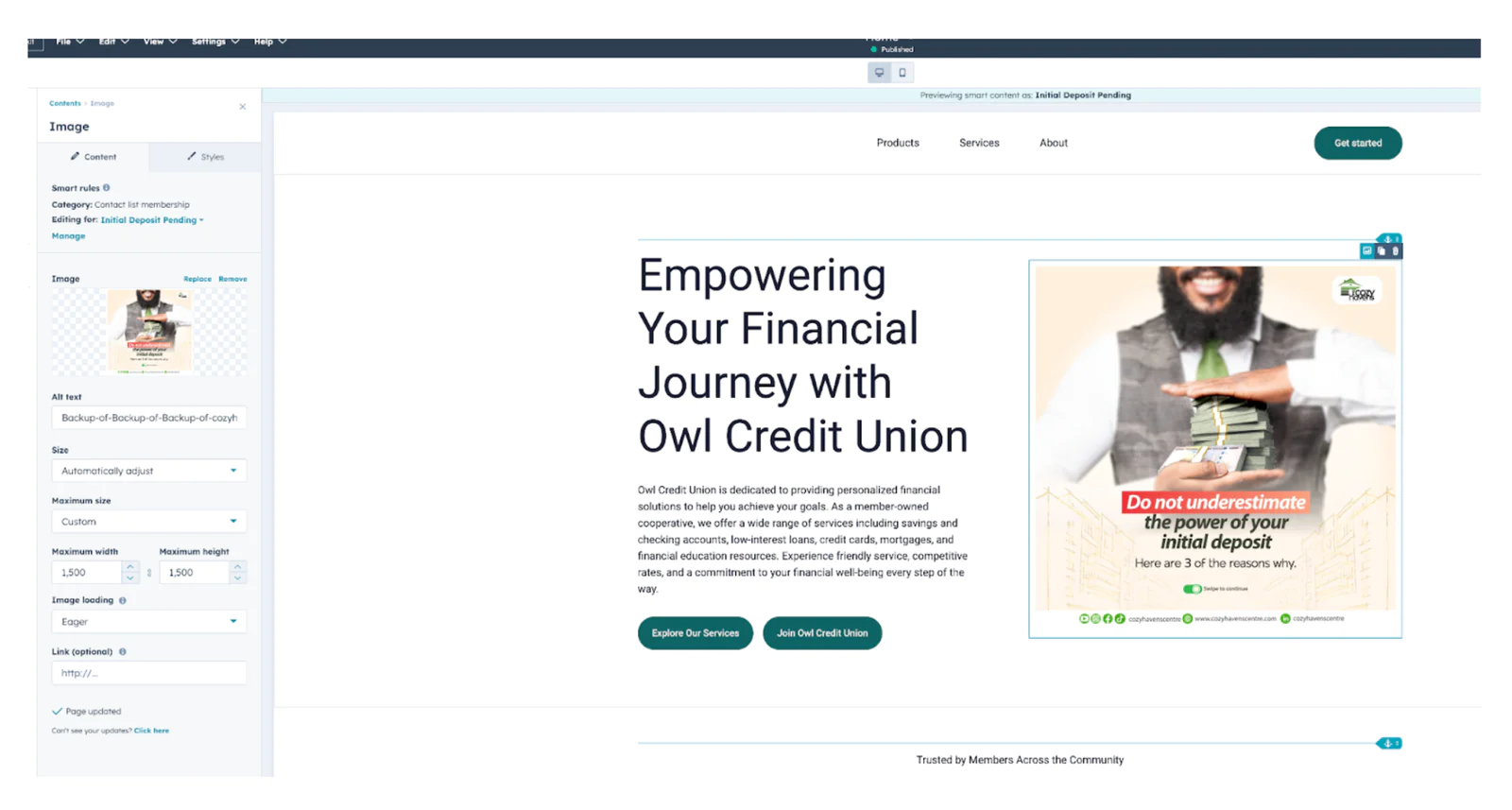
Using HubSpot Website Pages, leverage smart content. When a member from the “Deposit pending” list hits the site, HubSpot’s smart content swaps the generic image for an initial deposit centric image. If that same member returns after completing the setup (Twilio Segment would have set the initial deposit property to True), the page automatically flips to a congratulatory badge and introduces mobile-wallet tips.
The same concept can be applied to set up a button that reads “Add Money Now” which appears only if has_funded_account = false; once a deposit lands, that space can promote “Explore High-Yield CDs” instead, driven by the “High-Value Funders” or “Single-Product” audiences. The CTA rules reference live Twilio Segment fields that HubSpot refreshes in near real time.
For members whose initial_deposit_amount meets the VIP threshold, conditionally display a hero banner celebrating their high opening balance and inviting them to an exclusive “Premier Savers” webinar while everyone else sees a simple “How to fund in three clicks” graphic.
HubSpot handles the presentation subject lines, layouts, smart sections, CTAs while Twilio Segment supplies the truth about each member’s latest behavior. The integration ensures every message, banner, and button is contextually perfect.
Step 5: Trigger Personalized Journeys
Before launching any automated program, decide where the journey logic itself should live. Twilio Segment Journeys excel at real-time, multi-channel coordination powered by real-time events, profile and warehouse data, while HubSpot workflows for quick-turn campaigns that leverage HubSpot’s own channels and object schema.
When to pick Twilio Segment Journeys
When to use:
- Critical, revenue-driving journeys (e.g., 60-day fund-and-direct-deposit sprint).
- Flows that span multiple channels (email, SMS, push, paid ads, in-branch CRM).
- Journeys requiring deep personalization from warehouse data and traits from customer profiles.
- Customer traits like predictive traits live at the profile core, so segments such as “High Propensity to Set Up Direct Deposit” can drive highly targeted branches.
Why:
- Single tool controls timing, branching logic, and triggers, no duplicate rules scattered across tools.
- State changes (a deposit posts, a DD lands) propagate to every destination in real time, keeping all channels in sync.
- Centralizing logic reduces duplicate, billable events inside downstream tools allowing for cost optimization.
When to pick HubSpot for Journeys
When to use:
- Campaigns confined to HubSpot-native channels (email, SMS via HubSpot integration, in-app banners, smart site content).
- Time-boxed or low-risk drips (welcome series, abandoned-application nudges, monthly newsletters).
- Initial branching handled in Twilio Segment based on real-time event qualifications and profile traits and activation level journey logic handled in HubSpot.
Why:
- Simple to manage when real-time, cross-tool coordination isn’t critical; hourly property sync is sufficient.
Twilio Segment still feeds real-time events and traits (ex. Account Opened, has_funded_account) to drive enrollment and personalization, no extra logic required in Twilio Segment.
- Qualification and actions align with HubSpot’s native object model, workflows can trigger off built-in objects like Deals, Tickets, or the Product Catalog, making use-case setups (ex. cart-abandon recipes tied to the catalog) intuitive but more schema-locked to HubSpot.
Example “60-Day Deposit” journey
1. Entry Trigger - Member event Account Opened.
2. Funding Check Path
- Condition: has_funded_account = false → wait 48 hours, email “Fund Your Account.”
If still false after another 24 hours, SMS nudge. The moment a deposit posts, the trait flips, and the member exits this path automatcally.
3. Direct-Deposit Path
- 72 hours after has_funded_account becomes true, condition: direct_deposit_set = false.
Dynamic landing page “Route Your Paycheck, Earn $50.”
Trait flip to true ends the branch immediately; otherwise a final reminder fires at Day 30.
4. Cross-Sell Path
- A Journey wait node pauses until Day 60.
Condition: Audience Single-Product Members → send targeted offer (ex., high-yield CD). with a Smart CTA.
5. VIP Loop
- Members from Audience High-Value Funders (initial deposit ≥ $1000) detour to a quick “Thank-You” push and early invitation to a premium webinar.
Wrapping Up: Twilio Segment + HubSpot for Credit Unions
Accelerate digital account-opening with Twilio Segment and HubSpot: Twilio Segment captures every web, mobile, and core-banking interaction, then unifies them into member profiles enriched with funding status, deposit propensity, and VIP tiers. Those real-time traits and events flow straight into HubSpot, where dynamic emails, pages, and CTAs nudge unfunded accounts, rewarding direct-deposit converts, and showcasing tailored cross-sells.The outcome is more sign ups, faster deposits, and growth that rivals fintech giants.
Easily personalize customer experiences with first-party data
With a huge integration catalog and plenty of no-code features, Twilio Segment provides easy-to-maintain capability to your teams with minimal engineering effort. Great data doesn't have to be hard work!