Recipe
Harnessing the power of unified data with LiveRamp and Twilio Segment
This partnership between Twilio Segment and LiveRamp allows marketers to seamlessly integrate their customer data and activate audiences across the connected digital advertising ecosystem. By unifying customer data, and leveraging LiveRamp’s pseudonymized identifier, RampID, marketers can uncover deeper insights, enhance personalization strategies, and activate across their advertising and marketing channels often seeing up to a 79% Match Rate Across Publishers and a 30% Reduction in Cost-Per-Acquisition (CPA) compared to HEMs alone.

What do you need?
-
Twilio Engage Space
-
LiveRamp Account
-
SFTP or S3 Cloud Storage
On this page
In this recipe you'll learn how to seamlessly integrate customer data and activate audiences across a connected digital advertising ecosystem using LiveRamp and Twilio Segment. The customer will need a Twilio Segment Account with a Twilio Engage Space, a LiveRamp account, and SFTP or S3 Cloud Storage.
Objective
Leverage the integration between LiveRamp and Twilio Segment to create a unified customer engagement strategy, enabling cross-channel activation, enhanced personalization, and improved marketing performance.
Challenge
In today's fast-paced digital landscape, businesses are grappling with fragmented customer data across various channels. This fragmentation leads to a rising Cost-Per-Acquisition (CPA) and challenges in achieving cohesive cross-channel activation. This was the case for a Leading Retail Company looking to leverage Twilio Segment for their first-party identity resolution and segmentation, and LiveRamp for their paid activation strategy across multiple destinations. Prior to using Twilio Segment with LiveRamp, the retailer struggled with
Maintaining consistent messaging and delivering personalized customer experiences across multiple channels due to fragmented customer data spread across various systems,
Achieving higher match rates without relying on third-party cookies and disparate identifiers.
Solution
By leveraging Twilio Segment’s identity resolution capability, the leading retailer was able to unify fragmented data across multiple systems and create targeted audiences for personalization.
The retailer used Twilio Segment’s integration with LiveRamp to send targeted audiences to their LiveRamp account, enhancing reach through LiveRamp’s Identity Graph, which connects de-identified offline and online data followed by audience activation across DSPs, DMPs, and paid media channels. This ensured consistent messaging across channels leading to significant improvements in insights, scale, and reach.
Powered by the first-party data collected and unified by Twilio Segment, companies that send Twilio Segment audiences to LiveRamp often see up to 79% Match Rate Across Publishers and a 30% Reduction in Cost-Per-Acquisition (CPA) through LiveRamp’s RampID, significantly enhancing data connectivity, targeting, and measurement for marketers.
For a more detailed step by step process you can view Twilio Segment’s LiveRamp Audiences Destination
Example Use Case
A Leading Retail Company wants to improve its cross-channel marketing efforts by creating highly targeted campaigns. The company’s goal is to increase customer engagement and drive conversions by delivering personalized messages across various platforms such as Meta, The Trade Desk, and Xandr, among others. To achieve this, they leveraged Twilio Segment for first-party identity resolution as well as segmentation and LiveRamp for increased privacy through LiveRamp’s pseudonymized identifier, RampID. This approach aimed to improve match rates and enable activation across multiple downstream destinations and partners. Currently, LiveRamp supports activation through over 500 advertising destinations, allowing customers to reach their desired audiences more effectively.
Setting up your audience integration
Step 1: Unify your data
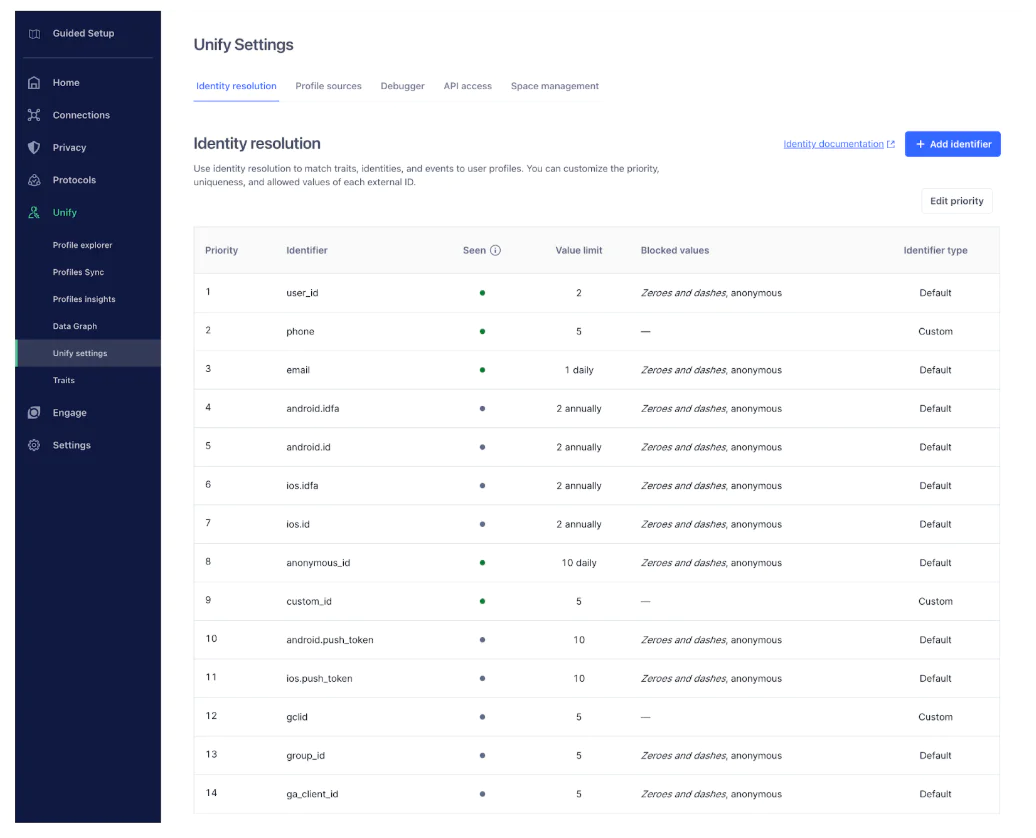
To effectively manage and merge user profiles in Twilio Segment, configure your Identity Resolution Settings to specify how identifiers like userId, anonymousId, and email are used. When a new event is received, Twilio Segment will either create a new profile, add data to an existing profile, or merge profiles based on matching identifiers and your predefined rules. Choose between an Out-of-the-Box configuration or set up Custom Rules to add default or custom identifiers, block specific values to prevent inaccurate merges, and set limits and priorities for each identifier type.
Step 2. Get your storage ready
SFTP setup
Contact your LiveRamp representative to get secure credentials. With these in hand, connect to the server and set up a new folder specifically for the target audience, e.g., "Running Enthusiasts."
S3 setup
Alternatively, you can create a new storage space (an S3 bucket) where you keep this audience data. Set up the necessary permissions to ensure LiveRamp can securely retrieve only the required data for activation from your storage and generate an access key for easy setup later.
Step 3. Link LiveRamp to your audience data
Create a LiveRamp Destination
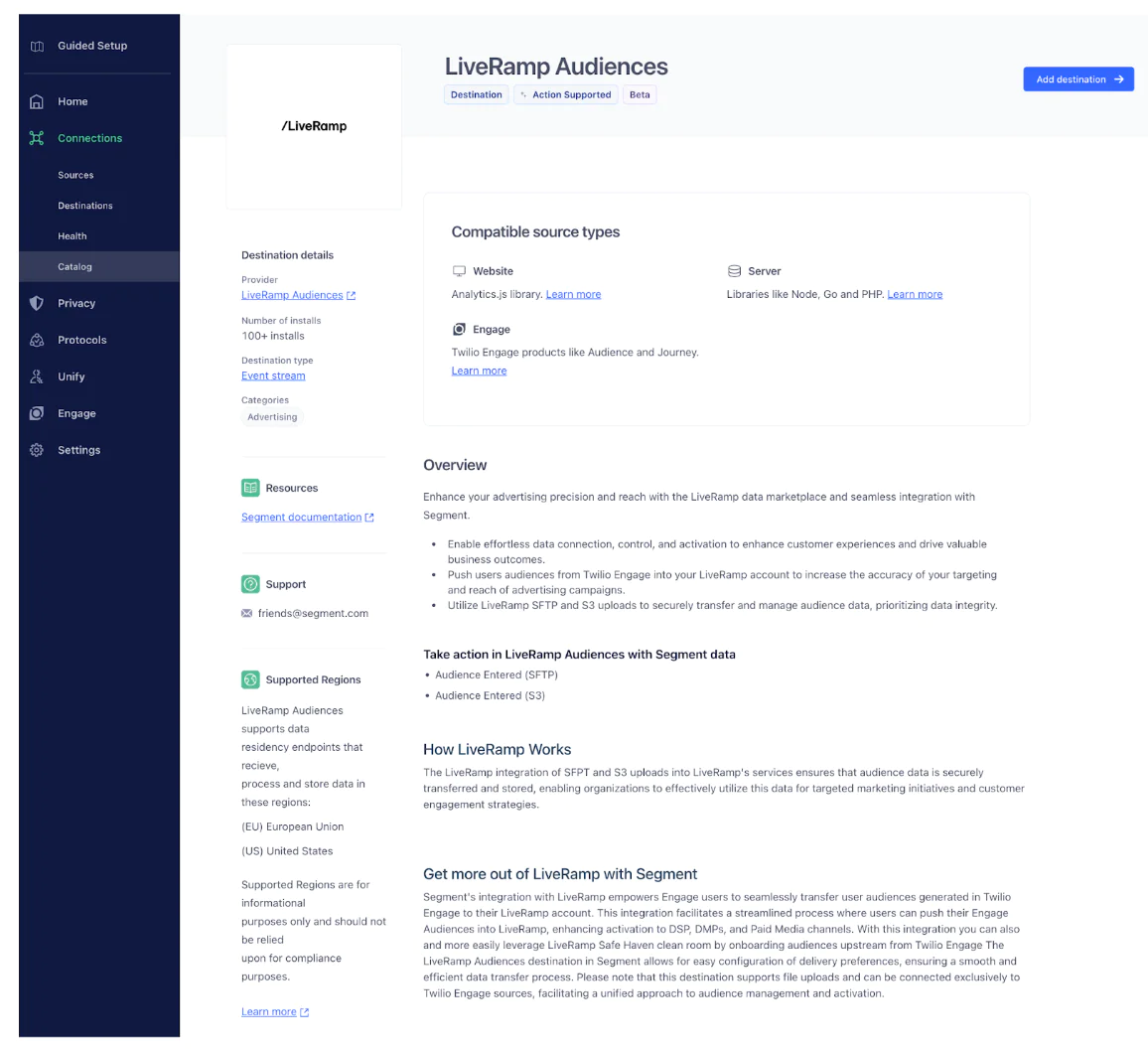
Start by navigating to the Twilio Segment Catalog. Search for and select "LiveRamp." Click on “Add Destination,” then choose the Space that corresponds to your Unify/Engage space where the relevant profiles are located. Assign a name to the destination and click "Save" to finalize the setup.
Create the audience
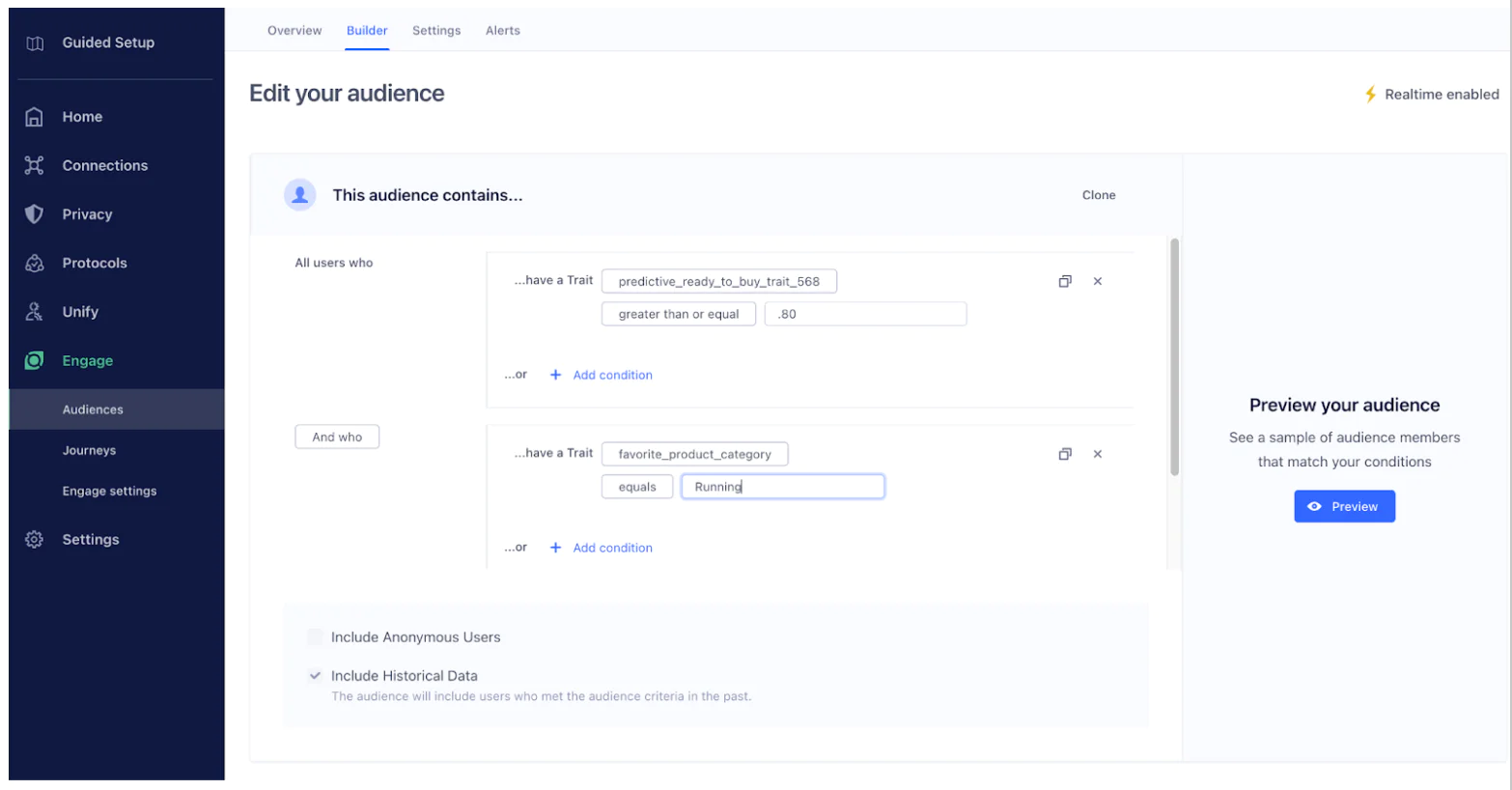
To create an audience of "Running Enthusiasts" in Twilio Segment, navigate to Engage > Audiences and use the Audience Builder to define conditions based on events and traits that indicate interest in running—such as users who have viewed or purchased items in the "Running Gear" category or have a trait like "Favorite Product Category" equal to "Running." Refine these conditions using event properties and set specific time frames if necessary.
Connect the LiveRamp Destination and enrich the data
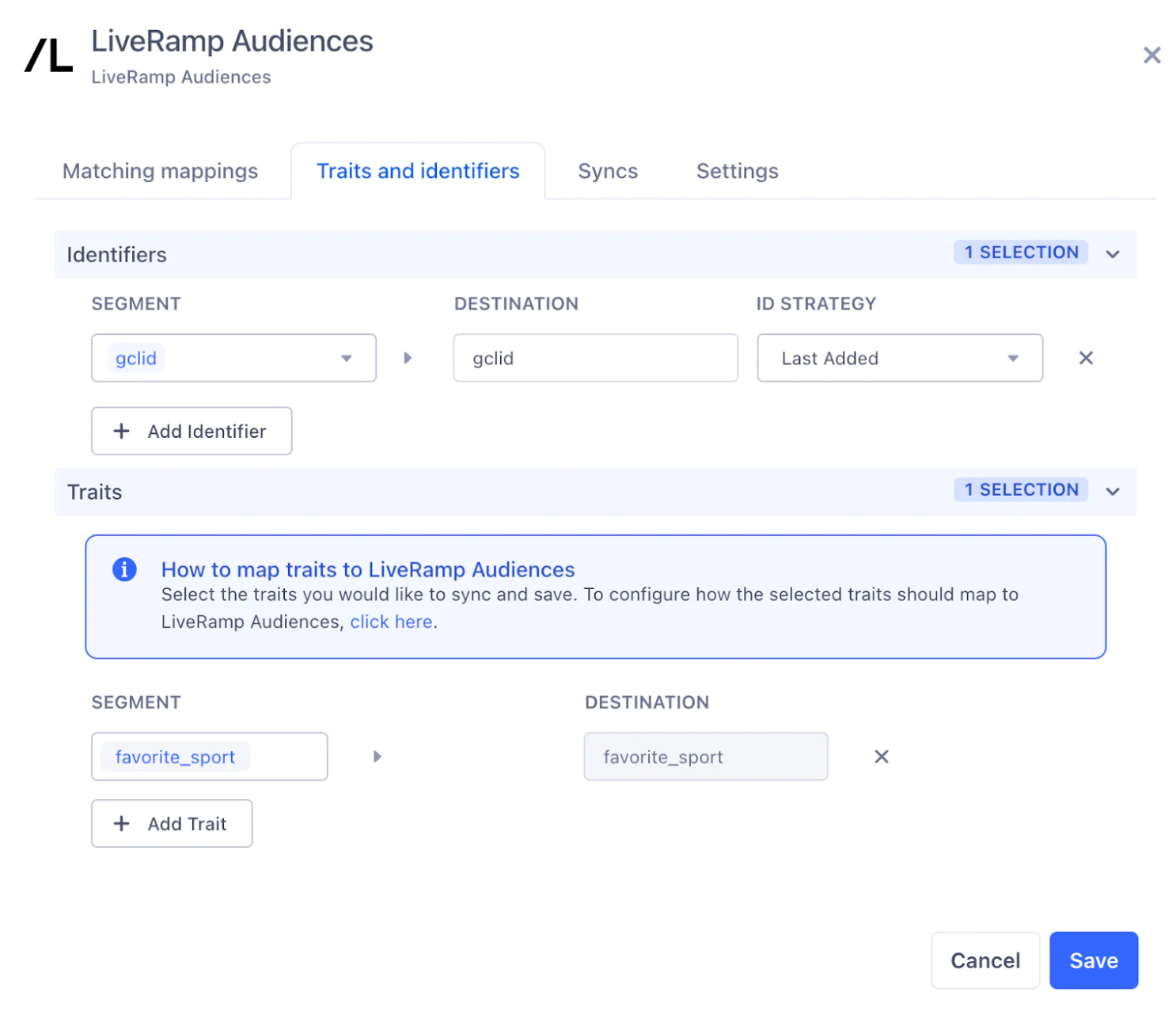
Add LiveRamp as a destination to the audience and configure the mappings for either S3 or SFTP. To improve match rates when syncing audiences to LiveRamp, utilize Trait Enrichment in Twilio Segment to include additional identifiers and profile traits in your audience data. This process involves accessing custom, computed, and predictive traits—such as emails, phone numbers, and other identifiers—to enrich the data sent to LiveRamp. By navigating to your Audience or Journey in Twilio Segment, selecting LiveRamp as the destination, and opting for a Customized Setup, you can add and map the desired traits to meet LiveRamp's requirements. This enrichment enables LiveRamp to more accurately match your users across platforms, enhancing the effectiveness of your targeting and marketing efforts.
Note: LiveRamp recommends clients enable as many identifiers as possible in order to maximize match rates.
Activate the Destination
After reviewing everything, LiveRamp will review to ensure the customers destinations and data setup are active and ready to go.
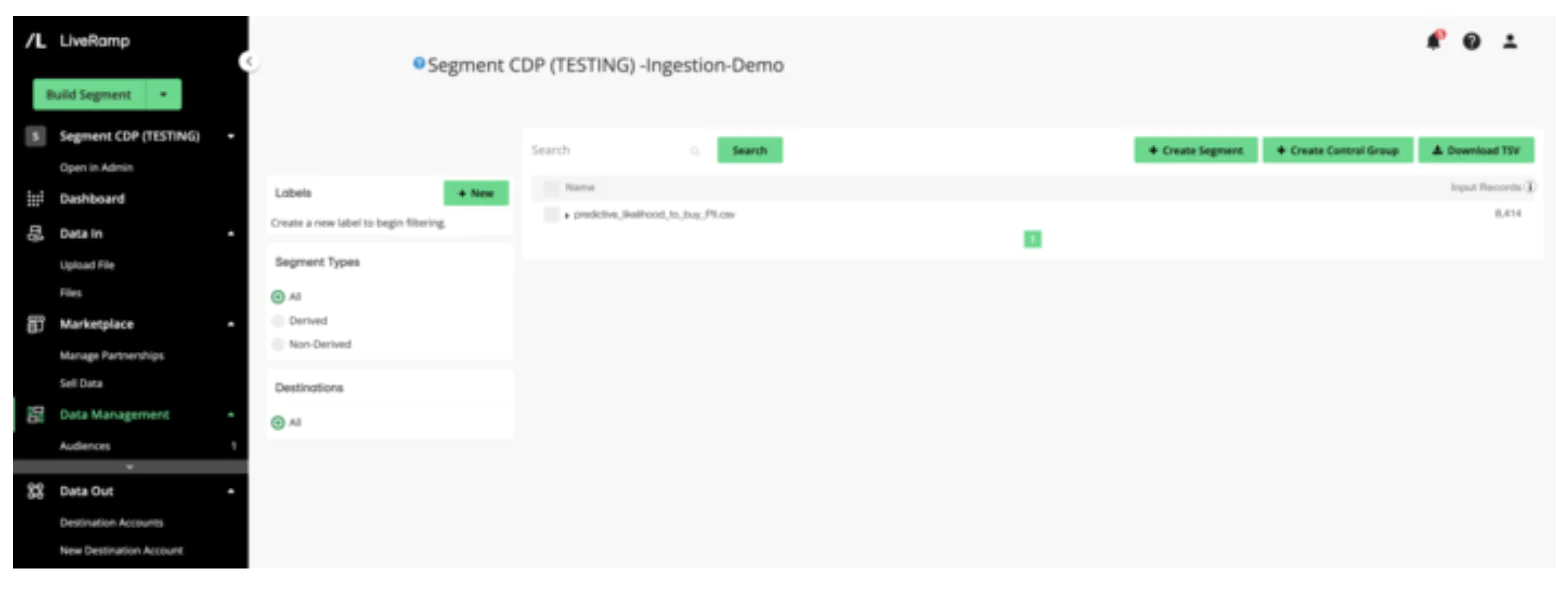
For more details on connection, you can view LiveRamp’s Audiences Destination Setup
Best practices
Customer-driven success: Implement cross-functional campaigns that integrate insights from various marketing and advertising channels, such as email, CTV, and personalized messaging strategies.
Maximize traits: Ensure you are increasing your match rates by maximizing the number of traits being sent via Segment’s trait and identity enrichment feature.
Increased traffic: Leverage valuable segments from both first- and third-party data sources to drive meaningful increases in in-store visits and overall foot traffic.
Extended user lifetime value: Engage users across multiple channels to substantially increase their lifetime value, making a multichannel approach to customer engagement and retention essential.
Wrapping up
Through this partnership, LiveRamp and Twilio Segment Customers can:
Connect their Engage Audiences to LiveRamp for paid activation
Easily segment and activate data within Twilio Segment and LiveRamp
Create an actionable and more holistic view of the customer
Easily personalize customer experiences with first-party data
With a huge integration catalog and plenty of no-code features, Twilio Segment provides easy-to-maintain capability to your teams with minimal engineering effort. Great data doesn't have to be hard work!