Recipe
How to Create Personalized Cart Abandonment with Event Triggered Journeys + Twilio SendGrid
Track user shopping carts in real time and instantly respond to changes with highly personalized messages that re-engage customers and reduce friction. Ensure a seamless shopping experience by automatically sending timely, relevant cart abandonment emails through Twilio SendGrid—powered by event-driven Journeys in Twilio Segment. Recover lost revenue by delivering tailored content that inspires shoppers to return and complete their purchase. Bring customers back with compelling details that make all the difference!

What do you need?
-
Twilio Segment Journeys & Twilio SendGrid
-
Twilio Segment Source & Twilio SendGrid Destination
-
Custom “Cart Abandoned” event tracking
-
User profile traits (e.g., email, name)
-
Cart context (item name, image URL, price, cart total, etc.)
-
Twilio SendGrid API key & dynamic email template
On this page
1. Select Triggering Event for your Cart Abandonment Campaign
What & Why:
You need to designate an event that kicks off the campaign. It can be any event that the user defines as their conversion event in the abandonment scenario. For this Abandon Cart scenario, that conversion event would typically be a placed order event. Capture the full details of the shopper’s cart (like product names, images, and prices) when they leave items behind. Granular context creates a more relevant and persuasive abandonment email, making shoppers more likely to return and convert.
How:
Implement a Product Added event on your product pages using Twilio Segment. Be sure to include the cart contents, user information, and any other relevant details in your event payload.
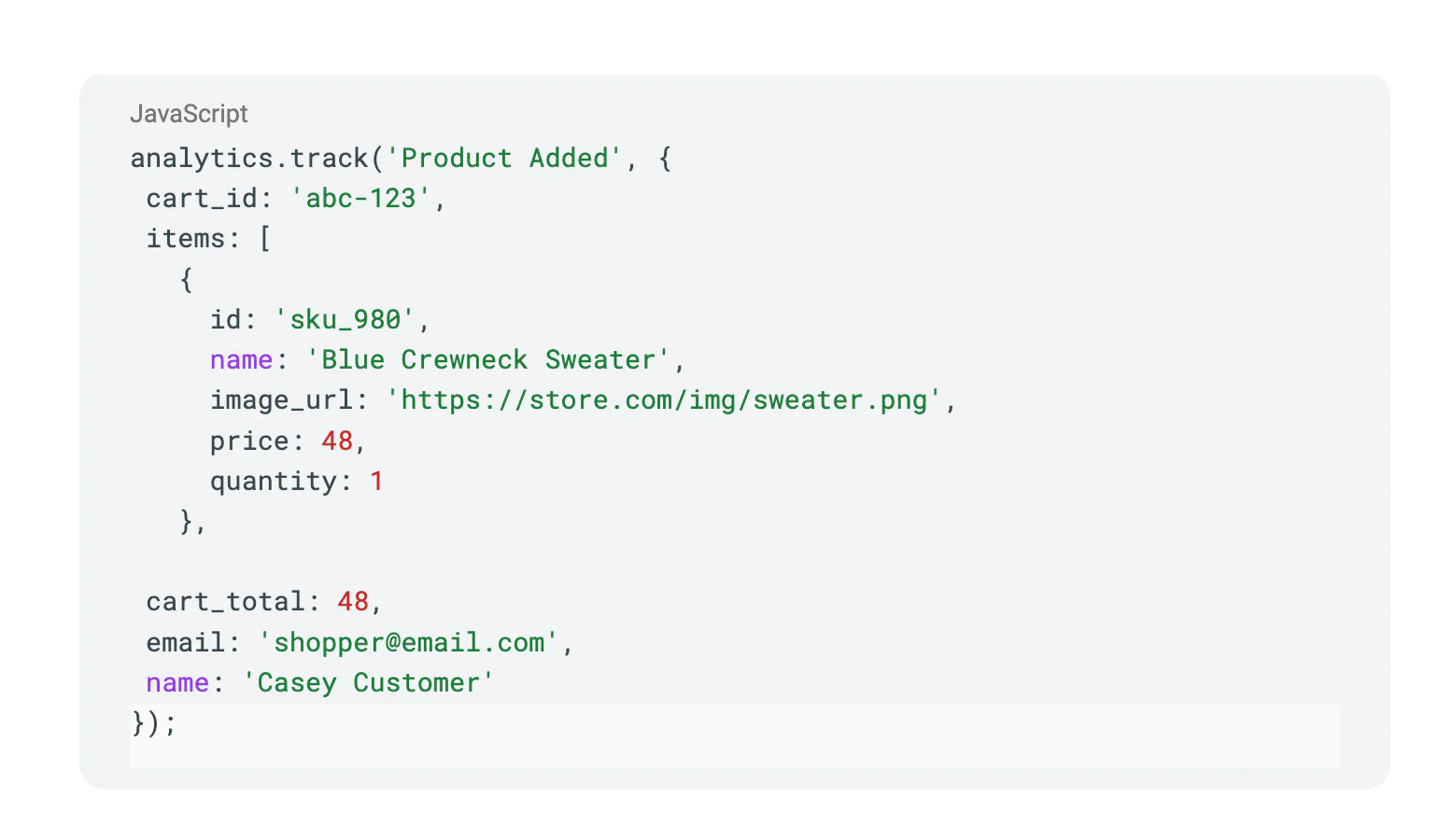
Include every property you want to show in the email—such as item images, quantities, and the shopper's name.
2. Create an Event Triggered Journey for your Cart Abandonment campaign in Twilio Engage
What & Why:
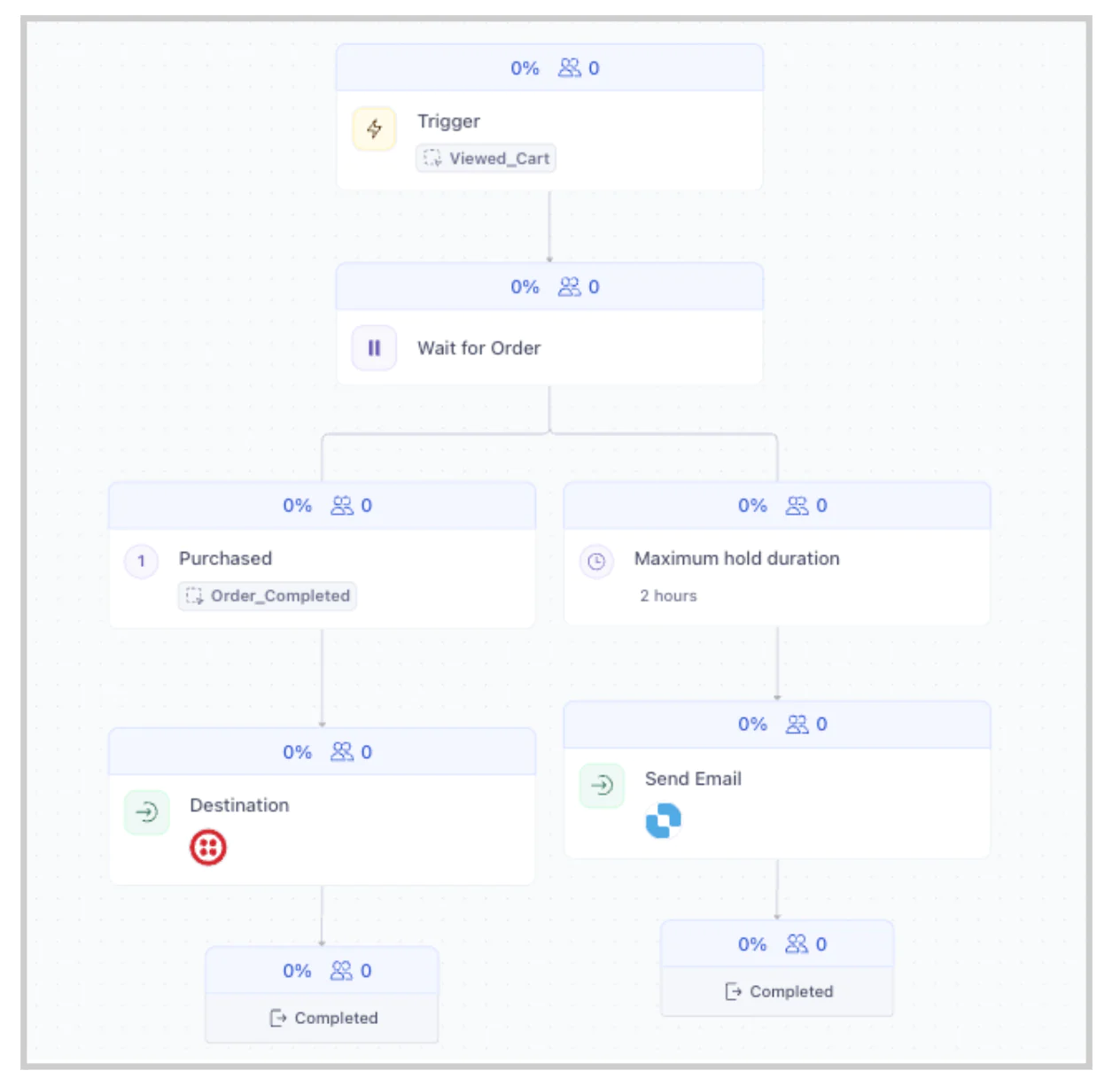
Journeys enable timely, automated communication directly tied to real user actions. By using event triggers, you ensure that each email responds to an actual cart abandonment—a much more powerful nudge than generic batch sends.
How:
Go to Engage > Journeys and click Create Journey.
Set the Entry Trigger: Choose “Event Trigger” and select the Product Added event.
(Optional) Add Audience Filters: For example, you might only target carts above $50 or registered users.
Add the Twilio SendGrid Action: Drag in a Send Email action and pick Twilio SendGrid as the provider.
Filters let you get more targeted—sending different messages to VIPs, high cart values, or repeat abandoners.


What & Why:
Setting up Twilio SendGrid as a destination in Twilio Segment ensures your user and cart data can be sent in real time, powering automated, event-based email campaigns.
How:
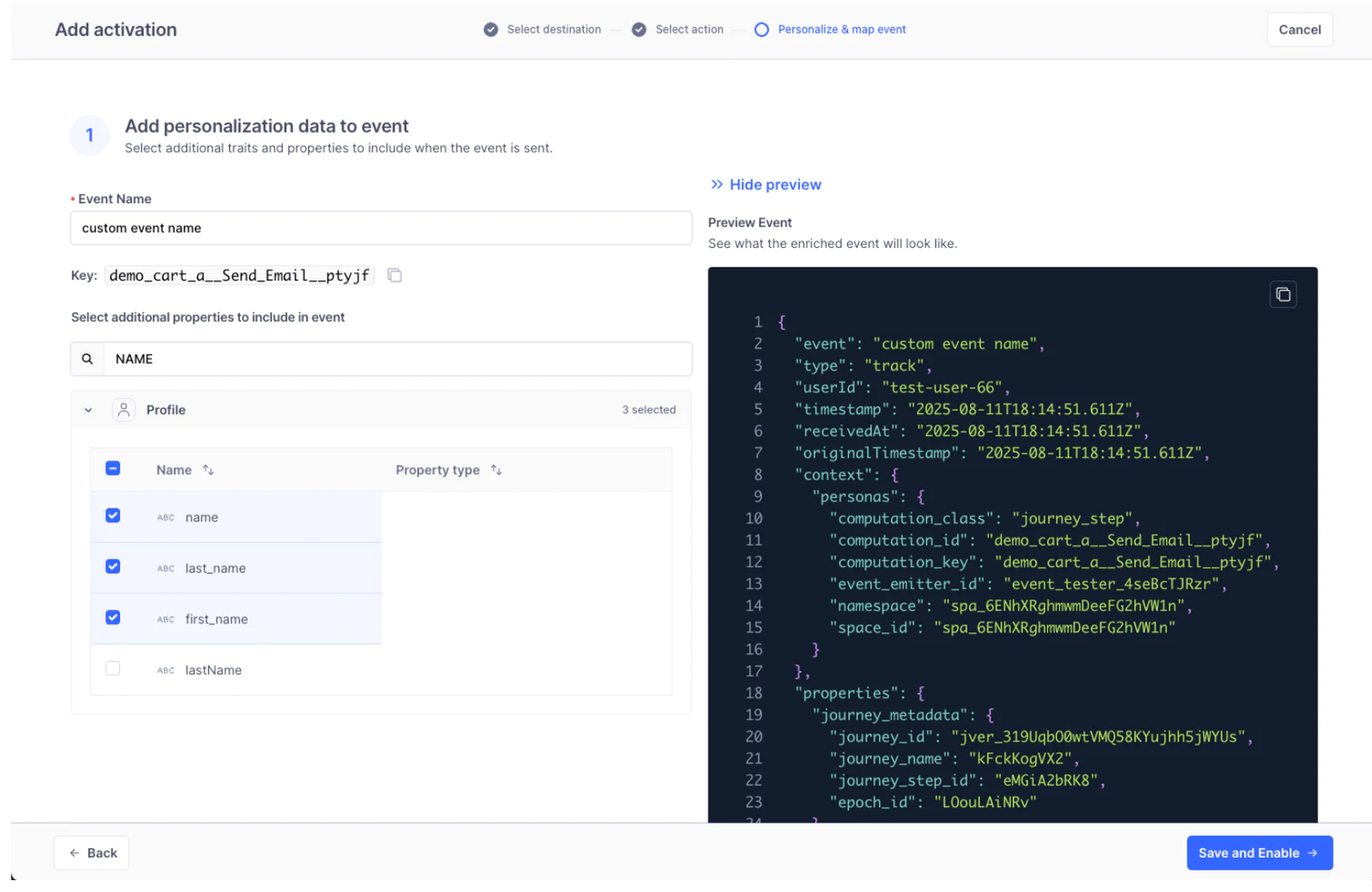
In Journeys, Add Destination step on canvas > Add Activation > Select your Destination from list > Select Action (Send Email with Dynamic Template) > Apply mappings in the “Personalize & Map Event” step.
If you don't have Twilio Sendgrid already available, then you would proceed to Connections to add Twilio Sendgrid from the destinations catalog.
Learn more about Twilio Sendgrid Dynamic Templates at: https://segment.com/docs/connections/destinations
/catalog/actions-sendgrid/#send-email-with-dynamic-template

Note: I'm selecting the Twilio SendGrid Dynamic template (Dependency) then applying mapping.
Double-check that every cart abandonment event includes an email—no email means no message delivered!
4. Pass Contextual Event Data to Twilio SendGrid for Personalization
What & Why:
Sending full event and profile data allows for dynamic, hyper-personalized emails. Display exactly what the user left behind, including product names, images, and prices—making the message both actionable and relevant.
How:
Personalize your payload within the Activation screen—goal is to enrich payload and map contextual data downstream (to Twilio SendGrid).
Customize the event name (note the Key that is unique to the Destination step
Enrich payload (currently only with profile traits).
Mapping (determine which payload parameters will populate which destination fields.
Send Test events.
5. Design Your Twilio SendGrid Dynamic Template
What & Why:
Dynamic templates let you use a single email design for every recipient while customizing it with each shopper’s details. This keeps your workflow efficient while maximizing personalization.
How:
In your Twilio SendGrid account, go to Dynamic Templates (Docs).
Build your template and insert variables for all the event data you want to use (e.g., {{name}}, {{cart_total}}, {{image_url}} etc.).
Reference your template ID in the Twilio Segment SendGrid action, ensuring fields in your event payload match those in the template.
Twilio Segment automatically includes event and profile properties when sending data to Twilio SendGrid. Reference these with Handlebars syntax in your dynamic template:
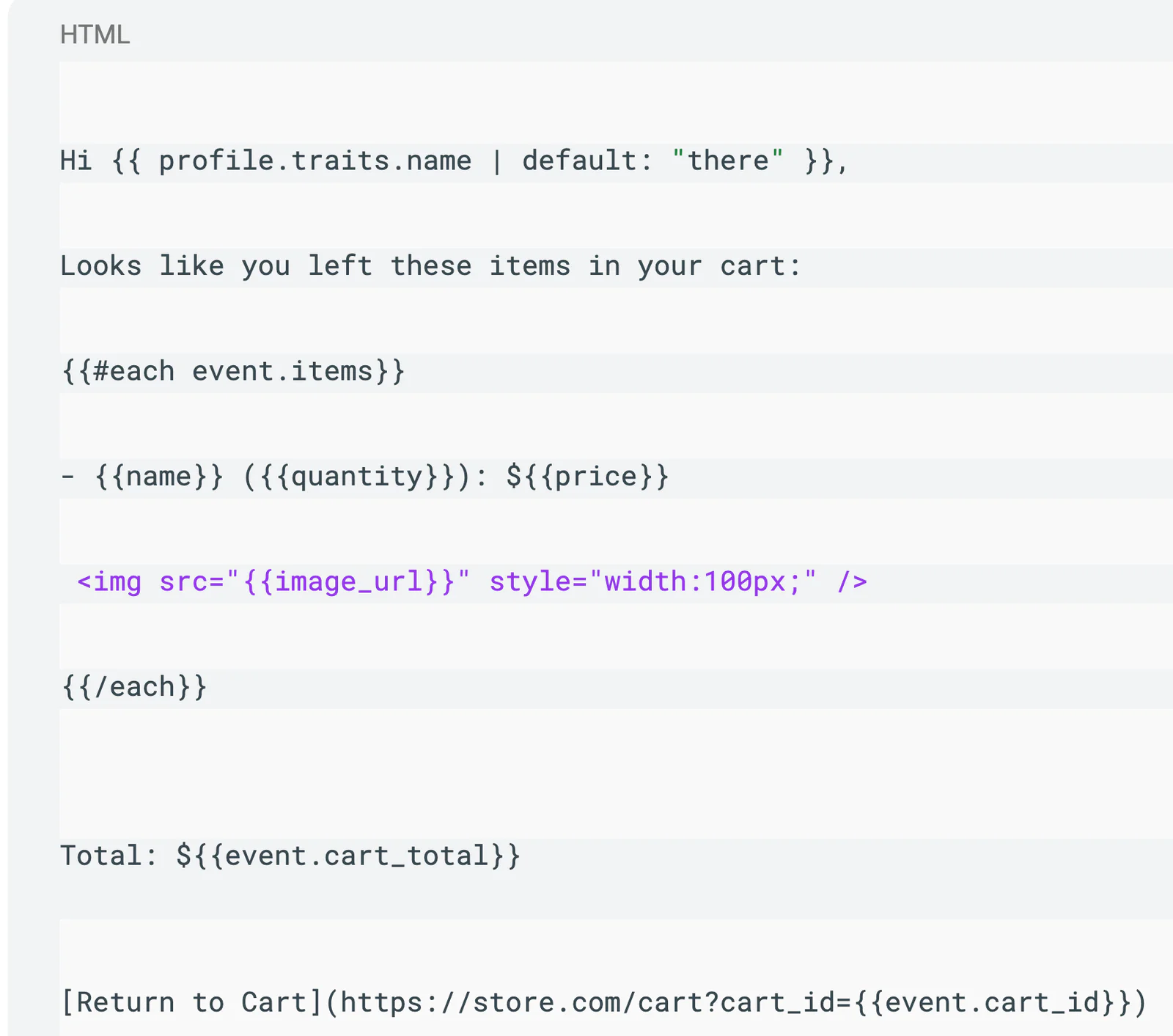
Test your template with different numbers of cart items, images, and cart totals to ensure a robust experience.
You can also create urgency (“Still interested?”) or target incentives to big cart values using event data.
6. Test the Experience
What & Why:
Testing ensures your emails are sending at the right time, reaching the right users, and displaying all dynamic content as intended—before customers ever see them.
How:
Use the Twilio Segment Event Tester or simulate a cart abandonment on your site.
Preview the email in Twilio SendGrid to verify all dynamic fields, including product images, prices, and links.
Send a test to your own or a colleague’s email to check for formatting, broken links, or missing content.
Validate with various scenarios—multiple items, missing data, large vs. small carts—to cover all edge cases.
7. Monitor, Analyze, and Improve
What & Why:
Ongoing analysis helps you boost cart recovery rates, refine content, and identify technical issues—turning valuable insights into higher conversion and more revenue.
How:
Track journey stats in Twilio Segment: entry rates, delivery successes, and flow drop-offs.
Review open rates and clicks in Twilio SendGrid reporting.
Experiment with A/B tests on email subject lines, timing after abandonment, or personalized discounts.
Use A/B testing to identify what messaging or timing yields the highest recovered sales.
Result
Your shoppers get a personalized, visually engaging nudge showing them exactly what’s waiting in their cart, making it easy—and enticing—to return and complete the purchase. Enjoy increased conversion and fewer lost carts!
References
Ready to win back shoppers? Start using event-triggered cart abandonment journeys with Twilio Segment and Twilio SendGrid today!
Easily personalize customer experiences with first-party data
With a huge integration catalog and plenty of no-code features, Twilio Segment provides easy-to-maintain capability to your teams with minimal engineering effort. Great data doesn't have to be hard work!