Building with AI? Why You Should Connect Twilio's AI Skills
Time to read:
June 05, 2026
Written by
Reviewed by
AI generated summary
- Twilio's AI Skills streamline integrating Twilio products, reducing coding challenges.
- They provide structured knowledge for authentication, rate limiting, compliance, and solution architecture.
- Using these skills improves coding efficiency and ensures production-ready solutions.
This summary was generated by AI.
Building with AI? Why you should connect Twilio's AI Skills
Your AI coding agent can generate functional code, but does it adhere to production-grade best practices for the tools you're integrating? Building with Twilio – with our over 1,800 endpoints and large product suite – can be challenging even for experienced developers. And AI agents can also struggle to navigate the nuances of solution architecture, authentication, rate limiting, compliance, and more.
Don’t worry, there’s a better way! Twilio Skills offer structured, curated knowledge and best practices to teach Claude or Codex or Cursor or whichever agent you use how to build Twilio systems the right way. Now, instead of bothering my coworkers on the solutions engineering team, I have their expertise in my terminal, and you can too!
How Twilio AI Skills Work
Twilio skills are built on the agent skills standard introduced by Anthropic. Skills enable anyone to encode repeatable tasks, procedural knowledge, or general guidance into a structured Markdown file. Each skill contains curated context, instructions and explicit constraints for AI Agents working with Twilio's products.
Skills can be called explicitly or implicitly: your agent will know what skills it has access to, and can bring in their context if the model decides the skill is relevant for the prompt. Twilio's skills use a progressive disclosure architecture which keeps the LLM's context window lean. Agents scan small amounts of metadata to know what's available and only pull in the deeper context once the prompt triggers a specific skill match.
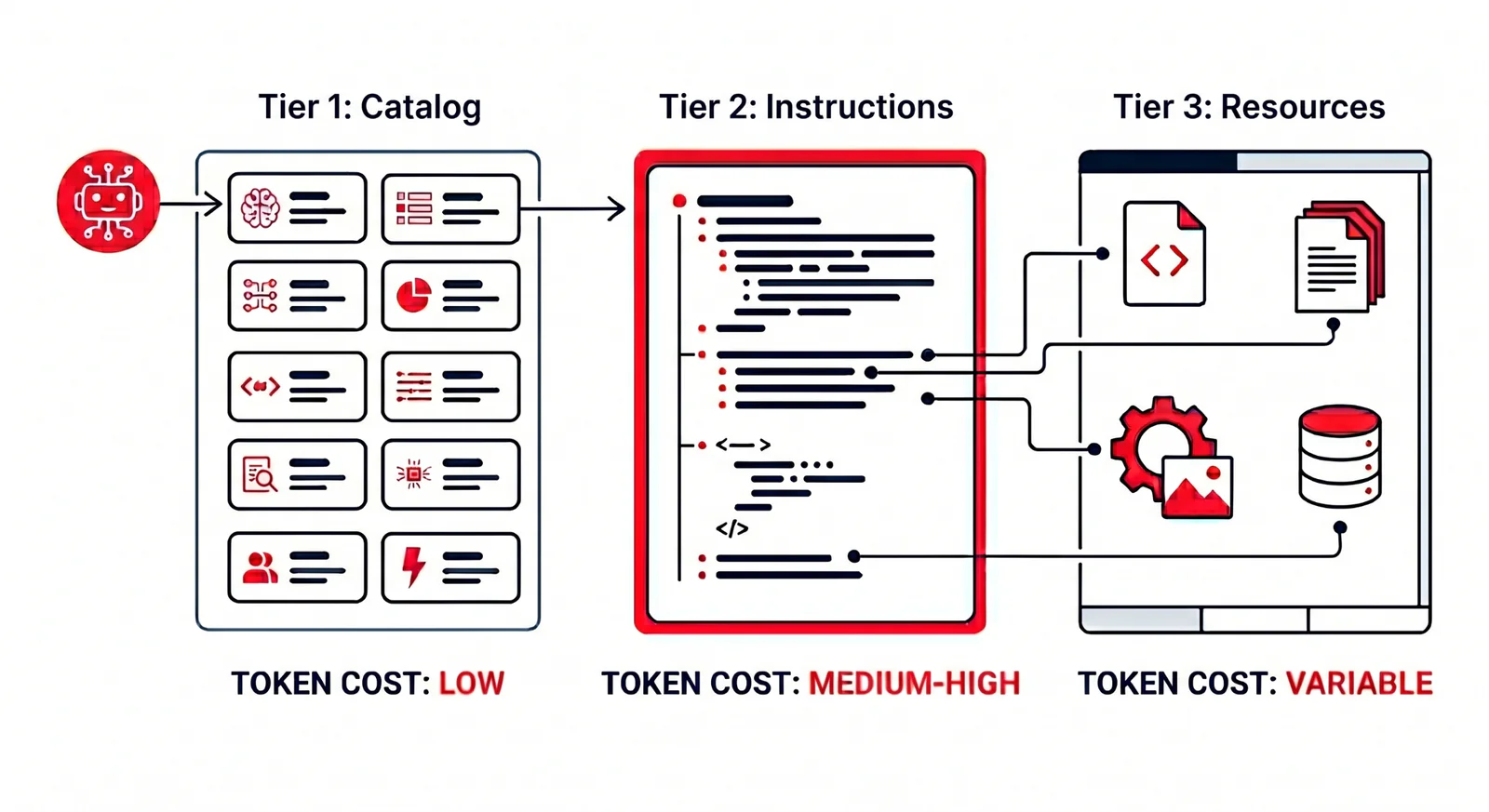
Progressive disclosure architecture. Generated by Gemini.
Twilio designed four skill types:
- Setup Skills help you get started with your account like configuring subaccounts or working with restricted IAM credentials.
- Planner Skills are strategic advisors for identity verification, voice, or multi-channel marketing. These offer guidance on which products to use for which use cases.
- Product Skills provide best practices for SMS, WhatsApp, Verify, Email, Conversational AI, and more of our products and services.
- Guardrail Skills ensure your application is compliant with things like A2P 10DLC, TCPA, and quiet hours. They also provide best practices for rate limiting and offer security hardening like webhook signature validation.
Twilio Skills work hand-in-hand with our Model Context Protocol (MCP) server and configuration. Learn more with our post Building with AI? Why You Should Connect Twilio's MCP Server to see how they pair together.
How to build with Twilio using AI Skills
I've tested Twilio's skills in a lot of different scenarios, and they all add confidence to what (and how!) I'm building. Let's look at 2 specific ways these skills help: sending one-time passcodes (OTPs) and building Voice AI agents.
How to use Twilio AI skills to send an SMS one-time passcode
Without skills, you might ask your coding agent to "verify users" or to "send an SMS OTP". When I tested this basic approach, the agent generated the OTP (String(crypto.randomInt(0, 1_000_000)).padStart(6, '0'); and sent it with the Twilio Messaging API. While that works, it's actually a lot more work for the developer since they need to add a database to tie codes to users, implement rate limiting, decide on routing fallback, configure fraud prevention, and more.
With skills enabled, the twilio-identity-verification-advisor skill prompts the agent to pivot to Twilio Verify, which handles edge cases and makes the code production ready from the start. When I re-prompted the agent with: " Users sign up with email + phone. I want to confirm they own the phone before activating the account. Implement it end-to-end." it knew to use the skill and noted the features that it would account for like fraud and deliverability:
How to use Twilio AI skills to create a Voice AI Agent
Unlike Verify, Twilio's Voice AI is both less familiar to me and has evolved a lot since I last used it. So I asked my coding agent to "build a phone support agent for our SaaS. When a customer calls, it should greet them by name if we recognize the number, remember what they discussed last time, answer their question conversationally, and let our team review the call afterward to spot frustrated customers. Implement it end-to-end."
Without skills this prompt tried to build a complex system with multiple database tables and brittle connection points. I later learned (after running the prompt with Twilio skills) the implementation was also missing tools and features that I didn't yet know existed, so I couldn't prompt for their inclusion.
With skills the agent pulls in Twilio best practices to build a smart Voice AI agent. After triggering the skill, the coding agent noted that:
This maps to a Level 3 architecture: ConversationRelay (voice) + Conversation Memory (recognize callers, recall last conversation) + Conversation Intelligence (sentiment for post-call review). No human escalation is required, so we skip TaskRouter. I'll use the Twilio Agent Connect SDK fast path — it bundles ConversationRelay + Conversation Orchestrator + Conversation Memory wiring.
Not only did these skills allow me to build something much faster, but it gave me a lot more confidence about the approach, which used products from Twilio’s Conversations suite.
When you should install Twilio AI Skills
If you use a coding agent like Claude Code, Cursor, or Codex with any regularity to write communications pipelines, adding these skills is definitely worth it. It will save you massive amounts of time debugging, and helps with architecting everything from prototypes to production solutions.
These skills also help mitigate the risk of hallucinations by using explicit CANNOT boundaries inside the skill definition. For example the verification skill notes that you Cannot retrieve the actual code sent — Code is never returned in any API response. By design.
Alternatively, you can install the skills directly into your local workspace from GitHub:
You can scope the skill based on where you install it:
- Project scope: put the skill inside the
.agents/skills/directory of your project folder - User scope: put the skill inside the
~/.agents/skills/directory of your computer user
Why Twilio AI Skills are a key to better AI Coding
AI coding tools are only as good as the context you provide, whether that's in prompts, with tools, or now with skills. Without accurate platform information and best practices, you will spend more time debugging or pursuing the wrong path. But with Twilio's AI Skills, you'll both gain confidence that you're building the right thing the right way the first time and know you’re building something ready to ship to production.
Ready to start building? Head over to the official Twilio AI Skills documentation to step up your developer workflow.
Related Resources
Twilio Docs
From APIs to SDKs to sample apps
API reference documentation, SDKs, helper libraries, quickstarts, and tutorials for your language and platform.
Resource Center
The latest ebooks, industry reports, and webinars
Learn from customer engagement experts to improve your own communication.
Ahoy
Twilio's developer community hub
Best practices, code samples, and inspiration to build communications and digital engagement experiences.