Building with AI? Why You Should Connect Twilio's MCP Server
Time to read:
June 08, 2026
Written by
Reviewed by
AI generated summary
- Save time by connecting Twilio's MCP Server; it indexes Twilio documentation for quick, accurate AI responses.
- Twilio MCP reduces context switching and prevents outdated answers, keeping your flow uninterrupted.
- Installation is quick and offers high returns, especially for frequent Twilio users or new project setups.
This summary was generated by AI.
Your Twilio SMS API call returns 201, but nothing delivers. You copy "error 30034" into your AI assistant. It searches the web, finds a Stack Overflow thread from 2019, and suggests verifying your account balance. You Google the error code yourself. Ten minutes and three browser tabs later, you find the real answer buried in Twilio docs.
Sound familiar? Here's what just happened: you left your IDE, lost your flow, and spent 15 minutes rebuilding your mental model of the problem. And 15 minutes was a small price to pay, research shows it takes an average of 23 minutes to return to a task after an interruption.
Now there's a better way. Twilio recently released a beta MCP (Model Context Protocol) Server that gives AI assistants like Claude Code, Codex, or Preplexity AI direct access to Twilio documentation. No web scraping, no stale tutorials, no leaving your editor.
This post shows you how it works, walks through real scenarios where it saves those 23 minutes, and gives you a 5-minute install guide.
How it works
Twilio's MCP Server connects to your AI assistant as a native tool. When you ask about Twilio, your AI searches indexed OpenAPI specifications and documentation instead of searching the web. The MCP Server indexes twilio/twilio-oai specifications across 30+ Twilio products, plus Twilio SendGrid and Segment documentation.
Here's the difference:
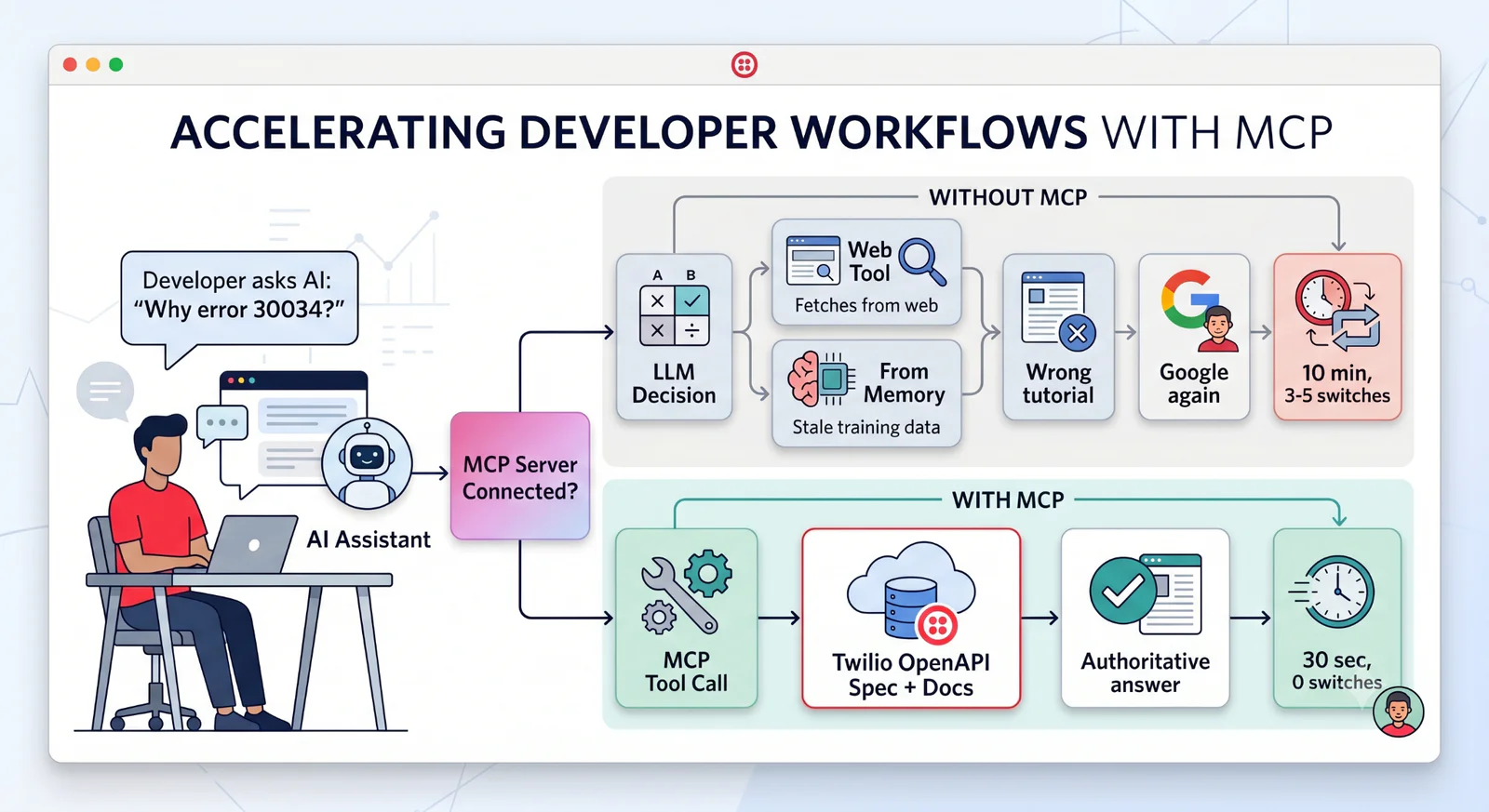
Without MCP: You're in the situation from the intro – searching the web, finding outdated Stack Overflow threads, then spending 15 minutes across multiple context switches trying to piece together what A2P 10DLC means and why it matters.
With MCP: You ask your AI assistant "Why error 30034?" and it searches Twilio's indexed documentation and returns the error page directly. Within 30 seconds, you get the information you need: you have an unregistered A2P 10DLC number, you need to complete.
Brand and Campaign registration to fix it, and toll-free or short codes are alternatives (use). One answer. Zero context switches.
The "Web Search" step means your AI is either using a web tool to fetch content or responding from memory with potentially stale information. Both lead to wrong answers. The MCP Server eliminates this by connecting directly to Twilio's documentation as a first-class tool.
Three things change once you wire in the MCP server:
- Terminology mapping - You prompt your agent with "spam blocking," your agent finds Twilio Voice Integrity (the actual product name).
- Context included - Answers include prerequisites, trial account limits, costs, and timelines.
- Hallucination prevention - Grounding your agent with the MCP server means it’s less likely to respond with plausible – yet incorrect – answers. And I didn’t hallucinate that: Stanford research showed using authoritative sources reduced some AI models’ hallucination rates from 58-88% down to 17-34%.
Real scenarios
Want to see where wiring up the MCP server would save you some real time? Here are three situations where adding the beta Twilio MCP Server to your setup would pay off:
Error 30034 (debugging): ~10 min → ~30 sec
Like the scenario described in the intro, imagine you send an SMS with Twilio’s Messaging API and get a 201 response, but no message is delivered. Error 30034 appears in your logs.
Without MCP: You Google the error code, find the error dictionary, search "A2P 10DLC," then slowly piece together that you need US carrier registration.
With MCP: Your AI explains error 30034 is "Unregistered US A2P 10DLC number." It tells you the fix (register your brand and campaign), the timeline (1-2 weeks), the cost ($4-40 depending on volume), and whether trial accounts are affected (yes, Twilio trial numbers cannot send SMS to unverified phones).
The difference: you get the complete picture in one response instead of assembling it from five different pages.
Carrier spam blocking (debugging): ~10 min → ~1 min
Maybe you’re building a voice application. Your outbound calls work to most numbers, but some carriers that worked on Day 1 are blocked by Day 2.
Without MCP: You search "carrier call blocking," wade through STIR/SHAKEN articles, try to figure out which Twilio product handles this. Eventually you find Twilio’s Voice Integrity.
With MCP: You ask your agent about “spam blocking”. AI maps your terminology to Twilio Voice Integrity, explains attestation levels, lists alternatives ( Branded Calling for caller ID trust, CNAM for name display), and shows you how to view your current attestation status with the API.
The difference: AI bridges the gap between your problem description and Twilio's product naming.
AI agent product discovery (building from scratch): ~15 min → ~2 min
You have big goals and want to build an automated customer support AI agent that remembers past conversations.
Without MCP: Your AI assistant suggests Autopilot (deprecated since 2023), Twilio Studio (a flow builder, not AI-native, so it would take extra work), or building your own solution with generic RAG patterns. You spend 15 minutes searching Twilio docs to find out what's actually current.
With MCP: Your AI immediately finds the current products: Twilio Agent Connect, Conversation Memory, Enterprise Knowledge, and Conversation Intelligence. It explains which one handles conversation history ( Memory), gives you the API endpoint (POST /v1/Stores/{storeId}/Profiles/{profileId}/Recall), and shows how it integrates with the other Conversations products.
The difference: Base AI routes you to deprecated products because they are in training data. MCP pulls from current docs, so you start with the right stack instead of discovering it later.
Should you try it?
Is connecting the beta Twilio MCP server worth the setup?If you debug Twilio 3+ times a week or are starting a new Twilio project... yes, absolutely! The 5-minute install will pay you back many times over during your first debugging session.
Doesn't my AI agent already have web access?Yes, but web search returns noise because it relies on search, which can have its own limitations. Think: outdated tutorials, Stack Overflow threads from 2019, and blog posts that predate product changes. MCP returns authoritative, current documentation.
Is the Twilio MCP server stable?It's beta, and we are actively improving it based on feedback (please let us know how it works for you!). The core value, direct documentation access, works today.
Install (5 minutes)
Have I convinced you to try the MCP server yet? Ready to try it? The setup takes about 5 minutes.
Install the MCP server:
Add it to your AI assistant:
Test it:
Now, for the payoff: ask your AI "What's Twilio error 21211?"
It should return: "Invalid 'To' phone number. Must be E.164 format (+15558675309)."
🔥. Now, try it on a real problem and time yourself. If it doesn't save you more than those five minutes in your first week, you can uninstall it – but I think you’ll want to keep it around!
What's next?
Hopefully I’ve convinced you to give the beta Twilio MCP server a try. Install it, work through a build or debug a project, and let us know how it works for you.
The MCP Server gives you accurate, up-to-date API specs and documentation. For strategic guidance on which Twilio products to use and how to architect solutions, next you should check out Twilio Skills. My colleague Kelley Robinson wrote a guide on connecting Twilio Skills that walks through exactly this – and the Skills docs have install steps for every platform."
Skills work alongside the MCP Server to help your AI assistant answer "which product should I use?" and "how should I build this?"
Resources
Elmer Thomas (he/him) is a Principal Developer Educator at Twilio and was employee #5 at SendGrid (acquired by Twilio). He's built so many MCP servers that he made one just to keep the others organized -- so he has opinions about which ones are worth your time. He can be reached at ethomas [at] twilio.com
Related Posts
-
 AI-powered agents for contact center in Australia: containment quality, not deflectionAliakbar Lokhandwala
 -
AI-powered agents for contact center in India: what they can and cannot doAliakbar Lokhandwala
-
AI-powered agents for contact center in Philippines: what the term actually meansAliakbar Lokhandwala
Related Resources
Twilio Docs
From APIs to SDKs to sample apps
API reference documentation, SDKs, helper libraries, quickstarts, and tutorials for your language and platform.
Resource Center
The latest ebooks, industry reports, and webinars
Learn from customer engagement experts to improve your own communication.
Ahoy
Twilio's developer community hub
Best practices, code samples, and inspiration to build communications and digital engagement experiences.