Building a Multi-Channel AI Agent with Twilio Conversations and eve
Time to read:
October 08, 2026
Written by
Reviewed by
Building a Multi-Channel AI Agent Twilio with Conversations and eve
Building a Multi-Channel AI Agent with Twilio Conversations and eve
Getting an AI agent to answer a customer's SMS is easy. Getting it to remember that customer next week when they message you on a different channel? That’s where most agent projects give up and start writing their own memory layer.
Twilio helps remove that step with one of our tools that we launched earlier this year: Twilio Conversations. Pair it with Vercel's eve framework, and together, they draw a clean line between the two types of memory an agent needs:
- Vercel’s eve: holds the short-term memory the running transcript of the current conversation
- Twilio Conversations: hold the long-term memory knowledge of the current person (customer profiles and observations extracted automatically)
With these two tools, you can spend your time on the agent's behavior rather than the plumbing. Now you can plug in the LLM that you want.
In this post, you'll build an agent that unifies SMS and WhatsApp into one thread, remembers what each customer told you last month, and lets you swap the model in just one line.
What you'll build
Picture this: a customer texts your support line asking about the return policy on the blue running shoes they ordered. Ten days later they message you on WhatsApp, follow up on that same order, and ask a new question.
The interesting facts about that customer are things like their name, the products they bought, that they prefer WhatsApp for anything urgent, and the last few questions they asked. If you persist only those facts and inject the relevant ones selectively, prompts stay small, debuggable, and stable across sessions.
This is the separation of concerns you'll build below. eve keeps a compact per-conversation transcript for the current thread. Twilio's Memory Store keeps the extracted facts across every past thread. A dynamic instruction merges these two types of information pieces at the start of each session.
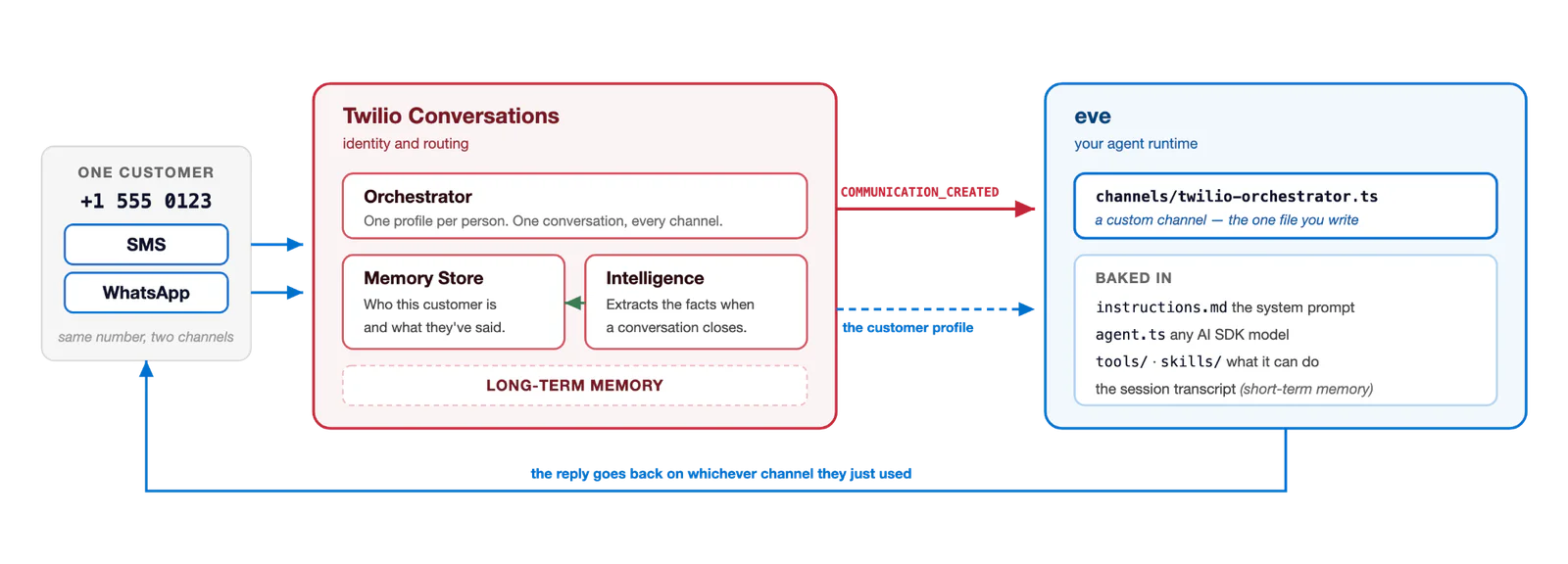
Figure 1: Architecture diagram showing how Twilio Conversations and Vercel’s eve integrate with each other
Meet the stack
eve is Vercel's file-system-first framework for durable AI agents. You author files, and eve compiles them into a runtime that manages sessions, tool calls, streaming, and durable state across crashes and redeploys. The project is also open source on GitHub.
Twilio Conversations is our suite of AI-native products that go beyond the traditional scope of our communications APIs. Underneath it, there are three pieces:
- Conversation Orchestrator:a durable, cross-channel conversation resource that stitches SMS, WhatsApp, RCS, chat, and voice into one thread per customer. As the developer, you decide how traffic on each channel should be treated and whether to connect it to the two other Conversations sub-products below.
- Memory Store: a persistent, per-customer profile database with traits (such as name, phone, preferences) and observations (such as facts extracted from past conversations).
- Conversation Intelligence: runs language operators for summaries, sentiment, and observation extraction against conversations, either in real time or at the end of a conversation.
The mental model to hold onto: Orchestrator handles the "who is this and where do I reply?" question. Memory Store handles the "what do I already know about them?" question, and Intelligence writes new facts to Memory Store.
Prerequisites
You'll need a handful of things before you start:
- Node.js 24 or newer
- A Twilio account with an Account SID and Auth Token (find both in the Twilio Console)
- At least one SMS-capable Twilio phone number
- A WhatsApp sender attached to a phone number. It can be the same number you use for SMS, or a second dedicated number. Both work with this setup.
- An OpenAI API key, or your provider of choice ( any AI SDK provider works)
- A shell for the provisioning calls. macOS and Linux ship with
curl.On Windows, every provisioning command below also has a PowerShell version using `Invoke-RestMethod`, so no extra tooling is needed; if you'd rather run the
curlversions verbatim, use WSL or Git Bash. - ngrok or a similar tool for local webhook tunneling. ngrok is a tool that gives you a public HTTPS URL that forwards to a port on your laptop, so Twilio can reach your webhook while you develop.
Bootstrap the project
Let’s initialize a new project, and get all the packages we need. In your terminal, use the following command:
You might be asked to “install the following packages” and a reference to eve’s latest version. It’s okay to hit “y” here to install eve.
The twilio npm package is what you'll use later to verify Orchestrator webhook signatures. @ai-sdk/openai is the AI SDK provider you'll wire the model through.
eve init generates the project scaffold with everything a hello-world agent needs:
For this tutorial, the default instructions.md is fine.
Configure the model
Now let’s configure our agent/agent.ts file. Open the file in your editor of choice, and you’ll see the file contains:
To use a different provider, install its AI SDK package and swap the model where it’s referenced in the file.
Set up environment variables
Create a .env file at the project root. The comments below tell you where each value comes from, so you can fill in the top block before moving onto the next step
Leave the last two empty for now, as you'll fill them in a few steps below.
Start ngrok before provisioning
You need a public HTTPS URL before you create the Orchestrator Configuration, because that curl call registers the webhook URL Twilio will call. If you are using a free ngrok account, it will get a fresh random hostname on every start. Start the tunnel now and paste the URL into .env as PUBLIC_BASE_URL:
Copy the https://…ngrok… hostname from the ngrok output, set it in .env as PUBLIC_BASE_URL.
Once the file is saved on disk, load every variable into your current shell so that curl and pnpm dev see the same values:
Provision the Twilio side
Memory Store and Orchestrator Configuration are a one-time setup. Both are REST resources.
If you are using PowerShell, build the basic-auth header once and reuse it for all four calls below.
Create the Memory Store
Now let’s create the Memory Store. In the terminal, use the following commands:
The response is a 202 with a statusUrl that looks like https://memory.twilio.com/v1/ControlPlane/Operations/mem_configop_XXXXXXXX. That's Twilio's way of saying "I've accepted the job, check this URL when you're ready." Confirm with a plain “GET” against the statusUrl from your own response (substitute your op_... id for the placeholder below):
Look for "status": "COMPLETED" and the mem_store_... id in the response body. Copy the id into .env as MEMORY_STORE_ID, then reload the shell:
Create the Orchestrator Configuration with GROUP_BY_PROFILE
Now all the values that your requests need are now in your environment. Use a heredoc so Bash substitutes the variables inline. PowerShell has no heredoc, but its expandable here-string (@" ... "@) does the same job; note that the closing "@ must sit at the very start of its own line.
Two settings are worth calling out:
conversationGroupingType: GROUP_BY_PROFILEunifies the same customer across channels into one conversation, keyed on the Memory Store profile rather than on the address the customer uses. The default,GROUP_BY_PARTICIPANT_ADDRESSES_AND_CHANNEL_TYPE, separates SMS and WhatsApp into separate conversations.GROUP_BY_PARTICIPANT_ADDRESSESgroups channels together, but only when the customer uses the same address on each. This means that if a customer sends an SMS from one number, but a WhatsApp message from another number, then those channels won’t be grouped.GROUP_BY_PROFILEis what Twilio recommends for production.memoryExtractionEnabled: trueturns on the intelligence pipeline that writes observations back to Memory Store when a conversation closes.
Note: don't configure a webhook on the phone number or on the WhatsApp sender. The captureRules above are what pull traffic in, and the single statusCallbacks URL is where Orchestrator delivers it.
Here's what GROUP_BY_PROFILE buys you, once everything below is wired up:
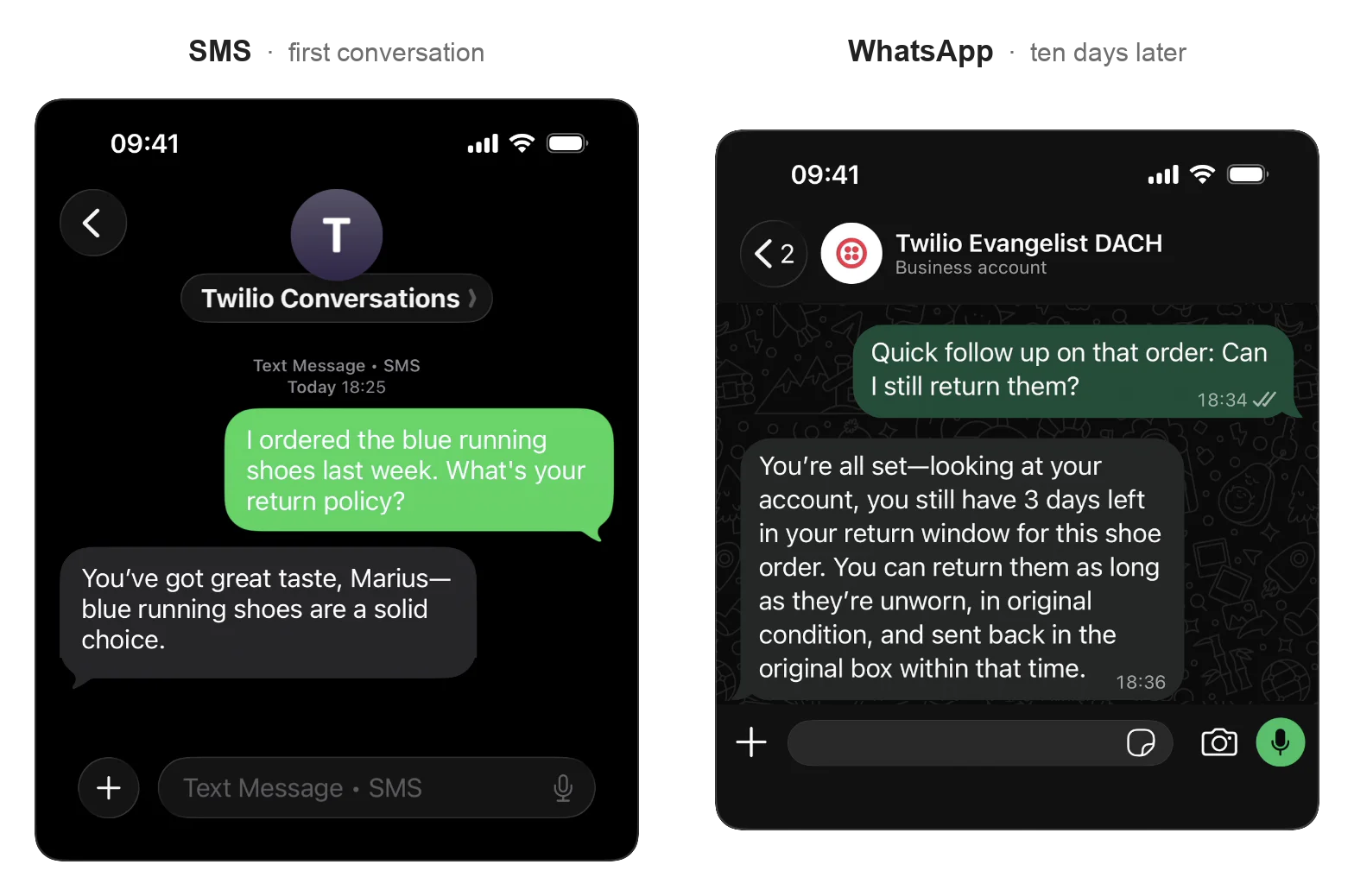
Figure 2: One continuous conversation that started on the left via SMS and continues on the right via WhatsApp
Notice that the WhatsApp message didn’t contain information about the product, the order, or any reminder of the earlier conversation. That context came from the Memory Store profile that Conversation Orchestrator grouped both channels into.
This call also returns a 202 with a statusUrl. You can confirm the call in the same way, substituting your own op_... id:
Once the response shows "status": "COMPLETED", copy the conv_configuration_... id into .env as ORCHESTRATOR_CONFIG_ID.
First attempt: eve's built-in Twilio adapter
Before you write anything custom,try eve’s built-in Twilio adapter:
Point your Twilio phone number's inbound messaging webhook at $PUBLIC_BASE_URL/eve/v1/twilio/messages, run pnpm dev, and text your number. Awesome, you built a working SMS agent with just a few lines of code!
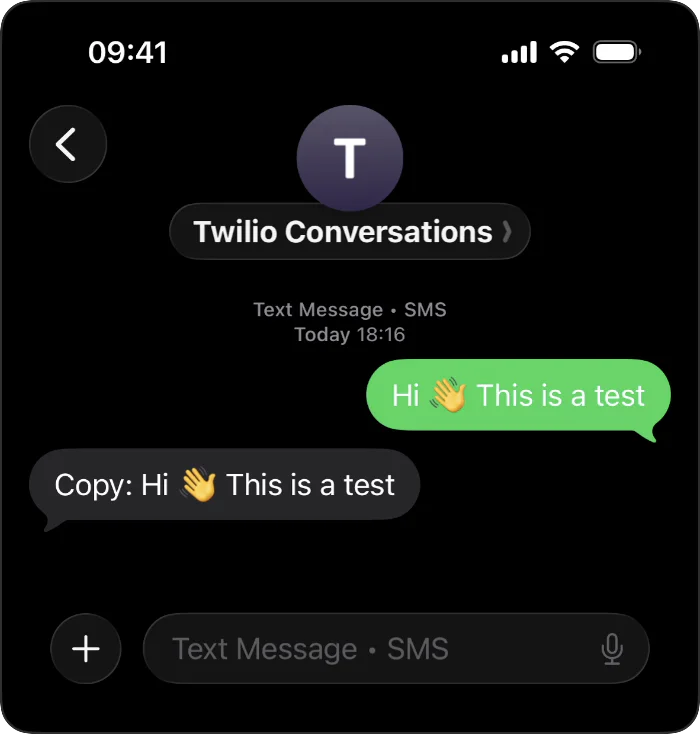
Figure 3: A green outgoing bubble reads "Hi 👋 This is a test"; the gray reply below it echos the message
Eve’s Twilio adapter is a well-organized cluster of eight TypeScript modules under packages/eve/src/public/channels/twilio that handle:
- Webhook signature verification against Twilio's HMAC scheme
- Parsing the form-encoded body (SMS, MMS metadata, voice transcription callbacks)
- Building continuation tokens so a caller keeps the same session between messages
- A
sendMessagehelper that resolves the reply'sfromandtofrom the inbound - Voice support via
<Gather>and status callbacks - Default handlers for
message.completedandturn.failedso you get a working reply out of the box
For a proof-of-concept, this is excellent. But you might run into issues if you want to advance your use-case: This adapter neither supports media, nor provides a useful voice integration, and all sessions are tied to the sender address, which means the SMS and WhatsApp channel are distinct. You essentially lose everything Twilio Conversations gives you. So to avoid that, let’s write your own adapter that allows agents to remember what the customer told you during the previous conversation.
Building an Orchestrator-aware channel
The Twilio Messaging API webhook fires per incoming message and you can infer the details from its own form-encoded payload. Conversation Orchestrator sits one layer up, where you subscribe to events on the Orchestrator Configuration itself, and every message (inbound or outbound) and additional event types arrives at a single JSON webhook keyed by conversationId.
That's a different webhook shape than the one eve's built-in adapter handles. So let’s write an adapter to handle the JSON payload.
The imports and setup
Create agent/channels/twilio-orchestrator.ts with these sections:
In the above code, these are the main components::
AGENT_ADDRESSESis the echo filter, built once at startup (more on this below).!onprocess.env.PUBLIC_BASE_URLis a promise to TypeScript that the variable is set. If you forget to fill it in, signature verification compares againstundefined/eve/...In production, replace the!with a real startup check that throws.- The two types and the
withChannelhelper are declared here so the rest of the file can reference them freely. Read on further to see where each component is used.
Verifying the webhook
The default verifyTwilioRequest in eve/channels/twilio implements Twilio's HMAC-over-form-params scheme. This is the scheme that every classic Twilio Messaging or Voice webhook uses. However, Orchestrator webhooks are different.
For Conversation Orchestrator, the body is JSON, not form-encoded. Twilio appends a bodySHA256 query parameter and signs the URL against the raw body bytes. Thus, you need to open the channel definition and its first route::
The twilio Node SDK's validateRequestWithBody reads the raw body once, verifies it, then parses it. toPublicUrl rebuilds the URL Twilio actually called (using PUBLIC_BASE_URL).
Parsing and filtering echoes
Orchestrator sends many event types (CONVERSATION_CREATED, PARTICIPANT_ADDED, COMMUNICATION_CREATED, etc.).
The two we care about most here are:
-
PARTICIPANT_ADDED: fires when a customer joins a Conversation, and it's the hook that’s used to link their identities across channels (more on that below). COMMUNICATION_CREATED: carries the message body.
Capture rules are bidirectional. When your agent sends a reply, Orchestrator captures that message too and delivers a fresh COMMUNICATION_CREATED event to your webhook.
Without a filter, the agent replies to its own reply, forever. (Ask me how I know!)
That's what AGENT_ADDRESSES is for – it's a static set built at startup: the only addresses you ever send from are the two senders already in .env.
TWILIO_WHATSAPP_NUMBER carries the whatsapp: prefix because outbound sends need it, but the webhook doesn't consistently report the author in that same form. Normalizing to the bare number and storing both spellings means the filter matches either way.
Twilio Memory resolves customers by identity trait: SMS, Voice, RCS, and MMS lookup under phone, and WhatsApp under whatsapp.
The same person on both channels would create two profiles (and land in two separate conversations!) unless you hydrate the sibling identifier at the exact moment the first profile is created. That's what linkCrossChannelIdentity does.
Dispatching the turn
Applied to your dispatch:
Notice: there is no state in the send options. Everything the reply needs is on auth.attributes, which refresh on every turn.
participantId comes from Twilio Conversations: it's Orchestrator's id for one participant within one Conversation. principalId comes from eve, an app-level actor tag eve keeps on the session so your code can tell callers apart.
participantId is scoped to the conversation in Twilio Memory, which is the scope eve's session has. Long-term identity is the Memory Store's job, and the next section hands that off properly.
Reading auth.attributes on the reply side
The context function of defineChannel is called every time an event handler needs to talk to the channel. That's where you read the fresh routing info:
withChannel re-adds the whatsapp: prefix when the channel is WhatsApp and the address doesn't already have one. Twilio needs this on outbound to ensure it routes correctly.
Wiring events to send
Finally, we need to tell eve that when the model finishes a turn, you want the completed message routed through sendMessage:
And that’s it! The channel receives Orchestrator webhooks, filters echoes, dispatches turns into eve, and routes replies back on the correct channel.
Enriching prompts with Memory Store
Now that the channel handles routing, let’s use Twilio's stored knowledge of the customer to condition every model call.
The Memory Store helper
Create a new file agent/lib/memory.ts:
You use basic auth for the Memory Store REST API, a small helper for the whatsapp: prefix quirk, linkCrossChannelIdentity for the identity-linking POST you saw in the channel, and a Promise.all so the profile and its observations come back in parallel. The pageSize=20 cap is enough for a walkthrough like this.
The dynamic instruction
Now we are back in the agent/instructions/ folder from earlier.
The instructions.md contain your hand-written base prompt, and files in the instructions/* folder add to it at runtime. eve's dynamic instructions let you inject text into the system prompt at session.started or turn.started – we’ll use session.started here.
Create the instructions/customer-context.ts file now.
That block makes it so once per session, the model sees the encapsulated information that look like this:
The <customer_context> tags are the formatting I picked to help the model understand what we are injecting.
Twilio's Intelligence extracted those observations automatically at the end of the previous conversation. And the best part? You didn't write a single line of extraction code.
On the very first message from a new customer, the Memory Store lookup defineDynamic returns null, so the model sees just your base instructions.md. Twilio fills in the profile after the first conversation with a customer closes, so the <customer_context> block above shows up at the start of the next conversation with that customer.
Run it
Start the agent in a new terminal (leave ngrok running):
You should see something like this (though your eve version will likely differ):
Send an SMS to your Twilio number with some information in it, so Intelligence has material to extract later. Something like this:
"Hi, I ordered the blue running shoes last week. What's your return policy?"
You'll see the webhook fire in the eve log, the model call goes out to your provider, and replies within a second or two.
Now, send a follow-up over WhatsApp from the same phone, and deliberately leave out the details:
"Actually, can I still return them?"
"Them" is the whole test: you’re carefully revealing nothing in that second message and using a different channel. You should receive a reply on WhatsApp, and eve treats it as the same session because Orchestrator grouped both channels into one Conversation. When the conversation closes (Orchestrator's inactivity timeout, or an explicit PATCH to status: CLOSED), Conversation Intelligence extracts observations from the transcript and writes them to the Memory Store profile. From the two messages above, that's "Asked about the return policy for the blue running shoes" and "Ordered blue running shoes". And the next time this customer messages you, days, weeks, or months later? Those observations are back in the prompt on the first turn.
Peek inside the Memory Store
Pretty cool, right? But before you cheer, let’s see the memory that Twilio built for you.
Open the Twilio Console, click “Conversation Memory” under Orchestration, pick the store you provisioned (the one whose id lives in MEMORY_STORE_ID), and click the profile that was created when your phone number first messaged the agent.
The profile is split across four tabs:
- Traits holds the structured fields (name, phone, channel identities)
- Identifiers lists the addresses Orchestrator grouped together
- Summaries holds the per-conversation recaps
- Observationsare the facts Intelligence pulled from the transcript linked back to the conversation where they came from.
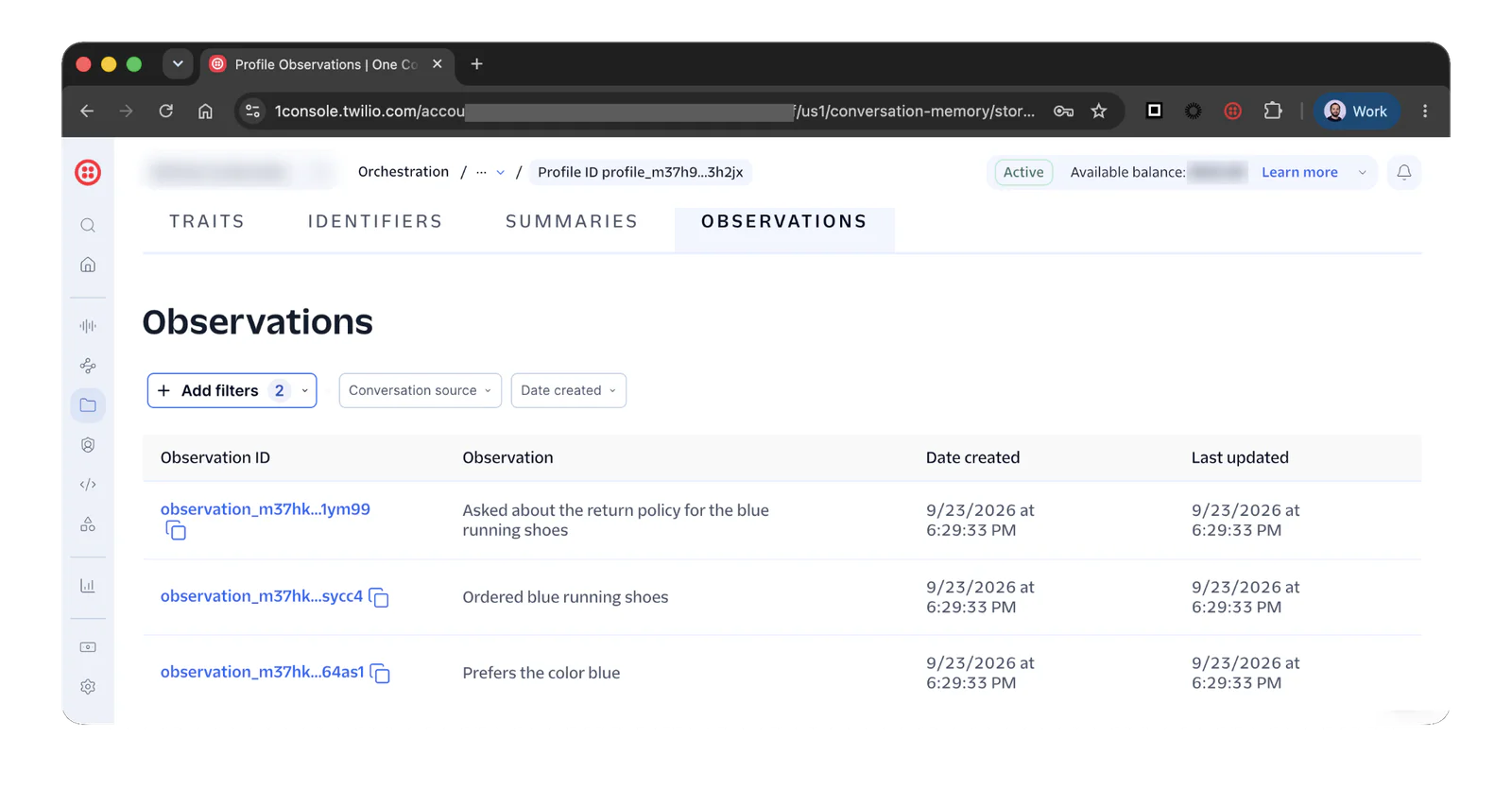
Figure 4: The Twilio Console Memory Store profile page showing all current observations
This is also the place to sanity-check what Intelligence has (or hasn't) extracted. If an observation doesn’t look right, you can delete it from the Console.
Note that Twilio's per-conversation timeouts are usually measured in minutes to hours (the statusTimeouts.inactive and statusTimeouts.closed fields on your Orchestrator Config), while eve's session lifetime defaults to 30 days (limits.sessionTimeoutMs). When an Orchestrator conversation closes, the customer's next message arrives with a new conversationId, which means a new eve session and a fresh transcript. This is the desired behavior. In these cases, the long-term memory moved to Twilio's Memory Store. If you want short-term memory to stretch further, raise the Orchestrator closed timeout so both systems agree on when a conversation is really over.
Where to take this from here
If you want to build further, you can do a few things once you already have the SMS and WhatsApp base running:
- Add voice. Twilio Conversation Relay plugs into the same Orchestrator Configuration, so the same agent can answer phone calls with the same session and memory.
- Send richer replies. Every message your agent sends today is plain text. If you want images, buttons, or list messages in a reply, define a Content Template once, and give the model a tool that references the template SID to fill in the variables. The content types overview contains a full menu of what you can send:
twilio/mediafor images,twilio/quick-replyfor buttons,twilio/list-pickerfor selectable lists, and a handful more.
Wrapping up with eve and Twilio Conversations
Underneath the concept of short-term and long-term memory, the architecture is fairly straightforward: one channel file, one memory helper, and one dynamic instruction. Everything else you need to make a dynamic multi-channel agent which remembers customer context across conversations and channels is already there in Twilio and eve.
You tied a well-provisioned Orchestrator Configuration, a Memory Store with automatic observation extraction, and eve's session model into a single pipeline, and built an agent that extends cleanly to voice, RCS, and any other channel Orchestrator supports, remembers customers across sessions without any bespoke persistence code, and stays swappable at the model layer.
Now it’s your turn to extend it. Build an experience we’ll all enjoy and share it in our Subreddit– we can't wait to see what you'll build.



Related Resources
Twilio Docs
From APIs to SDKs to sample apps
API reference documentation, SDKs, helper libraries, quickstarts, and tutorials for your language and platform.
Resource Center
The latest ebooks, industry reports, and webinars
Learn from customer engagement experts to improve your own communication.
Ahoy
Twilio's developer community hub
Best practices, code samples, and inspiration to build communications and digital engagement experiences.